
Rank Tracking: How Often, How Many Keywords, Which Tool
How many keywords to track, how often, and which tool actually fits. A practical setup guide, not a feature comparison.
Published August 2026. Written by the SEO team at PalV’s DM.
Track your top 10-20% of revenue-relevant keywords daily, and everything else weekly. Most sites should track between 50 and 300 keywords depending on site size, split across branded, money, and long-tail buckets. For tool choice, Google Search Console gives free, unlimited query-level position data but averages it over time; a dedicated rank tracker like Ahrefs, SEMrush, or a lighter tool like AccuRanker gives keyword-by-keyword daily snapshots that GSC doesn’t provide natively.
How many keywords should actually be tracked?
The number depends on site size and maturity, not a fixed rule, but a workable starting range:
| Site type | Typical tracked keyword range | Reasoning |
|---|---|---|
| New site or single service page | 20-50 | Focus on core commercial terms before expanding |
| Established SMB site, multiple service lines | 100-300 | Covers branded, money, and supporting long-tail terms |
| Content-heavy publisher or large ecommerce catalogue | 1,000+ | Volume of pages requires proportional keyword coverage |
Tracking too few keywords misses the long-tail terms that often drive the bulk of qualified traffic. Tracking too many without segmenting them by priority produces a dashboard nobody actually reads, because there’s no way to tell which movement matters. Group tracked keywords into buckets: branded, primary money terms, secondary commercial terms, and long-tail, then review each bucket with a different level of attention.
How often should rankings be checked?
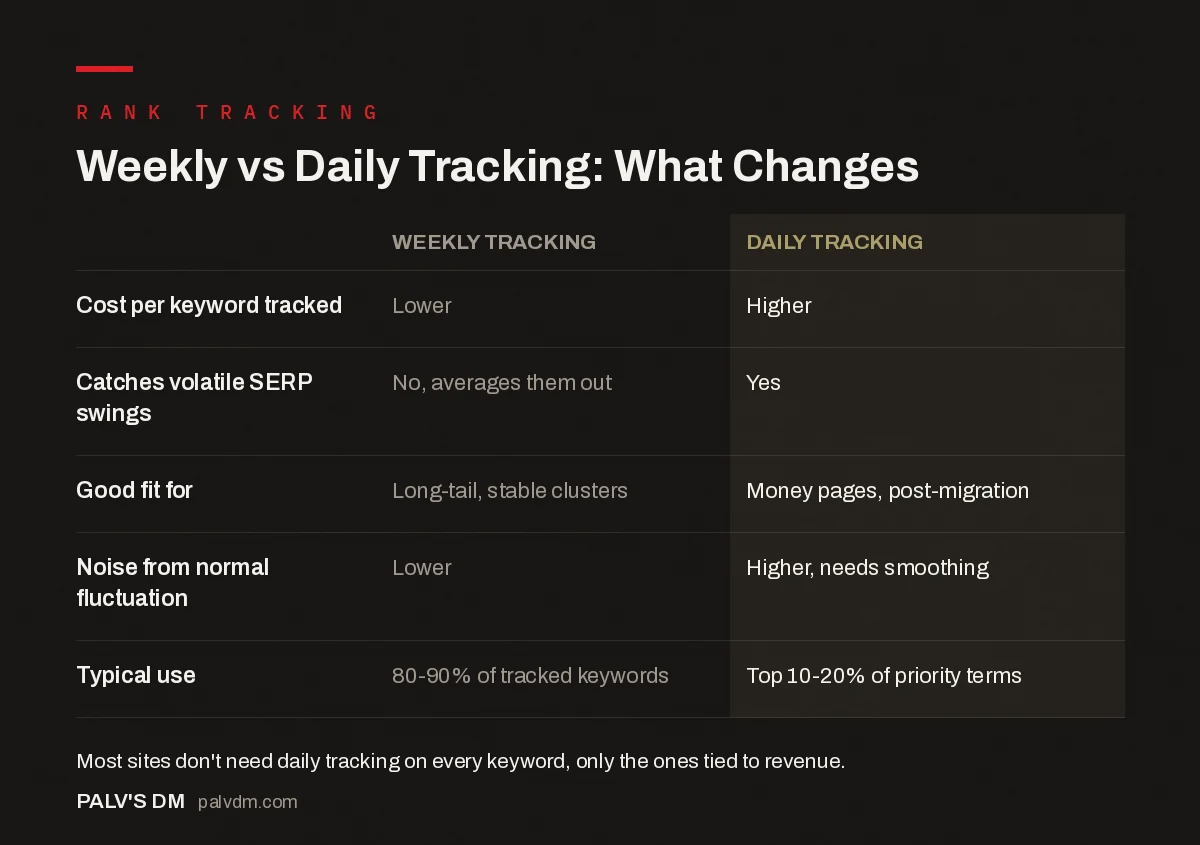
Weekly vs daily tracking: what changes
| Weekly tracking | Daily tracking | |
|---|---|---|
| Cost per keyword tracked | Lower | Higher |
| Catches volatile SERP swings | No, averages them out | Yes |
| Good fit for | Long-tail, stable clusters | Money pages, post-migration |
| Noise from normal fluctuation | Lower | Higher, needs smoothing |
| Typical use | 80-90% of tracked keywords | Top 10-20% of priority terms |
Daily tracking is worth the added cost for a small set of keywords directly tied to revenue: primary money pages, terms currently in a competitive battle for position 1-3, and anything being actively worked on during a migration or major content update, when catching a sudden drop within a day matters more than usual. For the remaining 80-90% of tracked terms, weekly checks are enough to spot real trends without paying for daily noise that gets smoothed out in review anyway.
Google’s own search results fluctuate meaningfully day to day even with no changes on your end, driven by algorithm testing, personalisation, and location-based variation. Daily tracking on low-priority keywords mostly just captures that normal noise rather than anything actionable.
Which rank tracking tool should you use?
Three realistic options for most businesses:
- Google Search Console is free and gives real click and impression data by query, which paid tools estimate rather than measure directly. Its limitation is granularity: GSC shows average position over a date range, not daily position, and doesn’t track competitor rankings.
- All-in-one SEO platforms like Ahrefs or SEMrush bundle rank tracking with keyword research, backlink data, and site audits. Worth it if the business needs those other capabilities anyway; overkill if rank tracking is the only feature being used.
- Dedicated rank trackers like AccuRanker or Nightwatch focus specifically on tracking speed, accuracy, and volume at a lower per-keyword cost than a bundled platform, useful once keyword count grows past a few hundred and cost-per-keyword starts to matter.
For most SMBs starting out, GSC plus a lighter dedicated tracker for the top-priority keyword set covers both the free, accurate query data and the daily granularity GSC doesn’t provide, without paying for an all-in-one platform’s full feature set.
What settings actually matter when setting up tracking?
Beyond frequency and tool choice, three configuration details change how useful the data ends up being:
- Location and device targeting. Rankings differ by city and by device. A business serving Mumbai and Bengaluru separately needs location-specific tracking for each, not a single national average that masks real differences between markets.
- Search engine and language settings. Confirm the tracker is checking google.co.in results, not a generic google.com default, if the audience is primarily Indian. Local SERPs can differ meaningfully from the global default.
- Alert thresholds. Set alerts for any keyword moving more than three to five positions, any new keyword entering the top 10, or any tracked page dropping out of the top 20 entirely. Alerting on every single position change, including normal day-to-day fluctuation, trains a team to ignore the alerts altogether.
How should rank tracking data actually get used, not just collected?
A dashboard full of position numbers is only useful if it drives specific decisions. Three practical habits turn tracking data into action rather than a report nobody opens:
- Review by bucket, not alphabetically. Look at money-page rankings first, every week, regardless of how many other keywords are tracked. Long-tail movement can wait for a monthly review; revenue-relevant terms can’t.
- Pair position data with click data before reacting. A keyword dropping from position 3 to position 6 sounds alarming in isolation, but if GSC shows clicks held steady because a featured snippet or AI Overview absorbed the position-1-3 traffic anyway, the real story is different from what the position number alone suggests.
- Log the cause when a ranking moves, not just the fact that it moved. Was there a core algorithm update that week, a content refresh on the page, a new competitor piece, or a technical change elsewhere on the site? Without that note, six months of tracking data becomes a list of numbers with no explanation attached, and the next person reviewing it has to reconstruct the history from scratch.
Tracking without this layer of interpretation still has value as a historical record, but it stops short of being a tool that actually improves decisions month over month.
What mistakes make rank tracking data misleading?
A tracking setup can run for months and still produce numbers that mislead more than they inform. The common causes:
- Tracking from the wrong location. A rank tracker checking results from a US-based server for a business serving Indian cities will show a different SERP than what local searchers actually see, since Google increasingly personalises results by location even for non-local-intent queries. Confirm the tracker’s location setting matches the target market before trusting any position data from it.
- Not accounting for personalisation and logged-in results. A marketer checking their own ranking by searching manually while logged into a personal Google account sees a result shaped by their own search history, which can differ meaningfully from what a new visitor sees. Manual spot-checks like this should never override tool-based tracking data, only supplement it.
- Treating SERP feature presence as absence of ranking. A keyword where an AI Overview, featured snippet, or “People Also Ask” block pushes organic results further down the page can look like a ranking drop in position-only tracking, when the underlying organic position hasn’t actually changed. Some rank trackers now flag SERP feature presence separately; if the tool being used doesn’t, cross-check manually before reacting to an apparent drop.
- Setting alert thresholds too tight. Alerting on every one-position move, rather than a meaningful multi-position shift, buries real signals in noise until the team starts ignoring the alerts altogether. Wide enough thresholds keep the alerts worth opening.
- Never cross-checking against GSC. A third-party rank tracker’s position data is an estimate based on its own crawl; GSC’s average position reflects real impressions from real users. Large, sustained gaps between the two are worth investigating rather than assuming one tool is simply wrong.
Fixing these doesn’t require a different tool, just a more careful read of what the tool is actually reporting and under what conditions.
Frequently asked questions
Does rank tracking position match what a real user sees?
Not exactly. Rank trackers query Google from a fixed location and typically a logged-out, non-personalised state, while real users see results affected by their own search history, location, and any active SERP features like AI Overviews that push organic results further down. Treat tracked position as a consistent benchmark for trend comparison, not a literal promise of what every visitor sees.
How much should I worry about day-to-day ranking fluctuation?
Very little, for most keywords. Search results shift constantly due to Google’s own testing and algorithm behaviour, independent of anything happening on your site. Focus on the trend over two to four weeks rather than any single day’s snapshot, and reserve real concern for sustained multi-week drops or a sudden fall of ten or more positions.
Should branded keywords be tracked alongside non-branded ones?
Yes, but reviewed separately. Branded keyword rankings tend to be stable and less informative about SEO performance, since a business usually ranks first for its own name regardless of SEO effort. Track them to catch genuine problems, like a competitor bidding on branded terms or a negative result appearing on page 1, but don’t mix branded and non-branded performance into a single blended ranking average.
Is GSC’s average position the same as a rank tracker’s daily position?
No. GSC’s average position is calculated across every impression for a query over the selected date range, including different devices, locations, and SERP layouts, which can differ noticeably from a single daily snapshot taken by a rank tracker from one fixed location. Both are useful, but they answer slightly different questions and shouldn’t be compared directly as if they measured the same thing.
The bottom line
Track daily only where the cost is justified by how much a fast catch actually matters, weekly everywhere else, and size the total keyword list to the business rather than an arbitrary round number. Combine GSC’s free, accurate click data with a dedicated tracker for daily granularity on priority terms, and set alert thresholds wide enough to filter out normal noise.
PalV’s DM’s SEO Growth service includes a rank tracking setup calibrated to which keywords in your account actually move revenue.
For how ranking movement should feed into a broader traffic model, see our guide to SEO forecasting. To understand competitive visibility beyond individual keyword positions, read share of voice as a better metric than average position. For separating branded from non-branded performance in your reporting, see segmenting branded and non-branded traffic. Our Google Search Console guide covers the free reporting layer this setup builds on.


