
Segmenting Branded and Non-Branded Traffic in GA4 and GSC
Blending branded and non-branded traffic overstates SEO progress. Here is how to build the split correctly in GSC and GA4.
Published August 2026. Written by the SEO team at PalV’s DM.
To segment branded from non-branded traffic, build a complete list of brand terms including your company name, product names, common misspellings, and founder names, then filter Google Search Console queries to exclude that list for a non-branded view. In GA4, create a matching segment or custom dimension using the same brand list applied to landing query parameters. Report the two segments separately in every dashboard. Blending them into one “organic search” number is the most common way SEO progress gets overstated, because branded search growth often has little to do with the SEO work being measured.
Why does this segmentation matter?
Someone searching your company name by name was likely already going to find you, through a bookmark, a business card, a referral, or a direct URL guess, regardless of how strong your organic SEO is. Someone searching a non-branded, category-level term found you because your content or page ranked for a topic they didn’t already associate with your brand. That’s the traffic SEO work is actually responsible for creating.
When a report blends both together, a spike in brand searches following a successful ad campaign or a PR mention can make “organic search” performance look like it’s growing from SEO work, when the growth is really coming from brand awareness driven by a completely different channel. Separating the two protects both the SEO team’s credibility and the business’s ability to correctly diagnose what’s actually driving traffic.
How do you build a complete brand term list?
Start broader than seems necessary. A thorough brand list includes:
- The full company name and any common abbreviations or short forms customers use
- Product or service names, including any that have since been renamed or rebranded
- Common misspellings and phonetic variants, which GSC’s query data will reveal over a few months of monitoring
- Founder or key executive names, if customers commonly search by a person rather than the company
- Domain name variants, including with and without extensions like “.com” or “.in”
Pull actual query data from GSC’s Performance report first and scan it manually for brand-adjacent terms before finalising the list. This catches real variants a team might not think to include from memory alone, like a common misspelling that’s been generating meaningful impression volume for months.
How do you filter in Google Search Console?
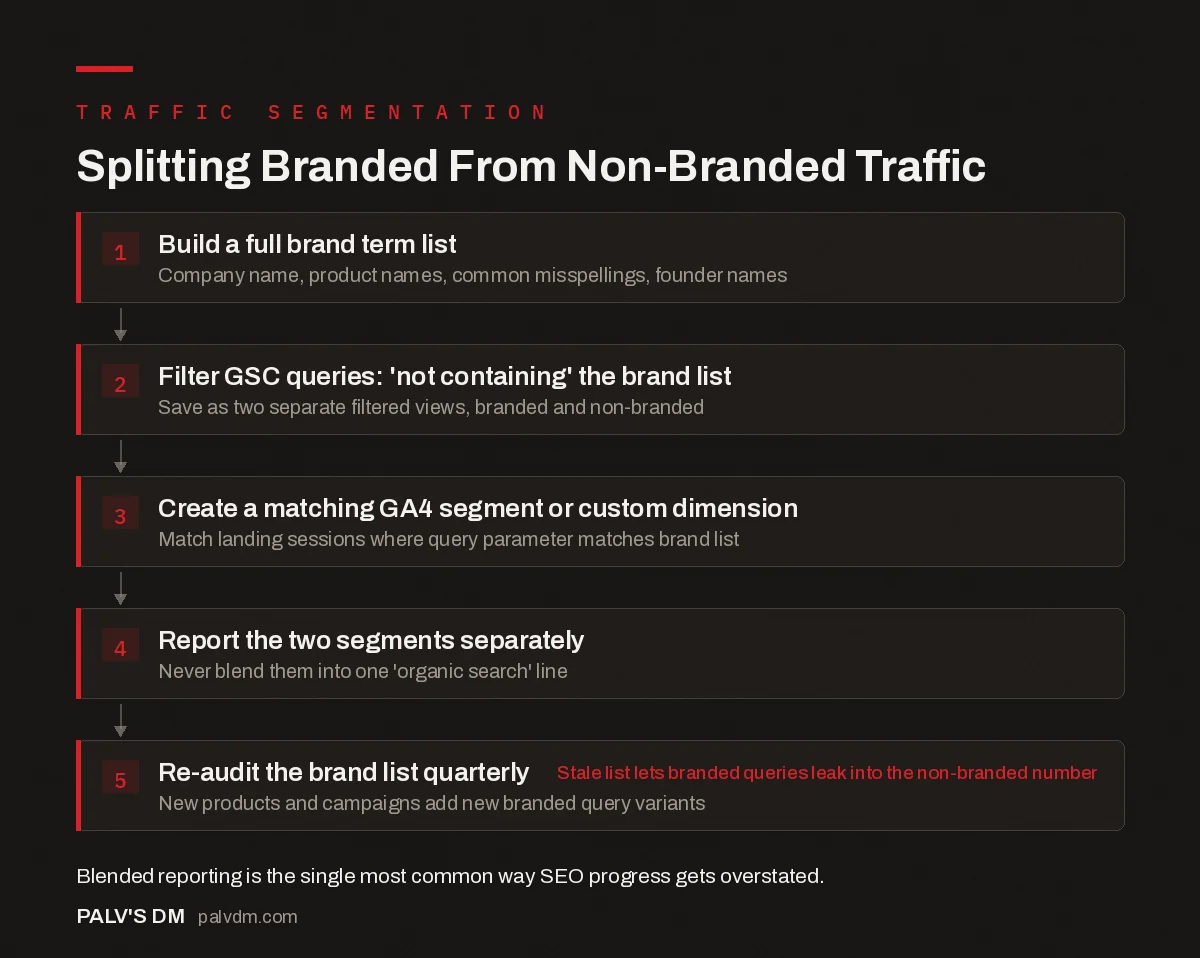
Splitting branded from non-branded traffic
- Build a full brand term list. Company name, product names, common misspellings, founder names.
- Filter GSC queries: “not containing” the brand list. Save as two separate filtered views, branded and non-branded.
- Create a matching GA4 segment or custom dimension. Match landing sessions where the query parameter matches the brand list.
- Report the two segments separately. Never blend them into one “organic search” line.
- Re-audit the brand list quarterly. New products and campaigns add new branded query variants.
In GSC’s Performance report, use the Query filter and set it to “Queries not containing” for each brand term, or use a regular expression filter that excludes the entire brand list in one pass if the platform supports regex filtering. Save this as a filtered view labelled clearly as “non-branded,” and build a second view with the inverse filter labelled “branded,” so both are available for comparison without rebuilding the filter each time.
How do you replicate this in GA4?
GSC’s native query data doesn’t flow directly into GA4 as a session-level dimension, so the segmentation has to be built slightly differently. The most reliable method uses the Search Console integration inside GA4, which surfaces query data alongside session and conversion metrics, filtered the same way as the GSC-side filter. For a more precise, ongoing segment, some teams build a custom dimension that tags a session as “branded” or “non-branded” at the landing page level, based on the referring query parameter where it’s available, though query-level data is increasingly limited by privacy-driven “not provided” restrictions across search engines.
Where query-level GA4 segmentation isn’t fully available, a practical fallback is segmenting by landing page instead: pages that predominantly receive branded search traffic (like the homepage or an “About” page) versus pages built to rank for non-branded, topical terms (like most blog and service pages). It’s a coarser proxy than true query-level segmentation, but it’s far better than no segmentation at all.
How often should the brand list be updated?
Quarterly, at minimum, and immediately after launching a new product, service line, or major campaign. A brand list built once at the start of a reporting relationship and never revisited quietly lets new branded query variants leak into the “non-branded” bucket, which inflates the apparent SEO growth over time in a way that’s hard to catch without a direct audit of the query list.
What does the split typically look like in practice?
The ratio varies enormously by business maturity and category. A newer site with limited brand recognition might see 85-95% of organic traffic classified as non-branded, since few people are searching the company by name yet. A well-established brand with strong word-of-mouth can see the reverse, with branded search accounting for 40% or more of total organic sessions. Neither ratio is inherently good or bad, but tracking how it shifts over time is informative: a rising branded share alongside flat non-branded traffic usually signals that awareness is growing faster than topical visibility, which points toward investing more in non-branded content rather than assuming overall SEO is stalling.
What does a branded vs non-branded query actually look like?
The distinction is easier to apply once it’s shown side by side against real query patterns rather than described abstractly:
| Query pattern | Classification | Why |
|---|---|---|
| “palv’s dm” | Branded | Exact company name |
| “palvdm reviews” | Branded | Company name plus modifier |
| “palv dm pricing” | Branded | Company name plus commercial modifier |
| “plav digital marketing” | Branded (misspelling) | Phonetic variant of company name |
| “seo agency mumbai” | Non-branded | Category and location, no brand reference |
| “how to calculate seo roi” | Non-branded | Informational, topic-based |
| “best seo agency for d2c brands” | Non-branded | Commercial intent, no brand named |
| “[founder name] seo” | Branded | Named individual associated with the company |
The misspelling and founder-name rows are the ones teams miss most often when building a brand list from memory. Both require pulling actual query data from GSC rather than guessing, since neither shows up until real searchers demonstrate the pattern exists.
What mistakes make this segmentation unreliable?
A few setup errors show up repeatedly once teams start splitting branded from non-branded traffic:
- Building the brand list once and never updating it. A new product line launched eight months after the original brand list was built won’t be caught by the existing filter, and its branded searches will leak into the non-branded bucket, quietly inflating the apparent non-branded SEO number.
- Using “contains” instead of matching whole-word brand terms. A brand name that’s also a common word in a different context, or that appears as a substring inside an unrelated query, can get miscategorised if the filter isn’t precise enough. Review filtered results periodically for false matches in both directions.
- Forgetting regional-language variants. A business operating in multiple Indian markets may see the brand name searched in transliterated regional-language form, which a brand list built only in English will miss entirely. Scan GSC query data for these variants specifically rather than assuming English coverage is sufficient.
- Applying the GSC-side filter but not the GA4-side segment. Reporting non-branded numbers from GSC while GA4 dashboards still show blended totals creates two different “SEO performance” numbers depending on which report a stakeholder opens, which undermines confidence in both.
Frequently asked questions
Should branded traffic be excluded from all SEO reporting?
No, it should be reported, just separately. Branded search volume and trend are still useful signals, particularly for measuring overall brand awareness or catching a competitor bidding on your brand terms in paid search. The issue isn’t tracking branded traffic, it’s blending it into a number meant to represent non-branded SEO performance specifically.
What if a competitor’s name is similar to mine and creates overlap in the query data?
Check the actual query strings in GSC before assuming overlap is a real problem. Genuine name collisions are rarer than they seem once the real query data is reviewed, and most apparent overlaps turn out to be distinct enough to filter cleanly. If a true overlap exists, note it explicitly in the reporting methodology so anyone reading the numbers understands the limitation.
Does segmenting branded traffic change the SEO ROI calculation?
Yes, meaningfully. Excluding branded traffic from the revenue base used in an ROI calculation typically produces a smaller, more conservative, and more defensible number, since branded search revenue would likely have occurred with or without the SEO work being measured. Most stakeholders trust an ROI figure more once they understand branded traffic was excluded from the calculation.
How do I know if my non-branded traffic segment is accurate?
Spot-check it periodically by manually reviewing a sample of queries currently falling into the non-branded bucket. If any of them are clearly brand-related, the brand term list needs an update. This kind of manual review, even just twenty minutes per quarter, catches drift that an automated filter alone won’t flag on its own.
The bottom line
Branded and non-branded traffic answer different questions and should never be reported as one blended number. A thorough brand term list, applied consistently across GSC and GA4 and re-audited quarterly, keeps SEO reporting honest about what the work is actually driving versus what brand awareness from other channels is contributing on its own.
PalV’s DM’s SEO Growth service builds this segmentation into every client’s reporting from month one, so branded traffic growth never gets mistaken for SEO progress.
For how this segmentation affects the bigger revenue picture, see our post on calculating SEO ROI. For a competitive view that goes beyond your own site’s numbers, read share of voice as a better metric than average position. Our rank tracking setup guide covers how to track branded and non-branded keyword sets separately. The Google Search Console guide covers the underlying query filters this post builds on.


