Repurposing One Article Into Eight Assets
How to repurpose one article into eight formats: LinkedIn posts, threads, video scripts, carousels, infographics, and more, with a practical workflow.

Published August 2026 · Content team at PalV’s DM
One well-researched, 1,800-word article can realistically become eight distinct assets without any new research: a LinkedIn post, a Twitter/X thread, an email newsletter section, a short video script, a slide carousel, an infographic, a FAQ page or schema block, and a quote graphic. The core idea, called “create once, publish everywhere,” treats the original article as raw material rather than a finished, single-use product. The catch is that repurposing badly — just re-pasting the same paragraphs into a new format — performs worse than not repurposing at all, because each format has its own reading pattern and attention span.
Why repurpose instead of just writing more new content?
Writing genuinely new, well-researched content takes real time and, for most small teams, is the bottleneck on content output. Repurposing multiplies the return on that time investment by reaching audiences who never would have read the original 1,800-word article: someone scrolling LinkedIn during a commute, someone who only checks a weekly email digest, someone who found a 30-second video before they’d ever search for a blog post.
It also reinforces SEO indirectly. Each repurposed asset that links back to the source article is another entry point and another potential signal of relevance, and video or social content sometimes reaches people who then search for the full article by name — a branded-search pattern that’s hard to manufacture any other way.
Which eight formats work from a single article?
| Format | Source material | Time to produce |
|---|---|---|
| LinkedIn post | The article’s core argument, rewritten as a hook + 3-4 short paragraphs | 15-20 min |
| Twitter/X thread | Break the article’s H2s into 5-8 standalone tweets | 20-30 min |
| Email newsletter section | A tighter summary with one added personal note or context | 15 min |
| Short video/Reel script | The single most useful or surprising point, scripted to 45-60 seconds | 20-30 min |
| Slide carousel | A numbered list or process from the article, one point per slide | 30-40 min |
| Infographic | Any table, comparison, or ranked list already in the article | 30-45 min (design) |
| FAQ addition to a related page | Reuse 2-3 FAQ answers on a service or product page | 10 min |
| Quote graphic | The single most quotable sentence, designed as a standalone image | 10-15 min |
What should not be repurposed as-is?
- Long, unedited paragraphs pasted into social captions. LinkedIn and Instagram readers scan; a wall of text built for a blog reads as a wall of text there too, and gets scrolled past.
- Tables, without redesigning them. A blog table with six columns doesn’t fit a 1080×1080 social graphic. Cut it down to the two or three data points that matter most for that format.
- Anything time-sensitive without a check. If the source article references “this month” or a specific date, repurposed content published weeks later needs that language adjusted.
What’s a practical repurposing workflow?
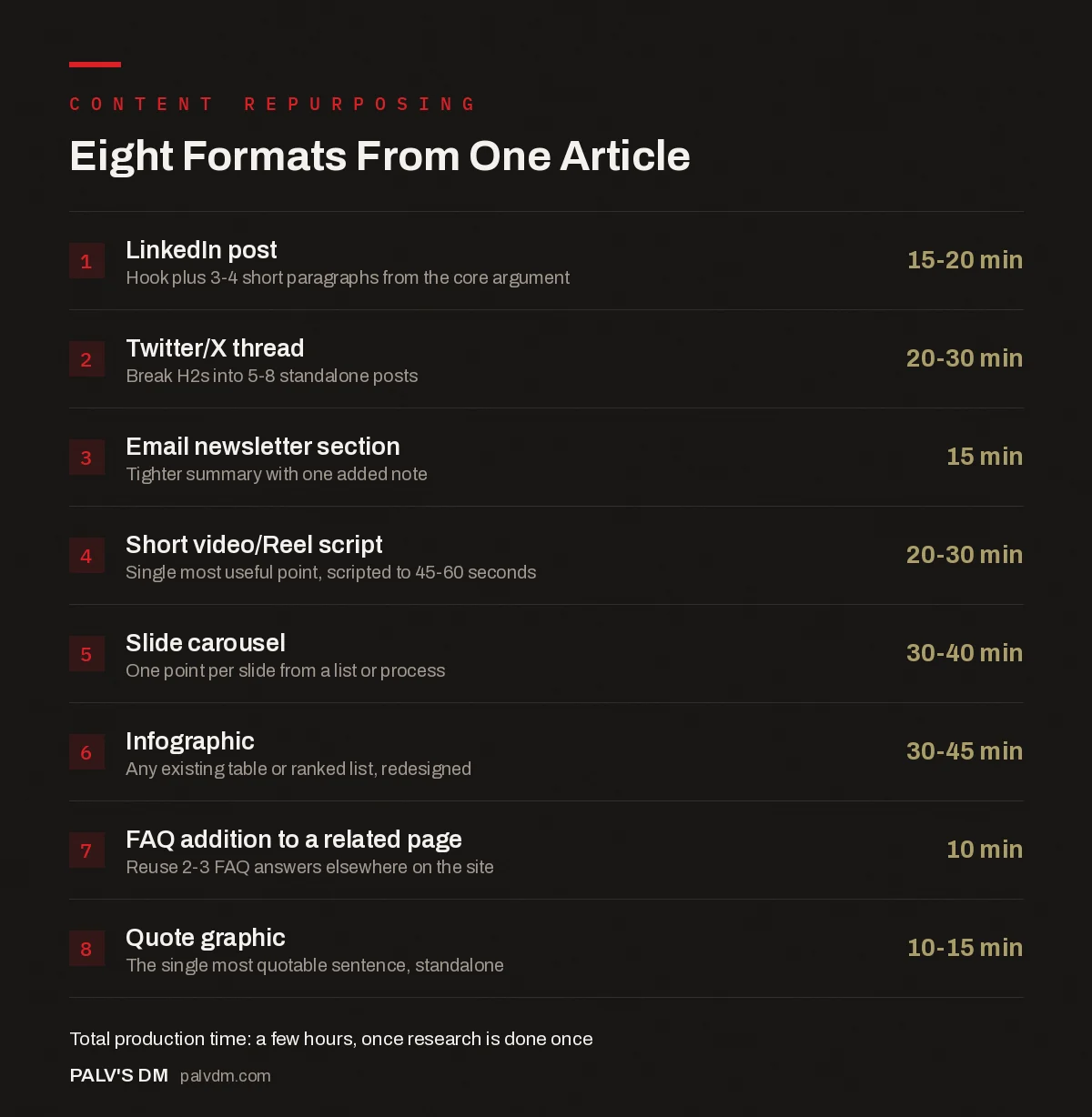
Eight Formats From One Article
- LinkedIn post — 15-20 min. Hook plus 3-4 short paragraphs from the core argument.
- Twitter/X thread — 20-30 min. Break H2s into 5-8 standalone posts.
- Email newsletter section — 15 min. Tighter summary with one added note.
- Short video/Reel script — 20-30 min. Single most useful point, scripted to 45-60 seconds.
- Slide carousel — 30-40 min. One point per slide from a list or process.
- Infographic — 30-45 min. Any existing table or ranked list, redesigned.
- FAQ addition to a related page — 10 min. Reuse 2-3 FAQ answers elsewhere on the site.
- Quote graphic — 10-15 min. The single most quotable sentence, standalone.
- Pick the source article carefully. Not every post is worth repurposing into eight formats. Choose ones with a clear structure — numbered steps, a comparison, real data — since those translate into other formats far more easily than a narrative or opinion piece.
- Extract the “atomic” ideas first. Before touching any format, list the 5-8 standalone points the article makes. Each one is a candidate for a tweet, a slide, or a quote graphic.
- Match format to idea, not the other way round. A statistic works as a bar chart or quote graphic. A process works as a carousel or video script. Don’t force every idea into every format.
- Batch by format, not by article. If you’re repurposing three articles in a week, write all three LinkedIn posts in one sitting, then all three video scripts. Context-switching between formats costs more time than switching between topics.
- Link back consistently. Every repurposed asset should point back to the source article, either as a direct link or, for video/social, “full breakdown linked in bio” or similar.
How much time does this actually save versus writing eight separate pieces?
Producing all eight formats from a single source article, once a team has a repeatable process, typically takes a few hours combined — a fraction of what eight independently researched pieces would take, since research and fact-checking (usually the slowest part of content production) happen once. The time saved compounds further once a team builds templates for each format, since the “what goes where” decision stops being a fresh judgment call every time.
What tools help without adding real cost?
Repurposing doesn’t require an expensive stack. A design tool with a template library (Canva’s free tier covers most social graphic and carousel needs), a basic video editor for Reels or Shorts, and a shared doc where the “atomic ideas” extraction happens are enough for most small teams to run this workflow consistently. The constraint is rarely tools — it’s having someone accountable for doing the extraction step before the batch-production step, since skipping straight to design without pulling out the core ideas first tends to produce repurposed content that just restates the headline.
What are the most common repurposing mistakes teams make?
Four show up repeatedly once a team starts repurposing at volume, and each one quietly undermines the return on the work already done.
The first is treating repurposing as a copy-paste job instead of a rewrite for a different reading pattern. A paragraph that reads well in a 1,800-word article, with room to build an argument across several sentences, reads as bloated in a LinkedIn post where the first two lines decide whether anyone keeps scrolling. The fix isn’t shortening the paragraph, it’s restructuring around what that specific format rewards: a hook line, then the payoff, then support.
The second is skipping the extraction step and repurposing straight from the finished article. Teams under time pressure often jump straight to designing a carousel or writing a thread from the article as written, which produces repurposed content that follows the article’s structure rather than the format’s structure. Pulling out the 5-8 atomic ideas first, before opening any design tool, is what prevents this, even though it feels like an extra step when the deadline is tight.
The third is repurposing an article that was never a good candidate in the first place. A nuanced opinion piece or a narrative case study built around a specific argument doesn’t break into eight standalone chunks without losing the thread that made it work. Forcing that kind of article through the full eight-format process usually produces content that reads as disconnected fragments rather than eight legitimately useful assets.
The fourth is losing the link back to the source. A repurposed asset that doesn’t point back to the original article captures attention but doesn’t convert it into anything measurable, whether that’s traffic, an email signup, or eventually a lead. Every format on this list should carry some version of that link, even when the platform makes it awkward, like adding “link in bio” to a Reel caption rather than a clickable URL in the post itself.
How does repurposing differ across content types?
A how-to guide, a data-driven piece, and an opinion piece each repurpose differently, and treating them the same way wastes the format’s strengths.
- How-to and process articles repurpose naturally into carousels, video scripts, and checklists, because the step order does most of the structural work already.
- Data-driven articles (with a stat, survey result, or benchmark) repurpose best into quote graphics, bar-chart infographics, and single-stat social posts — the number itself is the hook.
- Comparison articles convert well into short comparison tables for social and into “myth vs reality” style carousels, since the contrast is already built into the source.
- Opinion or perspective pieces repurpose least easily into visual formats, but often make the strongest LinkedIn posts and email content, where a point of view reads better than a checklist.
Matching the repurposing plan to the article type up front, rather than defaulting to the same eight formats for everything, is what separates a repurposing habit that actually gets used from one that quietly stops after a few attempts.
FAQs
Do all eight formats need to launch at the same time?
No, and spacing them out usually performs better. Publishing the LinkedIn post and email on day one, then the video and carousel over the following two weeks, keeps the source article generating traffic and engagement over a longer window instead of one short burst.
Does repurposed content count as duplicate content for SEO?
Search engines evaluate indexable web pages, not social posts or videos, so a LinkedIn post or Instagram carousel isn’t competing with your blog article for rankings. The only duplicate-content risk is if you republish the full article text verbatim on another indexable platform like Medium without a canonical tag pointing back to the original.
Which article types repurpose best?
Articles built around lists, steps, comparisons, or a single strong data point repurpose fastest because they already have a natural structure to break apart. Narrative or heavily nuanced opinion pieces are harder to chop into standalone assets without losing the argument’s logic.
Should a freelancer or an in-house team handle repurposing?
Either can work, but whoever does it needs to understand the source material well enough to extract the right ideas, not just copy sentences. A repurposing specialist who never reads past the introduction tends to produce shallow, generic derivative content.
How do we measure whether repurposing is worth the effort?
Track referral traffic back to the source article from each repurposed channel, plus engagement on the repurposed asset itself. If a format consistently gets low engagement and sends no traffic back, drop it from the rotation rather than repurposing into it out of habit.
Repurposing works best as a planned step, not an afterthought — see our content strategy guide for where it fits into a broader publishing plan. Once assets are repurposed, the 48-hour distribution window covers how to actually get them in front of an audience.
If your team is producing content but not stretching its reach, PalV’s DM’s content writing service builds repurposing into the deliverable, not as a separate line item.