Exit-Intent Popups: When They Help, When They Repel
Exit-intent popups recover 10-15% of leaving visitors at a roughly 3-4% conversion rate. Here is when they help, when they hurt, and how to build one.
Exit-intent popups convert roughly 3-4% of visitors on average and recover an estimated 10-15% of people who were about to leave with no action taken at all, but they only earn that result when the trigger, offer and design are all done properly. Done badly, the same mechanism just adds one more reason someone remembers your site as annoying.
The reason exit-intent gets a worse reputation than it deserves is survivorship of the bad examples. Nobody screenshots the popup that quietly recovered a cart abandonment with a relevant 10% code. Everyone remembers the full-screen interruption that covered the entire article three seconds after the page loaded. Both are “exit-intent popups” technically. Only one of them is worth building.
How does the exit-intent trigger actually work?
On desktop, it’s mouse velocity and direction. The script tracks cursor movement, and when the cursor accelerates toward the top of the viewport, the direction a user moves when reaching for the browser’s back button, tab close, or address bar, it fires the overlay. That’s a genuinely useful signal: it only catches people in the act of leaving, not people scrolling or reading normally.
Mobile has no cursor, so there’s no clean equivalent. Mobile implementations fall back on proxy signals: a fast scroll-up (someone jumping back to re-check something, sometimes confused with leaving), a tap on the browser’s back button, or a stretch of inactivity after scroll. Each of these is noisier than desktop mouse tracking and produces more false positives, which is the core reason mobile exit popups need a much lighter touch than their desktop counterparts.
Do they actually convert, or is this mostly folklore?
The data holds up, with wide variance depending on execution. Baseline exit-intent popups convert somewhere around 2.8% to 4% on average. That’s not a huge number, but it’s converting visitors who were leaving anyway and would have contributed zero otherwise, so it’s closer to pure upside than a popup shown mid-session that risks interrupting someone already headed toward a purchase.
Exit-Intent Popup Performance by Offer Type
| Popup type | Typical conversion rate |
|---|---|
| Generic newsletter signup, no incentive | Well under 2% |
| Baseline exit-intent popup, any offer | 2.8% – 4% |
| Discount or free-resource offer | 7% – 10% |
| Cart-abandonment-specific popup | Around 17% |
| Top-performing, well-targeted popups | Up to roughly 20% |
The pattern in that table is the real lesson: the popup mechanism itself isn’t what drives conversion, the specificity of the offer is. A popup that says “wait, don’t go” converts worse than one that says “here’s 10% off the exact product still sitting in your cart.” Genericness is what people find annoying. Relevance is what people find useful, even as an interruption.
Worth sitting with the scale of that gap for a second: a cart-abandonment popup converting near 17% against a generic newsletter box struggling to clear 2% isn’t a small optimisation difference, it’s roughly an eightfold gap driven entirely by relevance. Most teams spend their energy tweaking button colour and headline font on the popup itself when the offer inside it is the actual lever.
When do exit-intent popups cross into repelling visitors?
Three failure modes account for most of the bad reputation. First, firing too early or too often: a popup that appears within seconds of landing, before the visitor has even read anything, reads as desperate rather than helpful. Second, covering too much of the screen, especially on mobile, where a full takeover with a tiny close button feels closer to a trap than an offer. Third, misjudging the offer against the page: showing a discount popup on a support documentation page, or a “sign up for our newsletter” popup on a page someone reached specifically to solve one narrow problem, ignores what the visitor actually came for.
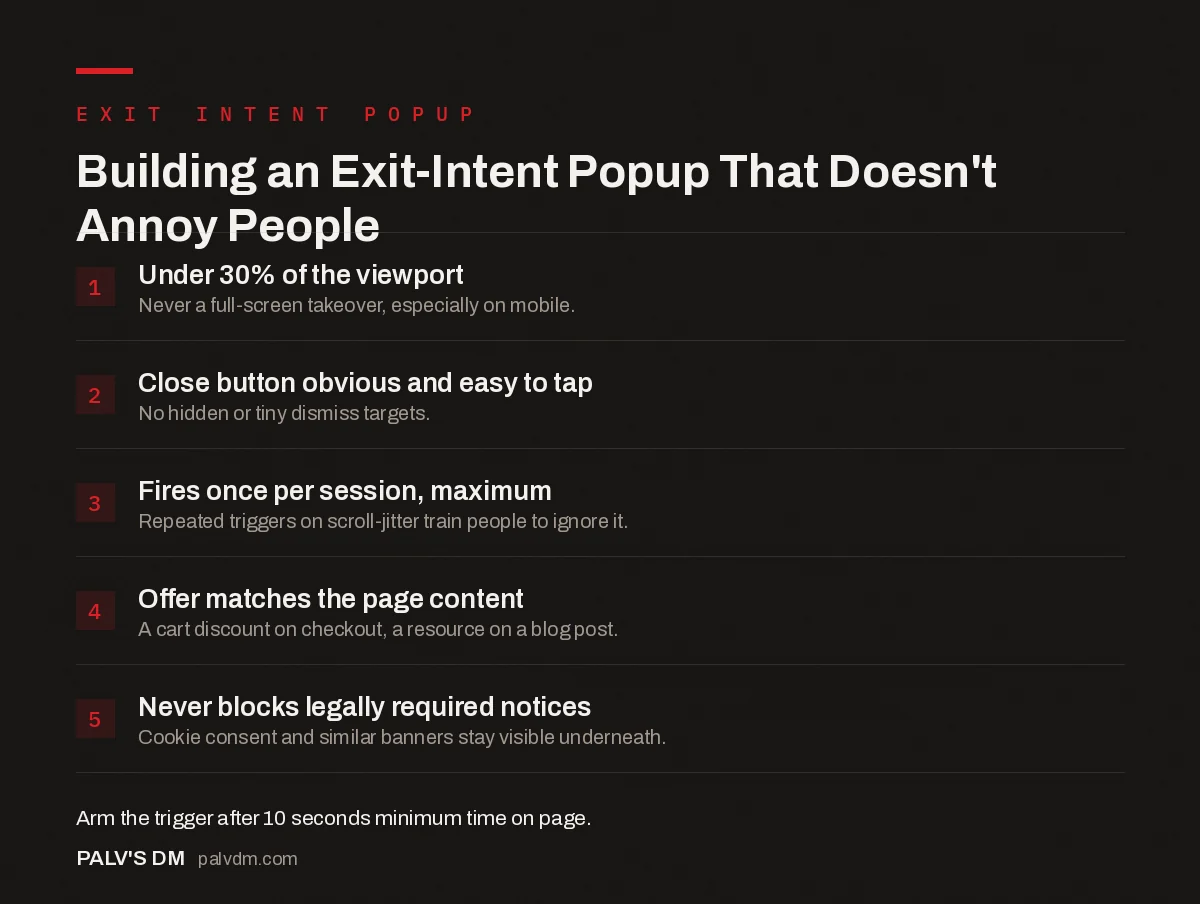
Building an Exit-Intent Popup That Doesn’t Annoy People
- Under 30% of the viewport. Never a full-screen takeover, especially on mobile.
- Close button obvious and easy to tap. No hidden or tiny dismiss targets.
- Fires once per session, maximum. Repeated triggers on scroll-jitter train people to ignore it.
- Offer matches the page content. A cart discount on checkout, a resource on a blog post.
- Never blocks legally required notices. Cookie consent and similar banners stay visible underneath.
Does Google penalize sites for using exit-intent popups?
Not this kind, specifically. Google’s mobile intrusive interstitial guidance, in effect since January 10, 2017, targets popups that appear the moment a visitor arrives from a mobile search result, before they’ve seen any of the content they clicked through for. That’s a different pattern from an exit-intent overlay, which by definition fires later in the session, after genuine content has already rendered and been read. Google’s own guidance explicitly carves out exceptions for legally required notices (cookie consent, age verification) and for reasonably-sized banners that don’t cover the main content, so a well-designed exit popup sitting comfortably within that guidance has nothing to worry about on the SEO side.
Where sites do get into trouble is stacking a full-screen exit popup on top of an already-aggressive cookie banner and a newsletter signup that fires on scroll. None of those three is individually against Google’s guidelines. Together, on a small mobile screen, they create exactly the experience the intrusive interstitial policy was written to discourage, even without technically triggering the penalty condition.
Does the delay before showing it matter?
A little, and in a direction that surprises people who assume faster is always better. Popups with a short delay of six to ten seconds after the exit gesture fires tend to convert somewhat better than ones that appear the instant the cursor moves, roughly 2.4% against 1.9% in one dataset comparing the two approaches. The gap isn’t dramatic, but it’s consistent enough to matter, and the likely explanation is that an instant popup reads as reflexive and automated, where a half-second beat feels closer to the site actually noticing you were leaving.
Don’t over-engineer this. A ten-second minimum time-on-page before the exit trigger is even armed does more good than fiddling with the popup’s own fade-in animation. If someone lands, decides in two seconds this isn’t the right page, and moves their cursor toward the tab bar, showing them a popup at that point is interrupting a bounce that was never going to convert regardless of what you offer. Arm the trigger only after a visitor has had enough time to actually engage with something.
Does mobile need a completely different approach?
Yes, more than most teams assume. Beyond the detection mechanism being different, mobile screens punish size mistakes far more than desktop does. A popup that looks reasonably sized on a 24-inch monitor can occupy the entire visible viewport on a phone. Design the mobile version separately rather than letting the same popup scale down automatically; test it on an actual device, not just a resized browser window, because scroll-up false triggers on mobile are common enough that a popup firing too eagerly there will show up constantly to people who were never actually leaving.
On the client sites where we’ve pulled exit popups entirely and watched nothing measurable change in revenue, the common thread was always a generic offer with no relationship to what the visitor was doing. The sites where removing it hurt were the ones where the popup carried a specific, well-timed discount tied to an abandoned cart. The mechanism isn’t inherently good or bad. The specificity of what’s inside it is doing almost all the work.
Frequently asked questions
Do exit-intent popups actually increase conversions?
Yes, moderately. They typically convert around 3-4% of the visitors who trigger them and recover an estimated 10-15% of people who were about to leave with no action at all. Because they only fire on exit, they don’t interrupt visits that were already heading toward a conversion.
Does Google penalize sites for using exit-intent popups?
Not exit-intent popups specifically. Google’s mobile interstitial penalty, active since January 2017, targets popups that appear immediately after a visitor clicks through from a mobile search result, not overlays triggered later by an exit gesture during an established session.
Do exit-intent popups work on mobile?
There’s no cursor to track leaving toward the browser chrome, so mobile implementations rely on proxies instead: scroll-up velocity, back-button taps, or a period of inactivity. These signals are noisier than desktop mouse tracking and produce more false triggers, which is part of why mobile exit popups need a lighter touch.
What offer converts best in an exit-intent popup?
Discount and free-resource offers tend to perform best, often reaching 7-10% conversion, with cart-abandonment-specific popups performing strongest of all popup types. A generic newsletter signup with no incentive converts far lower than an offer tied directly to what the visitor was just looking at.
How do I stop an exit-intent popup from feeling spammy?
Keep it under roughly 30% of the viewport, make the close button obvious and easy to tap, never trigger it more than once per session, and match the offer to the page the visitor was actually reading. A generic discount on a blog post about return policies reads as noise, not help.
Sources
- Intrusive Interstitials: Guidelines To Avoiding Google’s Penalty, Smashing Magazine
- 20+ Popup Statistics, Wisepops
- Core Web Vitals: LCP, INP and CLS Explained Properly
- Trust Signals That Work in the Indian Market
- Testimonials and Proof: Making Them Believable
- Thank-You Pages That Do More Than Say Thanks
Want this done on your site?
Every PalV’s DM engagement starts with a free audit of your actual website — a 12-point
crawl covering what is blocking indexation, on-page gaps against your primary keywords, speed
findings, and the three to five fixes worth making first. Delivered in two working days. No
payment details, and the findings are yours whether you hire us or not.
Get your free SEO audit
See Web Development plans and prices