
Content Pruning: Deciding What to Delete, Merge or Keep
Content pruning is a five-step process for deciding whether to delete, merge, redirect, or improve every indexed page. The decision framework and the mistakes that make it backfire.
Content pruning means auditing every indexed page and sorting each one into keep, improve, merge, or remove — using organic traffic, backlinks, and topical overlap as the deciding data, not gut feel. Done correctly, it concentrates crawl budget and internal link equity onto the pages actually capable of ranking, instead of spreading both across hundreds of thin or duplicate URLs that were never going to compete.
The nervous instinct is to leave everything published because “more pages can’t hurt.” In practice a large body of thin, outdated, or overlapping content dilutes topical authority and gives Google more low-quality pages to weigh against the good ones on the same domain. Five steps get a pruning pass from spreadsheet to shipped without breaking the pages worth keeping.
Step 1: Pull the full page inventory and performance data
Export every indexed URL from Google Search Console’s Pages report, then join it against Google Analytics sessions, average engagement time, and conversions per page, plus a backlink count from any link tool available. This becomes the working sheet for the whole audit — one row per URL, with the metrics needed to make a defensible decision rather than a subjective one.
Include pages currently excluded from the index too. A page marked “Crawled, not indexed” is often a pruning candidate already flagged by Google as not worth including.
Step 2: Score each page against a simple decision framework
Four categories, and every page should land cleanly in one of them once traffic, backlinks, and content quality are in view.
| Signal | Keep | Improve | Merge | Delete/redirect |
|---|---|---|---|---|
| Organic traffic (12-month trend) | Steady or growing | Declining but non-zero | Near-zero, overlapping topic | Near-zero, unique topic |
| Backlinks pointing to it | Any amount | Any amount | Some — worth preserving via redirect | None |
| Content quality vs top-ranking competitors | Competitive | Thin or outdated | Thin, duplicated elsewhere on-site | Irrelevant or obsolete |
| Topical overlap with another page | None | None | High | N/A |
The “merge” and “improve” categories are easy to mix up. Improve is for a page with the right topic and weak execution — thin content on a query worth targeting. Merge is for a page whose entire topic is already better covered somewhere else on the same site; keeping both active is what causes cannibalisation in the first place.
Step 3: Decide delete vs redirect for every removal candidate
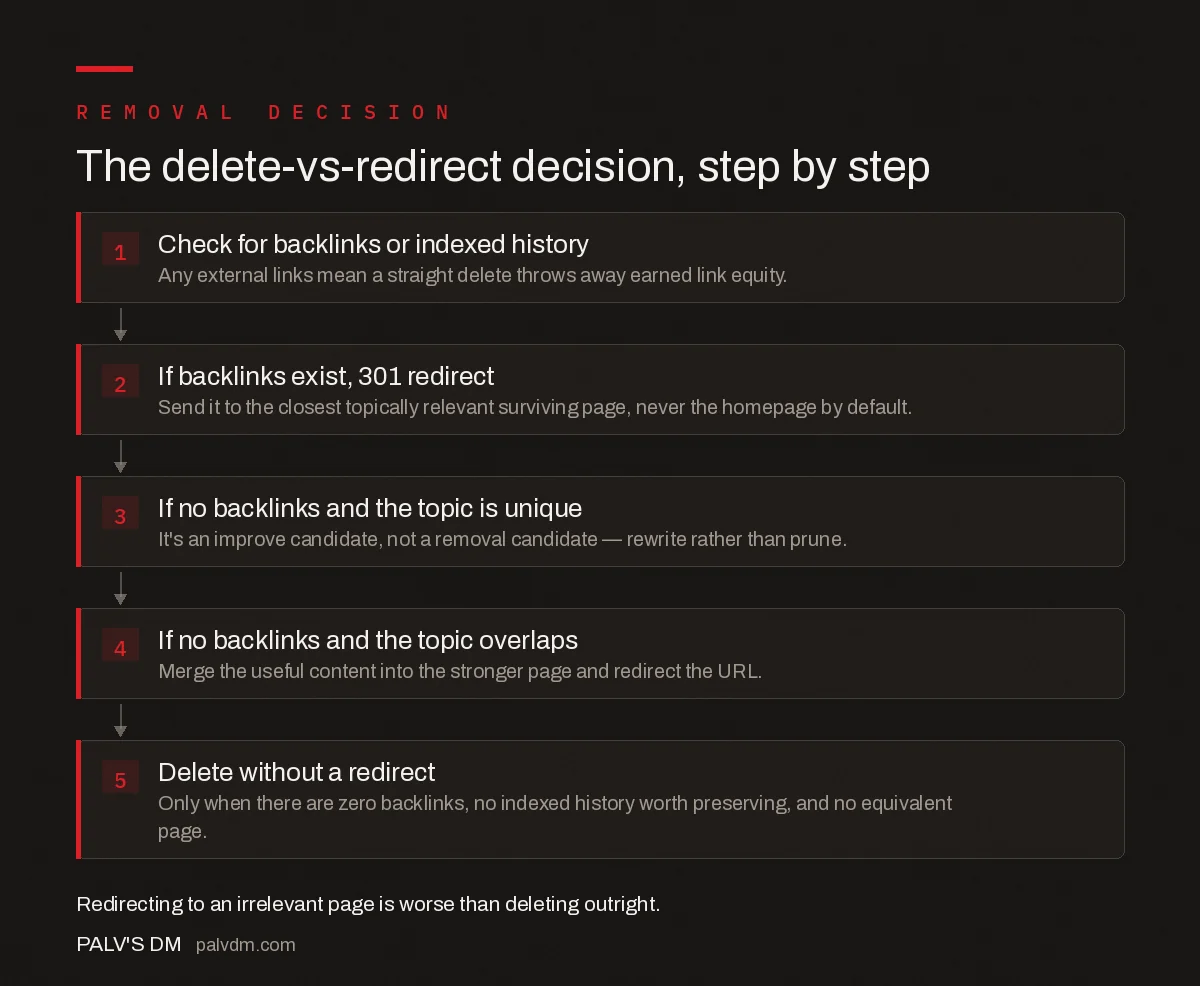
The delete-vs-redirect decision, step by step
- Check for backlinks or indexed history first. Any external links pointing to the page mean a straight delete throws away link equity that took real effort to earn.
- If backlinks exist, 301 redirect to the closest topically relevant surviving page — never to the homepage as a default, which wastes the signal.
- If no backlinks and the topic is unique, it’s an improve candidate, not a removal candidate — rewrite rather than prune.
- If no backlinks and the topic overlaps a stronger page, merge the useful content into that page and redirect the URL.
- Only delete without a redirect when there are zero backlinks, zero indexed history worth preserving, and no reasonable equivalent page to redirect to — true dead weight.
Redirecting to a genuinely irrelevant page is worse than deleting outright. Google’s guidance on creating helpful content is explicit that content should exist to serve people first — a 301 to an unrelated page just to “preserve the redirect” sends visitors and link equity somewhere that doesn’t answer what they came for, and Google treats a pattern of irrelevant redirects as a soft-404 signal over time.
Step 4: Execute merges without losing what was working on either page
When combining two pages, keep the URL with more backlinks, more indexed history, or a stronger current ranking as the surviving page, and 301 the other one into it. Pull forward any unique, useful sections from the page being retired rather than starting the merged page from scratch — a merge that discards everything from the weaker page and just redirects it isn’t really a merge, it’s a delete with extra steps.
Update internal links across the site to point at the surviving URL directly rather than relying on the redirect chain to carry the weight. A redirect passes most signal value, but a direct internal link is cleaner and faster for both users and crawlers.
Step 5: Monitor the aftermath and adjust
Track total organic sessions, indexed page count, and rankings for the surviving pages for 8-12 weeks after the pass. A short-term dip in raw session count is common and not itself a failure signal, since some of the removed pages were contributing marginal traffic even if they weren’t converting. What matters is whether the surviving pages gain rankings and traffic over the same window — that’s the actual goal of the exercise.
What mistakes make a pruning pass backfire?
- Pruning by traffic alone, ignoring backlinks. A page with low traffic but meaningful referring domains is a redirect candidate, not a delete candidate — deleting it forfeits link equity for no reason.
- Merging pages that actually serve different intents. Two pages ranking for similar terms isn’t automatically cannibalisation; if one serves a “how to” query and the other a “buy now” query, merging them weakens both.
- Redirecting everything to the homepage. A generic catch-all redirect target is barely better than a 404 for relevance purposes and wastes the topical signal a targeted redirect would have passed.
- Pruning in one large batch with no monitoring window. Removing hundreds of URLs at once makes it impossible to isolate which specific changes caused which ranking movement if something goes wrong.
- Skipping the content-quality comparison against competitors. A page can have decent traffic and still be thin compared to what currently ranks — traffic alone doesn’t tell you whether “improve” or “keep” is the right call.
How often should a site run a content pruning pass?
Annually for most sites, or after a significant traffic drop that a technical and content audit can’t otherwise explain. Sites publishing at high volume — daily news, large ecommerce catalogues — benefit from a lighter quarterly pass focused just on the newest cohort of pages, catching thin or duplicate content before it accumulates into a larger problem.
Frequently asked questions
What is content pruning in SEO?
Content pruning is the process of auditing every indexed page on a site and deciding, page by page, whether to keep it as-is, improve it, merge it into a stronger page, or remove it. The goal is concentrating ranking signals and crawl budget on pages worth ranking.
Should I delete a page or redirect it?
If the page has any backlinks, indexed history, or a close topical match to a live page, 301 redirect it to the most relevant surviving URL rather than deleting outright. Only delete without a redirect when the page has no external links and no reasonable equivalent elsewhere on the site.
How much traffic loss is normal right after a content pruning pass?
Some sites see a short dip in total organic sessions immediately after removing low-traffic pages, since those pages were still contributing some sessions even if unprofitable ones. The pages that remain typically show improved rankings within 4-8 weeks as crawl budget and internal links concentrate on them.
Does content pruning help with keyword cannibalisation?
Yes, when the cause is genuinely overlapping content. Merging two thin, competing pages into one comprehensive page removes the cannibalisation and consolidates the ranking signals both pages were splitting. It doesn’t help when two pages target the same head term but serve genuinely different search intents.
Sources
- Creating Helpful, Reliable, People-First Content — Google Search Central
- On-Page SEO: The Complete Checklist
- Keyword Cannibalisation: Diagnosis and Repair
- When Two Pages Ranking for One Term Is Actually Fine
Want this done on your site?
Every PalV’s DM engagement starts with a free audit of your actual website — a 12-point
crawl covering what is blocking indexation, on-page gaps against your primary keywords, speed
findings, and the three to five fixes worth making first. Delivered in two working days. No
payment details, and the findings are yours whether you hire us or not.


