
Setting Up Conversion Tracking for WhatsApp and Call Leads
WhatsApp and phone clicks aren't tracked by GA4 by default. Here's the exact GTM setup to track both as real key events.
Published August 2026. SEO team at PalV’s DM.
WhatsApp and phone clicks don’t get tracked by GA4 automatically, no matter how much traffic they generate. Both need a Google Tag Manager trigger built around the link pattern (wa.me for WhatsApp, tel: for calls), a GA4 event tag connected to that trigger, and a final step marking the resulting event as a key event. For many Indian service businesses, this single setup gap means the highest-volume lead channel is invisible in every report.
Why doesn’t GA4 track WhatsApp and call clicks by default?
GA4’s Enhanced Measurement automatically tracks outbound link clicks as a generic outbound_click event, but it doesn’t break these out by destination type or mark them as conversions on its own. A click on a wa.me link and a click on a random external blog link both register as the same generic outbound_click event unless you build specific tracking for each. Since GA4 has no way to know which outbound clicks matter to your business, it treats them all the same, which for a service business means the most valuable click type disappears into an undifferentiated bucket.
Phone number links using the tel: protocol have the same problem. On mobile, tapping a phone number to call directly is one of the strongest possible purchase-intent signals a visitor can give, and GA4 doesn’t flag it as anything special without explicit setup.
How do you set up WhatsApp click tracking through GTM?
This is the most reliable method and takes about 20-45 minutes for a first-time setup:
- Create a new Trigger in Google Tag Manager, type “Click – Just Links,” with the condition Click URL contains
wa.me(orapi.whatsapp.com, depending on your link format). - Create a new Tag, type “GA4 Event,” referencing your GA4 configuration tag, with an event name such as
whatsapp_click. - Attach the trigger to the tag so the event fires specifically on WhatsApp link clicks.
- Test using GTM’s Preview mode before publishing, click your WhatsApp button in the preview session and confirm the tag fires in the debug panel.
- Publish the container once confirmed working, which pushes the change live site-wide.
How is call tracking set up differently, and what are the limits?
Phone click tracking follows the same GTM pattern, a Click Just Links trigger with the condition Click URL contains tel:, paired with a GA4 event tag named something like phone_click. The setup mechanics are nearly identical to WhatsApp tracking.
The real limitation with phone tracking is that a click event only tells you someone tapped the number, it says nothing about whether the call connected, how long it lasted, or whether it turned into a sale. For businesses where phone conversion quality matters more than click volume, dedicated call tracking software that assigns unique tracked numbers per traffic source provides far more detail, including call duration and recording, but adds ongoing cost that a basic GTM click event doesn’t.
| Tracking method | What it tells you | What it doesn’t tell you |
|---|---|---|
| GTM click event (WhatsApp) | Someone clicked the WhatsApp link | Whether the chat led to a real conversation or sale |
| GTM click event (phone) | Someone tapped the number to call | Whether the call connected or its outcome |
| Dedicated call tracking number | Call duration, source attribution, sometimes recordings | Requires a paid tool and ongoing number management |
| Manual CRM logging | Actual lead quality and outcome | Doesn’t connect automatically back to the marketing channel that drove it |
How do you mark these events as key events once they’re tracked?
Once whatsapp_click or phone_click events are firing and visible in GA4’s Realtime report or DebugView, go to Admin, then Events, find the event name in the list, and toggle “Mark as key event.” This applies from that point forward, it won’t reclassify historical outbound_click data retroactively, so it’s worth doing this setup as early as possible rather than waiting.
If you’re running Google Ads campaigns, importing these as conversions into Google Ads (via Tools, then Conversions, then Import from Google Analytics) lets Smart Bidding optimise toward WhatsApp contacts and calls directly, rather than just toward site visits or generic form fills.
What about DPDP Act consent requirements for this kind of tracking?
Click tracking on WhatsApp and phone links generally falls under standard analytics tracking rather than personal data collection, since the event itself just records that a link was clicked, not any personal details the visitor later shares over WhatsApp or on a call. That said, under India’s Digital Personal Data Protection Act, if your broader analytics or advertising setup collects personal data through cookies or similar technologies, you still need valid consent mechanisms in place site-wide, and consent state can affect whether GA4 records events at all for a given visitor. If your site already runs a consent banner for GA4 broadly, WhatsApp and call click tracking simply inherits the same consent state, no separate consent flow is typically needed just for these two event types.
What should you check to confirm the setup is working correctly?
- Use GTM Preview mode first, always, before publishing any container change, this catches trigger misconfigurations before they go live.
- Cross-check GA4 event counts against a rough manual estimate for the first week, if your WhatsApp click count looks wildly higher or lower than what seems plausible for your traffic, the trigger condition likely needs adjusting.
- Watch for double-counting if both a custom GTM tag and GA4’s native outbound_click tracking are capturing the same click, this inflates totals and can mislead channel comparisons.
- Revisit the setup if you change your WhatsApp link format, switching from a plain
wa.melink to a click-to-chat widget with pre-filled messages can change the URL pattern enough to break an existing trigger.
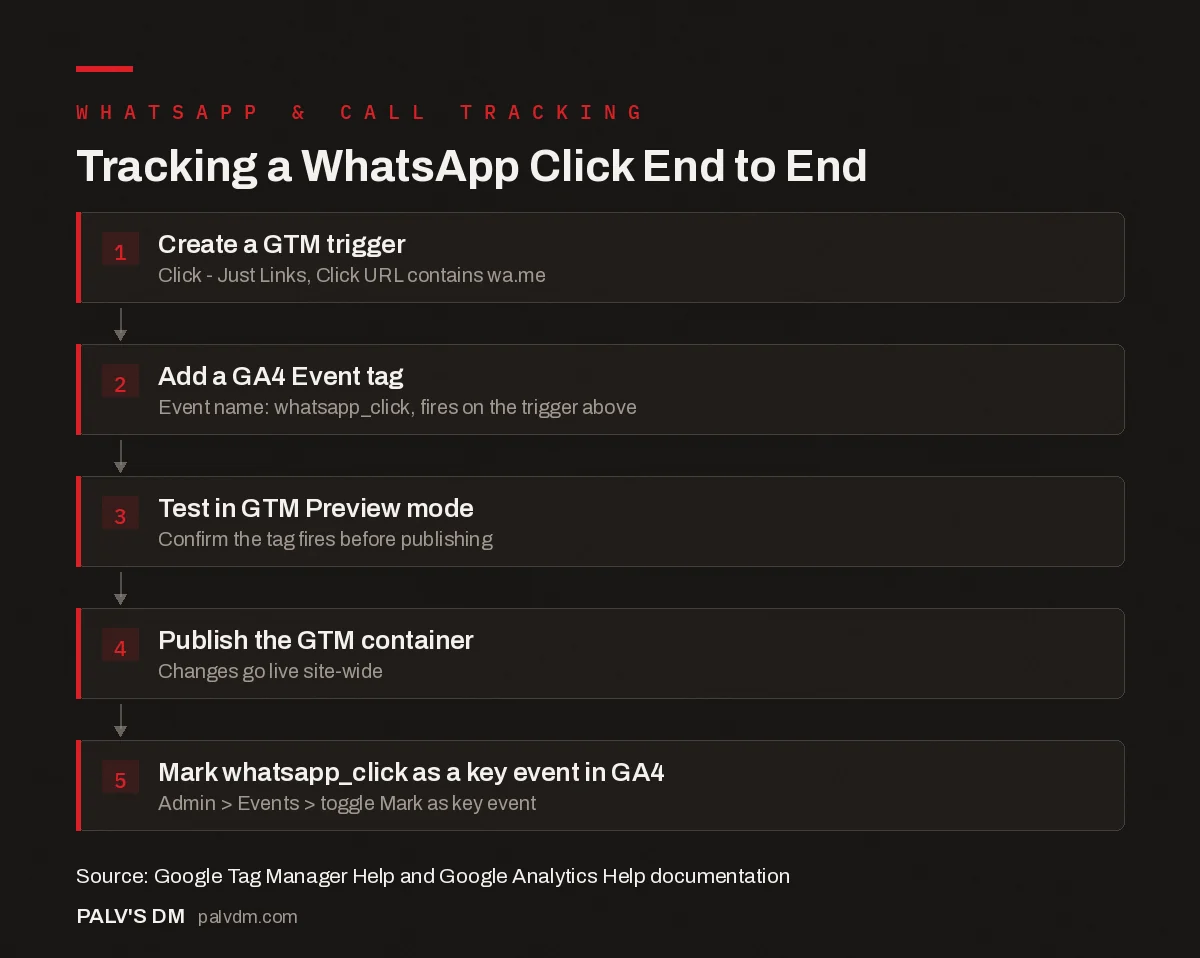
Tracking a WhatsApp Click End to End
- Create a GTM trigger. Click – Just Links, Click URL contains wa.me.
- Add a GA4 Event tag. Event name: whatsapp_click, fires on the trigger above.
- Test in GTM Preview mode. Confirm the tag fires before publishing.
- Publish the GTM container. Changes go live site-wide.
- Mark whatsapp_click as a key event in GA4. Admin > Events > toggle Mark as key event.
For most Indian SMB and D2C sites we’ve reviewed, WhatsApp is either the top or second lead channel by volume, yet it’s the one most likely to have zero tracking in place. Fixing this gap is one of the fastest wins we implement inside SEO Growth engagements, since it usually changes the entire read on which channels are actually working.
This setup builds on the broader event framework covered in GA4 events and conversions for a service business, and connects back to the full GA4 for SEO setup guide for teams building out measurement from scratch.
Should WhatsApp clicks count the same as form submissions in reporting?
Not automatically. A WhatsApp or phone click is a lower-friction action than filling out a form, so it typically has a lower intent threshold and a lower conversion-to-sale rate per click, even though it often has higher volume. Weighting these events equally in a blended “total conversions” number can overstate lead quality if WhatsApp clicks dominate the count but convert to actual sales less often than form fills. Where possible, track these separately in reporting rather than combining them into one undifferentiated key event total, and periodically sanity-check WhatsApp click volume against real closed-lead numbers from your CRM or sales log.
What does a full audit trail from click to closed deal actually look like?
The click event itself is only the first link in a chain that most service businesses never fully connect. A more complete picture requires tagging the WhatsApp click event with a timestamp and, where possible, a session identifier, then manually or semi-automatically matching that against the sales team’s WhatsApp Business or CRM log of actual conversations that led to a booking. Few small businesses have this fully automated, but even a simple weekly practice, sales team notes which new WhatsApp conversations converted, marketing cross-references that volume against the week’s GA4 whatsapp_click count, gives a rough conversion rate per channel that a click count alone can’t provide. Over a few months, this manual reconciliation often reveals that WhatsApp converts at a meaningfully different rate than the contact form, which changes how much budget or attention each channel deserves.
What happens if you skip call tracking and rely on click counts alone?
Relying purely on phone_click counts without any deeper tracking is still far better than no tracking at all, but it has a specific blind spot worth naming to stakeholders upfront: a click only proves intent to call, not that a call happened, connected, or led anywhere. A campaign that doubles phone_click volume could be driving genuinely more calls, or it could be driving more accidental taps from a poorly placed button, or more calls that ring out because staff availability didn’t scale with the campaign. Pairing click data with even a rough weekly count from whoever answers the phone, “we took about 40 calls this week”, is usually enough to sanity-check that the click trend and the real call trend are moving together, without needing to invest in dedicated call tracking software immediately.
FAQ
Can I track WhatsApp clicks without using Google Tag Manager?
Yes, by adding a gtag event call directly into the onclick attribute of your WhatsApp link in your site’s code. This works but requires a code change every time you want to add or adjust tracking, which is why GTM is generally preferred for teams without a developer on standby.
Does this setup work the same way on WordPress sites with a page builder?
Generally yes, since GTM tracking is based on the rendered link’s URL pattern, not the underlying page builder technology. The trigger looks for wa.me or tel: in the clicked link’s URL regardless of whether that link was built with Elementor, native WordPress, or any other builder.
How long does it take for tracked events to show up as key events in reports?
Once an event is marked as a key event, new occurrences typically appear in the standard Key events report within 24-48 hours, though the Realtime report shows individual events within minutes for testing purposes.
Is call tracking software worth it for a small business?
It depends on call volume and how much call outcome data matters to the business. A basic GTM click event is usually enough to know calls are happening and roughly how many. Dedicated call tracking becomes worth the cost when you need to know call duration, source-level attribution across multiple numbers, or recorded call quality for training purposes.
What’s the most common reason a WhatsApp click trigger stops working after it was tested and published?
A site redesign, a switch to a different WhatsApp button plugin, or a change from a plain wa.me link to a pre-filled click-to-chat widget are the most common causes. Any of these can change the underlying URL pattern the GTM trigger is matching against, so the trigger silently stops firing even though nothing about GTM itself changed. Re-checking key event triggers after any site or plugin update is worth adding to a standard launch checklist.


