
How to Update an Old Blog Post for Rankings
Updating an old blog post starts with Search Console data, not a rewrite. The six-step process for refreshing a page that's plateaued without breaking what already ranks.
Updating an old blog post starts with Search Console data, not a rewrite: pull the page’s current position trend and the exact queries it ranks for, compare it against what’s currently in the top 10, then edit specifically to close that gap without touching the parts already working. Posts sitting in positions 11 to 20 are the best return on effort — Google already treats them as relevant, so a focused update is more likely to move them than starting a new page from zero.
The mistake that undoes most content refreshes is treating the update as a rewrite. A page that ranks for eight different query variations can lose six of them if an edit narrows the focus to just the one keyword someone was targeting. The process below is built to prevent that.
How do you decide which old posts to update first?
Sort Search Console’s Performance report by average position and look specifically at pages sitting between 11 and 20 — page two, essentially. These pages have already cleared Google’s relevance bar; they’re competing on depth, freshness, or content structure rather than fundamental topical fit. A page ranking at position 45 usually has a bigger gap to close and a lower probability that a content edit alone gets it there.
Step 1: Pull the current ranking and query data from Search Console
Before editing anything, find every query phrase the page currently ranks for, not just the one it was originally written to target. A post about “canonical tags” might also be pulling impressions for “duplicate content” or “rel canonical example” — queries a narrow rewrite could accidentally drop. This list becomes the checklist for what the update needs to preserve.
Step 2: Compare against what’s currently ranking above you
Open the top five results for the primary target query and note what they cover that your page doesn’t — a comparison table, a specific example, a more recent statistic, a section answering a sub-question your page skips. This isn’t about matching word count; it’s about identifying the specific gaps a reader would notice if they compared both pages side by side.
Step 3: Update facts, examples, and dates without breaking what already works
Replace anything time-bound that’s gone stale — a statistic from an old algorithm update, a screenshot of a UI that’s changed, a “as of [year]” claim that’s now inaccurate. Add the missing depth identified in step 2. Leave the sections already covering ranking queries intact rather than restructuring them for style alone; a section that’s working doesn’t need to be rewritten just because it’s old.
Step 4: Add internal links to and from newer, relevant posts
Old posts often predate newer, more specific content published since — link to those newer posts where they add depth the old post doesn’t need to duplicate. Equally, check whether newer posts should be linking back to this one; an old post being updated is exactly the moment to also improve the internal link paths pointing to it.
Step 5: Refresh the title tag and meta description — selectively
Rewrite the title and meta description only if the current version is measurably underperforming for its position — a low click-through rate relative to similar-position pages is the signal to look for. A title and meta that are already earning a reasonable click-through rate don’t need a refresh just because the body content changed.
Step 6: Republish and request indexing
Update the visible publish or “last updated” date only when the change is substantive enough to justify it. Once live, submit the URL through URL Inspection’s “Request Indexing” to prompt a faster recrawl rather than waiting for the page’s normal crawl cycle to pick up the change.
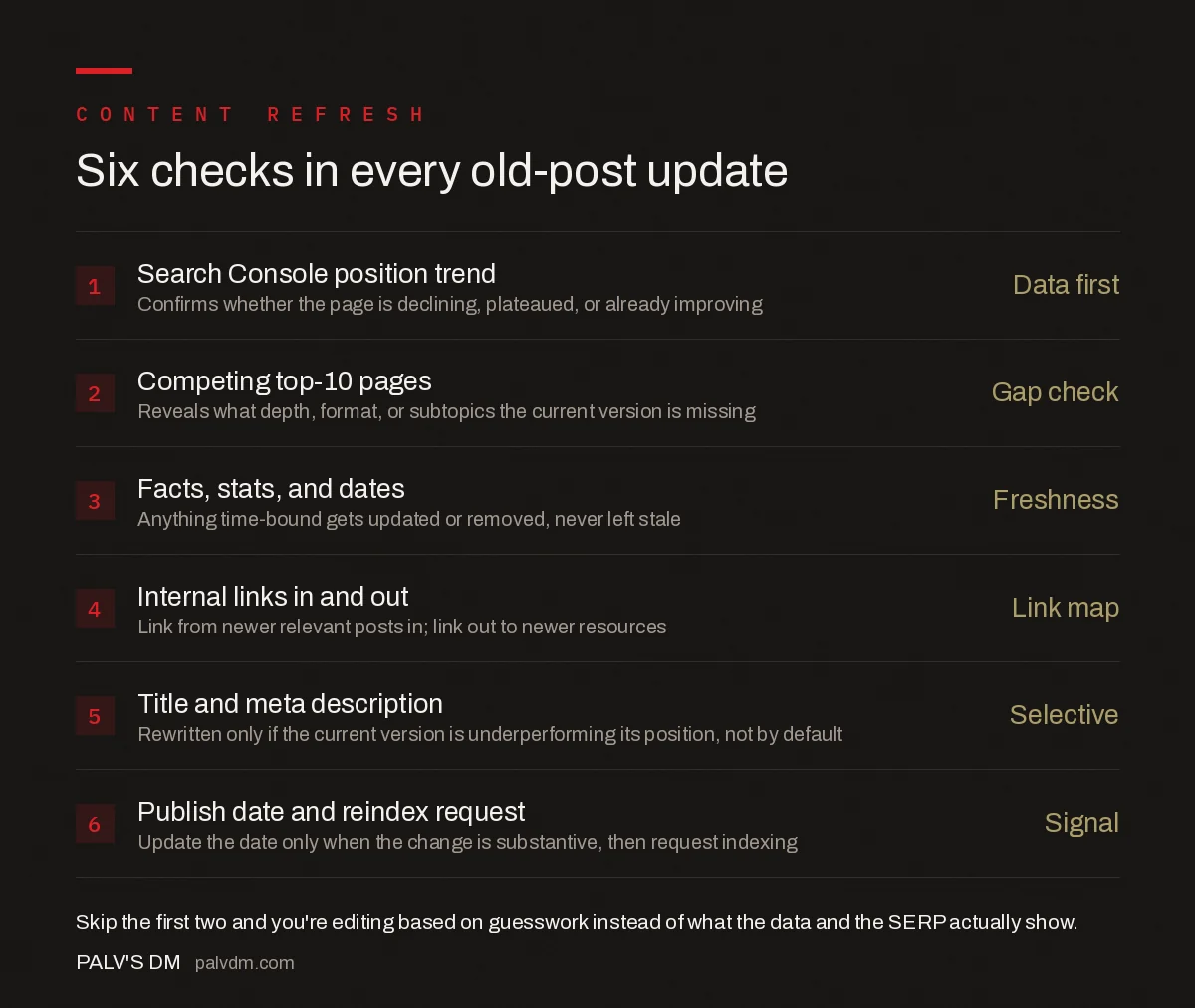
Six checks in every old-post update
- Search Console position trend — Data first. Confirms whether the page is declining, plateaued, or already improving.
- Competing top-10 pages — Gap check. Reveals what depth, format, or subtopics the current version is missing.
- Facts, stats, and dates — Freshness. Anything time-bound gets updated or removed, never left stale.
- Internal links in and out — Link map. Link from newer relevant posts in; link out to newer resources.
- Title and meta description — Selective. Rewritten only if the current version is underperforming its position, not by default.
- Publish date and reindex request — Signal. Update the date only when the change is substantive, then request indexing.
Update, merge, or leave alone: how do you decide?
| Situation | Recommended action | Why |
|---|---|---|
| Post ranks positions 11-20 with a clear content gap versus competitors | Update in place | Fastest path to page one for a page Google already considers relevant |
| Two posts on the site target near-identical queries | Merge into one, redirect the other | Stops the posts competing with each other and consolidates their signals |
| Post covers a topic that’s no longer relevant to the business or industry | Redirect to the closest current replacement | Keeps any link equity useful instead of leaving it on a dead page |
| Post already ranks in the top three for its target query | Light freshness pass only | Avoids destabilising a page that’s already performing well |
What common mistakes make a content refresh backfire?
- Rewriting the whole page instead of the parts that need it. Sections already ranking for secondary queries get diluted or removed in the process.
- Chasing a single keyword and losing the others. A page ranking for eight variations only needs the gap closed for the primary one, not a rewrite that narrows its topical coverage.
- Changing the URL during an update. This resets the accumulated backlink and ranking history unless a redirect is handled carefully — usually unnecessary for a straightforward refresh.
- Bumping the publish date on a trivial edit. Readers and Google both treat a “last updated” date as a freshness claim; a one-line fix doesn’t justify it.
- Skipping the competitor comparison. Editing based on gut feeling instead of what’s actually outranking the page wastes effort on changes that don’t close the real gap.
What tools help find update candidates at scale?
On a site with a few dozen posts, scanning Search Console manually is fine. Past a hundred or so, filter the Performance report by pages, sort by clicks or impressions descending, then cross-reference average position — a page pulling meaningful impressions but sitting at position 15 is a stronger candidate than a page with negligible impressions regardless of position, since there’s no query volume to capture even with a perfect update. A simple spreadsheet export from Search Console, filtered to position 8 through 20 and sorted by impressions, produces a prioritised worklist without needing a dedicated content-audit tool.
Frequently asked questions
Which old blog posts should I update first?
Posts ranking in positions 11 to 20 in Search Console are usually the best return on effort — Google already considers them relevant enough for page one’s neighborhood, so a targeted update is more likely to move them than starting from nothing. Prioritise these before pages ranking beyond position 30.
Do I need to change the URL when I update an old blog post?
No, and you generally shouldn’t. Keeping the URL the same preserves the backlinks, internal links, and historical ranking signals the page has already accumulated. Change the URL only if you’re deliberately merging it with another post and redirecting the old one.
Should I change the publish date when I update a post?
Only if the update is substantive — new sections, corrected information, or a meaningful expansion. Changing the date on a post with only a typo fix or a single sentence edit misrepresents how current the content actually is, to both readers and search engines.
Can updating a blog post hurt rankings that are already working?
Yes, if the update removes or de-emphasises a section the page was already ranking for on a secondary query. Check which phrases a page ranks for in Search Console before editing, so a rewrite aimed at one keyword doesn’t accidentally strip out what was working for another.
How often should old blog posts be reviewed for updates?
There’s no universal schedule — it depends on how fast the topic changes. A post about a Google algorithm update needs review far more often than an evergreen definitional post. Checking Search Console position trends quarterly is a reasonable baseline for flagging candidates.
How do you handle a post that’s been updated before without much success?
Check whether the previous update actually addressed a real gap or just refreshed dates and swapped a few sentences. A post updated twice without movement usually has a structural problem a light edit can’t fix — the wrong search intent for the page’s format, a competing page elsewhere on the same site pulling the same query, or a top-10 field that’s shifted toward a content type (video, an interactive tool, a much longer guide) the page can’t reasonably match with another paragraph-level edit. At that point, a full rewrite or a merge with a stronger related post is usually a better use of time than a third light pass.
Sources
- Google Search ranking systems guide — Google Search Central
- On-Page SEO Checklist
- Detecting Cannibalisation in Search Console Data
- How to Merge Two Competing Posts Into One
- Redirecting a Merged Post Without Losing Rankings
Want this done on your site?
Every PalV’s DM engagement starts with a free audit of your actual website — a 12-point
crawl covering what is blocking indexation, on-page gaps against your primary keywords, speed
findings, and the three to five fixes worth making first. Delivered in two working days. No
payment details, and the findings are yours whether you hire us or not.


