
Author Bios and Bylines: Making Expertise Machine-Readable
A byline with just a name isn't machine-readable. How to structure Article schema and an author bio page so Google and AI systems can verify who wrote a page and why they're credible.
A byline that just prints a name isn’t machine-readable — what makes an author identifiable to Google and to AI systems is a combination of a visible, specific byline, an author.url or sameAs property in Article schema pointing to a real bio page, and that bio page demonstrating actual background and expertise, not a one-line title. Miss any one piece and the signal breaks: a byline with no schema is invisible to structured-data parsers, schema with no bio page has nothing to link to, and a bio page with no external verification can’t be disambiguated from anyone else sharing that name.
Google has been explicit that author markup isn’t required to rank — there’s no mandatory property in its Article structured data spec. What it does say, repeatedly, is that clear authorship helps its systems understand and represent who’s behind a page, and that guidance has only gotten more relevant as AI Overviews and chatbots need a verifiable source to attribute a claim to.
What does Google actually check on a byline?
Google’s Article structured data documentation lays out specific best practices for the author property, and most sites violate at least one of them without realising it.
| Rule | Correct | Common mistake |
|---|---|---|
| Multiple authors | Separate author entry per person | Merging names into one string: “Jane Doe, John Smith” |
| author.name content | Name only | Adding job title, honorifics, or “posted by” text into the name field |
| Job title | Separate jobTitle property | Job title stuffed into author.name |
| Entity type | Person for people, Organization for brands | Using Organization for an individual writer, or the generic Thing type |
| Disambiguation | author.url or sameAs linking to a bio page | No URL at all — a bare name with nothing to verify it against |
The name-field rule trips up more sites than any other on this list, because it feels natural to write “Dr. Jane Doe, Editor in Chief” as a single string. Google’s own example shows why that’s wrong: author.name should read “Echidna Jones,” full stop, with honorificPrefix and jobTitle carrying the rest as separate, structured properties a machine can parse independently.
What makes an author bio page itself credible, not just present?
Having a bio page is step one; what’s on it determines whether it does any work. Google’s guidance on creating helpful content frames this as three questions worth asking about every author page: is it self-evident who created the content, do bylines lead to real background about the person, and would someone researching the site come away thinking this person is genuinely knowledgeable on the topic? A bio page that answers “SEO Consultant” and nothing else fails all three, even with a photo and a schema tag attached.
A bio page that does the job includes specific, checkable claims: years of experience in the actual field the byline covers, named credentials or certifications, a clear description of what the person does day to day, and — where genuinely true — first-hand experience with the topic rather than only aggregated knowledge of it. Google’s documentation calls this out directly as part of E-E-A-T: content that “demonstrates first-hand expertise and a depth of knowledge” is treated differently from content that summarises what others have said without adding anything.
How does Person schema tie the byline to the bio page?
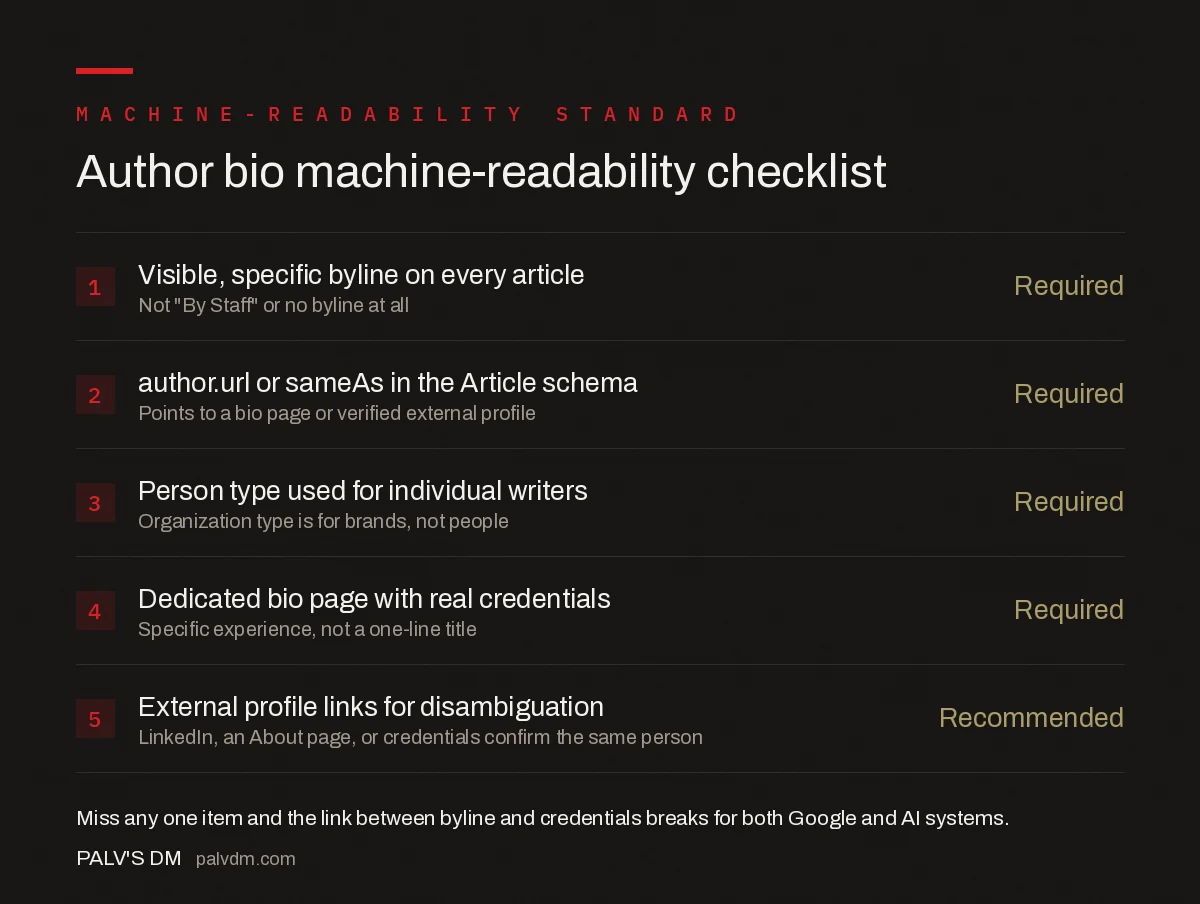
Author bio machine-readability checklist
- Visible, specific byline on every article — Required. Not “By Staff” or no byline at all.
- author.url or sameAs in the Article schema — Required. Points to a bio page or verified external profile.
- Person type used for individual writers — Required. Organization type is for brands, not people.
- Dedicated bio page with real credentials — Required. Specific experience, not a one-line title.
- External profile links for disambiguation — Recommended. LinkedIn, an About page, or industry credentials confirm the same person.
The mechanism connecting a byline to that bio page is the author.url (or sameAs) property inside the page’s Article schema. A minimal, correct example for a single author looks like this:
"author": [{
  "@type": "Person",
  "name": "Willow Lane",
  "jobTitle": "Journalist",
  "url": "https://example.com/staff/willow-lane"
}]
That url value is where Google — and increasingly, AI crawlers building their own knowledge of who’s credible on a topic — go to verify the claim the byline is making. If that page doesn’t exist, redirects somewhere unrelated, or is blocked from indexing, the link between “this article” and “this credentialed person” breaks even though the schema is technically valid.
Does a stronger author bio help with AI visibility?
It helps for a structural reason, not a mysterious one: AI systems summarising or citing a source generally need to establish who’s behind the claim before treating it as citable, in much the same way a human reader checks “who wrote this” before trusting a specific number or recommendation. A page with a specific, verifiable author connected via schema to a bio page full of real credentials gives an AI system something concrete to point to if it needs to attribute the claim. A page with no byline, or a generic one, gives it nothing to attribute — which doesn’t guarantee exclusion, but it removes one of the clearer trust signals available.
This is also why consistency across platforms matters more than any single page. An author whose name, photo, and described expertise match across the site’s bio page, LinkedIn, and any guest-published work elsewhere is easier for both Google and an AI system to treat as one verified entity, rather than several unconnected mentions of a name that happens to be shared by more than one professional.
How do you audit bylines across an existing site?
On a site with more than a handful of writers, checking bylines one article at a time isn’t practical, so start with a crawl. Pull every published URL along with its Article schema, then filter for three conditions: pages with no author property at all, pages where author.url or sameAs is missing or empty, and pages where the same person’s name appears spelled or formatted differently across posts. Each of those is a distinct fix — missing schema is a template problem, a missing URL is a linking problem, and inconsistent naming is a content-ops problem that usually traces back to multiple writers or editors entering bylines by hand instead of pulling from a single author profile record.
Once schema and byline consistency are confirmed, check the bio pages themselves against Google’s “Who” questions: is authorship self-evident, does the byline lead somewhere with real background, and would a reader come away trusting this person on the topic. A site can have flawless schema syntax and still fail this step if every bio page reads like a placeholder — the Rich Results Test validates the markup, not whether the bio page it points to is actually convincing.
What mistakes undermine an otherwise good author setup?
- Schema present, bio page missing or thin. Correct markup pointing to a bio page that says almost nothing defeats the purpose of having the markup at all.
- Inconsistent name spelling or byline format across the site. “P. Sharma” on one post and “Priya Sharma” on another splits what should be one entity into two ambiguous ones.
- Stock photos or no photos with no compensating detail. Not disqualifying on its own, but it removes one more signal a reader — and a quality rater — uses to gauge whether this is a real, specific person.
- Using Organization type for an individual writer. Muddies the entity type Google is trying to parse and undercuts the personal-expertise signal a byline is meant to carry.
- Never updating the bio page as credentials change. A bio that hasn’t been touched in three years while the person’s actual expertise has grown is a missed, low-effort opportunity to strengthen the same signal.
Frequently asked questions
Does Google require author schema markup?
No. Google states there are no required properties for Article structured data — only recommended ones. Author markup isn’t mandatory to rank, but Google explicitly recommends it to help its systems understand and represent who wrote a page, which matters more as AI systems increasingly need to attribute claims to a source.
What should go in the author.name field?
Only the author’s name — nothing else. Google’s author markup guidelines explicitly say not to include the publisher’s name, the author’s job title, or honorific prefixes and suffixes in that field. Job titles belong in a separate jobTitle property; the publisher belongs in the publisher field.
How do I handle bylines with multiple authors?
List each author in their own separate author entry in the schema — never merge multiple names into a single author.name string like “Jane Doe, John Smith.” Google’s guidance is explicit that each author needs their own object with its own name and url properties.
Does a generic byline like “By Staff” hurt SEO?
It removes a trust signal rather than actively penalising the page. Google’s helpful-content guidance asks whether it’s self-evident who created content and whether bylines lead to further background about the author — a generic “staff” byline answers no to both, weakening the E-E-A-T signals a specific, linked byline provides.
What’s the difference between author.url and sameAs?
Both point Google to more information about the author and can be used interchangeably for disambiguation, according to Google’s own documentation. author.url typically links to an internal bio page; sameAs is more commonly used to list external profiles such as LinkedIn, ORCID, or a Wikipedia page confirming the same identity.
Sources
- Article structured data, author markup best practices — Google Search Central
- Creating helpful, reliable, people-first content — Google Search Central
- Semantic SEO and Entities: The Complete Guide
- On-Page SEO: The Complete Checklist
- Thin Content: What Counts and How to Fix It
- How to Win Featured Snippets, Format by Format
Want this done on your site?
Every PalV’s DM engagement starts with a free audit of your actual website — a 12-point
crawl covering what is blocking indexation, on-page gaps against your primary keywords, speed
findings, and the three to five fixes worth making first. Delivered in two working days. No
payment details, and the findings are yours whether you hire us or not.


