Why Search Console and GA4 Never Match
Search Console clicks and GA4 sessions almost never match. Here's exactly why, how big a gap is normal, and how to use both tools correctly together.
Published August 2026 · SEO team at PalV’s DM
Search Console and GA4 almost never show matching numbers for the same period because they measure fundamentally different things at different points in a visitor’s journey. Search Console logs a click server-side, the moment someone selects your result on Google’s search results page. GA4 logs a session client-side, after the page has loaded and its JavaScript tracking tag has fired successfully. Every gap between those two moments, a slow page, a blocked script, an ad blocker, a user who closes the tab before load, creates a click that Search Console counted but GA4 never saw. This is expected behaviour, not a sign either tool is broken.
What exactly is each tool measuring?
| Google Search Console | GA4 | |
|---|---|---|
| What it counts | Clicks on your result within Google Search | Sessions after your tracking tag fires on your site |
| When it’s logged | Server-side, at the moment of the click on Google’s results page | Client-side, after the page loads and JavaScript executes |
| Affected by ad blockers? | No | Yes, tracking can be blocked entirely |
| Affected by cookie consent rejection? | No | Yes, in regions with active consent requirements |
| Session grouping | Each click counted individually | Multiple actions within a 30-minute window grouped into one session |
What are the specific reasons the numbers diverge?
- Traffic lost between click and page load. Some clicks never fully load the destination page, a slow connection, a user who taps back immediately, or a page that fails to render. Search Console counted the click; GA4 never got the chance to log a session.
- Ad blockers and privacy tools. Browser extensions and privacy-focused browsers can block GA4’s tracking script from firing entirely while having no effect on Search Console, since Search Console doesn’t rely on any script running on your site.
- Cookie consent rejection. On sites using a consent banner, users who decline analytics cookies won’t be tracked by GA4 but will still be counted as a click by Search Console.
- Session grouping differences. If someone clicks your result, leaves, and clicks it again from a fresh search within 30 minutes, GA4 may group that into a single session while Search Console logs two separate clicks.
- Bot and crawler traffic. Search Console’s click data is generally cleaner of bot traffic since it originates from real Google Search interactions, but the two systems don’t apply identical filtering logic, which can introduce small discrepancies either direction.
- Attribution and channel definitions. A session in GA4 might get attributed to a different channel than “organic search” depending on how it arrived (through a redirect, a shortened link, or a referral chain), even if Search Console still logged the original click as organic.
How big a gap is normal?
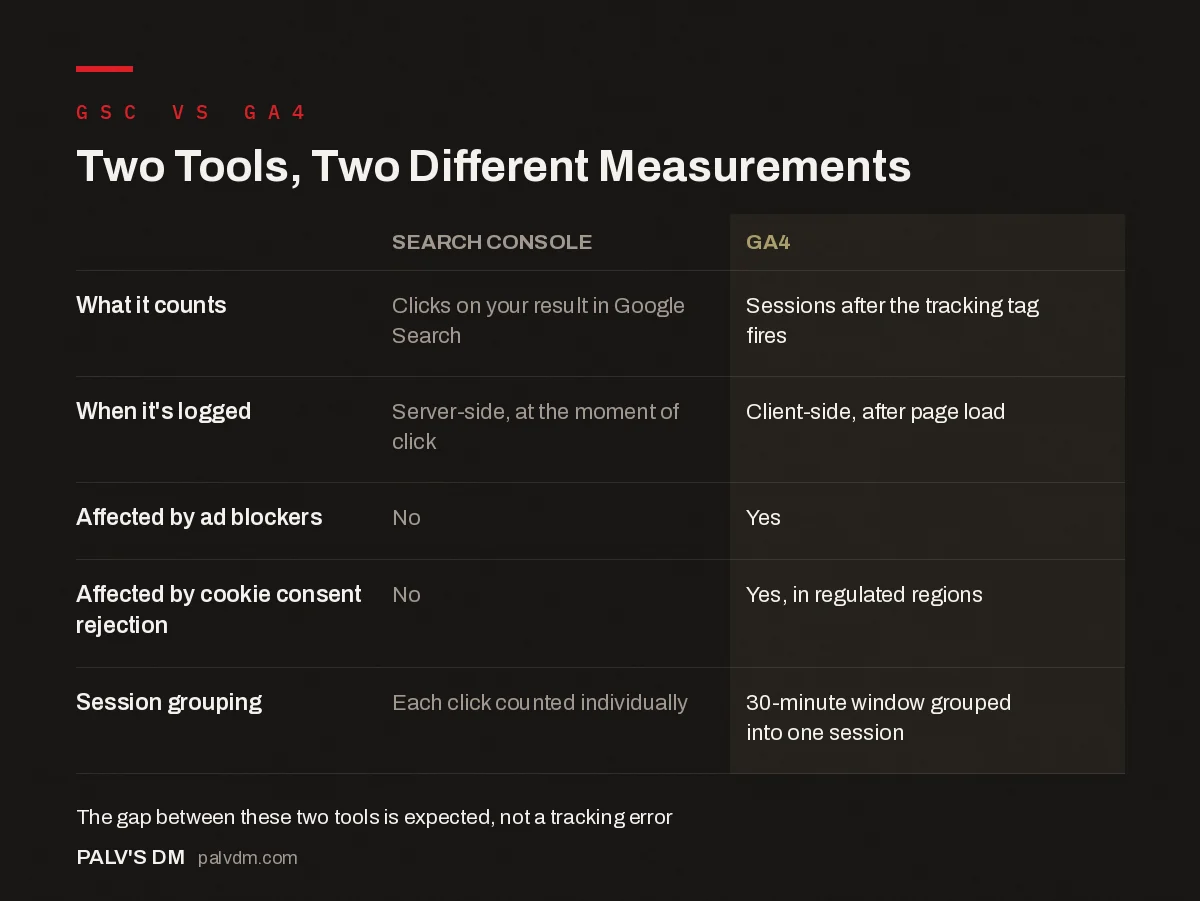
Two Tools, Two Different Measurements
| Search Console | GA4 | |
|---|---|---|
| What it counts | Clicks on your result in Google Search | Sessions after the tracking tag fires |
| When it’s logged | Server-side, at the moment of click | Client-side, after page load |
| Affected by ad blockers | No | Yes |
| Affected by cookie consent rejection | No | Yes, in regulated regions |
| Session grouping | Each click counted individually | 30-minute window grouped into one session |
There’s no single universal percentage, since the gap depends heavily on your audience’s use of ad blockers, your region’s cookie consent behaviour, and your site’s load speed. Sites with a significant EU or privacy-conscious user base tend to see wider gaps than sites with a more typical mixed audience, because consent rejection rates run higher in those regions. Rather than chasing a specific target percentage, the more useful practice is establishing your own site’s typical gap over a few months and then watching for that gap widening or narrowing sharply, which can signal a tracking issue worth investigating.
What does a real discrepancy investigation look like?
Say a site’s Search Console clicks for organic search sit around 4,000 for a month, while GA4 shows roughly 3,100 organic sessions for the same period and property, a gap of about 22%. The first check is whether that gap is new or typical; pulling the trailing six months shows the site has consistently run a 18-24% gap, which suggests this is simply how the site’s tracking behaves given its audience and consent setup, not a new problem. The second check, worth doing anyway, is confirming the GA4 property and date range match the Search Console property exactly, a common source of false discrepancies is comparing a domain-level GSC property against a single subdomain’s GA4 data stream, which will never reconcile because they’re not covering the same set of pages to begin with. Once both checks come back clean, the gap is filed as expected behaviour rather than investigated further, and the team moves on to comparing trend direction instead of chasing an exact match that was never going to happen.
How should you actually use these two tools together?
- Use Search Console for visibility and search behaviour, impressions, clicks, position, and query-level insight into what people searched to find you.
- Use GA4 for on-site behaviour, what happened after the click: bounce rate, pages per session, conversions, revenue.
- Compare trends, not absolute numbers. If Search Console clicks are up 20% month over month and GA4 organic sessions are roughly flat, that’s worth investigating for a tracking problem. If both are up by different but directionally similar amounts, that’s normal.
- Check the linked property setup. If Search Console is linked to GA4 (via Admin > Product Links), some Search Console data becomes viewable inside GA4’s Search Console reports, which can help sanity-check the two side by side without exporting separately.
- Investigate sharp, sudden gap changes specifically, rather than the steady-state gap itself. A steady 20-30% difference that’s been consistent for months is just how your site’s tracking behaves; a gap that suddenly doubles in a week usually points to a tracking tag breaking, a consent banner misconfiguration, or a genuine traffic quality issue.
Does this discrepancy matter for reporting to clients or leadership?
It matters more in how it’s explained than in the raw numbers themselves. Presenting Search Console clicks and GA4 sessions as if they should reconcile, then treating any gap as an error, sets an expectation that can never be met and erodes trust in the reporting over time. The more useful approach is naming the gap explicitly in the first report a client or stakeholder sees, explaining briefly why it exists, and then tracking both numbers’ trends going forward rather than trying to force them into agreement. Once that expectation is set once, it rarely needs repeating.
What tracking issues should you rule out before assuming the gap is “just normal”?
- Confirm the GA4 tag is firing correctly on all key landing pages, not just the homepage, using GA4’s DebugView or Google Tag Assistant.
- Check whether a recent site change (a new page builder, a cookie consent tool update, a CDN or caching change) coincided with the gap widening.
- Verify Search Console is tracking the correct property, a domain property versus a URL-prefix property can behave slightly differently and cause confusion if compared against the wrong GA4 data stream.
- Check whether internal traffic or staging environments are accidentally included in either tool’s data, inflating one side of the comparison.
What role does site speed play in the size of the gap?
Page load speed has a direct, measurable effect on how much of the gap comes from lost sessions rather than blocking or consent behaviour. If a landing page takes several seconds to become interactive, a meaningful share of visitors who clicked through from Google will abandon before GA4’s tag has a chance to fire, particularly on mobile connections. Sites that have invested in faster load times sometimes see their Search Console-to-GA4 gap narrow afterward, not because tracking improved, but because fewer real visits are being lost in the loading window itself. This is one of the few levers within direct control, ad blocker usage and consent behaviour aren’t something a site can change, but load speed is, and it’s worth checking as part of any gap investigation rather than assuming the cause is purely external.
FAQs
Which number should I trust more, Search Console clicks or GA4 sessions?
Neither is simply “more correct”, they measure different things. Search Console clicks reflect real interactions with your search result, even ones that don’t result in a fully tracked session. GA4 sessions reflect confirmed, tracked visits. Use each for what it’s actually designed to measure rather than picking a winner.
Can linking Search Console to GA4 fix the discrepancy?
Linking the two lets you view Search Console data inside GA4’s interface for convenience, but it doesn’t make the two numbers match, since the underlying measurement methods remain different. The link is for easier side-by-side viewing, not reconciliation.
Is a 50% gap between Search Console clicks and GA4 sessions too high?
It can be normal on sites with high ad-blocker usage or strict cookie consent enforcement, but it’s worth investigating rather than assuming. Check whether the gap has always been around that size or whether it’s a recent, sudden change, since the latter is the more actionable signal.
Do bots inflate Search Console click numbers?
Search Console’s click data reflects genuine interactions with Google Search results and is generally considered clean of the kind of bot traffic that can inflate raw server logs, but no measurement system is perfectly immune to anomalies. If click numbers look implausible relative to your site’s actual audience size, it’s worth a closer look rather than an assumption either way.
Should small sites worry about this discrepancy at all?
Understanding that the gap is normal matters more than acting on it for very small sites, where month-to-month numbers are naturally noisy anyway. It becomes more worth monitoring closely once a site has enough consistent traffic that a sudden, unexplained widening of the gap is a meaningful, reliable signal rather than statistical noise.
Does comparing a domain property to the wrong GA4 data stream cause false discrepancies?
Yes, and it’s a more common cause of “huge” gaps than any of the tracking issues above. A Search Console domain property aggregates all subdomains and protocols (www, non-www, http, https) into one view, while a GA4 property is usually scoped to a single data stream tied to one hostname. Comparing the two without checking they cover the same set of URLs can produce a gap that looks alarming but is really just a scope mismatch, not a tracking problem at all.
This discrepancy makes more sense once you’re comfortable with what Search Console’s core metrics actually measure, see our guide on what impressions, clicks, and position each really tell you, and reading the Performance report correctly for the fuller picture. If you’re also tracking AI referral traffic in GA4, similar attribution gaps show up there for related reasons.
If reconciling Search Console and GA4 data is eating into your team’s reporting time every month, PalV’s DM’s SEO Growth service handles this analysis as part of ongoing SEO reporting.