Lead Qualification Before the Call: Building Forms That Filter
How to build a lead qualification form that filters out unqualified enquiries before they reach a sales call, using conditional logic and BANT.

A lead qualification form filters unqualified enquiries before they reach a calendar by asking role and buying stage first, then revealing budget and timing questions only to the people whose answers say they’re worth pursuing. The goal isn’t fewer leads. It’s fewer fifteen-minute calls with someone who was never going to buy anything.
Most “contact us” forms ask three questions and route every single submission straight to a sales calendar. That works fine at low volume. Past a certain point it turns your best salesperson into a filter, spending their morning on calls that a form could have screened out in four questions.
What actually belongs on a qualification form?
Four fields, structured around a framework like BANT: budget, authority, need, timeline. You don’t need all four every time, and you rarely need to ask about budget directly in year one of collecting this data. What you do need is a role question and a buying-stage question, because those two alone predict most of the outcome. In practice, those two answers do more filtering work than the other five fields on a typical form combined.
Skip the blunt version of the authority question. “Are you the decision maker?” gets a yes from almost everyone, including people three steps away from any actual authority, because nobody wants to admit they can’t approve their own enquiry. Ask “what’s your role in this decision?” instead, with options like final decision maker, recommending to leadership, researching for the team, or just browsing for later. The honest answer sits in the options rather than in a single yes-or-no checkbox people feel pressured to tick.
How do you actually build the qualification sequence?
The order matters more than the questions themselves. Ask role and stage before budget and timeline, then use conditional logic so the later, more sensitive questions only appear to people whose first answers earned it.
Building a lead qualification form
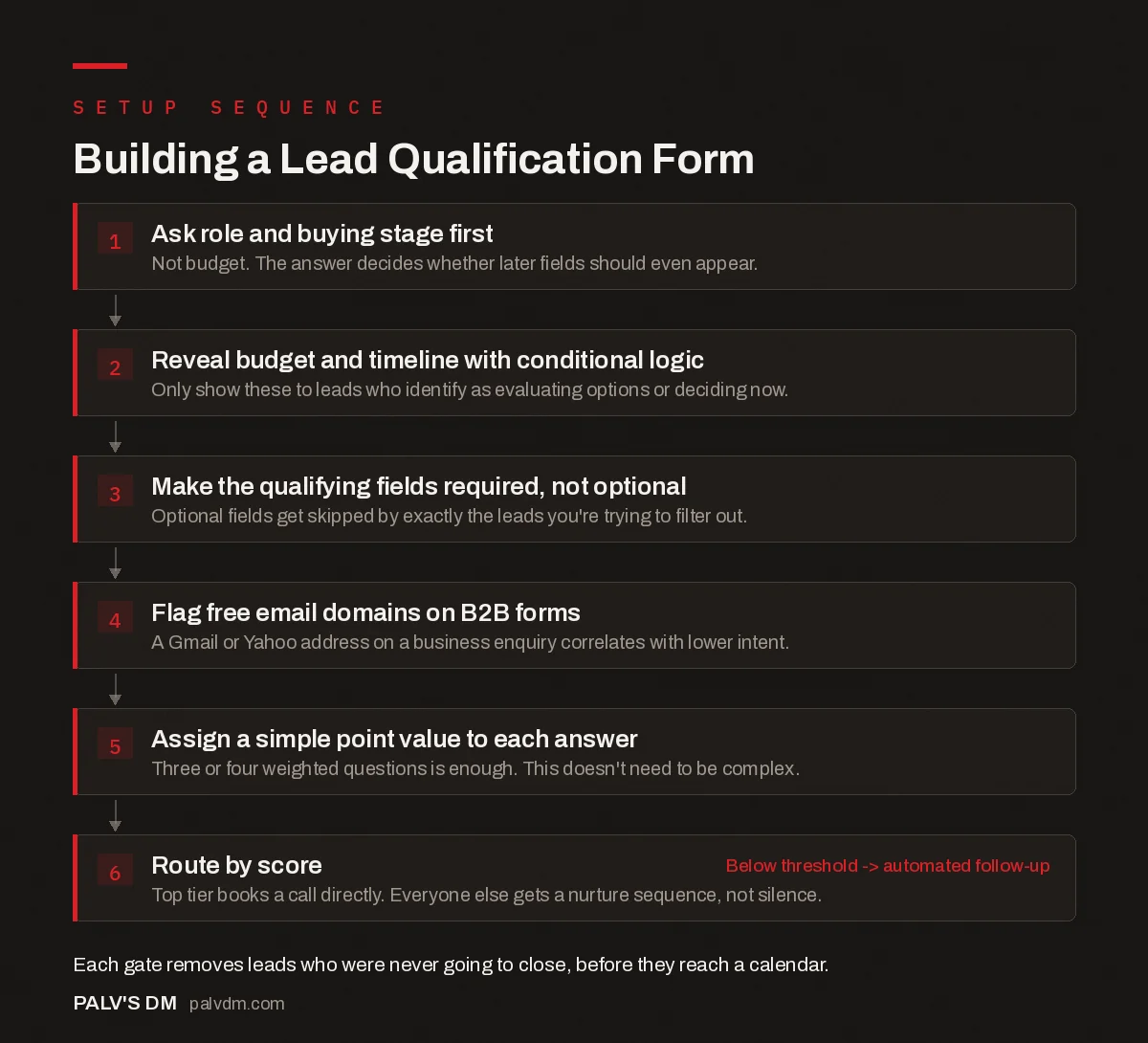
Building a Lead Qualification Form
- Ask role and buying stage first. Not budget. The answer decides whether later fields should even appear.
- Reveal budget and timeline with conditional logic. Only show these to leads who identify as evaluating options or deciding now.
- Make the qualifying fields required, not optional. Optional fields get skipped by exactly the leads you’re trying to filter out.
- Flag free email domains on B2B forms. A Gmail or Yahoo address on a business enquiry correlates with lower intent.
- Assign a simple point value to each answer. Three or four weighted questions is enough. This doesn’t need to be complex.
- Route by score. Top tier books a call directly. Everyone else gets a nurture sequence, not silence. Below threshold -> automated follow-up
Fluent Forms, WPForms, and most modern form builders support this kind of branching natively now, showing or hiding fields based on a previous answer without any custom code. Assign each answer option a point value (a “final decision maker” answer might be worth more than “researching for the team”), sum them, and route based on the total. This doesn’t need to be sophisticated. Three or four weighted questions with a simple threshold, say 15 points routes to the calendar and anything under 8 routes to a nurture sequence, covers most small businesses completely.
Where do qualification forms usually go wrong?
The most common mistake is making the qualifying fields optional. An optional budget field gets skipped almost exclusively by the leads you most needed it to catch, since unqualified visitors have every incentive to avoid answering and no incentive to fill in extra fields for a form they’re half-committed to anyway. Required fields aren’t friction here, they’re the entire point of the form.
The second mistake is asking for too much too soon. A form that opens with eight fields including company revenue and current vendor feels like an interrogation before anyone’s earned that level of disclosure. Lead with the two questions that do the most filtering (role and stage), then layer in the rest through conditional logic once someone’s shown enough intent to keep going.
The field I’d flag hardest for a B2B form: a business email requirement, or at minimum a warning flag on free domains. A Gmail or Yahoo address on a form asking about a company’s marketing budget is not disqualifying on its own, some genuine small business owners do use personal email for everything, but it correlates strongly enough with lower intent that it’s worth a lower score weighting rather than ignoring.
One long form or a multi-step form?
Multi-step, almost always, once you’re past three or four questions. Breaking a qualification form into two or three short screens, contact details, then role and stage, then the conditional follow-ups, reduces the sense of commitment each screen asks for. Visitors see one manageable question at a time instead of a full page of fields before they’ve decided the form is worth finishing.
There’s a secondary benefit that gets missed: a multi-step form lets you capture partial submissions. Someone who fills in name and email on step one but drops off before the qualifying questions still left you a contactable lead, just an unscored one. A single long form that abandons halfway through usually gives you nothing at all, because most builders only fire the submission event on final completion.
How do you know the qualification gate is actually working?
Watch two numbers for the first month, not one. Total form completions on their own tell you almost nothing about whether the gate is doing its job. Track completions against how many of those leads your sales team actually calls “worth the time” a few weeks later, and compare that ratio to whatever you were seeing before the qualifying questions existed.
Here’s the failure mode I see most: a team adds qualifying questions, submission volume drops (expected, that’s the point), and someone panics at the lower number without checking whether the leads that remain are converting at a meaningfully higher rate. A form that cuts volume by a third while doubling the close rate on what’s left is a win dressed up as a problem, if you’re only watching the top-line count.
How many questions is too many?
Past six or seven and completion rates start dropping fast, which matters because a qualification form only works if people actually finish it. Our piece on form length versus lead quality goes into the completion-rate trade-off in more depth, but the short version for a qualification form specifically: two to three filtering questions plus contact details is usually the ceiling before you start losing people you’d actually want to talk to, not just the ones you’re trying to screen out.
What should happen after someone fails to qualify?
Not silence. A lead who scores below your threshold still gave you an email address and told you what they’re interested in. Route them into an automated nurture sequence instead of dropping them, and make the thank-you page do some work too: a case study, a lower-commitment resource, or a way to self-serve an answer instead of waiting for a callback nobody’s going to make.
I’ve watched sales teams treat “unqualified” as a synonym for “delete.” Most of those leads simply aren’t ready yet, and a six-month nurture sequence converts a meaningful share of them into exactly the qualified lead the form was built to find the first time. Discarding them because they didn’t hit today’s threshold throws away a pipeline you already paid to generate.
Frequently asked questions
What is a lead qualification form?
A lead qualification form asks structured questions, usually about role, budget, need, and timeline, before routing a submission to sales. It filters out enquiries unlikely to close so a sales team spends time on leads with a real chance of converting.
What does BANT stand for in lead qualification?
Budget, Authority, Need, and Timeline. It’s a widely used framework for assessing whether a lead has the financial resources, decision-making power, genuine need, and readiness to buy within a reasonable timeframe.
Should qualification questions be required or optional?
Required. Optional qualifying fields get skipped disproportionately by the unqualified leads you’re trying to filter, since they have no incentive to answer honestly or at all. Making them required is what makes the form function as a filter rather than decoration.
How do I avoid making the form feel like an interrogation?
Use conditional logic. Ask one or two light questions first, like role and buying stage, and only reveal more sensitive questions like budget once someone’s early answers indicate genuine intent. Most form builders support this without custom code.
What happens to leads who don’t qualify?
They shouldn’t be discarded. Route them into an automated nurture sequence with lower-commitment content instead of a sales call. Many “unqualified” leads simply aren’t ready yet and convert later if they’re followed up with rather than dropped.
Sources
- The Ultimate Guide to Sales Qualification, HubSpot
- What Is BANT? DealHub Sales Glossary
- Core Web Vitals: LCP, INP and CLS Explained Properly
- Form Length vs Lead Quality: Finding the Balance
- Thank-You Pages That Do More Than Say Thanks
- Writing CTAs People Actually Click
Want this done on your site?
Every PalV’s DM engagement starts with a free audit of your actual website — a 12-point
crawl covering what is blocking indexation, on-page gaps against your primary keywords, speed
findings, and the three to five fixes worth making first. Delivered in two working days. No
payment details, and the findings are yours whether you hire us or not.
Get your free SEO audit
See Web Development plans and prices