
Regex for SEOs: Search Console, GA4 and Screaming Frog
A practical regex reference for SEO work: the patterns that actually get used in Search Console, GA4 and Screaming Frog, and where each tool's syntax breaks the rules.
Regex for SEO means using a small, repeatable set of pattern-matching symbols to filter Search Console queries, segment GA4 data, and extract information from a Screaming Frog crawl, without needing full programming knowledge. The same core syntax works across all three tools with one catch: Search Console and GA4 both run on RE2, which doesn’t support lookbehind assertions, and that single gap breaks more copy-pasted patterns than anything else.
Most SEOs learn regex the way we did: badly, under deadline pressure, copying a pattern from a forum post and adjusting it until it stops erroring. That works, eventually. This is the shortcut version, the dozen patterns that cover almost everything you’ll actually need, plus the tool-specific gotchas that waste an afternoon if you don’t know about them going in.
What does regex actually do for an SEO?
Ninety percent of SEO regex use falls into three jobs: filtering a report down to rows that match a pattern, extracting a piece of data buried inside a longer string, or excluding a specific pattern from a bulk export. None of these require the deeper end of regex, the backreferences and recursive patterns programmers occasionally reach for. You’re doing text triage, not writing a parser.
It finds and isolates patterns in text: a set of URLs matching a folder structure, a group of queries that all start with a question word, a batch of pages missing a specific meta tag. Instead of manually scrolling through a spreadsheet of ten thousand rows looking for anything containing “pricing,” a single pattern does it in one filter action. It’s not programming in the full sense. It’s closer to a very precise search-and-replace, and the syntax barely differs from tool to tool once you know the core symbols.
What are the core symbols worth memorising first?
| Symbol | Meaning | Example |
|---|---|---|
. | Any single character | SE. matches SEO and SEM |
.* | Zero or more of any character | .*seo.* matches anything containing “seo” |
^ | Start of the string | ^blog/ matches URLs starting with “blog/” |
$ | End of the string | \.pdf$ matches URLs ending in .pdf |
[abc] | Any one of the listed characters | colo[u]?r matches color or colour |
| | OR logic between patterns | python|seo matches either word |
(?i) | Case-insensitive flag (GSC/GA4) | (?i)google matches Google and google |
That table covers the patterns behind most of what SEOs actually do with regex day to day. Everything past this point is a variation or combination of these seven symbols, not a new concept to learn from scratch.
What’s the actual workflow for using regex across your SEO tools?
Six steps, and the order matters because step five saves you from shipping a broken filter into a live report.
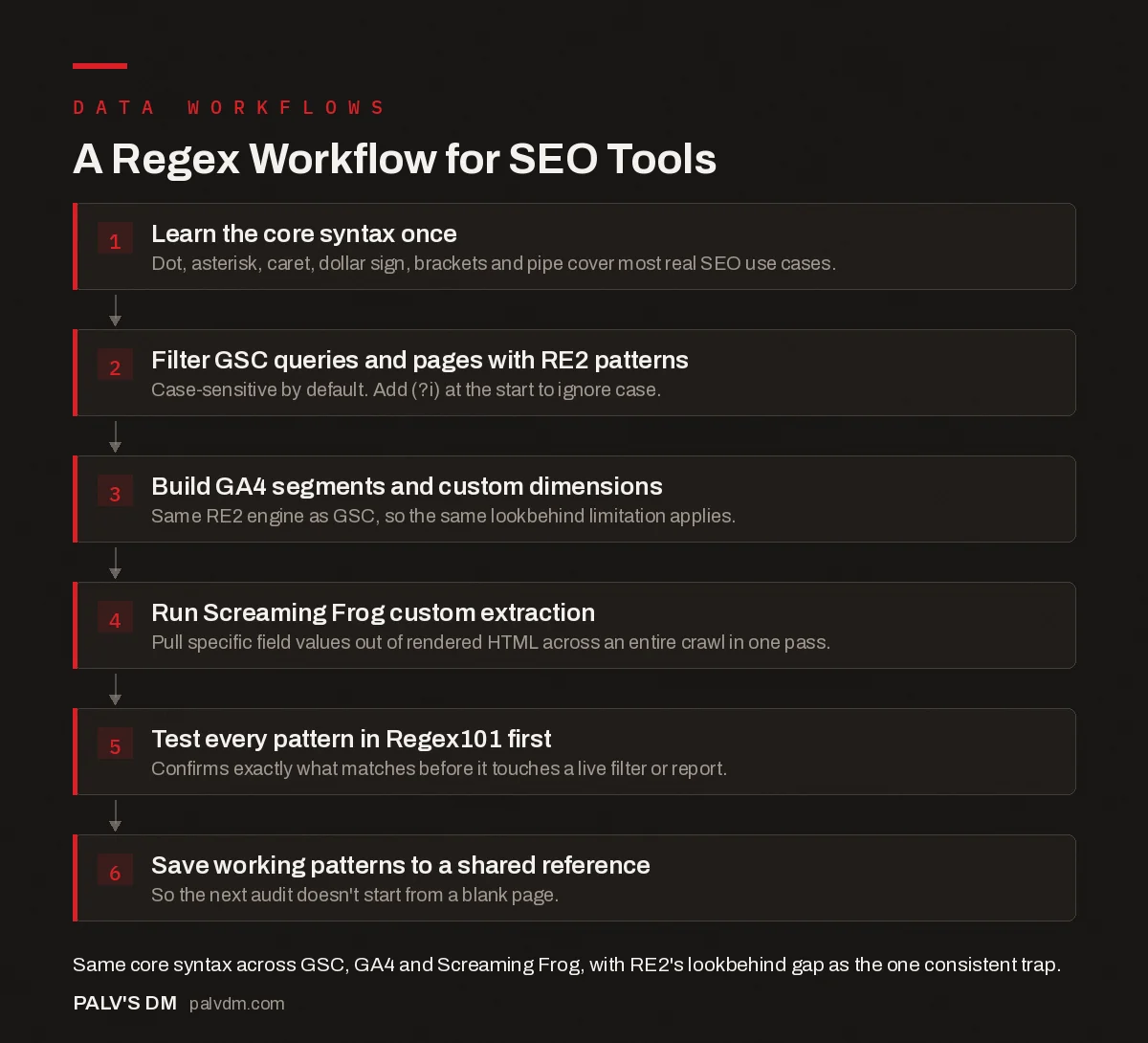
A Regex Workflow for SEO Tools
- Learn the core syntax once. Dot, asterisk, caret, dollar sign, brackets and pipe cover most real SEO use cases.
- Filter GSC queries and pages with RE2 patterns. Case-sensitive by default. Add (?i) at the start to ignore case.
- Build GA4 segments and custom dimensions. Same RE2 engine as GSC, so the same lookbehind limitation applies.
- Run Screaming Frog custom extraction. Pull specific field values out of rendered HTML across an entire crawl in one pass.
- Test every pattern in Regex101 first. Confirms exactly what matches before it touches a live filter or report.
- Save working patterns to a shared reference. So the next audit doesn’t start from a blank page.
Skip step five at your own risk. We’ve inherited more than one client account with a “working” GSC filter that had been silently excluding half the intended queries for months, because the pattern was tested once, looked plausible, and never got checked against edge cases. A pattern that looks right and a pattern that is right are not the same claim, and regex is exactly precise enough to punish the gap between them.
What breaks when you move a pattern between tools?
Lookbehind assertions, almost every time. Google Search Console and GA4 both run on RE2 syntax, the same regex engine Google uses internally for performance reasons, and RE2 deliberately doesn’t support lookbehinds (patterns like (?<=text)). Lookaheads ((?=text) and (?!text)) work fine in both. If you’ve built a pattern in Python, where lookbehinds are common and useful, and it fails the moment you paste it into a GSC filter, that’s almost always the reason, not a typo in the pattern itself.
Case sensitivity is the second most common trip-up. GSC regex filters are case-sensitive by default, so a query filter built for “SEO” won’t catch “seo” unless you prefix the pattern with (?i). We’ve watched a filtered report look suspiciously thin more than once, and case sensitivity, not a broken pattern, turned out to be the reason every time.
How is regex actually used in each tool?
- Google Search Console. Filter the Performance report by query or page using “Custom (regex)” in the filter dropdown. Useful for isolating question-style queries (
^(who|what|when|how|why)), a URL folder (^/blog/), or excluding branded terms with a negative lookahead. - GA4. Regex shows up in custom dimensions, audience definitions, and event-matching conditions rather than in the simpler report filters GA4 has moved toward. Still built on the same RE2 engine as GSC, so the same lookbehind limitation applies.
- Screaming Frog. Two places: crawl-level include/exclude rules to control what gets crawled, and Custom Extraction with regex mode to pull specific values (a JSON-LD field, a GTM container ID, a canonical tag’s target) straight out of a page’s HTML across an entire site in one pass.
- Python (pandas).
df['url'].str.contains('.*regex.*')for filtering rows, orstr.extract()for pulling a captured group into a new column. Python’sremodule supports the full syntax, lookbehinds included, since it’s not constrained by RE2.
What does a real audit task look like with regex in the mix?
Take a common one: a client migrated a site and wants to know which old URLs still get impressions in Search Console three months later. Export the Performance report, filter pages by the old URL pattern, for instance ^/old-folder/ if the migration moved everything out of a specific directory, and you’ve isolated exactly the rows worth checking against the redirect map. Without regex, that’s manually scanning a spreadsheet of thousands of rows for a folder name. With it, it’s one filter, applied once.
The habit worth building here is testing every pattern somewhere safe before it touches a live filter or a client-facing report. Regex101 lets you paste a pattern and a sample of real strings, and it highlights exactly what matches and what doesn’t, character by character, before you commit to it in GSC or GA4. Skipping this step and testing live in a report is how a slightly-wrong pattern quietly drops half your intended matches and nobody notices until someone asks why a number looks low.
What patterns actually get used the most?
A short, genuinely useful list, tested against real Search Console and Screaming Frog work rather than theoretical examples:
^(who|what|when|where|why|how): isolates informational-intent queries in a GSC query report..*(buy|price|cheap|order|purchase).*: flags transactional-intent queries worth checking against commercial pages.^https?://.*example\.com/?$: catches every protocol and subdomain variation of a homepage URL, useful for cleaning up self-referencing traffic in GA4..*\/$: finds every URL ending in a trailing slash, handy for auditing URL consistency across a crawl.^((?!keyword).)*$: matches anything that does NOT contain “keyword”, the standard way to exclude branded queries from a GSC filter.
Frequently asked questions
Do Search Console and GA4 use the same regex syntax?
Yes, both run on RE2 syntax, the same engine Google uses internally. That means no lookbehind assertions in either tool, though lookaheads work in both. A pattern that relies on a lookbehind, common in Python or JavaScript regex, needs rewriting before it’ll work in either GSC or GA4.
Is Search Console regex case-sensitive?
Yes, by default. To match regardless of case, add (?i) at the very start of your pattern. Forgetting this is one of the most common reasons a GSC regex filter silently returns fewer rows than expected, the pattern is correct, it’s just missing queries in a different case.
What’s the fastest way to learn regex for SEO work?
Learn the handful of symbols that cover 90% of real use: the dot, the asterisk, the plus, the caret, the dollar sign, square brackets, and the pipe for OR logic. Everything else, lookaheads, non-greedy matching, backreferences, gets learned on demand when a specific task needs it.
Can I use regex to extract structured data with Screaming Frog?
Yes, through custom extraction with regex mode. It’s commonly used to pull specific JSON-LD field values, like a product’s price or rating, straight out of a page’s rendered HTML across an entire crawl, without opening a single page manually.
Why did my regex work in Python but fail in Google Search Console?
Almost always a lookbehind assertion, or an assumption about case sensitivity. Python’s re module supports lookbehinds; GSC and GA4’s RE2 engine does not. Rewrite the pattern using a lookahead or a different matching approach, and check whether you need the (?i) case-insensitive flag.
Sources
- Regex For SEO: How to Use Regular Expressions, JC Chouinard
- RE2 Syntax Reference, Google
- Google Search Console: The Reports That Actually Matter
- Google Sheets Formulas Every SEO Should Know
- Building an SEO Audit Workbook in Google Sheets
- Python for SEO: Five Scripts Worth Writing First
Want this done on your site?
Every PalV’s DM engagement starts with a free audit of your actual website — a 12-point
crawl covering what is blocking indexation, on-page gaps against your primary keywords, speed
findings, and the three to five fixes worth making first. Delivered in two working days. No
payment details, and the findings are yours whether you hire us or not.
Get your free SEO audit
See one-time project plans and prices


