Service Support — One-Time Services
How to Get Value From a One-Off Audit You Can’t Implement Yet
Bought an SEO audit but can't implement it yet? Here's how to triage findings, brief developers, and sequence SEO audit implementation without stalling.

If you’ve bought an SEO audit and don’t have the developer time, content team, or budget to act on it immediately, the fix isn’t to wait until you do. It’s to triage the findings into what you can do yourself today, what needs turning into a brief someone else can execute later, and what can genuinely wait. Most one-off audits list every finding with roughly equal weight. In practice, a meaningful share are no-code changes you can make this week, and the rest need sequencing and handing off in a form a developer, freelancer, or future hire can pick up without another scoping call. Audit implementation is a separate skill from auditing — and most of the value gets lost in that gap, not in the audit itself.
Key takeaway
- Sort every finding into no-code, dev-dependent, and content-dependent before you touch anything, not as you go.
- Turn dev-dependent items into standalone specs now, while the context is fresh, even if a developer won’t touch them for months.
- Re-sequence findings by effort versus impact, not by the order the audit report happens to list them in.
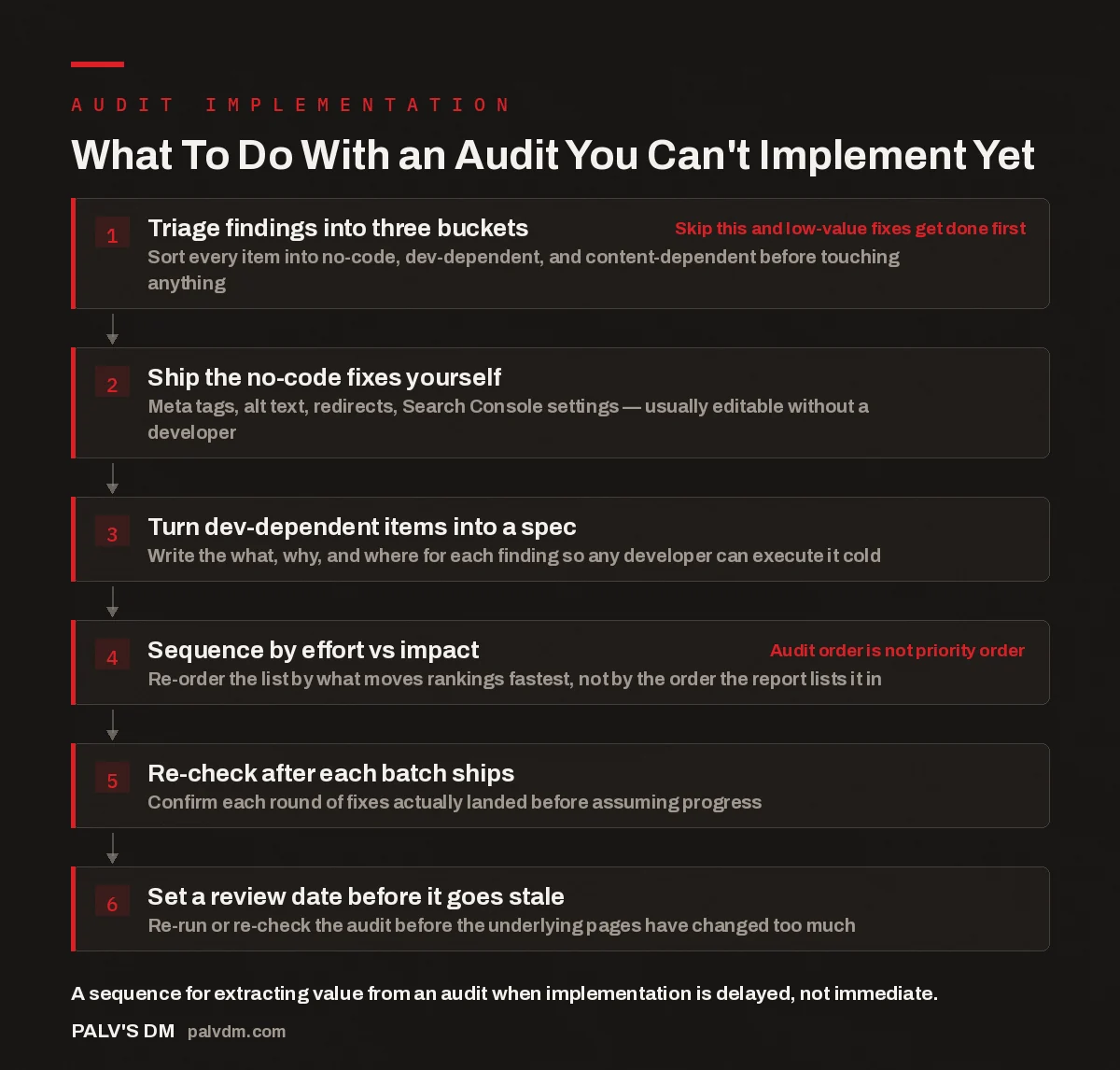
What To Do With an Audit You Can’t Implement Yet
- Triage findings into three buckets. Sort every item into no-code, dev-dependent, and content-dependent before touching anything. Skip this and low-value fixes get done first
- Ship the no-code fixes yourself. Meta tags, alt text, redirects, Search Console settings — usually editable without a developer.
- Turn dev-dependent items into a spec. Write the what, why, and where for each finding so any developer can execute it cold.
- Sequence by effort vs impact. Re-order the list by what moves rankings fastest, not by the order the report lists it in. Audit order is not priority order
- Re-check after each batch ships. Confirm each round of fixes actually landed before assuming progress.
- Set a review date before it goes stale. Re-run or re-check the audit before the underlying pages have changed too much.
What’s actually in a one-off SEO audit report?
A paid audit report is usually a long, flat list: technical findings (crawl errors, indexation issues, page speed, schema gaps), on-page findings (title tags, headings, thin content), and sometimes off-page or content findings layered on top. What it typically isn’t is a project plan. The report is organised around what’s wrong with the site, not around who on your team fixes it or in what order. That’s a reasonable scope for an audit to have — a free crawl-based scan and a paid, manually reviewed audit both stop at diagnosis, just at different depths, as covered in what the free audit covers and where the paid one goes deeper. The implementation plan is a second document you’re expected to build yourself, and it’s the part that decides whether the audit was worth paying for.
How do you triage findings you can’t act on immediately?
Before you implement anything, go through the full findings list once and tag every item with one of three labels: no-code, dev-dependent, or content-dependent. No-code items are things you or anyone with WordPress admin access can fix directly — meta descriptions, alt text, broken internal links, redirect rules, Search Console verification, robots directives set through a plugin. Dev-dependent items need someone with server or theme-level access — schema markup implementation, Core Web Vitals fixes tied to render-blocking scripts, URL structure changes, canonical tag logic. Content-dependent items need a writer — thin pages that need expanding, missing FAQ sections, pages that target the wrong intent entirely.
This triage pass usually takes an hour or two and does two things at once: it gives you a short list of items you can close out this week without waiting on anyone, and it separates the items that genuinely require outside help from the ones that just felt intimidating sitting in a 40-page PDF next to more technical language. If you’re building this into an ongoing routine rather than a one-time cleanup, the same triage logic applies to every future audit or check you buy — see stacking one-time services into a DIY SEO programme.
How do you turn dev-dependent findings into a spec someone else can execute?
The single biggest reason audit findings never get implemented is that they sit in a report only you have context on, and by the time you have developer time, the context is gone. The fix is to rewrite each dev-dependent finding into a standalone spec while the audit is still fresh. A usable spec has four parts: what the problem is in plain language, why it matters (described directionally rather than with an invented number), exactly where it applies (the URL pattern, template, or specific pages), and what “done” looks like so whoever implements it can verify their own work.
Written this way, a finding stops being a line in an audit and becomes a ticket. A well-specified fix can go to a freelancer who never read the original audit, a junior developer, or a future hire, without a scoping call first. An unspecified finding — “improve Core Web Vitals on product pages” — needs you in the room to translate it every time, which is exactly the bottleneck that stalls implementation. Whether it makes more sense to hand this off or do it in-house is a capacity and skill-set question, covered in what an in-house team should buy versus do themselves.
How do you sequence findings when you can only do a few things at once?
Audit reports are typically ordered by category — technical, then on-page, then content — not by which fix will move rankings or traffic first. Treating that order as a priority order is a common way implementation stalls: teams start at the top of the PDF and work down, so the highest-effort, lowest-impact items sometimes get tackled before the quick wins that would have shown early progress.
Re-sequence the list yourself using two simple questions per finding: how much effort does this take relative to everything else on the list, and how directly does it affect a page that already gets meaningful search visibility or is close to ranking. Findings on pages that already rank on page two of search results, or that already get some organic traffic, generally deserve earlier attention than the same category of fix on a page nobody visits yet. This is also where it helps to formalise the sequencing into an actual document rather than keeping it in your head — see turning an audit into a prioritised action plan for what that document should contain.
An audit that never gets implemented isn’t a wasted audit — it’s a wasted diagnosis. The gap between finding a problem and fixing it is where all the value either gets captured or lost.
Palash, Founder, PalV’s DM
How do you confirm your fixes actually worked?
Implementation without verification just produces a second, quieter version of the same problem: you assume something is fixed because you shipped it, and move on. After each batch of fixes, whether it’s five no-code changes or one developer-shipped item, check that the change actually landed on the live page, not just in a staging environment or a pull request that never got merged. For technical items, that usually means checking the live HTML or Search Console’s URL inspection tool after a recrawl. For content items, it means confirming the published page reflects the brief, not an earlier draft. This is easy to skip when you’re implementing in small, spread-out batches over weeks rather than all at once — which is exactly the situation this approach is built for. A simple log of finding, date fixed, date verified is enough; it doesn’t need to be more sophisticated than a spreadsheet next to the original audit.
When does an SEO audit go stale?
An audit is a snapshot of a site and its search results on the day it was run. Both sides of that snapshot move. Technical findings tend to hold the longest, since crawl and indexation issues don’t resolve themselves. Content and on-page findings age faster, because competitor pages get updated, search intent shifts, and pages you were told to expand may already have been edited by someone else on your team.
If more than a few months have passed between when the audit was delivered and when you’re finally implementing a given item, it’s worth a five-minute spot-check before you act on it: pull up the page, confirm the issue described is still there, and glance at whether the top-ranking pages for that keyword have changed. Treating an old audit as gospel without that check is how teams end up “fixing” something that was already fixed, or missing a bigger change that happened after the report was delivered.
Key takeaway
If the audit findings are stacking up faster than your team can act on them, or you’d rather have someone turn the report into a scoped, sequenced implementation plan for you, that’s exactly what a standalone engagement is for.
Frequently asked questions
How long does an SEO audit stay useful if I don’t implement it right away?
Technical findings tend to hold for a few months on an active site, less if you or competitors are publishing frequently or Google ships a core update. Content and keyword findings age faster because search intent and competitor pages shift more often. If a quarter or more has passed since the audit, spot-check the biggest items before implementing them — the underlying page may have already changed.
Can I implement an SEO audit myself without hiring a developer?
Yes, for a meaningful share of findings. Meta tags, alt text, internal linking, redirects, and Search Console configuration are typically editable through your CMS or a plugin without touching code. Structural changes — schema markup, site architecture, or page speed fixes tied to theme or server config — usually do need developer access, even when the fix itself is small.
What’s the difference between an audit finding and an audit action item?
A finding describes a problem — “27 pages are missing meta descriptions.” An action item describes what to do about it, who does it, and how to verify it worked — “add unique meta descriptions to the 27 URLs listed in tab 3, using the template in row 2, then confirm in Search Console after reindexing.” Most audits stop at findings; implementation means writing the second part yourself.
Should I hire a freelancer just to implement the audit?
It depends on how many dev-dependent items you have and how technical they are. A short list of well-specified fixes is often a manageable one-off freelance job. That only works, though, if the spec is already written clearly enough that a freelancer who never saw the original audit can execute it without a briefing call first.
What happens if I never implement most of the audit?
You keep the diagnosis without the improvement, which is common and not catastrophic on its own. The real risk isn’t an unfinished audit — it’s treating the audit as the work itself, rather than the starting point for it. If capacity genuinely isn’t there, it’s more useful to formally park the plan with a review date than to let it quietly go stale in an inbox.
Short version: an audit you can’t implement immediately isn’t wasted — it’s unfinished. Triage the findings into no-code, dev-dependent, and content-dependent buckets before doing anything. Fix what you can yourself this week. Turn the rest into specs precise enough for someone else to execute without a briefing call. Sequence by effort versus impact rather than the order the report lists things in, verify each batch after it ships, and set a review date so the audit doesn’t quietly go stale before you get to it.