Service Support — One-Time Services
What the Free Audit Covers and Where the Paid One Goes Deeper
Free vs paid SEO audit compared: what a free scan checks, where a paid audit goes deeper with real verification and priority, and which one fits you best.
A free SEO audit and a paid SEO audit usually start from the same place: a crawler scans your site and spits out a list of technical and on-page issues. The difference is what happens after that list is generated. A free tool hands it to you raw — unfiltered, unranked, with no sense of what actually matters for your site. A paid audit takes the same starting data and adds the part a script can’t do: checking which flagged issues are real, ranking them by likely impact, and explaining what to fix first given your CMS, your templates, and your market. If you’re weighing a free vs paid SEO audit, the short version is this — the free one tells you something might be wrong; the paid one tells you what’s actually wrong, in what order to fix it, and why.
Key takeaway
- A free audit is unfiltered crawler output — useful for a first orientation, not for deciding what to fix first.
- A paid audit adds human verification, impact ranking, and context specific to your site — the layer that turns a list into a plan.
- The gap between the two matters most once you’re actually ready to act, not while you’re still deciding whether there’s a problem.
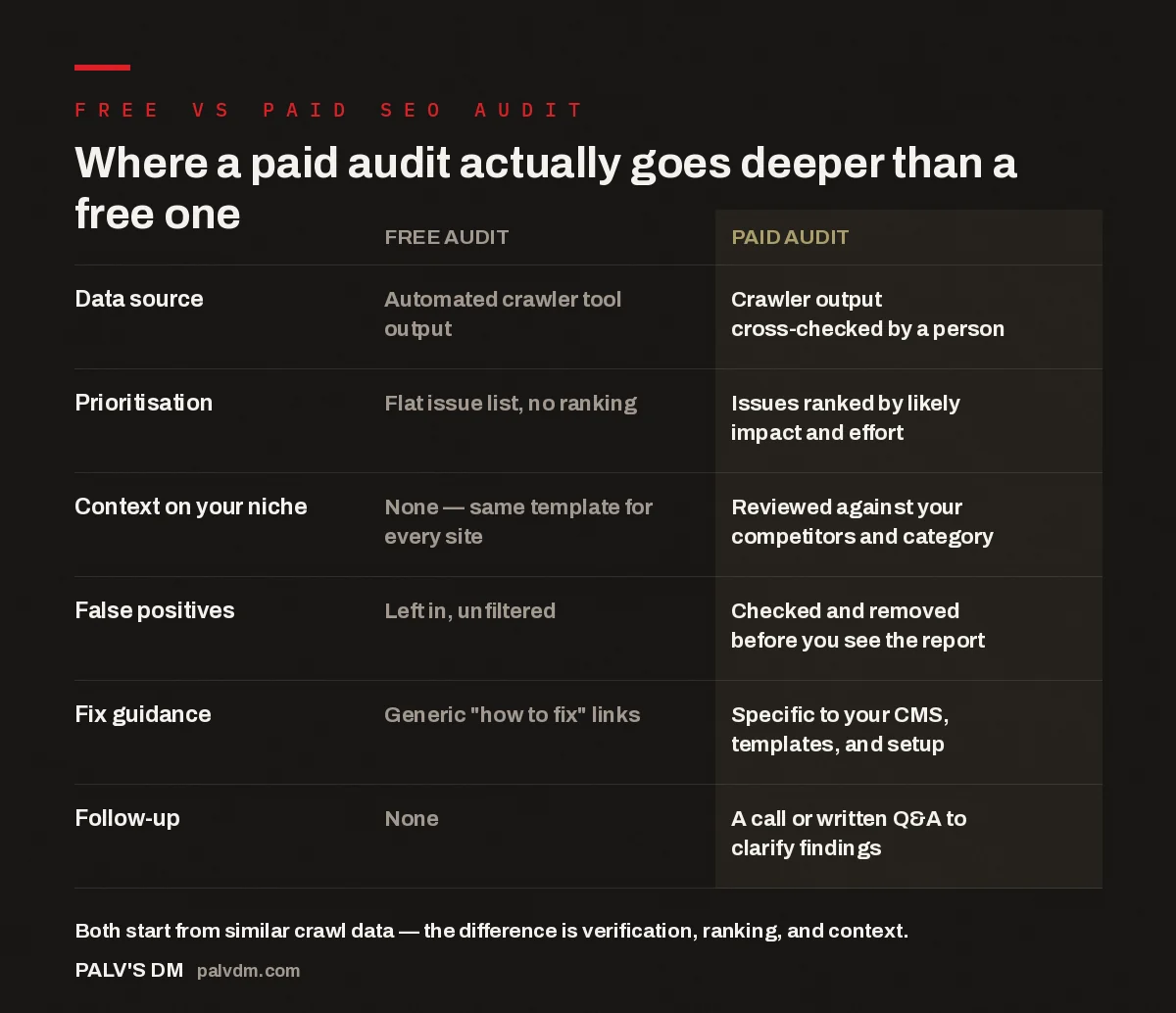
Where a paid audit actually goes deeper than a free one
| Free audit | Paid audit | |
|---|---|---|
| Data source | Automated crawler tool output | Crawler output cross-checked by a person |
| Prioritisation | Flat issue list, no ranking | Issues ranked by likely impact and effort |
| Context on your niche | None — same template for every site | Reviewed against your competitors and category |
| False positives | Left in, unfiltered | Checked and removed before you see the report |
| Fix guidance | Generic “how to fix” links | Specific to your CMS, templates, and setup |
| Follow-up | None | A call or written Q&A to clarify findings |
What does a free SEO audit actually check?
Most free audit tools — whether it’s a browser extension, a form on an agency’s site, or a standalone crawler — run the same handful of checks against every site they touch. That usually includes missing or duplicate title tags and meta descriptions, broken internal and external links, missing alt text on images, basic page-speed metrics, indexability signals like robots.txt and sitemap presence, and a scan for obvious structural gaps such as missing H1s or thin content pages. None of this requires a human to generate. It’s pattern matching against a checklist, applied identically whether the site is a five-page local business site or a two-thousand-page ecommerce catalogue.
That’s genuinely useful as a first pass. If you’ve never had any technical review done, a free audit will surface real problems — a sitemap that was never submitted, a batch of pages accidentally marked “noindex,” a page speed score that’s clearly poor rather than borderline. What it won’t do is tell you which of the twenty or forty issues it lists is actually costing you rankings versus which one is cosmetic and safe to ignore for now.
Why do free audits get so many things wrong?
Automated tools flag patterns, not problems. A crawler that sees a page without an H1 tag will report it as an issue — even if the page’s visual heading is rendered through CSS on a styled div, which happens constantly on template-built sites and doesn’t actually hurt the page. A tool that flags “duplicate content” across product variant pages will treat that the same way it treats genuinely copy-pasted pages, even though one is a normal ecommerce pattern search engines handle fine and the other is a real problem. Page-speed scores from free tools are usually lab data taken from a single test run on a single device profile — not a reflection of what your actual visitors experience on their connections and devices.
The pattern that shows up repeatedly when we look at free audit reports clients bring us: a third to half of the flagged items aren’t wrong in the sense of hurting rankings — they’re just things the tool doesn’t have the context to evaluate properly. A paid on-page check looks at these same signals but makes a judgment call on which ones actually matter for your specific templates, rather than flagging everything a rulebook says to flag.
What does a paid SEO audit add that the free one can’t?
Four things, mainly. First, verification — someone actually opens the flagged pages, checks whether the issue is real, and drops the false positives before you see the report. Second, prioritisation — issues get ranked by how much they’re likely to be limiting your rankings or conversions against how much effort they’ll take to fix, so you know whether to start with a quick meta description cleanup or a structural fix that needs a developer. Third, context — a paid audit is reviewed against your actual competitors and category, not against a generic template, so a finding like “your product pages are thin” means something specific rather than triggering on a word count threshold. Fourth, follow-up — a paid audit typically comes with a call or a written exchange where you can ask “why does this matter” and get a direct answer, instead of a report you have to interpret alone.
On the technical side specifically, this gap tends to be widest. Free tools are good at surface-level crawl errors but weak at anything involving how a site actually gets rendered and indexed over time — crawl budget being wasted on low-value URLs, JavaScript-rendered content that a crawler sees differently than Googlebot does, or canonical tags that are technically present but pointing at the wrong pages. A paid technical SEO check digs into exactly this kind of behaviour, which a free scanner can flag as “check this” at best but can’t diagnose.
The free audit tells you that something’s wrong. The paid one tells you what to actually do about it — and that second part is the only part that changes rankings.
Palash, Founder, PalV’s DM
How is a paid audit structured, and what do you actually receive?
A paid audit is usually a flat, one-time fee rather than a percentage of any future work, which matters because it means the person doing it has no incentive to inflate the issue list to justify a bigger retainer afterward — the deliverable is the audit itself. What you get back is typically a written report organised by priority rather than by category, with each item explained in plain language: what the issue is, why it matters for your specific site, and roughly what it takes to fix. Most paid audits also include a short call or written Q&A afterward, which is where a lot of the actual value shows up — you get to ask “does this apply to my situation” about the items that feel ambiguous, something a static PDF or dashboard can’t do.
When is a free audit good enough on its own?
If you’re at the “just want to know roughly where I stand” stage — before you’ve committed any budget or team time to fixing anything — a free audit is a reasonable starting point. It’s also fine if you already have someone in-house who can read raw crawl output and separate the real issues from the noise themselves; in that case the paid audit’s verification step is work you’re capable of doing internally anyway. And if you already know you won’t get around to acting on findings for a while, a free scan may be all you need for now — you can revisit a paid, prioritised version once you’re closer to actually building a fix queue. That’s a common enough situation that it’s worth reading separately about how to get value from an audit you can’t implement yet, since a report sitting untouched for months isn’t a failure of the audit, it’s just a timing mismatch.
When does paying for an audit actually make sense?
Pay for an audit when you’re about to commit real time or budget based on its findings — a development sprint, a content rewrite, a migration — and you need to know which items genuinely deserve that investment versus which ones are safe to leave alone. It also makes sense if a free tool’s list has been sitting untouched for months because nobody could tell which of the forty flagged issues to start with; that stuck feeling is usually a prioritisation problem, not a motivation problem, and prioritisation is exactly what a paid audit adds. The real value of a paid audit shows up once it stops being a report and becomes a prioritised action plan you can actually execute — that conversion from list to plan is the whole point of paying for it in the first place.
Key takeaway
- Run a free audit first if you haven’t already — it’s a reasonable starting orientation and it costs nothing.
- Move to a paid audit once you’re ready to act on findings, or once a free tool’s list has become too long to prioritise yourself.
Is a free SEO audit accurate?
The underlying crawl data is usually accurate — broken links are broken, missing meta descriptions are missing. Where free audits go wrong is interpretation: they flag patterns without checking whether each one is actually a problem for your specific site, which is why the same report can list dozens of items with no indication of which ones matter.
How long does a paid SEO audit take to complete?
It depends on site size and how much manual verification is needed, but the extra time compared to an instant free scan is exactly what buys the accuracy — someone has to actually open pages, check context, and rank findings rather than run a script and export a PDF.
Should I run a free audit before paying for one?
Yes — a free audit costs nothing and will confirm whether there’s enough going on to warrant a deeper look. It also gives whoever does your paid audit a starting reference point, which can make the paid version faster since some of the obvious surface issues are already on the table.
Can a paid audit replace hiring an SEO agency?
A one-time audit tells you what’s wrong and roughly what order to fix it in, but it doesn’t do the ongoing work of implementing fixes, publishing content, or building links. Whether that’s enough depends on whether you have someone in-house who can act on the findings, or whether you need help executing too.
What if a paid audit finds almost nothing the free one didn’t?
That can happen on small, simple sites, and it’s a legitimate outcome — not a sign the paid audit failed. In that case the value was in confirming which of the free tool’s findings were real and safe to ignore, and in getting a clear priority order, even if no dramatic new issue turned up.
Short version: a free SEO audit and a paid SEO audit often start from the same crawl. The free one is a reasonable first look — cheap, fast, and genuinely useful for spotting that something needs attention. The paid one earns its cost by verifying which of those flagged issues are real, ranking them by impact, and giving you a plan built around your actual site rather than a generic template. Use the free audit to decide whether to look further. Use the paid audit once you’re ready to act on what it finds.