Service Support — One-Time Services
What an On-Page Check Finds That You Won’t
A proper on-page SEO audit service checks past checklist scores to find keyword cannibalisation, thin content templates, and link gaps free scanners miss.

An on-page SEO audit service earns its fee by finding the problems a free scanner is structurally incapable of seeing: pages quietly competing against each other for the same query, content blocks that read fine to a bot but say nothing to a person, and priority pages that the rest of the site barely links to. Automated checkers grade what’s easy to measure — missing alt text, title length, a broken heading count. They don’t read the page, compare it to its siblings, or ask whether it matches what the searcher actually wants. That comparison work is what a paid on-page check is for.
Key takeaway
- Free and built-in tools score individual pages against fixed rules; a paid on-page check compares pages against each other and against search intent — that’s where cannibalisation and thin templates surface.
- The highest-value findings are usually structural: duplicate title patterns across templates, priority pages with almost no internal links, and content written for the wrong stage of the funnel.
- A proper deliverable is page-by-page and prioritised — not a dashboard score, but a list of exactly what to fix on which URL and in what order.
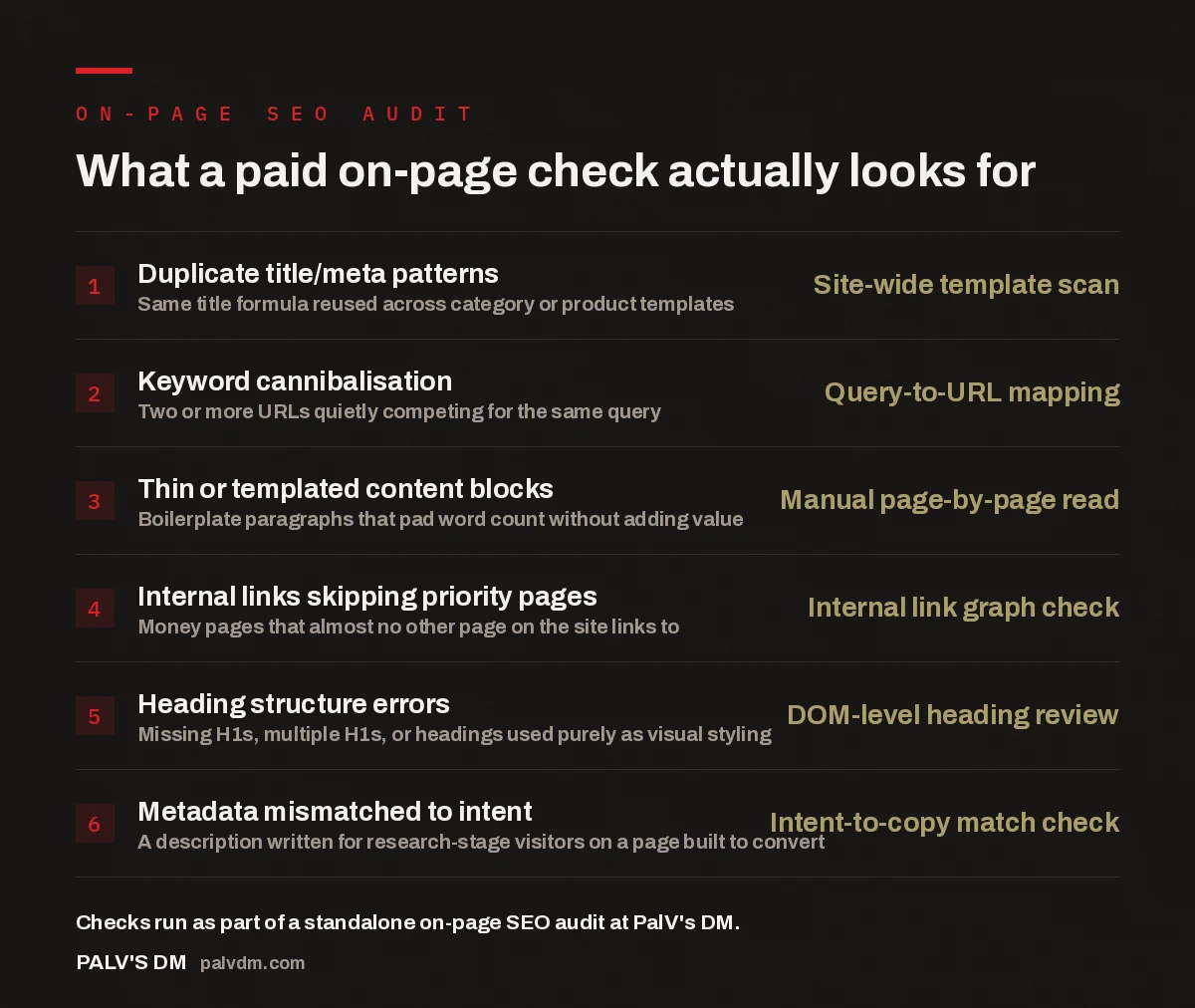
What a paid on-page check actually looks for
- Duplicate title/meta patterns — Site-wide template scan. Same title formula reused across category or product templates.
- Keyword cannibalisation — Query-to-URL mapping. Two or more URLs quietly competing for the same query.
- Thin or templated content blocks — Manual page-by-page read. Boilerplate paragraphs that pad word count without adding value.
- Internal links skipping priority pages — Internal link graph check. Money pages that almost no other page on the site links to.
- Heading structure errors — DOM-level heading review. Missing H1s, multiple H1s, or headings used purely as visual styling.
- Metadata mismatched to intent — Intent-to-copy match check. A description written for research-stage visitors on a page built to convert.
What does an on-page SEO audit service actually check?
An on-page SEO audit service works through the site page by page, not rule by rule. The output isn’t a percentage score — it’s a list tied to specific URLs: this category page’s title is identical to eleven others, this service page has no H1, this blog post and that landing page are both trying to rank for the same three-word phrase. The auditor reads the content the way a searcher and a search engine both would, then checks it against the site’s own structure — internal links, URL patterns, template logic — because most on-page problems aren’t isolated to one page. They’re patterns baked into how the site was built.
That template-level view is the main thing separating a paid check from a scan. A scanner tells you page 47 has a short meta description. It won’t tell you that all 300 product pages share the same meta description template, generated from a plugin field nobody has touched since launch. The fix for the second problem is a template change, not 300 individual edits — and you only find it by comparing pages against each other, not against a rulebook.
What does a free or DIY on-page check miss?
Free browser extensions and built-in CMS checkers are good at binary rules: is there an H1, is the title under 60 characters, is there at least one image with alt text. They’re bad — structurally, not by oversight — at anything requiring judgment or comparison across pages. Three categories consistently slip through:
- Cannibalisation. A scanner has no concept of “this page” versus “that other page on the same site.” It can’t flag that your blog post and your service page are fighting for the same ranking position, because it evaluates one URL at a time.
- Content that technically passes but doesn’t help anyone. A page can hit every green tick — keyword in the H1, decent length, internal links present — and still read like it was written to satisfy the checker rather than the visitor. Judging that requires reading the page, not scanning it.
- Intent mismatch. A tool can confirm a keyword appears in the meta description. It can’t tell you the description is written for someone comparing options when the page itself is built to close a sale — a mismatch that quietly depresses click-through rate even when rankings look fine.
None of this means free tools are worthless — they’re a reasonable first filter for the obvious gaps. But treating a green score as “on-page is done” is where most sites lose ground, because the score was never measuring the things that actually move rankings.
How does a paid check find cannibalisation and thin content?
The process is comparative, not checklist-driven. It typically starts by mapping every indexed page against the query or query cluster it’s meant to rank for, then flagging every case where two or more pages overlap — the classic cannibalisation signature. From there, each flagged page gets read in full: is it thin because it’s genuinely underdeveloped, or thin because it’s a template stamping out near-identical boilerplate across dozens of URLs? The distinction matters, because the first is a content problem and the second is a build problem, and they’re fixed differently.
The same manual pass covers heading structure, internal linking, and metadata — not by running each page through a rule, but by asking whether the page, read as a whole, does its job. In the accounts we work on, the pattern that shows up repeatedly is that priority pages — the ones meant to generate leads or sales — are the most internally under-linked pages on the entire site, simply because nobody built the habit of linking to them from newer content. A scanner won’t catch that. Reading the link graph will.
The pages that need the most help are rarely the ones with red flags. They’re the ones that look fine in isolation and only look wrong once you put them next to every other page on the site.
Palash, Founder, PalV’s DM
DIY tool vs a paid on-page check: what’s the actual difference?
Both have a place, but they answer different questions. A free tool answers “does this page break any obvious rules?” A paid check answers “is this page, and this site’s structure around it, actually working for the query it’s supposed to win?” The table below lays out where each one is strong.
| What’s being checked | Free/DIY tool | Paid on-page audit |
|---|---|---|
| Title/meta length and presence | Yes, instantly | Yes, plus checks for site-wide duplication |
| Keyword cannibalisation across pages | No — evaluates one URL at a time | Yes — the core of the audit |
| Content quality and intent match | No — can’t judge meaning | Yes — manually read against searcher intent |
| Internal linking to priority pages | Rarely, and only surface-level | Yes — full link graph review |
| Prioritised, page-specific fix list | No — generic rule output | Yes — ranked by expected impact |
What’s inside the deliverable?
A useful on-page audit deliverable is organised around action, not diagnostics — every finding tied to a specific URL, explained in plain English, and ordered by likely impact rather than page ID. A typical structure looks like this:
- A cannibalisation map showing every query with more than one page competing for it, and a recommendation on which page should own the term.
- A template-level list of duplicate or near-duplicate titles, meta descriptions, and heading patterns, grouped by the page type they affect.
- A short list of thin or underdeveloped pages, each flagged as either “needs a content rewrite” or “needs a template fix.”
- An internal linking gap list, specifically flagging money and priority pages that are under-linked from the rest of the site.
- A prioritised action list ranking every finding by expected effort and expected impact, so you know what to fix first.
This is deliberately close in spirit to what a paid technical SEO check actually covers — the two are companion audits, not overlapping ones. Technical checks look at crawlability, speed, and indexation; on-page checks look at what’s written on the page and how it’s linked internally. Sites with backlink or authority concerns often pair this with what an off-page check reveals about your link profile, since on-page fixes rarely move rankings on their own if the link profile is weak.
Who actually needs a paid on-page check right now?
The clearest signal is a site that’s grown past the point where one person can hold its structure in their head — dozens of blog posts written over a few years, product or service pages added in batches, or a redesign that changed templates without anyone auditing the copy that got carried over. That’s when duplicate patterns and cannibalisation accumulate fastest, because nobody planned the overlap; it happened one page at a time.
It’s also the right move if your free-tool score already looks fine but rankings or organic traffic have plateaued. A green checklist score confirms the page isn’t broken — it says nothing about whether the page is the best answer to the query, or whether a sibling page on your own site is quietly splitting its ranking chances. If you’re unsure whether you’ve outgrown the free-tool stage, what the free audit covers and where the paid one goes deeper lays out that line more specifically. And once you have the findings in hand, turning an audit into a prioritised action plan covers how to sequence the fixes so the highest-impact ones get done first.
Next step
If your on-page fundamentals have never been checked against each other — not just against a rulebook — a standalone on-page audit is the fastest way to find out what’s actually holding rankings back.
Frequently asked questions
How is an on-page SEO audit service different from a free SEO checker?
A free checker scores individual pages against fixed rules — title length, alt text, basic structure. A paid on-page audit compares pages against each other and against the searcher’s intent, which is how it catches cannibalisation, template-level duplication, and content that passes the rules but doesn’t actually serve the visitor.
How long does an on-page check take on an average site?
It depends mostly on page count and how repetitive the templates are, since a manual page-by-page read is the core of the work. A small site with a few dozen pages moves faster than a large catalogue site with hundreds of near-identical product pages, where the audit also has to trace patterns across templates.
Does an on-page audit include technical SEO issues like crawlability or speed?
No — those sit in a separate technical SEO check. An on-page audit focuses on what’s written on the page and how it’s structured and internally linked. Sites often need both, but they’re distinct deliverables because they require different tooling and different expertise to review properly.
Can I fix everything in the audit myself once I have it?
Most of it, yes, if you have someone comfortable editing the CMS and writing copy. The deliverable is written to be implementable by an in-house person or a general web developer — it’s not written in a way that requires the auditor to also do the fixes, though some clients prefer to hand that part off too.
How often should a site get a fresh on-page check?
There’s no fixed interval — it depends on how much content and how many pages get added between checks. As a rough guide, it’s worth revisiting after any major content push, redesign, or template change, since those are the events that introduce most of the duplication and cannibalisation a future audit would need to catch.
Short version: a free scanner tells you whether a page follows the rules. A paid on-page SEO audit service tells you whether the page, read against every other page on your site and against what the searcher actually wants, is doing its job — and gives you a ranked list of exactly what to fix first.