
Crawling a Site You Don’t Own: Ethics and Rate Limits
Crawling a competitor site for SEO research is common practice. Here is what is actually legal, what robots.txt controls, and how to set a safe rate limit.
Crawling a competitor’s publicly accessible pages for SEO research is standard practice and generally not illegal in the US, but “publicly accessible” and “respectful” are doing a lot of work in that sentence: robots.txt is voluntary, most sites’ Terms of Service explicitly prohibit scraping, and hammering someone’s server fast enough to slow it down crosses into a different problem entirely.
The legal question gets asked more than the practical one, and the practical one matters more day to day. Most competitor crawls never get anywhere near a courtroom. What actually happens when a crawl goes wrong is a lot more mundane: a site’s WAF flags your IP and blocks it, a server that was already under-provisioned slows down for real visitors while your crawler is hammering it, or you end up with a spreadsheet full of scraped pricing data you can’t legally reuse because you never checked the terms of service.
Is it even legal to crawl a competitor’s website?
Mostly, for publicly accessible pages, but the history of how that got settled is worth knowing because it explains where the real risk sits. In hiQ Labs v. LinkedIn, the Ninth Circuit ruled in 2019 that scraping data publicly accessible on the internet doesn’t violate the Computer Fraud and Abuse Act (CFAA), the main US anti-hacking statute. The Supreme Court vacated that ruling in 2021 on unrelated grounds from a different case, sent it back down, and the Ninth Circuit reaffirmed its original position in April 2022, this time explicitly invoking the Supreme Court’s “gate-up, gate-down” framing: if a website’s gates are up, meaning the content is accessible without logging in, accessing it isn’t “unauthorized” under the CFAA.
That’s the good news for anyone running competitor research crawls. The part that gets left out of the “scraping is legal” headlines: that same case ended, later in 2022, with a district court finding that hiQ had separately breached LinkedIn’s Terms of Service, a contract claim, entirely distinct from the CFAA hacking question, and the two companies settled. The practical lesson is specific: not violating the CFAA doesn’t mean you’re in the clear if a site’s terms explicitly prohibit automated access and you go ahead anyway. Check the terms before running anything beyond a single manual page view.
What does robots.txt actually control?
Less than most people assume. Google’s own documentation is direct about this: a robots.txt file is used to manage crawler traffic, and it is explicitly “not a mechanism for keeping a web page out of” search results, let alone out of a determined scraper’s reach. It’s a voluntary protocol. Respectable crawlers, Googlebot included, honor it. Nothing about the file format technically prevents a crawler from ignoring it entirely, and different crawlers can interpret its syntax slightly differently even when they do try to comply.
For a competitor research crawl, treat robots.txt as the baseline courtesy regardless of whether it’s enforceable. If a competitor has disallowed /checkout/ or /account/ paths, that’s telling you something about what they don’t want indexed or crawled, and Screaming Frog’s “ignore robots.txt” toggle exists for legitimate technical audit reasons, not as a default setting for crawling someone else’s property. Flip it only when you have a specific, defensible reason to.
How do you set a crawl rate that won’t cause harm or get you blocked?
Start well under whatever the tool’s maximum concurrent-thread default is. Screaming Frog and similar crawlers will happily fire dozens of simultaneous requests if you let them, which is appropriate for auditing your own server, not for pointing at infrastructure you don’t control and don’t know the capacity of. A reasonable starting point for external competitor crawls is one to two requests per second, a real and identifiable user-agent string (not a spoofed browser string pretending to be a human), and immediate backoff, not a retry loop, the moment you see 429 (rate limited) or 503 (service unavailable) responses.
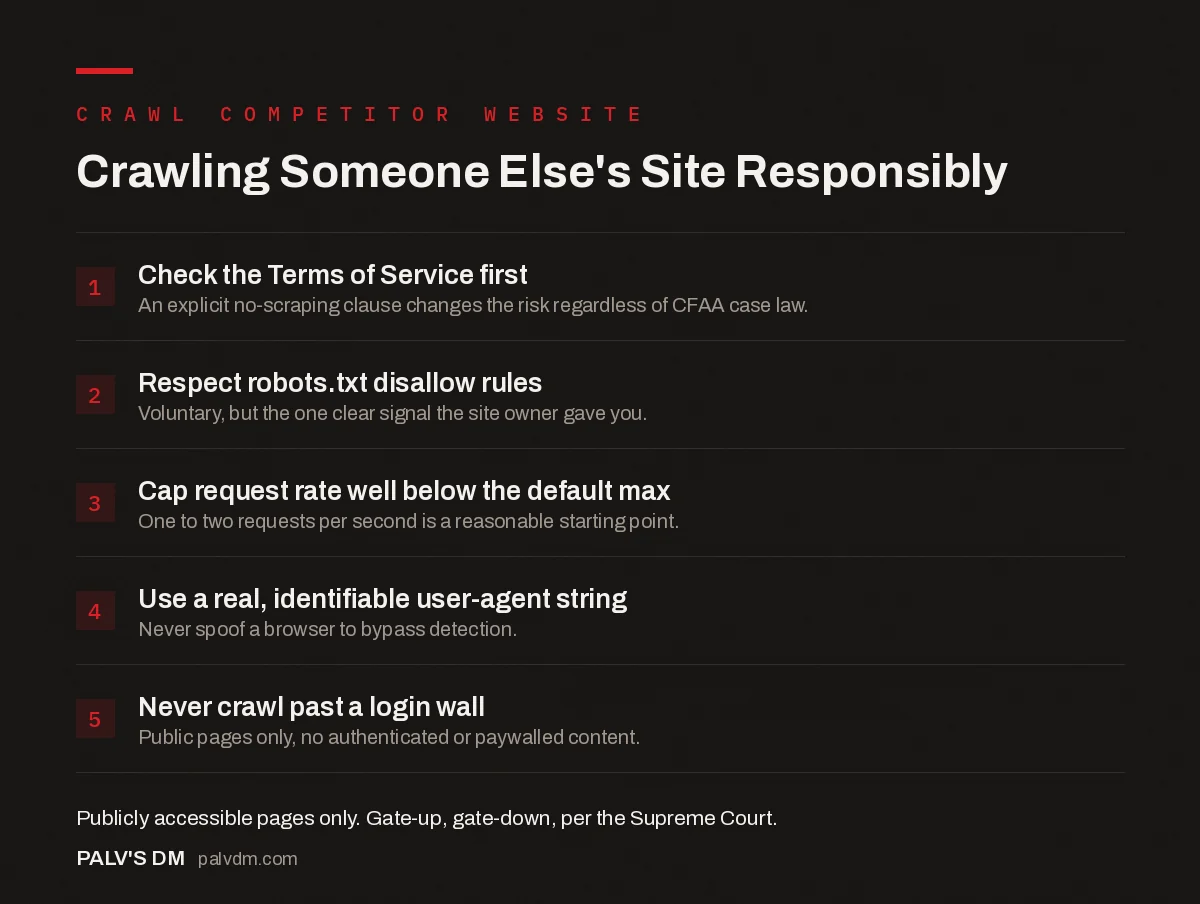
Crawling Someone Else’s Site Responsibly
- Check the Terms of Service first. An explicit no-scraping clause changes the risk regardless of CFAA case law.
- Respect robots.txt disallow rules. Voluntary, but the one clear signal the site owner gave you.
- Cap request rate well below the default max. One to two requests per second is a reasonable starting point.
- Use a real, identifiable user-agent string. Never spoof a browser to bypass detection.
- Never crawl past a login wall. Public pages only, no authenticated or paywalled content.
What should you never scrape, regardless of legality?
Anything behind authentication. That’s the clearest line the case law itself draws: “gate-up” public pages are one legal category, and automating access past a login, a paywall, or a CAPTCHA is a materially different, higher-risk one, closer to what the CFAA was actually written to address. This includes competitor account areas, gated pricing quotes that require a signup, and any personal user data even if a misconfigured page happens to expose it publicly by accident. Finding something publicly accessible by mistake on someone else’s server isn’t the same as it being intended for public consumption, and treating it that way is a good way to turn a routine SEO crawl into a genuine legal problem.
What’s the practical workflow for a legitimate competitive crawl?
Screaming Frog and Sitebulb remain the standard desktop tools for this kind of work, both letting you configure crawl speed, custom user-agent strings, and robots.txt handling before you start. For a one-off competitive audit, capping the crawl at a sensible page limit, sticking to a slow, consistent request rate, and running it during hours when the target site’s traffic is likely lower (late night in their primary market’s timezone, for instance) covers most of the practical risk. For recurring or larger-scale monitoring, a custom script gives finer control over backoff behaviour than most GUI tools expose by default, worth the setup time if you’re doing this regularly rather than as a one-time project.
None of this is about hiding what you’re doing. A well-behaved crawler that identifies itself honestly, respects rate limits, and backs off when asked is doing something functionally similar to what Googlebot does every day, at a much smaller scale. The sites that get into real trouble are the ones running unthrottled, spoofed, or authentication-bypassing scrapes and calling it competitive research after the fact.
The default Screaming Frog install trips people up more than they expect here. Out of the box, it’s set to render JavaScript, follow internal links aggressively, and fire at a speed tuned for auditing your own infrastructure, which is a completely different situation from a courtesy crawl of somebody else’s server. Dropping the max threads down to two or three and setting a fixed delay between requests takes thirty seconds in the configuration menu and is the single change that separates a considerate competitive crawl from one that looks, from the target server’s side, indistinguishable from a low-grade denial-of-service attempt.
Frequently asked questions
Is it legal to crawl a competitor’s website?
Crawling publicly accessible pages is generally not a violation of the U.S. Computer Fraud and Abuse Act, per the Ninth Circuit’s ruling in hiQ Labs v. LinkedIn. That does not make every crawl risk-free: many sites’ Terms of Service explicitly prohibit automated scraping, and violating those terms can still expose you to a breach-of-contract claim, a separate legal theory from hacking.
Does robots.txt legally stop me from crawling a site?
No. Robots.txt is a voluntary protocol, not an access-control or legal mechanism. Google’s own documentation states it manages crawler traffic and that compliance depends entirely on the crawler choosing to obey it. Ignoring it isn’t illegal by itself, but it does discard the one clear signal the site owner gave about what they don’t want crawled.
How fast can I crawl a competitor’s site without causing problems?
Slower than the tool’s default maximum. A reasonable starting point is one to two requests per second with a real, identifiable user-agent string, crawled during the site’s likely off-peak hours where possible, and backed off immediately if you see 429 or 503 responses.
Should I ever crawl content behind a login?
No. Content that requires authentication sits on the other side of the Supreme Court’s “gate-up, gate-down” distinction from hiQ v. LinkedIn: publicly accessible pages are one thing, but automating access past a login wall is a materially different, higher-risk category regardless of what your intent is.
What tools are typically used to crawl a competitor’s site for SEO research?
Screaming Frog and Sitebulb are the standard desktop crawlers for this, both configurable on speed, user-agent and robots.txt handling. For larger or scheduled jobs, a custom Python script using requests and BeautifulSoup, or Scrapy for bigger crawls, gives more control over rate limiting and backoff behaviour.
Sources
- Introduction to robots.txt, Google Search Central
- Web scraping is legal, US appeals court reaffirms, TechCrunch
- Technical SEO: The Complete Working Guide
- Setting Up Screaming Frog for a 10,000-URL Site Without Crashing
- Screaming Frog vs Sitebulb: Which Crawler to Learn
- Python for SEO: Five Scripts Worth Writing First
Want this done on your site?
Every PalV’s DM engagement starts with a free audit of your actual website — a 12-point
crawl covering what is blocking indexation, on-page gaps against your primary keywords, speed
findings, and the three to five fixes worth making first. Delivered in two working days. No
payment details, and the findings are yours whether you hire us or not.


