
Screaming Frog vs Sitebulb: Which Crawler to Learn First
Screaming Frog and Sitebulb solve different problems. Here is the honest verdict on which to learn first, with real pricing and a feature comparison.
Learn Screaming Frog first. It’s the tool most SEO job descriptions, courses and forum threads assume you already know, it’s cheaper for unlimited crawling, and its raw, unopinionated data format teaches you to actually understand what a crawl is doing rather than trusting a tool’s interpretation of it. Add Sitebulb once you need to hand polished, plain-English audits to clients who don’t want to look at a spreadsheet.
Both tools crawl a website and report on what they find. The difference is what happens after the crawl finishes. Screaming Frog gives you a dense, configurable data table and expects you to know what you’re looking for. Sitebulb interprets that same kind of data into prioritised, explained issues with visuals attached. Neither approach is wrong. They’re built for different moments in the same job.
What does each tool actually do differently?
Screaming Frog is, at its core, a crawler with an enormous amount of manual configuration exposed to you: custom extraction via XPath or CSS selectors, regex-based crawl scoping to dodge faceted navigation traps, custom JavaScript execution during a crawl, and direct integrations with Search Console, Analytics and PageSpeed Insights. It doesn’t tell you what’s wrong with your site. It tells you exactly what it found, in exhaustive detail, and leaves the interpretation to you.
Sitebulb runs a comparable crawl underneath, but wraps the output in over 300 named “Hints”, plain-English explanations of what each issue means and why it matters, plus visual site architecture maps and crawl comparison reports. It’s built explicitly for turning a crawl into something you can present, not just something you can query.
Verdict up front: the honest comparison
Here’s how the two stack up on the details that actually change a buying or learning decision.
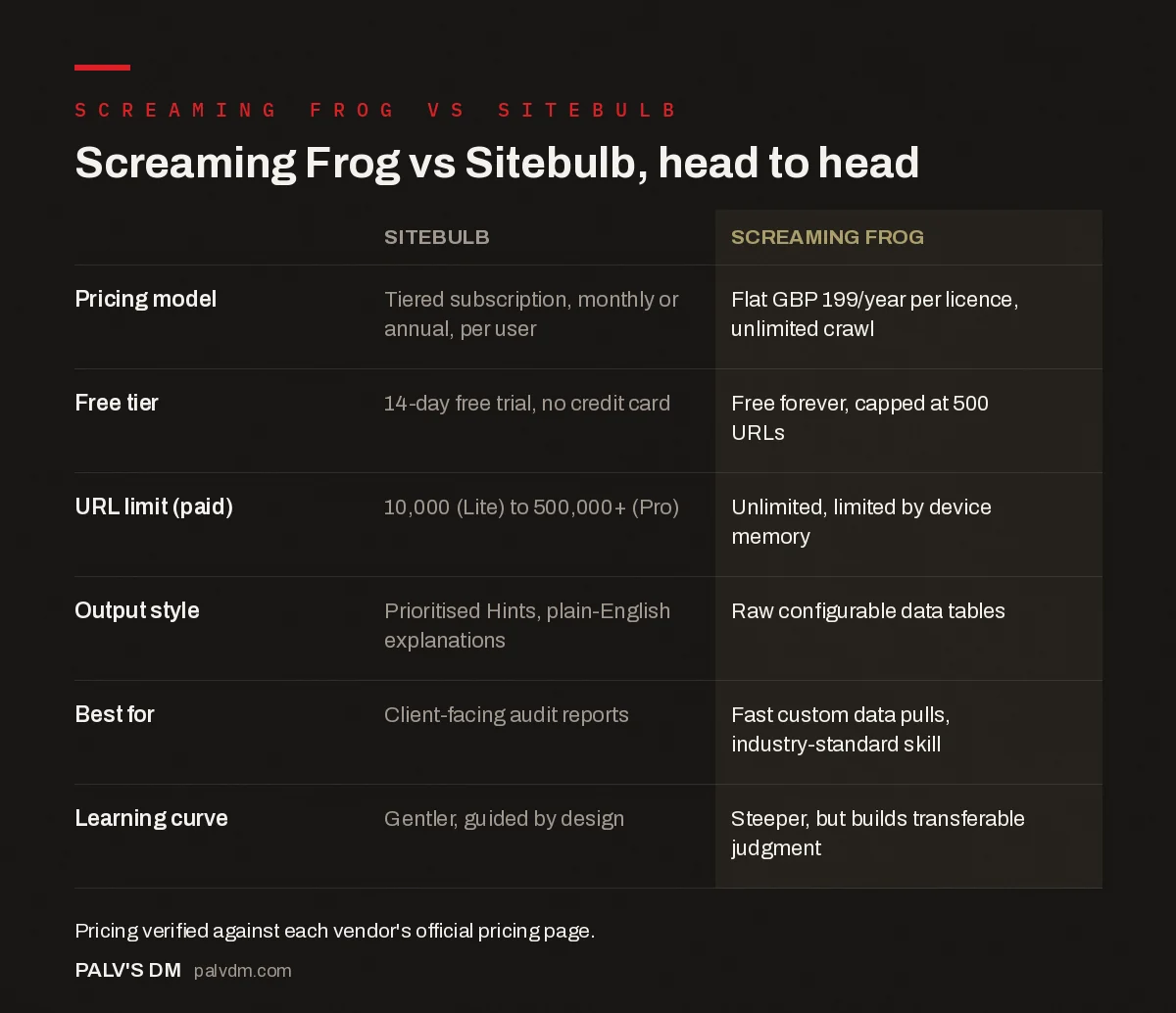
Screaming Frog vs Sitebulb, head to head
| Sitebulb | Screaming Frog | |
|---|---|---|
| Pricing model | Tiered subscription, monthly or annual, per user | Flat GBP 199/year per licence, unlimited crawl |
| Free tier | 14-day free trial, no credit card | Free forever, capped at 500 URLs |
| URL limit (paid) | 10,000 (Lite) to 500,000+ (Pro) | Unlimited, limited by device memory |
| Output style | Prioritised Hints, plain-English explanations | Raw configurable data tables |
| Best for | Client-facing audit reports | Fast custom data pulls, industry-standard skill |
| Learning curve | Gentler, guided by design | Steeper, but builds transferable judgment |
On raw pricing, Screaming Frog’s £199 a year for unlimited crawling (limited only by your machine’s memory) is hard to beat if volume is your main constraint. Sitebulb runs on a tiered monthly or annual subscription instead, with the Lite tier capped at 10,000 URLs per audit and Pro stepping up to 500,000, extendable further. If you’re crawling one site a month under 10,000 pages, Sitebulb Lite might genuinely be the cheaper option. Once you’re crawling multiple large sites regularly, Screaming Frog’s flat licence wins on cost.
Why learn Screaming Frog first specifically?
This is the part most comparison posts dodge by staying neutral. I won’t. If you’re new to technical SEO and can only learn one tool right now, it’s Screaming Frog, for a reason that has nothing to do with which interface is nicer.
Most technical SEO job postings, freelance briefs and in-house SEO roles reference Screaming Frog by name as an expected skill. It’s the de facto industry standard, the same way Excel is assumed knowledge in finance roles regardless of whether a fancier tool exists. Learning it first means you can walk into almost any SEO team’s existing workflow without a translation step.
There’s also a genuine skill-building argument. Because Screaming Frog doesn’t interpret anything for you, learning it forces you to understand what a 3xx redirect chain actually looks like in raw data, what a canonical mismatch actually means at the HTML level, before a tool hands you a pre-packaged explanation. That understanding transfers to every other tool you’ll ever use, including Sitebulb. The reverse isn’t as true. I’ve watched junior SEOs who learned Sitebulb first struggle to debug a crawl issue the moment they’re handed raw Screaming Frog output with no Hints panel to lean on.
What does “learning” a crawler actually involve?
It’s worth being specific here, because “learn the tool” undersells what’s actually being asked. With Screaming Frog, the real skill isn’t clicking the crawl button, it’s configuring the crawl correctly before you start: setting the right crawl scope with include and exclude regex so you’re not wasting an hour crawling a staging subdomain by accident, choosing render mode correctly for JavaScript-heavy sites, and knowing which custom extraction to set up before the crawl runs rather than after, because rerunning a crawl on a 50,000-page site to grab one more data point wastes real time.
With Sitebulb, the learning curve is different. The crawl configuration is simpler by design, but the skill shifts to interpretation and prioritisation: knowing which of the 300-plus Hints actually matter for a given client’s situation versus which are minor and can wait, and how to translate a Hint’s plain-English explanation into a specific, actionable line item in a report a non-technical stakeholder will actually read.
Neither skill set is harder than the other. They’re just different muscles, and that’s the real argument for learning Screaming Frog’s raw approach first: it builds the underlying technical SEO judgment that makes Sitebulb’s automated prioritisation easier to sanity-check later, instead of just trusting it blindly.
When does Sitebulb become the better choice?
- Client-facing audits. A PDF report with a prioritised issue list and visual site maps lands better with a non-technical stakeholder than a raw CSV export ever will.
- Teaching junior staff. The plain-English Hint explanations double as an informal training tool, useful if you’re onboarding someone without years of technical SEO background yet.
- Audit comparison over time. Sitebulb’s built-in audit comparison reports make it straightforward to show a client what changed between two crawls without building that comparison yourself.
- Very large sites, if you go Cloud. Sitebulb Cloud removes the desktop hardware ceiling entirely for sites in the hundreds of thousands of URLs, at a meaningfully higher price point than either desktop tool.
What about running both?
This is where most working agencies actually land, and it’s not indecision, it’s specialisation. Screaming Frog for the fast, improvised digging: pulling a quick list of pages missing a specific meta tag, running a custom extraction against a template change, checking redirect chains during a migration. Sitebulb for the scheduled, structured audit that gets exported and handed to a client or a stakeholder who wants a narrative, not a spreadsheet.
If budget is genuinely tight and you can only run one, match the tool to what you spend more time doing. Heavy on ad hoc technical debugging: Screaming Frog. Heavy on recurring client reporting: Sitebulb Pro. Doing meaningful amounts of both, which is most agency work past a certain size, budget for both eventually; the combined cost is still modest against what either tool saves in audit time.
One workflow worth mentioning from actual agency use: run Screaming Frog first during a migration or a fast diagnostic sprint, then run Sitebulb once the technical fixes are in place, specifically to generate the before-and-after comparison report a client actually wants to see. The two tools aren’t really competing for the same moment in a project. They’re solving different parts of the same job, which is the main reason “which one should I use” is often the wrong question. “Which one should I use right now, for this specific task” is the better one.
Frequently asked questions
Is Screaming Frog or Sitebulb better for beginners?
Screaming Frog has a steeper initial learning curve because it hands you raw data with minimal interpretation, but that same raw format is what most SEO job postings and courses assume you already know. Sitebulb is easier to start with because it explains issues in plain English as you go.
Do agencies need both crawlers?
Many established agencies run both: Screaming Frog for fast, custom, ad hoc data pulls, and Sitebulb for structured client-facing audits with visual reports. A solo consultant or small agency starting out can usually get by on one and add the other once a specific workflow gap shows up.
Is Screaming Frog free?
Yes, with a hard limit of 500 URLs per crawl and some advanced features disabled. The paid licence removes the URL cap, subject to your computer’s memory, and costs £199 per year for one to four licences as of Screaming Frog’s current published pricing.
How many URLs can Sitebulb crawl?
The Lite plan caps at 10,000 URLs per audit. The Pro plan defaults to 500,000 URLs per audit and can be raised as high as 2 million, though Sitebulb’s own documentation warns that’s pushing past what most desktop machines comfortably handle.
Which one is better for client-facing audit reports?
Sitebulb, without much debate. Its prioritised hints, plain-English issue explanations and customisable PDF exports are built specifically for handing a report to someone who isn’t a technical SEO. Screaming Frog’s exports are raw spreadsheets that need work before a client should see them.
Can Sitebulb replace Screaming Frog entirely?
For most day-to-day audit work, yes. Where it falls short is the kind of fast, improvised, highly customised data pull, XPath extraction, bulk find-and-replace style analysis, that Screaming Frog is built for. Heavy technical SEO work still tends to need both eventually.
Sources
- Screaming Frog SEO Spider — Official Pricing
- Sitebulb Desktop Plans — Official Pricing
- Technical SEO: The Complete Guide
- Setting Up Screaming Frog for a 10,000-URL Site Without Crashing
- The SEO Tool Stack a Small Agency Actually Needs
- How to Verify a Tool’s Data Before You Trust It
Want this done on your site?
Every PalV’s DM engagement starts with a free audit of your actual website — a 12-point
crawl covering what is blocking indexation, on-page gaps against your primary keywords, speed
findings, and the three to five fixes worth making first. Delivered in two working days. No
payment details, and the findings are yours whether you hire us or not.


