
The SEO Tool Stack a Small Agency Actually Needs
The real SEO tool stack a small agency needs: one crawler, one keyword and backlink platform, free Google tooling, and what to cut when budget is tight.
A small agency needs five categories covered, not fifteen tools: a technical crawler, one all-in-one keyword and backlink platform, a rank tracker, free Google tooling, and a reporting layer. Everything past that is either a nice-to-have or two tools doing the same job because nobody cancelled the first one.
Tool sprawl is the quiet budget killer at small agencies. Not one bad purchase, but four decent ones that all overlap by 60%, quietly billing every month while three of them go untouched. Before adding anything, the real question is which category is actually uncovered, not which tool has the flashiest new AI feature this quarter.
What actually needs to be in a small agency’s stack?
Here’s the stack we’d tell a new agency to build, in the order to acquire it.
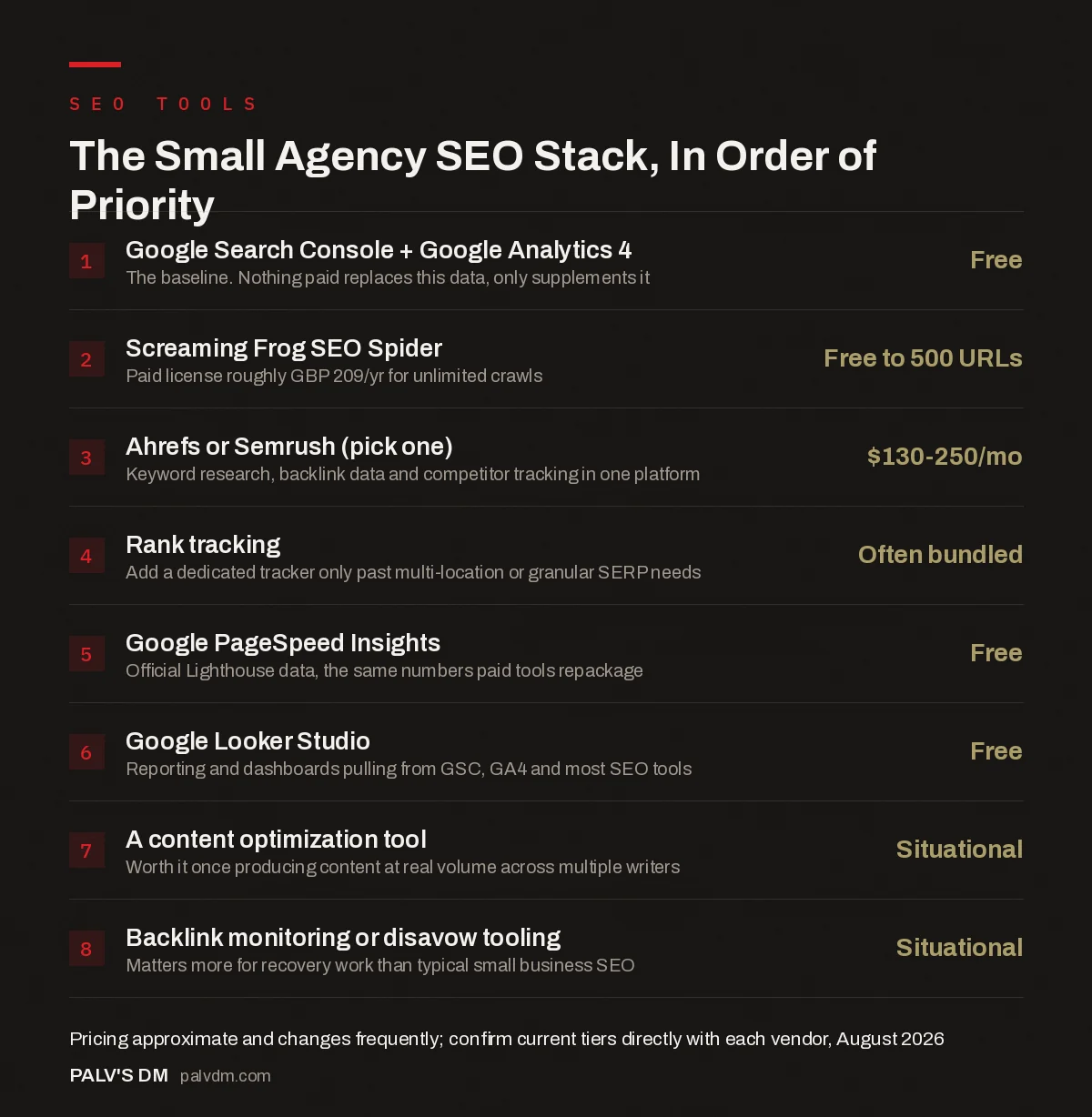
The Small Agency SEO Stack, In Order of Priority
- Google Search Console + Google Analytics 4: Free. The baseline. Nothing paid replaces this data, only supplements it.
- Screaming Frog SEO Spider: Free to 500 URLs. Paid license roughly GBP 209/yr for unlimited crawls.
- Ahrefs or Semrush (pick one): $130-250/mo. Keyword research, backlink data and competitor tracking in one platform.
- Rank tracking: Often bundled. Add a dedicated tracker only past multi-location or granular SERP needs.
- Google PageSpeed Insights: Free. Official Lighthouse data, the same numbers paid tools repackage.
- Google Looker Studio: Free. Reporting and dashboards pulling from GSC, GA4 and most SEO tools.
- A content optimization tool: Situational. Worth it once producing content at real volume across multiple writers.
- Backlink monitoring or disavow tooling: Situational. Matters more for recovery work than typical small business SEO.
What handles technical crawls?
Screaming Frog SEO Spider, and it’s not close for most small agency use cases. The free version audits up to 500 URLs, which covers a real chunk of small business client sites outright. The paid license runs about £209 a year for unlimited URLs and the full feature set (custom extraction, JavaScript rendering, scheduling), making it one of the cheapest tools in this entire list relative to how often you’ll actually open it.
Sitebulb is the other serious option, and it’s genuinely better at visualizing crawl data for a client who isn’t technical. If your agency spends a lot of time explaining crawl issues to non-technical stakeholders, Sitebulb’s reporting layer earns its higher price. If it’s mostly you and your team using the data to fix things, Screaming Frog does the job for less and has a much larger community of tutorials and forum answers when something breaks.
What handles keyword research and backlink data?
Pick one of Ahrefs or Semrush and stop there. Both sit in a similar band once you’re past their cheapest entry tier, commonly somewhere in the $130-250 a month range depending which plan you pick and how often they run promotions, and both cover keyword research, backlink analysis, and competitor tracking well enough that switching between them rarely changes your output meaningfully.
Ahrefs generally has the edge on backlink index size and freshness. Semrush generally has the edge on feature breadth, including its content and AI-visibility tooling. Neither edge is large enough to justify running both at a small agency’s budget. If you’re just starting out and the full-price tiers feel steep, Ahrefs has introduced a cheaper entry-level plan aimed at smaller teams, and SE Ranking and similar all-in-one platforms position themselves as lower-cost alternatives that cover most of the same core ground; check current pricing and feature lists directly before committing, since both change tiers and pricing more often than most software categories.
What handles rank tracking?
For most small agencies, whatever’s bundled into Ahrefs or Semrush already covers this well enough that a separate rank tracker is redundant spend. Dedicated rank trackers earn their keep once you’re tracking rankings across many locations for local SEO clients, or need more granular SERP feature tracking than the bundled version offers. If that’s not your situation yet, don’t buy a fourth subscription to do a job your second subscription already does.
What’s free and still essential?
- Google Search Console. Non-negotiable. It’s the only source of Google’s actual impression, click, and indexing data for a site, and nothing paid replaces it, only supplements it.
- Google Analytics 4. The conversion and behavior side of the same picture. Free, and required if you’re reporting on anything beyond rankings.
- PageSpeed Insights. Free, official, and the same Lighthouse data your paid tools are often just repackaging with a nicer dashboard.
- Google Looker Studio. Free reporting and dashboards that pull directly from GSC, GA4, and most major SEO tools via connectors, which covers the reporting layer without a separate paid product.
That’s four core tools costing nothing, and together they cover data collection and reporting for a big share of what a small agency actually needs day to day.
What do you cut first, if budget is genuinely tight?
Cut the rank tracker before you cut the crawler, and cut the crawler before you cut the keyword and backlink platform. A crawler catches the technical problems that quietly tank a client’s traffic, which is the kind of issue that costs you the client if it goes unnoticed. A keyword and backlink platform is what most of your strategic recommendations are built on. Ranking position by itself, tracked separately from everything else, is the easiest of the three to live without for a while, especially with GSC’s average position data filling some of that gap for free.
The agencies we see overspend on tools almost always have the same pattern: three overlapping subscriptions doing roughly the same keyword research job, and nobody’s opened Screaming Frog in three months even though it’s the one tool that would have caught the client’s broken canonical tags. Audit your own subscriptions the way you’d audit a client’s site: what’s actually being used weekly, and what’s just billing quietly in the background.
Are there tools worth adding once the basics are covered?
A few, situationally. A dedicated content optimization tool earns its cost once you’re producing content at real volume and want consistency across multiple writers. A backlink monitoring or disavow-specific tool matters more for a client recovering from a past manual action than for a typical small business site. AI-visibility tracking tools are newer and worth watching, but for most small agency clients right now, the core five categories above still account for the large majority of billable work. Add specialized tools when a specific, recurring client need justifies the line item, not because a tool launched with a compelling demo video.
How do you actually decide when to add a new tool?
Ask three questions before adding anything to the stack, in this order. First: is there a recurring client need this solves, or is this solving a hypothetical need you don’t actually have yet? A tool bought for “someday” client work sits unused far more often than one bought to fix a problem you hit last week. Second: does something already in the stack cover 80% of this job? Ahrefs and Semrush both dabble in content optimization, rank tracking, and even some AI-visibility tracking now. Check what you already pay for before assuming you need a new line item. Third: can you cancel it easily if it doesn’t earn its keep? Annual-only contracts from a tool you haven’t tested monthly first are a common way agencies end up paying for software nobody opens by month four.
Spreadsheets deserve a mention here too, because they quietly do more work than any single paid tool in a lot of small agencies. A well-built Google Sheet, pulling data through Search Console’s and GA4’s native connectors or a simple API script, replaces a surprising amount of what a dedicated reporting tool charges monthly for. It’s not as polished, and it takes someone who actually knows the formulas to build and maintain it, but for an agency watching every rupee before revenue catches up to ambition, that trade-off is usually worth making.
Frequently asked questions
Do I need both Ahrefs and Semrush?
No, for almost every small agency. Their core feature sets overlap heavily, and running both is close to paying twice for the same job. Pick one based on whether backlink depth (Ahrefs) or broader feature coverage (Semrush) matters more for your specific client mix.
Is Screaming Frog’s free version enough for a small agency?
For sites under 500 URLs, often yes. Past that limit, or once you need scheduled crawls, custom extraction, or JavaScript rendering, the paid license becomes worth it fast given how low the annual cost is relative to the rest of the stack.
What’s the minimum viable SEO tool stack if budget is very tight?
Google Search Console, Google Analytics 4, and Screaming Frog’s free tier, plus a Google Sheet for tracking rankings manually or via a low-cost API-based checker. It’s more manual work, but it covers the essentials at close to zero cost while a new agency builds revenue toward a paid keyword and backlink platform.
Are group-buy SEO tools worth the risk?
Generally not for client-facing agency work. Shared or resold accounts violate most tools’ terms of service, can be shut down without warning mid-project, and offer no support if something breaks during a client deliverable. The savings rarely justify the risk once a client’s results depend on the tool staying accessible.
Do I need a dedicated rank tracker if I already have Ahrefs or Semrush?
Usually not at first. Both include rank tracking that’s sufficient for a typical small business client. A dedicated tracker becomes worth adding once you’re managing rankings across many locations or need SERP feature tracking more granular than what’s bundled in.
Sources
- SEO Spider, Screaming Frog
- PageSpeed Insights, Google for Developers
- Google Search Console: The Reports That Actually Matter
- Free SEO Tools That Replace Paid Ones (Mostly)
- Screaming Frog vs Sitebulb: Which Crawler to Learn
- Google Sheets Formulas Every SEO Should Know
Want this done on your site?
Every PalV’s DM engagement starts with a free audit of your actual website — a 12-point
crawl covering what is blocking indexation, on-page gaps against your primary keywords, speed
findings, and the three to five fixes worth making first. Delivered in two working days. No
payment details, and the findings are yours whether you hire us or not.


