Should You Gate Content? The Honest Trade-Off
Gated vs ungated content compared: what each costs in SEO and leads, and a simple rule for deciding which of your content belongs behind a form.

Gate content only when it offers something a form is a fair trade for, like a calculator, template, or proprietary data set. Leave blog posts, guides, and anything meant to build search visibility ungated, because search engines cannot index content sitting behind a form. The old binary of “gate everything for leads” versus “gate nothing for reach” is the wrong framing. The real decision is content-by-content, based on what job each piece is doing: building trust and traffic, or qualifying someone who’s already interested.
Published August 2026.
What’s the actual trade-off between gated and ungated content?
Gated content gives you a name, an email address, and a signal of intent, at the cost of reach: search engines can’t crawl and index what’s behind a form, social shares drop because people are reluctant to share a page they had to give up data to see, and a meaningful share of visitors simply leave rather than fill out the form. Ungated content builds organic traffic, backlinks, and topical authority, but produces no direct contact information, so you’re relying on other signals, like return visits or on-page CTAs, to know who’s actually interested.
Neither approach is free. The mistake is treating this as one company-wide policy rather than a decision made per asset, based on what that specific piece of content is for.
Gated vs ungated: how do they compare directly?
| Factor | Gated content | Ungated content |
|---|---|---|
| Search visibility | None; search engines cannot index content behind a form | Full; content is crawlable and can rank |
| Lead capture | Direct: name, email, often company and role | Indirect only, via on-page CTAs or return-visit tracking |
| Reach and shares | Lower; friction reduces social sharing and referral traffic | Higher; nothing stops sharing or backlinking |
| Conversion rate on the asset itself | Only counts people willing to trade data for access | No conversion event on the content itself |
| Best use case | Tools, calculators, original research, templates with real standalone value | Blog posts, guides, and anything meant to earn organic traffic |
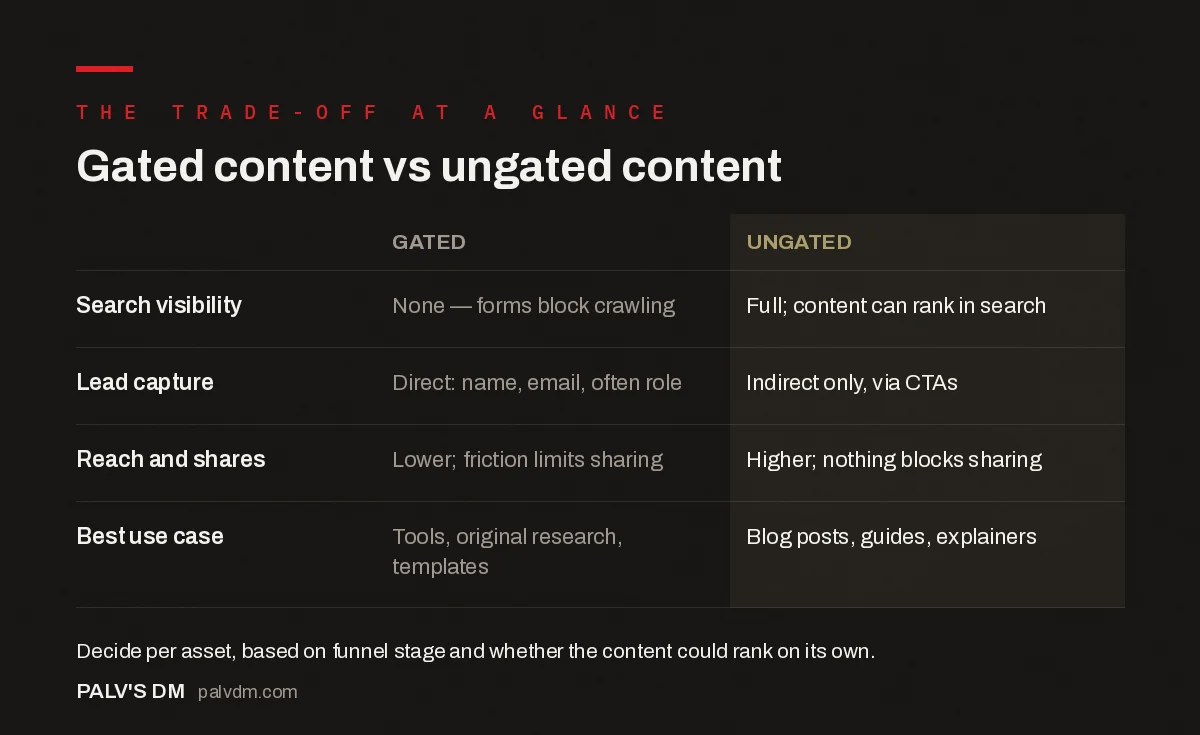
Gated content vs ungated content
| Gated | Ungated | |
|---|---|---|
| Search visibility | None — forms block crawling | Full; content can rank in search |
| Lead capture | Direct: name, email, often role | Indirect only, via CTAs |
| Reach and shares | Lower; friction limits sharing | Higher; nothing blocks sharing |
| Best use case | Tools, original research, templates | Blog posts, guides, explainers |
Which content is actually worth gating?
The bar for gating should be “tool,” not “information.” A downloadable PDF that just repackages what’s already in a blog post rarely justifies asking for an email address, and most visitors can tell the difference. What tends to earn the trade fairly:
- Interactive tools, like an ROI calculator or an audit tool that produces a personalised result
- Original research or proprietary data that doesn’t exist anywhere else, such as a survey report with real sample sizes
- Templates and worksheets that save the reader real production time, not a reformatted blog post
- Webinars and events, where registration also serves a scheduling function beyond just lead capture
Everything else, including most blog posts, explainer guides, and how-to content, works better ungated, because its job is to build search visibility and trust, and it can’t do that job from behind a form.
Does gating actually hurt SEO?
Gating itself doesn’t damage a site’s SEO the way, say, duplicate content or broken links do. The problem is opportunity cost: if your best, most keyword-relevant content sits behind a form, it simply can’t rank, because search engines cannot crawl what a form is blocking. A company that gates its most substantive guides and leaves only thin, ungated content on the surface is handing that ranking opportunity to a competitor who didn’t gate theirs. The fix isn’t “never gate,” it’s making sure your organic-growth content, the material meant to attract new visitors through search, stays ungated, and reserving gates for content whose job is qualification, not discovery.
How much does gating cost in lost leads?
Form friction has a measurable cost. Industry research on landing page behaviour has repeatedly found that a large share of visitors abandon a form partway through, often due to concerns about spam or how their data will be used, and that aggressive gating strategies can lose the majority of potential leads at the earliest research stage of a buying journey, before they’re ready to hand over contact details. B2B buying cycles are also long: Gartner’s research on B2B buying groups puts a typical enterprise purchase cycle at 6 to 12 months, involving 6 to 10 stakeholders. Gating early-stage research content, the material a buyer reads before anyone internally has agreed there’s a problem worth solving, tends to block the exact audience you want building familiarity with your brand over that long cycle.
A simple rule for deciding whether to gate a piece of content
- Ask what stage of the buying journey this content serves. Early research stage: leave it open. Late evaluation stage: a gate is more defensible.
- Ask whether the content could rank in search on its own merits. If yes, gating it trades long-term organic reach for a smaller number of immediate leads.
- Ask if the asset delivers something a form is a fair exchange for. A calculator or proprietary dataset, yes. A repackaged blog post, usually no.
- Test the gate’s cost. Track how many organic sessions the page would likely get ungated, versus how many leads it generates gated, and weigh the two against your actual sales cycle.
A worked example: the same asset, gated and ungated
A B2B services company runs a genuine test on a piece of original research: an industry pricing benchmark report built from real client data. For the first three months, it’s gated behind a standard name-and-email form. The report generates 340 leads over that period, but shows zero organic search visibility, because the gated PDF was never indexable.
The team then rebuilds the report as an ungated blog post with all the key data visible, keeping only a downloadable “full dataset” spreadsheet behind a lighter, single-field email gate. Over the following three months, the ungated post ranks for several benchmark-related queries and drives organic traffic that dwarfs the original gated page’s visits, while the lighter-gated spreadsheet still generates 210 leads – fewer than the original 340, but from a much larger, now-compounding traffic base that keeps growing month over month instead of depending entirely on paid or referral traffic to find the gated page. Six months in, the ungated version is outperforming the original on both leads and reach, because it’s no longer trading away its best chance at organic discovery.
What does a reasonable gating policy look like written down?
Teams that keep re-litigating this decision asset by asset usually benefit from writing a short, three-line policy once: blog posts, guides, and explainer content stay ungated by default, no exceptions without a specific reason. Interactive tools, proprietary data, and production-ready templates are gated by default, with a preview or partial version left ungated where feasible. Anything genuinely uncertain gets a 90-day test – publish ungated first, measure organic traffic and lead quality, and only add a gate later if the data supports it. Having this written down removes the asset-by-asset debate and replaces it with a default that’s already been thought through, adjusted only when a specific piece of content has a real reason to be the exception.
Frequently asked questions
Should a company gate all of its whitepapers?
Not automatically. A whitepaper with genuinely original research or data that can’t be found elsewhere is a reasonable candidate for gating. A whitepaper that mostly restates points already covered in the company’s own blog posts is better left ungated, since gating it just blocks search visibility without offering the reader anything a blog post didn’t already give away for free.
Can you partially gate content, like showing a preview?
Yes, and it’s a common middle ground: show the first section or a summary ungated, so search engines can index and rank that portion, then gate the deeper detail or the downloadable version. This captures some SEO value while still asking for an email address for the full asset.
Does gated content convert better than a newsletter signup?
It depends on the offer, not the mechanism. A highly relevant, specific asset like an industry benchmark report tends to convert well when gated because the value is clear. A generic newsletter signup usually converts at a lower rate unless the newsletter itself has an established reputation, since the value exchange is vaguer.
How do you know if you’re gating too aggressively?
A useful signal is organic traffic relative to competitors covering the same topics. If competitor guides on similar subjects are ranking and yours, which sit behind a form, aren’t appearing in search at all, that’s a sign the gate is costing more in visibility than it’s gaining in leads.
Making the call per asset, not company-wide
The honest answer to “should you gate content” is that it depends on what each specific piece is for. Content meant to build organic reach and trust should stay ungated so it can actually be found. Content that delivers a genuine tool, proprietary data, or a time-saving template is a fairer trade for an email address. Treating this as one blanket policy, in either direction, leaves value on the table. If you’re planning a content mix and aren’t sure where the gate line should sit for your funnel, our content writing service builds that decision into the content strategy from the start, asset by asset.
This post sits inside our broader content strategy guide. If lead magnets are part of your gating plan, see our post on lead magnets worth an email address, and if you’re weighing content ROI more broadly, our piece on attributing revenue to individual posts covers how to measure whether a gate is actually paying off.