
Page vs Query vs Page+Query: Reading the Right View
Query, Page, and Page+Query views in Search Console answer different questions. Learn which one to use for content planning versus cannibalisation checks.
Published August 2026. SEO team at PalV’s DM.
Use the Query view to find topics your site ranks for; use the Page view to see how one URL performs across every query that surfaces it; use Page+Query together only when you need to know which specific URL is answering a specific search term. Mixing these up is the single most common reason GSC data leads to the wrong conclusion — you’ll diagnose a cannibalisation problem as a content problem, or the other way round.
What’s the actual difference between these three views?
Search Console’s Performance report lets you group rows by up to two dimensions at once. Query alone answers “what are people searching to find my site?” Page alone answers “how is this specific URL doing across everything it ranks for?” Page+Query answers a narrower and more useful question: “for this exact search term, which URL on my site is actually showing up?”
That third view matters because Google doesn’t guarantee the same URL ranks for a query every day. A site with three blog posts loosely covering the same topic might see Google alternate which one it shows in results, splitting authority across all three instead of concentrating it on one. You cannot see this happening from the Query view alone — the clicks and impressions just look “distributed.”
When should you use the Query-only view?
Query view is the right starting point for content planning and topic discovery. It aggregates performance across every page that ranks for a term, so it’s the fastest way to answer broad questions:
- Which topics already have traction — sort by impressions to find queries with reach but a weak click-through rate.
- What language your audience actually uses — compare the exact query phrasing against the keyword you assumed they’d search.
- Where new content opportunities sit — queries with impressions but no page ranking in the top 10 signal a content gap.
The limitation is that Query view hides which URL earns the traffic. If two or three pages compete for the same term, the query-level numbers look like one healthy line — right up until someone checks Page+Query and finds the clicks are being split three ways, with none of the three pages ranking as strongly as a single consolidated page would.
When should you use the Page-only view?
Page view flips the question: instead of “what do people search,” it asks “how does this URL perform overall?” This is the right view for auditing individual pages — landing page reviews, technical SEO checks, or deciding whether an old post needs a refresh.
Sort the Page view by clicks to find your top-performing URLs, or by impressions with low CTR to find pages that rank but don’t get clicked — often a sign the title tag or meta description needs work. The tradeoff is the same one in reverse: you can see a page’s total performance but not which individual queries are driving or dragging that number.
Why does Page+Query matter for cannibalisation specifically?
Keyword cannibalisation — multiple pages on the same site competing for the same query — is one of the few SEO problems that Page+Query view is built to expose directly. Filter to a single query, group by page, and you’ll see every URL on your site that Google has shown for that term over the selected period.
If you see two or more URLs each pulling meaningful impressions for the same query, that’s the signal to consolidate, redirect, or clearly differentiate the two pages’ intent. Leaving it alone typically means both pages rank worse than one focused page would, because Google is splitting relevance signals across duplicate content rather than reinforcing one clear answer.
| Question you’re asking | Right dimension view |
|---|---|
| What topics should I write about next? | Query only |
| Is this specific page performing well? | Page only |
| Are two of my pages competing for the same term? | Page + Query |
| Which URL should I optimise for a target keyword? | Page + Query |
| What’s my site’s overall click-through rate trend? | Query only, aggregated |
How does the 1,000-row limit change which view you should pick?
Search Console’s UI caps every report at 1,000 rows, regardless of which dimensions you’re grouping by. A site with thousands of ranking queries will hit that ceiling fast in Query view, especially if you’re not filtering by page or date range first. Page+Query view generates far more total row combinations, but because you’re usually filtering to one page or one query before you look, you rarely hit the cap in the way that matters — you’re not trying to see everything at once, just the specific slice you asked for. We cover the row limit itself, and how to get around it via the API, in a separate breakdown of Search Console’s data limits.
What does this look like with a real example?
Say a home services company in Pune has three pages: a general “plumbing services Pune” page, a “24/7 emergency plumber Pune” page, and a blog post titled “how to find a reliable plumber in Pune.” All three could plausibly rank for “plumber near me Pune.” In Query view, this might show up as one line: 400 impressions, 18 clicks, decent CTR. It looks fine.
Switch to Page+Query, filter to that exact query, and group by page. Now you might see the service page getting 220 impressions, the emergency page 130, and the blog post 50 — with Google alternating which one shows depending on the day and the searcher’s intent signals. None of the three is building consistent authority for that term. The fix is usually to pick the strongest candidate (typically the commercial page, since the query has commercial intent), strengthen its internal linking, and either merge or clearly redirect the weaker competing pages toward it.
How should a small business actually use this day to day?
Most SMB sites don’t need to run all three views constantly. A practical rhythm looks like this:
- Start with Query view monthly to catch new topic opportunities and CTR problems at a glance.
- Switch to Page view when reviewing a specific landing page’s performance before a refresh.
- Drop into Page+Query only when you suspect two pages are competing, or before assigning a target keyword to a new page — check nothing else on the site already ranks for it.
- Filter by device and country if your audience spans regions, since a query’s Page+Query breakdown can look different in Mumbai versus a Tier-2 city.
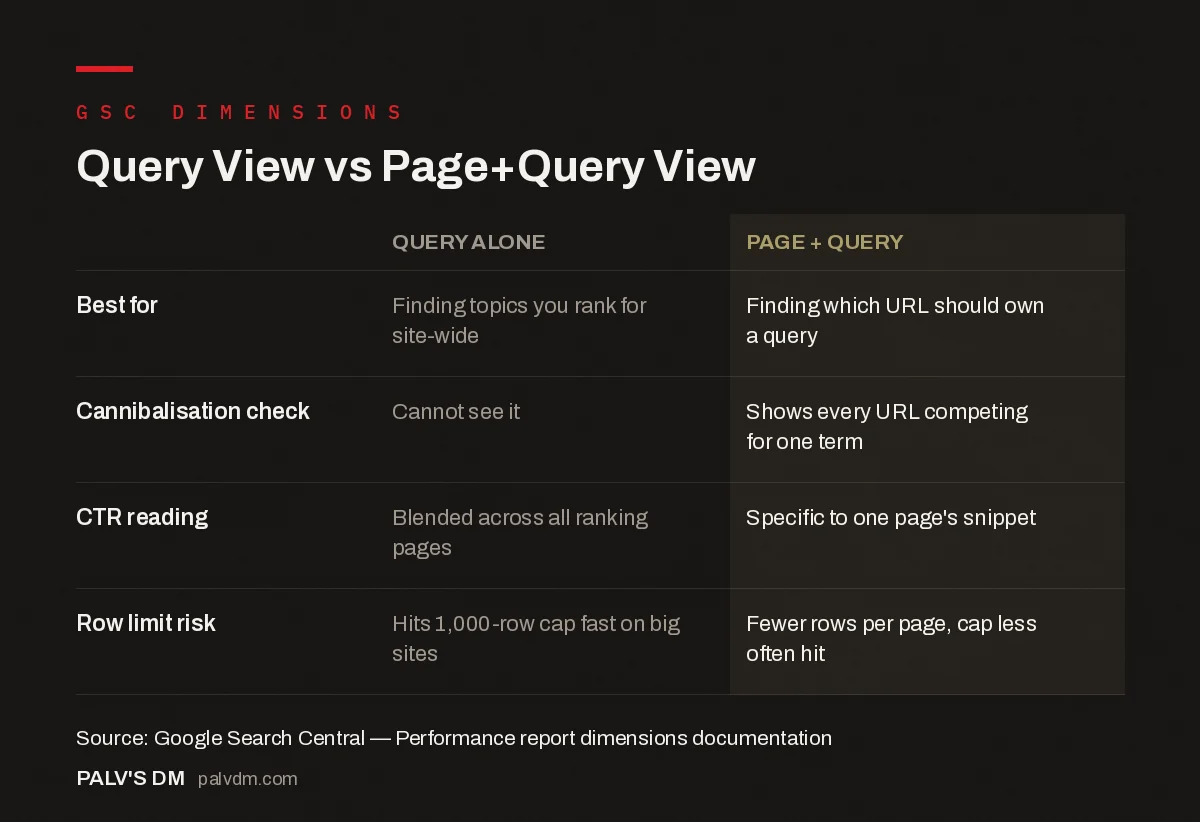
Query View vs Page+Query View
| Query alone | Page + Query | |
|---|---|---|
| Best for | Finding topics you rank for site-wide | Finding which URL should own a query |
| Cannibalisation check | Cannot see it | Shows every URL competing for one term |
| CTR reading | Blended across all ranking pages | Specific to one page’s snippet |
| Row limit risk | Hits 1,000-row cap fast on big sites | Fewer rows per page, cap less often hit |
Reading the wrong view isn’t just a reporting inconvenience — it changes what you’d decide to do next. A content gap and a cannibalisation problem look similar in Query view and completely different in Page+Query view. Getting this right before making changes is part of what we handle inside SEO Growth engagements, alongside the reporting cadence covered in our Google Search Console guide.
If you’re also trying to work out why a swing in either view might be misleading you, see our piece on comparing date ranges without fooling yourself, and if you want to understand what’s driving impressions and clicks apart in the first place, read GSC impressions vs clicks vs position.
FAQ
Can I group by more than two dimensions in Search Console?
No. The native Performance report UI allows grouping by a maximum of two dimensions at a time — for example Page and Query, or Query and Device. If you need more dimensions simultaneously, you’ll need the Search Console API or a connector like Looker Studio, which supports pulling raw data for custom multi-dimension analysis.
Why does the same query show different pages ranking on different days?
Google re-evaluates which URL best matches a query on an ongoing basis. If your site has multiple pages that could plausibly answer the same search, Google may alternate which one it surfaces, especially early on, before one page establishes clearer topical authority. This is often the first visible sign of cannibalisation.
Does Page+Query view show me impressions I’m missing entirely?
No — it only shows impressions that already happened for URLs Google indexed and considered for that query. It won’t reveal missed opportunities where no page on your site appeared at all. For that, Query view combined with keyword research tools is more useful.
Is Page view the same as looking at a URL in Google Analytics?
No. GSC’s Page view reports search-specific metrics — impressions, clicks, CTR, and average position in Google’s results. GA4’s page reports measure on-site behaviour after the click, like engagement rate and time on page. They answer different halves of the same funnel and are worth checking together.


