
Image Alt Text: What to Write and What to Skip
Alt text serves screen reader users first and image search second. What makes it useful for both, and when to leave it empty.
Alt text should describe what an image shows and why it’s relevant to the page it’s on, in one specific sentence under roughly 125 characters — and it should be left empty, not filled with a generic label, on any image that’s purely decorative. Get those two calls right and alt text does its actual job: making the page usable for screen reader users, and giving Google’s image crawlers something specific enough to index correctly.
Most sites get alt text wrong in one of two directions — either every image is left blank, or every image is stuffed with keyword phrases that read nothing like a real description. Both waste the same attribute.
What is alt text actually for?
The alt attribute exists first for accessibility: screen readers announce it in place of the image for users who can’t see it. Google’s own image SEO documentation calls alt text the most important attribute for providing image metadata, useful for accessibility and for helping Google understand the subject matter of an image. Both audiences want the same thing from it — a specific, accurate description — which is why writing good alt text for accessibility and writing it for SEO are the same task, not two competing ones.
What makes alt text useful versus generic?
The test is simple: could this alt text apply to a hundred other images, or does it describe this specific one, on this specific page? “Running shoes” describes a category. “Men’s trail running shoes in grey and orange, side profile on a rock trail” describes an image. The second version helps a screen reader user picture the product and gives Google’s image index something to differentiate this photo from every other running shoe photo online.
| Bad alt text | Why it fails | Better alt text |
|---|---|---|
| “image123.jpg” | Filename left as-is; describes nothing | “Blue ceramic coffee mug with wooden handle” |
| “shoes running shoes buy running shoes” | Keyword stuffing; no real description | “Men’s trail running shoes, grey and orange” |
| “logo” | Too generic; doesn’t say whose logo or where it links | “PalV’s DM — homepage” |
| “image of a chart” | “Image of” is redundant; chart data isn’t described | “Bar chart: organic traffic up 34% year over year” |
When should alt text be left empty?
Purely decorative images — a background texture, a spacer graphic, an icon that repeats next to text that already says the same thing — should use alt="", not a description. An empty alt attribute tells a screen reader to skip the image silently. Leaving the attribute off entirely, rather than setting it empty, can cause some screen readers to read the filename aloud instead, which is worse than saying nothing.
- Decorative dividers and background patterns — empty alt, always.
- Icons paired with visible text — empty alt on the icon; the adjacent text already carries the meaning.
- Complex charts or infographics — a concise alt summary, plus a full text description nearby for detail alt text can’t carry.
- Linked images (logos, banner CTAs) — alt text describes the destination, not just the visual.
What five rules make an alt attribute do its job?
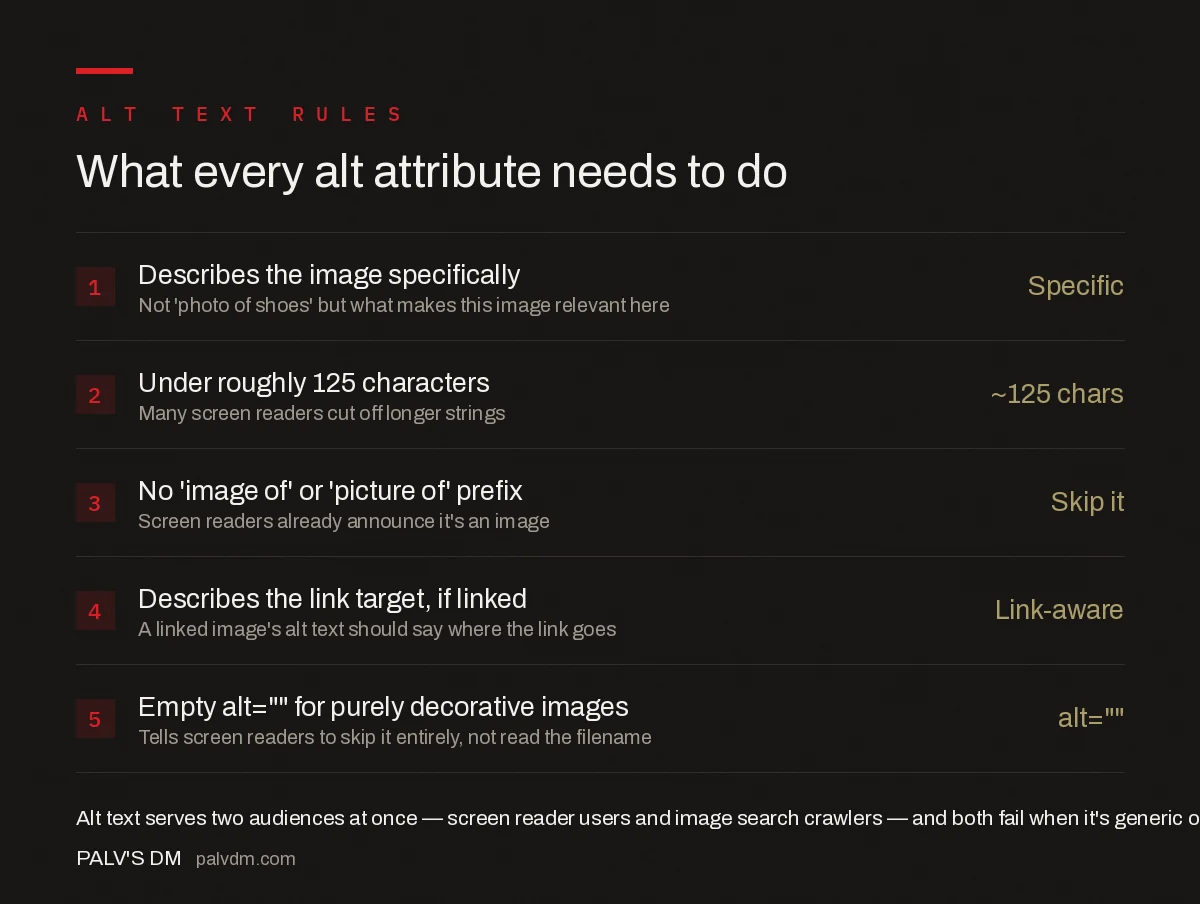
What every alt attribute needs to do
- Describes the image specifically — Specific. Not “photo of shoes” but what makes this image relevant here.
- Under roughly 125 characters — ~125 chars. Many screen readers cut off longer strings.
- No “image of” or “picture of” prefix — Skip it. Screen readers already announce it’s an image.
- Describes the link target, if linked — Link-aware. A linked image’s alt text should say where the link goes.
- Empty alt=”” for purely decorative images — alt=””. Tells screen readers to skip it entirely, not read the filename.
How does alt text interact with image search rankings?
Google’s image SEO guidance is explicit that keyword-stuffed alt text creates a negative user experience for people using screen readers and doesn’t help search performance, in Google’s own words. The sites that actually perform well in image search aren’t doing anything unusual — they maintain accurate, specific alt text consistently across their catalogue while competitors let it slide on new uploads. Alt text is one input among several for image ranking, alongside the filename, surrounding text, and the page’s overall topical relevance, so it works best as part of a complete, accurate page, not as a standalone trick.
What mistakes waste the alt attribute?
- Leaving every alt attribute blank by default. This is the most common failure on large sites with bulk-uploaded product or blog images, and it means every one of those images is invisible to screen reader users and to image search.
- Copy-pasting the same alt text across product variants. “Red t-shirt” and “blue t-shirt” as the only distinguishing word across a dozen product photos gives Google almost nothing to differentiate them.
- Writing alt text no human wrote or checked. Auto-generated alt text from a plugin or AI tool is a reasonable starting point but tends toward generic phrasing that misses page-specific context.
- Treating alt text and the image caption as the same content. A visible caption serves sighted users reading the page; alt text serves users who can’t see the image at all. They can say similar things, but the caption shouldn’t just be duplicated into the alt attribute as a shortcut.
Frequently asked questions
Should every image on a page have alt text?
Every image tag needs an alt attribute, but not every one needs descriptive text. Purely decorative images — background textures, spacer graphics, repeated icons with a text label next to them — should use an empty alt=”” so screen readers skip them instead of reading a meaningless filename.
Does keyword stuffing in alt text help rankings?
No. Google’s own guidance explicitly warns against filling alt attributes with keyword lists, calling it a negative experience for users of screen readers and unlikely to help in Search. Alt text that reads like a real, specific description of the image performs better than one padded with target keywords.
How long should alt text be?
There’s no hard limit, but keeping it under roughly 125 characters is the practical guideline, because many screen readers truncate longer strings. The goal is a complete, specific description within that budget, not a sentence stretched to hit a target length.
What should alt text say for a linked image, like a logo that goes to the homepage?
It should describe the link’s destination, not just the image. A site logo linking to the homepage should use alt text like “Company Name — homepage,” not just “logo,” because a screen reader user needs to know what clicking the image does.
Is AI-generated alt text good enough?
It’s a reasonable starting point but rarely a finished one. AI image descriptions tend toward generic output like “a photo of a beach,” missing the context that makes alt text useful — why this specific image is on this specific page. A quick human edit for context is usually worth the time.
Sources
- Image SEO Best Practices — Google Search Central
- On-Page SEO Checklist: Every Element That Matters
- Internal Linking: A Practical Guide
- URL Slugs: Short, Clean, and Keyword-Bearing
- Anchor Text Optimisation Without Over-Optimising
- FAQ Blocks: The Single Highest-Yield On-Page Element
Want this done on your site?
Every PalV’s DM engagement starts with a free audit of your actual website — a 12-point
crawl covering what is blocking indexation, on-page gaps against your primary keywords, speed
findings, and the three to five fixes worth making first. Delivered in two working days. No
payment details, and the findings are yours whether you hire us or not.


