
Log-Based vs Tag-Based Analytics for SEO
Server logs and GA4 measure different things. Here's when to use log-based analytics, when tag-based analytics wins, and why most sites need both.
Published August 2026. Log-based analytics and tag-based analytics answer different questions, not the same question in two ways. Server logs tell you what search engine crawlers actually did on your site — every request, every status code, every bot visit, with no sampling and no JavaScript dependency. Tag-based tools like GA4 tell you what human visitors did after a page loaded in their browser. If you’re only running one of the two, you’re missing half the picture of how your site performs in search.
What’s the Core Difference Between Log-Based and Tag-Based Analytics?
Log-based analytics reads your web server’s raw access logs — the record every server keeps of each request it receives, including the user agent, timestamp, URL requested, and HTTP status code returned. This captures every visit, bot or human, with no reliance on JavaScript executing correctly in a browser.
Tag-based analytics, the GA4 model, relies on a JavaScript snippet firing in the visitor’s browser after the page loads. It captures rich behavioral data — session duration, scroll depth, click events — but only for visitors whose browser actually executes the script, accepts cookies where required, and doesn’t block the tag with an ad blocker or privacy tool.
The practical consequence: log files see Googlebot. Tag-based tools almost never do, because crawlers don’t execute JavaScript tracking snippets the way browsers do. If you want to know how Google is actually crawling your site — which pages, how often, whether crawl budget is being wasted on low-value URLs — logs are the only accurate source.
| Question | Log-Based Analytics | Tag-Based Analytics (GA4) |
|---|---|---|
| How often does Googlebot crawl a given page? | Direct answer, from raw requests | Cannot answer — bots don’t fire GA4 tags |
| Which pages get 404s or 500s in practice? | Every server error, with the requesting user agent | Only errors a real browser hit and successfully sent a tag from |
| How long did a visitor spend reading an article? | Not tracked at this granularity | Direct answer, via engagement time |
| Which channel drove a converting session? | Not available without heavy custom parsing | Direct answer, via attribution reporting |
| Is crawl budget being wasted on parameter URLs? | Direct answer, from crawl frequency by URL pattern | Cannot answer — GA4 has no crawler visibility |
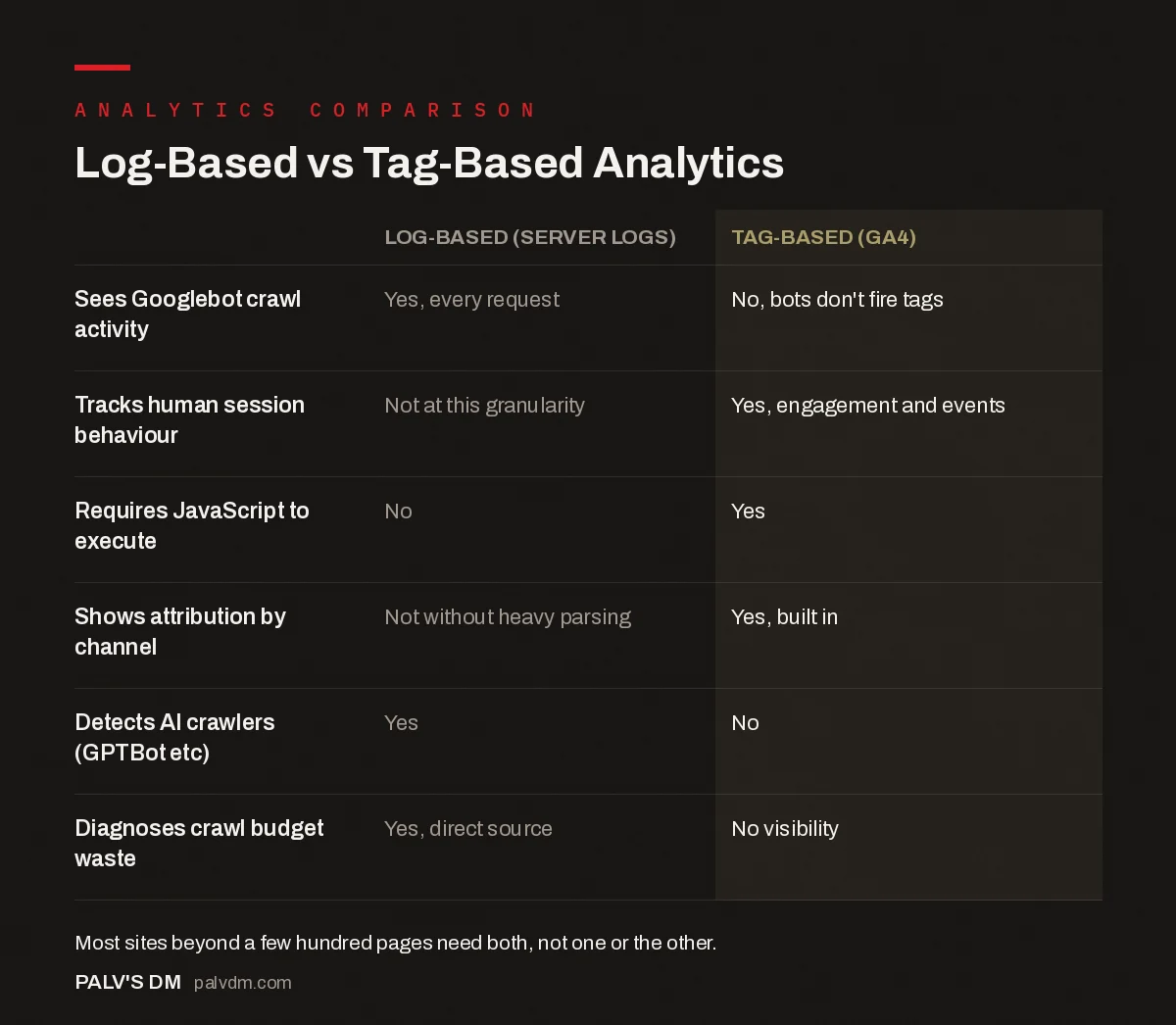
Log-Based vs Tag-Based Analytics
| Log-Based (Server Logs) | Tag-Based (GA4) | |
|---|---|---|
| Sees Googlebot crawl activity | Yes, every request | No, bots don’t fire tags |
| Tracks human session behaviour | Not at this granularity | Yes, engagement and events |
| Requires JavaScript to execute | No | Yes |
| Shows attribution by channel | Not without heavy parsing | Yes, built in |
| Detects AI crawlers (GPTBot etc) | Yes | No |
| Diagnoses crawl budget waste | Yes, direct source | No visibility |
When Should You Use Log Files Instead of GA4?
- Diagnosing crawl budget problems on large sites. If you run an e-commerce catalog or publisher site with tens of thousands of URLs, logs show exactly which pages Googlebot is spending time on and which it’s ignoring.
- Confirming a migration didn’t break crawling. After a domain move or URL restructure, log files show whether Googlebot is finding and requesting the new URLs, independent of whether GA4 tags are firing correctly on them yet.
- Investigating indexing gaps. If pages aren’t getting indexed, logs tell you whether Google is even requesting them. If a URL never appears in the logs, the problem is discovery or crawlability, not content quality.
- Auditing which bots hit your site. Beyond Googlebot, logs show AI crawlers (GPTBot, ClaudeBot, PerplexityBot and similar), scrapers, and malicious traffic that tag-based tools never register.
When Is Tag-Based Analytics the Better Tool?
For anything involving human behavior — conversion paths, engagement, on-page interaction, attribution across marketing channels — GA4 is the right tool and logs simply don’t capture that layer. Server logs have no concept of a “session” the way GA4 defines it, no scroll tracking, no event-level conversion data. If your question is about what people do on your site, not what crawlers do, tag-based analytics wins by default.
How Do You Access and Read Server Log Files?
Most hosting providers give you raw access logs through cPanel, an FTP directory, or a hosting dashboard — the exact path depends on your host. For sites on shared hosting, logs may only be retained for a short rolling window, so if you need historical crawl data, set up log archiving before you need it, not after.
Once you have the raw files, a dedicated log analyzer (Screaming Frog’s Log File Analyser is a common starting point, with a free tier that handles a limited volume of log events) parses the data into readable reports: crawl frequency by URL, status code breakdowns, and bot identification. Reading raw logs directly is possible for small sites but becomes impractical past a few thousand lines a day.
What Does a Real Crawl Budget Problem Look Like in Log Data?
A common pattern on mid-sized e-commerce sites: log analysis shows Googlebot spending the bulk of its daily crawl requests on faceted navigation URLs — filter combinations like color and size parameters — while genuinely new product pages get crawled only every few weeks. In GA4, none of this is visible. You’d just see that new products take a long time to start appearing in organic search, with no obvious cause in the behavioral data.
Cross-referencing the log data with Search Console’s crawl stats report usually confirms the diagnosis: high crawl request volume against low-value parameter URLs, low crawl frequency against the pages that matter for revenue. The fix is typically a combination of robots.txt rules, canonical tags, and internal linking changes — none of which a GA4-only view would have surfaced as the root cause.
How Do Log Data and Search Console Data Complement Each Other?
Search Console’s crawl stats report gives you an aggregated version of what log files show in granular detail — total crawl requests, response codes, and file types over time, sourced directly from Google’s own crawl data rather than your server’s raw logs. It’s a faster starting point for spotting crawl anomalies without needing log file infrastructure.
The limitation is granularity and history: Search Console typically shows a rolling 90-day window and aggregates by category rather than exposing every single request. Log files give you the full detail — exact timestamps, every URL, every user agent — when you need to trace a specific issue rather than spot a general trend. Use Search Console as the early warning system and logs as the diagnostic tool once something looks off.
Do You Need Both, or Can One Replace the Other?
For any site beyond a small brochure site, you need both. They’re not redundant — a log analysis tells you a page is being crawled; GA4 tells you whether visitors who land on it convert. Relying on GA4 alone means flying blind on crawl efficiency and indexing issues, which are often the actual cause of an SEO plateau that looks like a content or ranking problem from inside GA4’s dashboard. Relying on logs alone means you can see bots hitting your site with no idea whether any human visitor ever did anything valuable once they arrived.
FAQ
Do small sites need log file analysis?
Usually not as an ongoing practice. A site with a few dozen pages rarely has a crawl budget problem worth diagnosing through logs. Log analysis earns its keep on larger sites — typically several hundred pages or more — where crawl efficiency genuinely affects how quickly new or updated content gets indexed.
Can I see AI crawlers like GPTBot in Google Analytics?
No. GA4 only registers visits where a browser executes the tracking tag, and AI crawlers don’t run JavaScript the way a human browser does. Server logs are the only reliable way to see how often AI crawlers are accessing your content, which matters increasingly for AI visibility and citation tracking.
Does log file analysis require developer access?
You typically need either hosting panel access or FTP/SSH access to pull the raw log files, which is usually something a site admin or hosting account owner has without needing a developer. Parsing and interpreting them is more approachable with a dedicated tool than reading raw text.
How far back do server logs usually go?
This varies significantly by host — some retain 7 days, others 30, some archive indefinitely if configured to. If crawl history matters to your SEO work, set up automated log archiving to cloud storage rather than relying on your host’s default retention window.
Choosing the Right Tool for the Question You’re Asking
The mistake isn’t picking the wrong tool — it’s assuming one tool answers every measurement question. Log files and GA4 aren’t competing standards; they’re two lenses pointed at different parts of the same site. A crawl budget problem won’t show up in GA4 no matter how carefully you dig, and a conversion rate problem won’t show up in a log file no matter how many status codes you review.
If your SEO reporting currently leans entirely on GA4 and Search Console, log analysis is often the missing layer that explains why indexing lags behind content production. Our SEO Growth service includes crawl and log analysis as part of technical SEO work for sites where crawl efficiency is limiting organic growth.
For the tag-based side of this comparison, see GA4 for SEO: the setup that answers real questions and server-side tracking: is it worth the complexity. And if your GTM container needs a clean install before any of this data is trustworthy, start with setting up Google Tag Manager without breaking your site.
For the crawl-and-index side that server logs speak to directly, see Google Search Console: the reports that actually matter.


