
Event Schema for Webinars and Workshops
Event schema for webinars and workshops: the required fields, why Google's rich results still require a physical location, and how to mark up virtual events properly.

Event schema needs three required fields to be eligible for Google’s rich results at all: name, startDate, and a location marked up as a physical Place. That last part surprises a lot of people running webinars, because Google’s current guidelines explicitly exclude events with no real-world component from the event rich result. You can still mark up a purely virtual event for other reasons. You just won’t get the calendar-style listing in Search for it.
Most “Event schema for webinars” tutorials skip that detail entirely and walk you straight through adding VirtualLocation and eventAttendanceMode as if that settles the matter. It’s valid schema.org markup and it’s genuinely useful for AI systems parsing your page. It just isn’t what unlocks Google’s event rich result, and conflating the two wastes a lot of people’s time debugging markup that was never going to trigger the result they expected.
What does Event schema actually require?
Per Google Search Central’s current documentation, three properties are required for eligibility: name (the event’s title, never the venue’s name), startDate (in ISO-8601 format, including the timezone), and location, typed as a Place with an address. Everything past that is recommended, not required, but the recommended list is where most of the actual value sits: endDate, eventStatus, image, offers, organizer, and performer all shape whether Google shows a genuinely useful result or a bare-minimum one.
Why don’t purely virtual webinars qualify for the event rich result?
Because Google says so, in plain language: “Virtual experiences that have no real-world component aren’t supported. Events must take place in a physical location.” That’s a direct quote from Google’s own Event structured data guide, current as of this writing. It’s a deliberate quality decision, not an oversight, presumably aimed at keeping the event experience tied to things people can actually attend somewhere.
For a workshop or webinar with zero physical component, that rules out the calendar-style rich result no matter how carefully you mark it up. For a hybrid event (a workshop with an in-person venue and a livestream option), you’re fine: mark up the physical Place as required, and layer on VirtualLocation and eventAttendanceMode (set to MixedEventAttendanceMode) as additional, valid schema.org properties describing the online option. Google’s own documentation doesn’t use these virtual-specific properties at all, but nothing stops you from including them for other consumers of your markup.
So should you skip Event schema for a fully online webinar entirely?
No, and this is where we take an actual position rather than just reporting Google’s rule. Mark it up anyway. Structured data isn’t only read by Google’s rich-results pipeline. AI systems parsing your page for citations, other search engines, and your own site’s internal tooling can all use accurately marked-up Event data, and there’s no penalty for including schema that doesn’t win you a specific SERP feature. Use your registration or landing page’s actual address as the location if you have one (your office, your studio, wherever the event is technically hosted from), which keeps the markup honest and satisfies the physical-location requirement without inventing anything, and add eventAttendanceMode: OnlineEventAttendanceMode to describe the online-only nature accurately for anything that does read it.
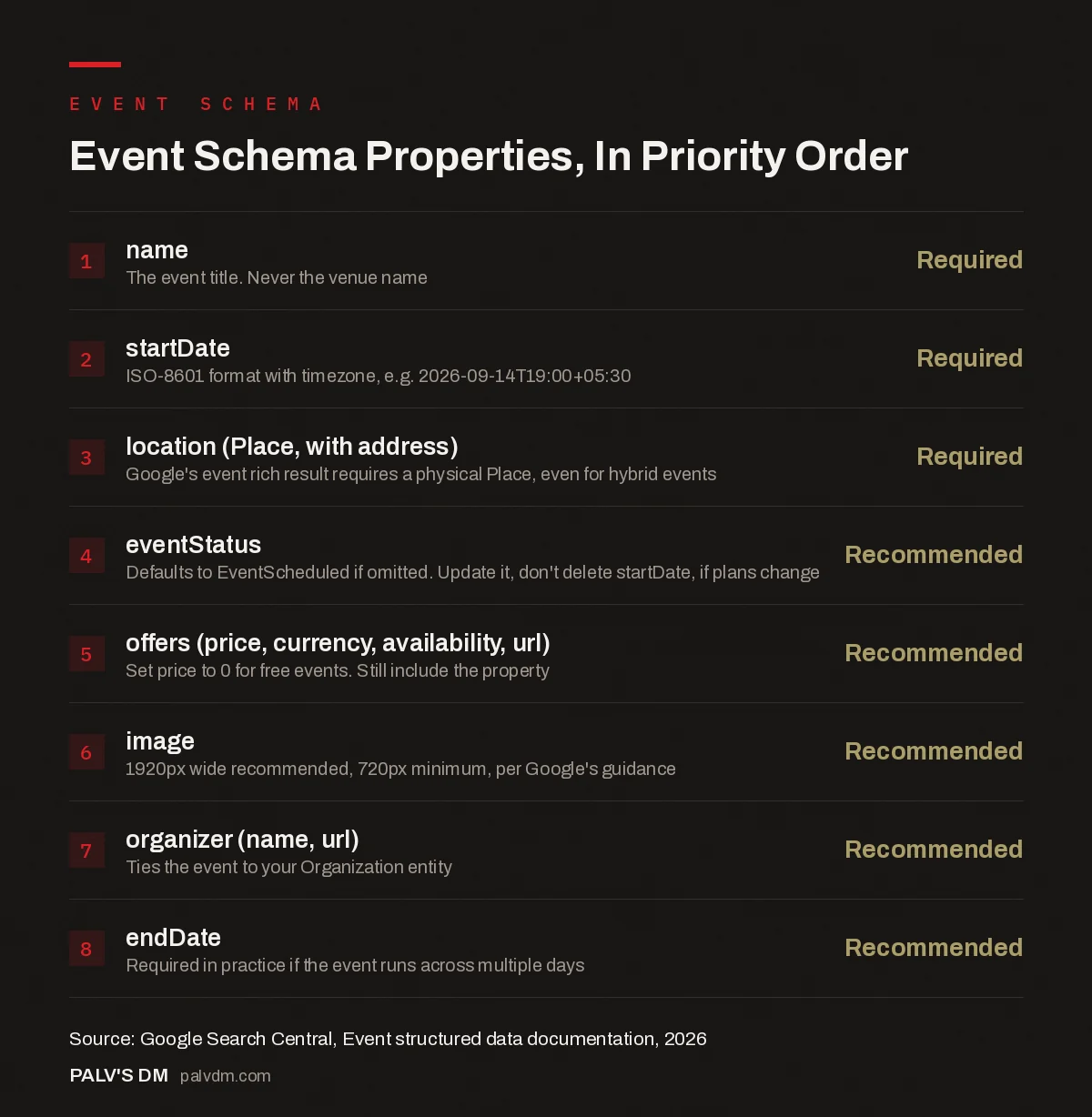
Event Schema Properties, In Priority Order
- name: Required. The event title. Never the venue name.
- startDate: Required. ISO-8601 format with timezone, e.g. 2026-09-14T19:00+05:30.
- location (Place, with address): Required. Google’s event rich result requires a physical Place, even for hybrid events.
- eventStatus: Recommended. Defaults to EventScheduled if omitted. Update it, don’t delete startDate, if plans change.
- offers (price, currency, availability, url): Recommended. Set price to 0 for free events. Still include the property.
- image: Recommended. 1920px wide recommended, 720px minimum, per Google’s guidance.
- organizer (name, url): Recommended. Ties the event to your Organization entity.
- endDate: Recommended. Required in practice if the event runs across multiple days.
What does a complete, working example look like?
For a workshop that mixes a required physical anchor with online attendance, a stripped-down example looks like this:
{
  "@context": "https://schema.org",
  "@type": "Event",
  "name": "Technical SEO Workshop: Core Web Vitals in Practice",
  "startDate": "2026-09-14T15:00+05:30",
  "endDate": "2026-09-14T17:00+05:30",
  "eventStatus": "https://schema.org/EventScheduled",
  "eventAttendanceMode": "https://schema.org/OnlineEventAttendanceMode",
  "location": {
    "@type": "Place",
    "name": "PalV's DM Studio",
    "address": {
      "@type": "PostalAddress",
      "addressLocality": "Ahmedabad",
      "addressRegion": "Gujarat",
      "addressCountry": "IN"
    }
  },
  "image": ["https://palvdm.com/events/seo-workshop-1920x1080.webp"],
  "offers": {
    "@type": "Offer",
    "price": "0",
    "priceCurrency": "INR",
    "availability": "https://schema.org/InStock",
    "url": "https://palvdm.com/events/seo-workshop/"
  },
  "organizer": {
    "@type": "Organization",
    "name": "PalV's DM",
    "url": "https://palvdm.com"
  }
}
Note the required location block still points to a real place, even though attendance is online. That’s what keeps this eligible for the physical-location requirement while eventAttendanceMode tells any consumer of the data that most attendees will join remotely.
How do you handle a postponed, cancelled, or rescheduled workshop?
Update eventStatus, and critically, don’t touch startDate or location when you do it. Google’s guidance is specific here because those two properties are what identify the event as the same event across a status change.
- Cancelled: Set
eventStatustoEventCancelled. LeavestartDateandlocationexactly as they were. - Postponed, new date unknown: Set
eventStatustoEventPostponed. Keep the originalstartDateuntil you actually have a new one. - Rescheduled, new date confirmed: Set
eventStatustoEventRescheduled, updatestartDateandendDateto the new date, and optionally addpreviousStartDatewith the original date.
Deleting the old date instead of updating the status is the single most common mistake we see here. It doesn’t clean anything up; it just removes the property Google actually needs to track the change.
What are the most common Event schema mistakes we see?
Marking up things that aren’t events tops the list. Google explicitly warns against using Event schema for short-term discounts (“50% off until Saturday”), business hours, or coupons dressed up as events. None of those are eligible, and repeated misuse is the kind of pattern that gets a domain’s structured data trusted less broadly, not just rejected for that one page.
Second most common: one Event object trying to cover multiple sessions of the same workshop run on different days. If you’re running the same webinar three times across a month with separate registration links, that’s three separate Event objects, each on its own eligible URL, not one object with three dates crammed in. Google’s guidance is direct about this: each performance with its own ticket gets its own markup.
Third: forgetting that structured data has to match what’s visible on the page. If your JSON-LD lists a price of zero but the visible page charges for a seat, or your markup shows an organizer nobody mentions in the actual copy, that’s a content-schema mismatch, and Google’s quality guidelines treat it as a real violation, not a technicality. Whatever you put in the Event object, make sure a visitor scrolling the actual page could confirm every field just by reading it.
What about a webinar series that repeats weekly or monthly?
Schema.org has no dedicated recurring-event object that Google’s guide documents, so the practical approach is the same one used for any multi-session run: a separate Event object for each occurrence, each with its own startDate and, ideally, its own landing page or at least its own unique URL fragment. It’s more setup work than one object with a repeat rule would be, but it also means each occurrence can carry its own accurate status if one date in the series gets cancelled or moved without touching the others.
If building a new Event object by hand for every weekly session sounds like a maintenance headache, it usually is, which is exactly the kind of repetitive markup task worth automating rather than hand-editing. A template that pulls the date, registration link, and speaker from wherever you already track them, and outputs a fresh Event block each time, keeps this from becoming a recurring chore that quietly falls out of date the third time someone forgets to update it.
Frequently asked questions
Can I use Event schema for a fully online webinar?
Yes, the schema itself is valid and worth adding, but Google’s event rich result specifically excludes events with no real-world component. If Search Console rich results are the goal, anchor the required location to a real physical place (your office, a partner venue) and layer eventAttendanceMode on top to describe the online option accurately.
What happens if I don’t add eventStatus?
Google defaults to treating the event as EventScheduled. That’s fine for events proceeding as planned, but if your event’s status ever changes, you need to add and update this property; there’s no other way to communicate a cancellation or reschedule through the markup.
Do I need to mark up every past webinar on my site?
No. Structured data should describe the current, visible state of a page. A past webinar’s landing page, if it stays live as an archive, is better served by Article or VideoObject schema (if a recording is embedded) than by Event schema implying a future occurrence.
Does Event schema help my SEO rankings, or just rich results?
It doesn’t directly influence rankings. What it does is make your event data unambiguous to Google, other search engines, and AI systems parsing the page, which affects whether you get a rich result and how accurately your event gets represented anywhere your content gets cited or summarized.
How do I test my Event schema before publishing?
Run the page through Google’s Rich Results Test before and after publishing, and fix any errors flagged there first. Non-critical warnings are worth addressing too, but errors are what block eligibility outright.
Sources
- Event structured data (Event), Google Search Central
- Rich Results Test, Google
- Schema Markup: A Practical Guide With Copy-Paste JSON-LD
- HowTo Schema: Where It Still Earns Results
- FAQPage Schema After Google Reduced Its Display
- Video Schema and Getting Into Video Carousels
Want this done on your site?
Every PalV’s DM engagement starts with a free audit of your actual website — a 12-point
crawl covering what is blocking indexation, on-page gaps against your primary keywords, speed
findings, and the three to five fixes worth making first. Delivered in two working days. No
payment details, and the findings are yours whether you hire us or not.


