
How to Build Your Own AI Citation Tracker in a Spreadsheet
Track AI citations across ChatGPT, Perplexity and Gemini with a free spreadsheet method. Step-by-step setup, columns to use, and when to upgrade to a paid tool.
You can track whether your site gets cited in ChatGPT, Perplexity and Gemini for free, using a spreadsheet, a fixed list of prompts, and a weekly hour of manual querying. It doesn’t scale past fifty or so prompts before the manual effort outweighs a paid tool’s subscription cost, but for most small and mid-sized sites, this covers what you actually need to know: is our content showing up, and is that changing over time.
Paid AI visibility platforms automate exactly this process at scale, and they’re worth it once volume justifies the cost. Before paying for one, building the manual version teaches you what actually matters in the data, which makes evaluating a paid tool later a much better-informed decision.
What do you need before you start?
A spreadsheet (Google Sheets works fine and makes sharing easy), access to the AI engines you want to track (ChatGPT, Perplexity, and Gemini all have usable free tiers; Claude too), and a clear sense of the actual questions your buyers ask, not just your target keywords rephrased as questions. The prompt list is the part worth spending real time on, since a lazy prompt list produces data that doesn’t reflect how anyone actually searches.
Step 1: Build a fixed prompt list of 20 to 50 questions
Pull these from real buyer language, not keyword research tools. Check your sales team’s common questions, your support tickets, and the “People Also Ask” boxes for your core topics on Google. A prompt like “what’s the best CRM for a 10-person sales team in India” reflects how someone actually queries an AI assistant; “CRM software India” does not, that’s a Google-style keyword, not a conversational prompt.
Keep the list fixed once you’ve built it. Changing prompts week to week breaks the trend line you’re trying to build. Add new prompts as your business or content expands, but keep the original set running consistently so the comparison stays valid over time.
Step 2: Set up the spreadsheet columns
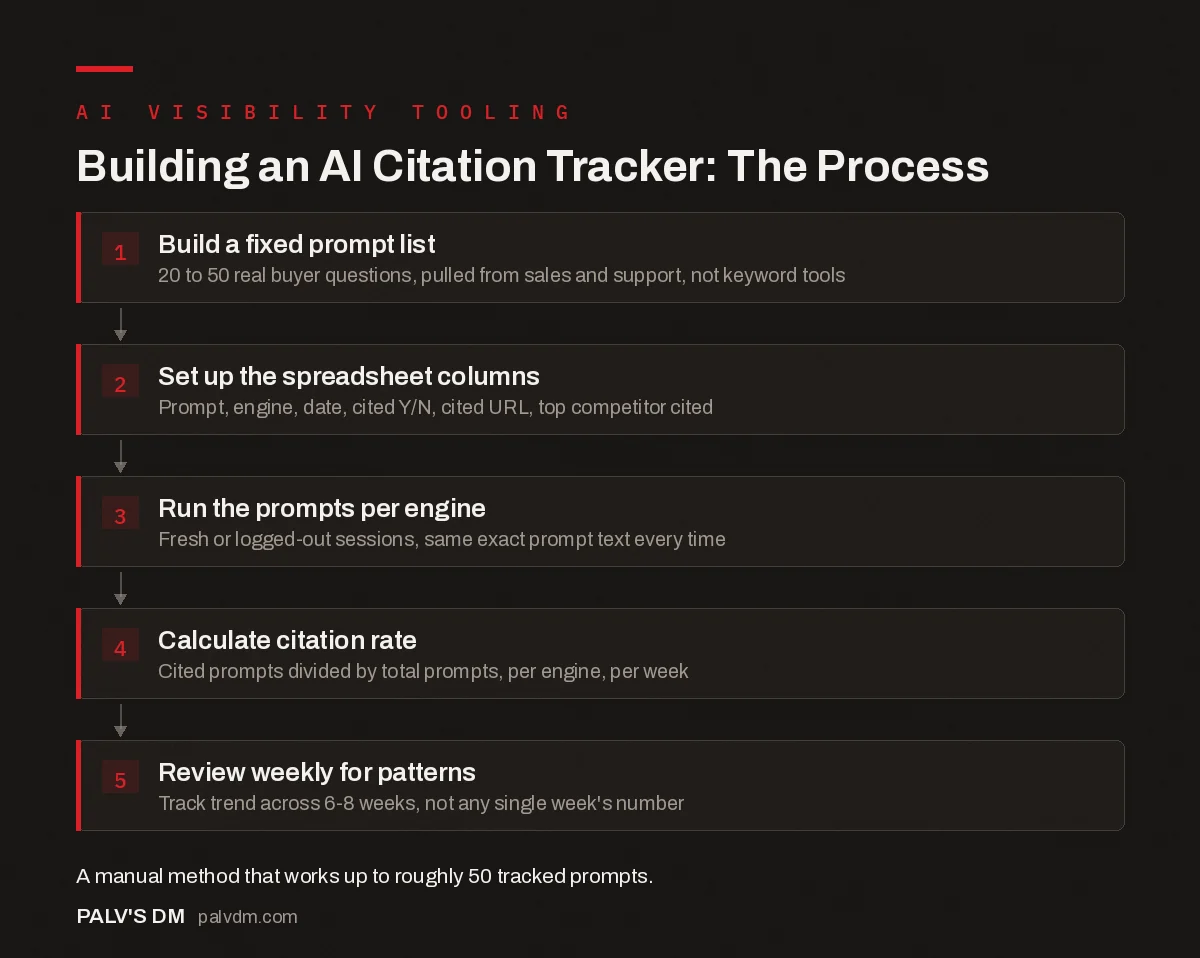
Building an AI Citation Tracker: The Process
- Build a fixed prompt list. 20 to 50 real buyer questions, pulled from sales and support, not keyword tools.
- Set up the spreadsheet columns. Prompt, engine, date, cited Y/N, cited URL, top competitor cited.
- Run the prompts per engine. Fresh or logged-out sessions, same exact prompt text every time.
- Calculate citation rate. Cited prompts divided by total prompts, per engine, per week.
- Review weekly for patterns. Track trend across 6-8 weeks, not any single week’s number.
| Column | What goes in it |
|---|---|
| Prompt | The exact question text, unchanged week to week |
| Engine | ChatGPT, Perplexity, Gemini, Claude, etc. |
| Date checked | So you can filter and chart by week |
| Cited (Y/N) | Was your domain mentioned or linked anywhere in the answer |
| Cited URL | Which specific page, if cited |
| Top competitor cited | Which domain showed up instead, if yours didn’t |
| Notes | Anything unusual, optional but useful for context later |
Resist the urge to add ten more columns before you’ve run a single week of data. The basic version above is enough to see whether citation rate is trending up or down. You can always add complexity once you know which extra fields you’d actually use.
Step 3: Run the prompts and log results, engine by engine
Open a fresh, logged-out or new-session window for each engine where possible, since a personalised chat history can skew what an assistant surfaces compared to what a new user would see. Paste each prompt exactly as written, read the response, and mark whether your domain appears, either by name or by a linked citation, depending on which the engine shows.
This step is genuinely tedious at fifty prompts across four engines, that’s two hundred individual checks. Block a fixed hour weekly rather than trying to fit it in piecemeal; the consistency of the schedule matters more than doing it fast.
Step 4: Calculate a simple citation rate
Citation rate is just cited prompts divided by total prompts checked, per engine, per week. If you were cited on 9 out of 40 prompts on ChatGPT this week, that’s a 22.5% citation rate for that engine. Track this number over time rather than obsessing over any single week’s result, since AI answers vary between identical queries even without any change on your end.
A pivot table off the raw log, engine down the rows, week across the columns, citation rate as the value, turns weeks of manual logging into a trend chart in about two minutes. That chart is the actual deliverable; the raw log is just the data behind it.
Step 5: Review weekly and look for patterns, not single data points
- Which prompts never cite you at all? Those are your biggest content gaps, worth prioritising over prompts where you’re already showing up inconsistently.
- Which competitor shows up most often in your place? Their content on that specific topic is probably structured or sourced in a way the AI engine trusts more, worth studying directly.
- Did citation rate shift after you published or updated content? This is the closest thing to a feedback loop this method gives you, so log content changes alongside the citation data to spot the connection.
What are the real limits of doing this manually?
It doesn’t scale past roughly fifty prompts across several engines before the weekly time cost, ten to fifteen hours a month at that volume, starts costing more in labour than a paid tracking subscription would. It’s also noisier than a dedicated tool: identical prompts can return different answers between sessions, so a single week’s number should be read as a data point in a trend, not a precise score you’d defend to a client without caveats.
What it does reliably show, even with that noise, is direction. A citation rate that’s climbed from 10% to 30% over eight weeks of consistent tracking is a real signal, even if any single week’s exact number wobbles. That directional read is honestly most of what a business needs before investing in AI visibility work at all, paid tooling included.
What does one week of this actually look like, worked through?
Say your prompt list includes “how do I choose an SEO agency in Ahmedabad.” You run it through ChatGPT, Perplexity and Gemini on a Monday morning. ChatGPT’s answer mentions two agencies by name, neither is yours, log a “No” with the two competitor domains noted. Perplexity’s answer links directly to a page on your site as one of four cited sources, log a “Yes” with that URL. Gemini gives a generic answer with no specific domains cited at all, log a “No” but note “no domains cited by anyone” rather than treating it the same as a loss to a named competitor, since that’s a meaningfully different situation for your notes.
Multiply that across your full prompt list and you get a week’s row of data. Do this consistently for six to eight weeks before drawing any real conclusions. One week where you got cited less than usual could be a genuine signal or could just be normal variance in how these engines generate answers session to session. The trend across two months tells you which one it was.
What mistakes make this data less useful than it should be?
- Changing the prompt wording between checks. Even a small rewording can shift an AI engine’s answer meaningfully. Copy the exact prompt text from your list every time, don’t paraphrase it from memory.
- Skipping weeks inconsistently. A gap-filled log makes trend analysis unreliable, since you can’t tell whether a change happened gradually or in the specific week you missed.
- Logging from a personalised or logged-in session. Some AI assistants weight results differently based on account history or location settings. Use a consistent, ideally logged-out or fresh-session setup so you’re comparing like with like week to week.
- Treating “mentioned” and “linked and cited” as the same thing. An engine naming your brand in passing is a weaker signal than one that links directly to a specific page as a source. If you have the column space, track these as separate flags rather than collapsing them into one.
Frequently asked questions
How do you track AI citations manually without a paid tool?
Build a fixed list of 20 to 50 buyer-relevant prompts, run them through each AI engine on a set schedule, and log whether your domain is mentioned or cited in a spreadsheet with columns for the prompt, the engine, a yes/no citation flag, the cited URL, and the date. It’s manual, but it costs nothing beyond the time to run it.
How often should you run an AI citation check?
Weekly, using the same fixed prompt set each time. AI engines re-crawl and re-rank the sources behind their answers frequently enough that a monthly check misses real movement, while checking daily produces more noise than signal for most small sites.
What columns should an AI citation tracking spreadsheet have?
At minimum: prompt text, AI engine, date checked, whether your brand or domain was cited (yes/no), the cited URL if applicable, and which competitor domains appeared instead. A sentiment or context note is useful but optional.
Is manual spreadsheet tracking actually reliable for measuring AI visibility?
It’s reliable for spotting trends over weeks and months on a small, consistent prompt set, less reliable for a precise, real-time citation rate, since AI answers can vary between sessions for the identical prompt. Treat the numbers as directional trend data, not a precise score.
When does manual tracking stop making sense and a paid tool become worth it?
Once you need more than 50 prompts tracked across several engines on a weekly cadence, the manual process stops scaling, roughly ten to fifteen hours a month of repetitive querying and logging. At that volume, a dedicated AI visibility tracking tool that automates the querying becomes worth the subscription cost.
Sources
- Google Search Central: AI features and your website
- OpenAI: GPTBot and how ChatGPT accesses web content
- Generative Engine Optimisation (GEO): The Complete Guide
- AI Visibility Tracking Tools: What Exists and What They Miss
- Building an SEO Audit Workbook in Google Sheets
- Google Sheets Formulas Every SEO Should Know
Want this done on your site?
Every PalV’s DM engagement starts with a free audit of your actual website — a 12-point
crawl covering what is blocking indexation, on-page gaps against your primary keywords, speed
findings, and the three to five fixes worth making first. Delivered in two working days. No
payment details, and the findings are yours whether you hire us or not.


