
How to Optimise a Page for Multiple Related Keywords
One page can rank for multiple keywords only when the SERPs overlap and the intent matches. The test to run first, and how to structure the page once you do.
One page can rank for multiple keywords only when the same piece of content genuinely satisfies what someone searching each term wants — checked by comparing the top 10 Google results for each keyword, not by guessing. When four or more of the same URLs show up for both searches, Google has already decided they share intent, and a single well-structured page can compete for both. When the results barely overlap, forcing them onto one page dilutes it and helps neither keyword rank.
The instinct to stuff a page with every related keyword usually comes from treating keywords as separate targets to hit rather than variations of the same underlying question. Google reads a page by its topic, not by a checklist of exact-match phrases, which is exactly why the SERP-overlap test works better than intuition.
Can one page realistically rank for multiple keywords?
Yes, but only within a specific boundary: the keywords need to represent the same search intent, not just related subject matter. “Best running shoes for flat feet” and “running shoes flat feet recommendations” are close enough in intent that one comprehensive page satisfies both. “Running shoes for flat feet” and “how to fix flat feet” are related in topic but different in intent — one wants product recommendations, the other wants a medical or exercise explanation — and belong on separate pages.
Optimising a single page for multiple genuinely related keywords also builds topical authority: covering a subject comprehensively, with natural variations throughout, signals depth that a page narrowly built around one exact phrase doesn’t.
Step 1: Check SERP overlap before you combine keywords
Search each keyword individually in an incognito window and record the top 10 URLs for each. Count how many of the same URLs appear in both result sets. Four or more shared URLs is a strong signal Google treats the terms as one intent cluster. Fewer than that, and the SERPs are telling you these are different searches that happen to share vocabulary — a case for two pages, not one.
Step 2: Pick one primary keyword and let the rest be supporting
Even when multiple keywords belong on the same page, one still needs to be the primary target — the term that best represents what the page is fundamentally about. Feature it in the title tag, the H1, and the opening 100 words. Every other related keyword becomes a supporting term the page also happens to rank for, not a co-equal target competing for the same real estate in the title and headline.
Step 3: Structure headings around the topic, not each keyword
Write question-style H2s and H3s that map to what someone researching the topic actually wants answered, rather than one heading per keyword variation. A page trying to force a separate H2 for every related term ends up with a heading structure that reads like a keyword list instead of a logical argument, which hurts both readability and the page’s ability to earn a featured snippet.
Step 4: Use natural variations instead of repeating the exact match
Modern ranking systems interpret meaning, not exact string matches, so a page benefits more from naturally varied phrasing — synonyms, related terms, the way a real person would ask the question conversationally — than from repeating one exact keyword phrase at a fixed density. Write for the reader first; the keyword variations that matter will appear naturally when the topic is covered thoroughly.
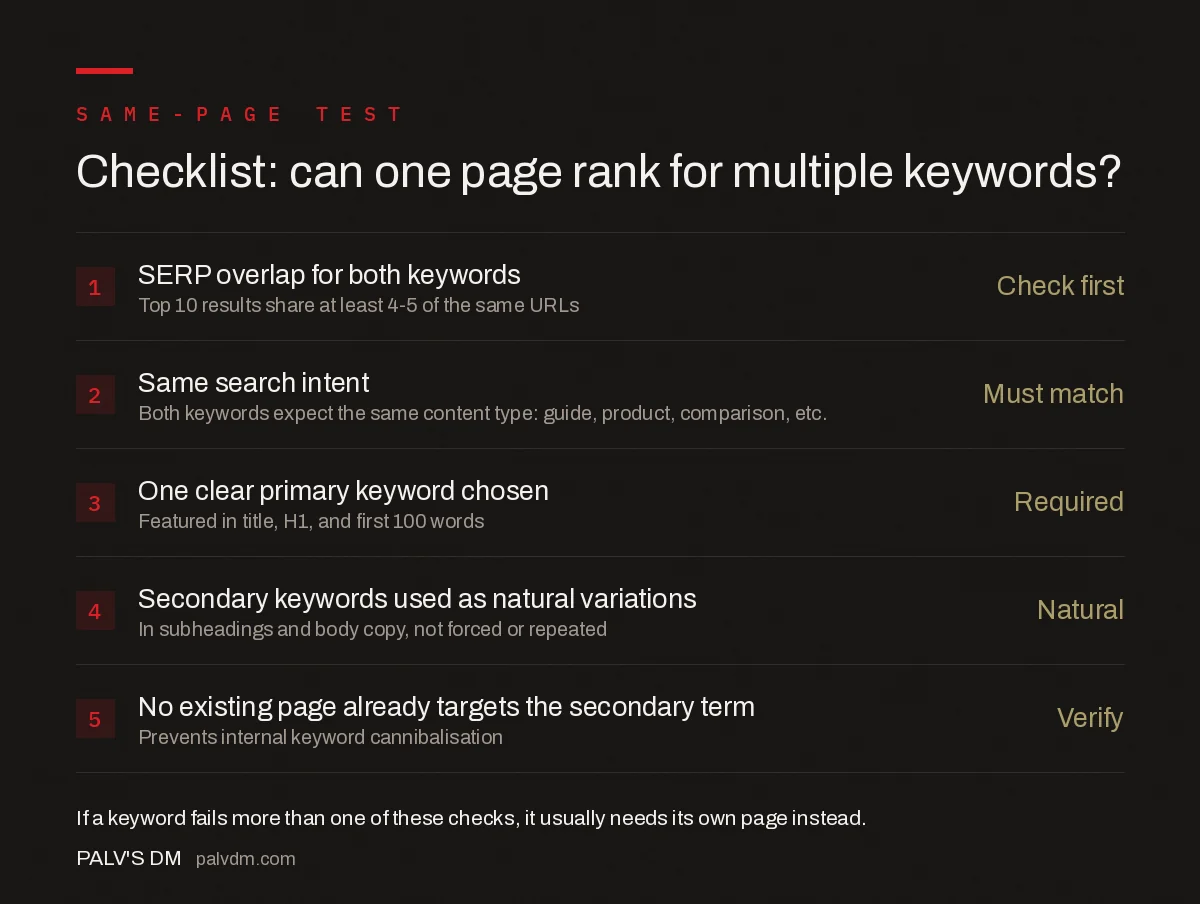
Checklist: can one page rank for multiple keywords?
- SERP overlap for both keywords — Check first. Top 10 results share at least 4-5 of the same URLs.
- Same search intent — Must match. Both keywords expect the same content type: guide, product, comparison, etc.
- One clear primary keyword chosen — Required. Featured in title, H1, and first 100 words.
- Secondary keywords used as natural variations — Natural. In subheadings and body copy, not forced or repeated.
- No existing page already targets the secondary term — Verify. Prevents internal keyword cannibalisation.
How do you find which related keywords belong on the same page?
Start from the primary keyword and pull the “related searches” and “people also ask” entries Google surfaces on that term’s results page — these are Google’s own signal of what it considers adjacent enough to show alongside the main query. Cross-check any candidate keyword using the SERP-overlap test from Step 1 before assuming it belongs. A keyword search tool can surface volume and a long list of variations, but volume alone doesn’t tell you whether a term shares intent; only comparing the actual ranking URLs does that reliably.
Group the keywords that pass the overlap test into rough themes before writing — pricing questions, comparison questions, how-it-works questions — and let each theme suggest a subheading rather than assigning one keyword to one paragraph. A page organised by theme reads naturally and still ends up covering every related term the grouping was built from.
How does internal linking support a multi-keyword page?
Once a page is confirmed as the right target for a cluster of related keywords, internal links pointing to it from elsewhere on the site should use varied anchor text drawn from those same related terms, rather than repeating one exact phrase every time. This reinforces to Google which page is authoritative for the whole cluster of related searches, not just the single keyword used most often in navigation. It also gives the page a natural spread of anchor text, which tends to look organic rather than engineered.
Revisit the keyword grouping periodically rather than treating it as a one-time decision. Search intent shifts as a topic matures — a term that once returned mixed informational and commercial results can consolidate toward one or the other over a year or two, which changes whether it still belongs on the same page as its original companions. A quarterly recheck of SERP overlap for the site’s highest-traffic multi-keyword pages catches this drift before it turns into unexplained ranking volatility.
When should you split into separate pages instead?
Split when the keywords fail the SERP-overlap test, when they represent genuinely different products or services even if the vocabulary is similar, or when an existing page on the site already ranks for one of the terms as its primary keyword. Common mistakes that lead teams to combine keywords that should be separate:
- Assuming similar wording means similar intent. “Email marketing software” and “email marketing tips” share two words and almost nothing else in terms of what the searcher wants.
- Ignoring an existing page that already targets the term. Adding a secondary keyword to a new page without checking whether another page on the site already owns it creates cannibalisation, not additional reach.
- Treating commercial and informational intent as interchangeable. A keyword implying “buy now” and one implying “learn about” rarely belong on the same page, even within the same product category.
- Combining keywords at very different funnel stages. A broad awareness-stage term and a narrow bottom-of-funnel comparison term usually need different content depth and structure.
Same page vs separate pages: the decision table
| Signal | Same page | Separate pages |
|---|---|---|
| SERP overlap | 4+ shared URLs in top 10 | Little to no overlap |
| Search intent | Identical content type expected | Different content type expected |
| Funnel stage | Same stage (both informational, or both commercial) | Different stages |
| Existing site content | No page already owns either term | A page already ranks for one term |
Frequently asked questions
How many keywords should one page target?
There’s no fixed number. A page can legitimately target a primary keyword plus several close variations and related terms, as long as they share search intent and the SERPs for each overlap significantly. The limit is topical coherence, not a keyword count.
How do I check if two keywords share the same search intent?
Search each keyword separately in an incognito browser window and compare the top 10 results. If four or more of the same URLs rank for both terms, Google is treating them as the same intent, and one well-structured page can realistically target both.
What is keyword cannibalisation and how does targeting multiple keywords cause it?
Cannibalisation happens when two pages on the same site compete for the same keyword, splitting ranking signals between them. It occurs when a page is optimised for a secondary keyword that another page on the site already targets as its primary term.
Should the primary keyword appear in the URL?
Yes, where practical. Including the primary keyword in the URL slug reinforces the page’s topic for both users scanning search results and crawlers parsing the page’s structure, though it’s one signal among many rather than a requirement Google enforces strictly.
Sources
- SEO Starter Guide — Google Search Central
- On-Page SEO Checklist
- Content Templates That Keep Quality Consistent Across Writers
- Keyword Density Is a Myth. Here’s What Replaced It
- How to Write Title Tags That Google Won’t Rewrite
Want this done on your site?
Every PalV’s DM engagement starts with a free audit of your actual website — a 12-point
crawl covering what is blocking indexation, on-page gaps against your primary keywords, speed
findings, and the three to five fixes worth making first. Delivered in two working days. No
payment details, and the findings are yours whether you hire us or not.


