
Self-Referencing Canonicals: Necessary or Not?
The myth that canonical tags are only for pages with an existing duplicate is backwards. Why every indexable page should self-canonicalise by default.
Yes, every indexable page should carry a self-referencing canonical tag, even one with no duplicate anywhere on the site. The tag costs nothing to add, adds no risk when done correctly, and closes off an entire category of future problems: tracking parameters, session IDs, and accidental URL variants that get crawled and indexed as if they were separate pages. The myth that canonical tags are only for pages with an existing duplicate is exactly backwards. The whole value of a self-referencing canonical is that it’s in place before the duplicate shows up.
This gets debated more than it should, usually framed as “extra code for no benefit” on a page that currently has no competing URL. That framing ignores how duplicates actually appear on a live site: not planned, but generated by a CMS, an analytics tool, or a filter someone adds six months later.
The cost argument doesn’t hold up either. On WordPress, Shopify, and most modern CMS platforms, self-referencing canonicals are generated automatically by the SEO plugin or the templating layer once configured correctly — this isn’t a manual tag added to every page by hand. The actual work is a one-time template check, not a page-by-page task, which makes the “not worth the effort” objection weaker than it sounds.
What does a self-referencing canonical actually do?
A self-referencing canonical is a <link rel="canonical" href="..."> tag where the URL in the href attribute matches the URL of the page it’s on. It makes an explicit statement to Google: “this exact URL is the one you should index for this content,” rather than leaving that decision to be inferred from the sitemap, internal links, and redirect behaviour around the page.
Functionally, it’s identical to any other canonical tag. The only difference is the target: instead of pointing away from a duplicate toward a preferred version, it points a page at itself. That distinction is why it gets dismissed as unnecessary — there’s no visible duplicate for it to “fix.” But the tag isn’t fixing a current problem. It’s declaring a default before one exists.
Is a self-referencing canonical really necessary, or just nice to have?
Necessary, for one practical reason: URLs on a live site rarely stay as clean as they were on launch day. Marketing adds UTM parameters. A filter or sort feature generates a query-string variant. A staging or preview URL gets accidentally crawled before it’s blocked. Each of these creates a URL that is technically different from the canonical page but serves near-identical content.
Without a self-referencing canonical already in place, every one of those variants is a fresh ambiguity Google has to resolve on its own. With one in place, the resolution is already decided: no matter how a page gets reached, the canonical tag on it points back to the one URL that should be indexed.
What happens if you skip it?
Nothing happens immediately, which is exactly why the myth persists. A page with no canonical tag and no duplicate looks and performs identically to one with a self-referencing tag, right up until a duplicate appears. At that point, Google is choosing a canonical URL using secondary signals: which version is in the sitemap, which one internal links point to, and which one loads faster. Those signals frequently disagree with each other, and the eventual choice is not guaranteed to be the URL you’d have picked.
| Scenario | With self-referencing canonical | Without one |
|---|---|---|
| UTM-tagged link shared on social media | Canonical already declares the clean URL as authoritative | Google must infer the clean URL is preferred from other signals |
| Filter/sort parameter added later by a developer | New parameterised URLs still canonicalise correctly if templated right | No existing pattern to follow; each new URL is a fresh decision |
| Staging subdomain accidentally crawled | Canonical on production pages points crawlers back to production | Staging and production can compete for the same query |
| Trailing-slash inconsistency in internal links | Canonical enforces one version regardless of link variance | Both slash variants may get crawled and indexed separately |
Does Google infer a canonical without one anyway?
Yes, and this is the part of the myth with some truth in it. Google’s algorithms will attempt to pick a canonical URL even on pages with no rel=”canonical” tag at all, using the sitemap, internal link patterns, redirects, and duplicate-content clustering. On a small, simple site with clean URL structures, this inference usually lands correctly.
The problem is that “usually” isn’t a standard worth building a site on. Inference is a fallback mechanism, not a preference. It exists for the sites that didn’t declare their own canonicals, not as an equally reliable alternative to declaring them. A self-referencing canonical replaces a probabilistic guess with a fact stated directly in the page’s head.
When would a self-referencing canonical be wrong?
Rare, but worth naming so the rule isn’t applied blindly:
- True duplicate content — a print-friendly version, an AMP page, or a syndicated republish should canonicalise to the original, not to itself. This is also where a cross-domain canonical applies, for content republished on a different domain entirely.
- Faceted or parameterised URLs with no unique value — a colour-filtered product listing that shows the same products as the unfiltered page should usually canonicalise to the unfiltered version, not to itself.
- Pages behind a client-side redirect — a URL that immediately forwards elsewhere shouldn’t self-canonicalise; it should carry a proper 301, since meta refresh and JavaScript redirects are handled inconsistently by crawlers and shouldn’t be relied on for this.
Outside those specific cases, self-referencing is the correct default, including on every paginated page in a series, which should canonicalise to itself rather than to page one.
One more edge case worth naming: query parameters that genuinely change the content, such as a language selector or a currency switch on an ecommerce listing, are not always candidates for self-canonicalisation either. If the parameterised version shows meaningfully different content, it may deserve its own indexable URL with its own self-referencing canonical, rather than being folded into the base page. The test is always the same: does this URL show a different result a searcher would want, or the same result with a different address?
How do you audit self-referencing canonicals at scale?
A full-site crawl with Screaming Frog or Sitebulb, configured to extract the canonical target for every URL, is the fastest way to check compliance. Filter the results for any URL where the canonical target doesn’t match the page’s own URL, then manually confirm each one is an intentional exception rather than a templating bug. On sites with thousands of URLs, a single broken template can silently mis-canonicalise an entire section, so checking a sample of pages per template type catches issues a page-by-page review would miss.
Search Console’s Page Indexing report adds a second layer: the “Alternate page with proper canonical tag” status shows every URL Google chose not to index because it deferred to a different canonical, which is the fastest way to spot a template that’s canonicalising the wrong direction. Cross-checking that list weekly during a migration or major template change catches problems while they’re still a handful of URLs, not thousands.
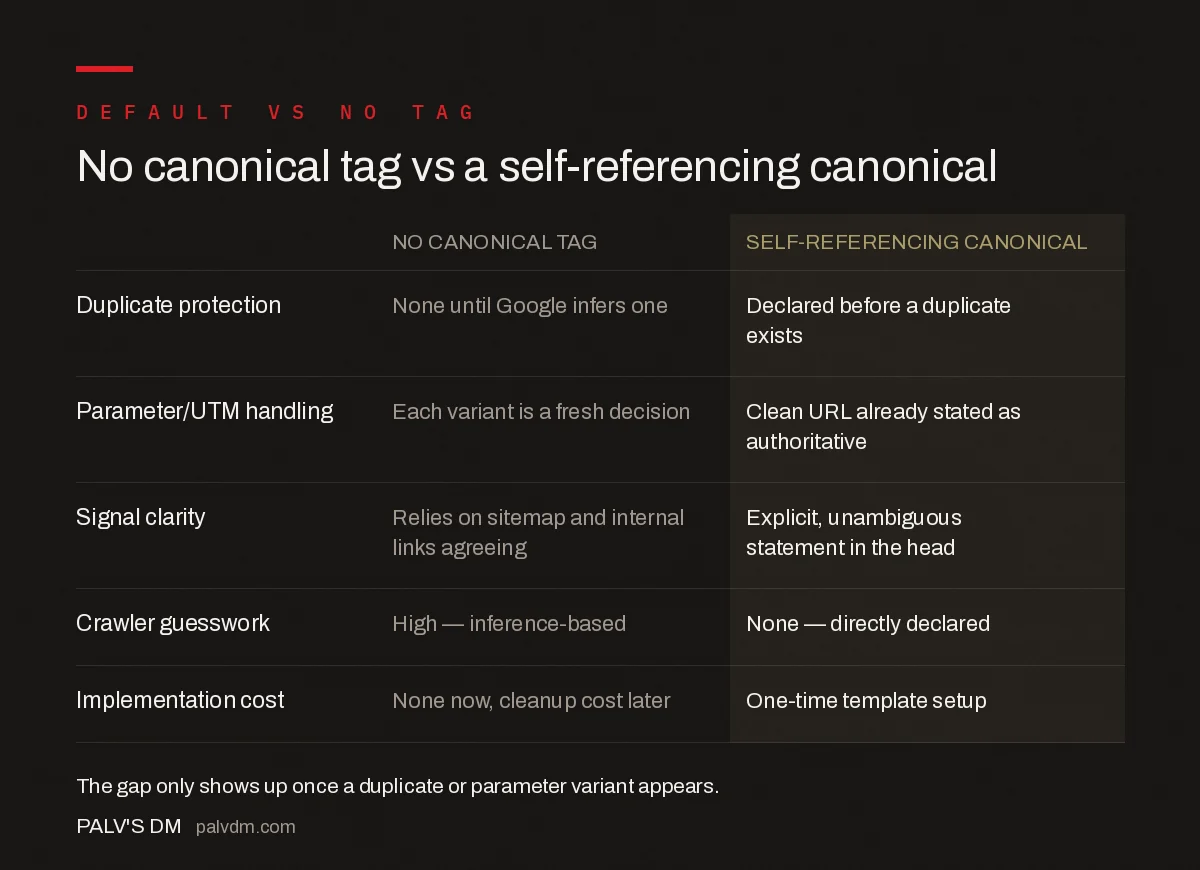
No canonical tag vs a self-referencing canonical
| No canonical tag | Self-referencing canonical | |
|---|---|---|
| Duplicate protection | None until Google infers one | Declared before a duplicate exists |
| Parameter/UTM handling | Each variant is a fresh decision | Clean URL already stated as authoritative |
| Signal clarity | Relies on sitemap and internal links agreeing | Explicit, unambiguous statement in the head |
| Crawler guesswork | High — inference-based | None — directly declared |
| Implementation cost | None now, cleanup cost later | One-time template setup |
Frequently asked questions
Does every page need a self-referencing canonical tag?
Yes. Every indexable page should carry a canonical tag pointing to its own URL, even when no duplicate currently exists. It costs nothing to implement and protects the page against tracking parameters, session IDs, or CMS-generated URL variants being crawled and indexed as separate pages later.
What happens if a page has no canonical tag at all?
Google will still try to pick a canonical URL using other signals: the sitemap, internal links, redirects, and HTTPS/HTTP or www/non-www consistency. Without an explicit tag, that decision is entirely automated and can land on a URL variant you didn’t intend, especially once parameters or duplicate paths appear.
Can a self-referencing canonical tag hurt a page?
No, as long as it’s implemented correctly: one tag, an absolute URL, exact protocol and trailing slash, pointing at a 200-status version of the same page. A self-referencing canonical that’s malformed or points to a redirect is a different, unrelated mistake.
Do paginated pages need their own self-referencing canonicals?
Yes. Since Google deprecated rel=next/prev as a pagination signal in 2019, each page in a paginated series should canonicalise to itself rather than to page one, so Google can crawl and index every page in the series independently.
Does Google index a page correctly even without a canonical tag?
Often, yes, on a simple site with no duplicate paths. But “often” is the problem: the moment a CMS adds a tracking parameter, a print view, or a staging URL that gets accidentally crawled, a site without self-referencing canonicals has no defence already in place, while a site with them does.
Sources
- How to Specify a Canonical with rel=”canonical” — Google Search Central
- Canonicalization — Google Search Central
- Technical SEO: The Complete Working Guide
- 301 vs 302 Redirects: When Each One Is Correct
Want this done on your site?
Every PalV’s DM engagement starts with a free audit of your actual website — a 12-point
crawl covering what is blocking indexation, on-page gaps against your primary keywords, speed
findings, and the three to five fixes worth making first. Delivered in two working days. No
payment details, and the findings are yours whether you hire us or not.


