
WebP and AVIF: Choosing a Modern Image Format
AVIF compresses 20-30% smaller than WebP at equal quality but encodes far slower. Which format to use, when, and how to serve both safely with a fallback.
AVIF compresses roughly 20-30% smaller than WebP at equivalent visual quality and supports HDR, but it encodes 10 to 50 times slower and has thinner tooling support — for most sites, the right answer is serving both: AVIF for browsers that support it, WebP as the fallback, using a <picture> element. Treating this as an either/or choice misses that the two formats aren’t actually competing for the same job anymore.
WebP replaced JPEG and PNG as the default modern format years ago and is supported everywhere. AVIF is the newer, more efficient format layered on top of that baseline, not a replacement for it — at least not yet, given how much slower it is to encode at scale.
What’s the actual difference between WebP and AVIF?
Both are modern raster formats designed to beat JPEG and PNG on file size while keeping visual quality high, and both support lossy compression, lossless compression, transparency, and animation. The differences that matter for a production website come down to four things: compression efficiency, encoding speed, browser support, and tooling maturity.
| Attribute | WebP | AVIF |
|---|---|---|
| Compression vs JPEG | ~25-35% smaller | ~45-55% smaller |
| Compression vs each other | Baseline | ~20-30% smaller than WebP at equal quality |
| Encoding speed | Fast | 10-50x slower, minutes for large high-quality photos |
| Browser support | Universal across modern browsers | Full support across Chrome, Firefox, Safari, Edge since 2024 |
| HDR / wide colour gamut | No | Yes |
| CMS and plugin tooling | Mature, default in most build pipelines | Growing, not yet universal in older CMS setups |
The compression gap is real but the encoding-speed trade-off is the part that changes the decision for a lot of sites: converting a large product catalogue or media archive to AVIF at high quality settings can turn a five-minute WebP batch job into hours, which matters for build pipelines and CI systems with time limits.
When should you choose AVIF over WebP?
- Large hero and above-the-fold images where the file-size saving directly reduces LCP, and where the one-time encoding cost per image is worth it because the image is reused across many page loads.
- Photography-heavy sites — galleries, real estate listings, ecommerce product shots — where AVIF’s compression advantage compounds across hundreds of images and the bandwidth savings are substantial.
- Sites needing HDR or wide colour gamut, a capability WebP doesn’t have at all.
When does WebP still make more sense?
- High-frequency, low-value images — thumbnails, icons, UI chrome — where AVIF’s encoding overhead outweighs the marginal file-size benefit.
- Build pipelines with tight time budgets, such as CI systems that regenerate thousands of images per deploy and can’t absorb AVIF’s slower encode times.
- CMS platforms or plugins without mature AVIF support, where forcing AVIF means fighting the tooling instead of using it.
- Animated images, where WebP’s animation tooling and browser handling is currently more consistent than AVIF’s.
How do you serve both formats safely?
The <picture> element with ordered <source> tags lets the browser pick the best format it supports, falling back automatically:
| Element | Purpose |
|---|---|
| <source type=”image/avif”> | Served first; used by browsers that support AVIF |
| <source type=”image/webp”> | Fallback for browsers without AVIF support |
| <img src=”…jpg”> | Final fallback for very old browsers with no modern-format support |
Order matters: browsers check <source> tags top to bottom and use the first format they support, so AVIF should always come before WebP in the markup. Most modern image CDNs and WordPress plugins handle this automatically once both formats are generated and stored.
How much does format choice actually move Core Web Vitals?
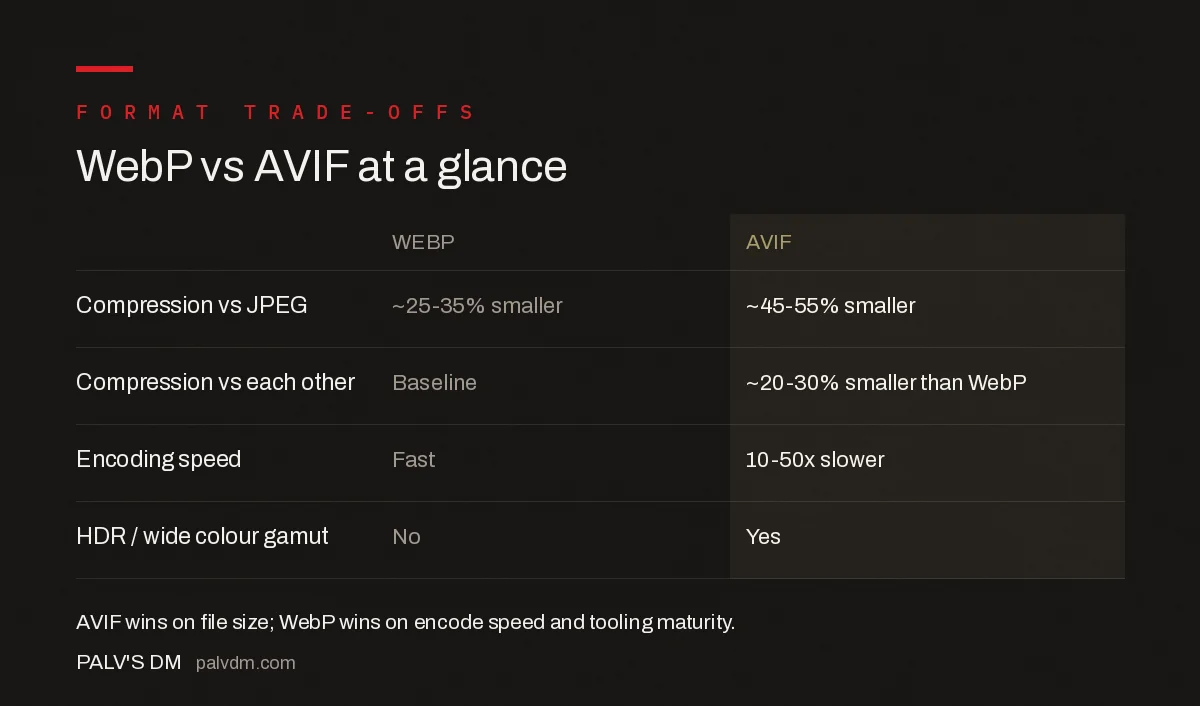
WebP vs AVIF at a glance
- Compression: AVIF is roughly 20-30% smaller than WebP at matched visual quality.
- Encoding speed: WebP encodes 10-50x faster than AVIF at high quality settings.
- Browser support: Both are supported across all modern browsers as of 2024-2026.
- HDR support: AVIF only.
For an image-heavy landing page, moving from unoptimised JPEG to WebP typically cuts image payload by a quarter to a third; moving from WebP to AVIF on top of that shaves off another fifth to a third. On a page where LCP is currently sitting just over the 2.5-second “Good” threshold and the LCP element is an image, that second step is frequently the difference that pushes the metric into the passing range.
What does adoption actually look like across the web?
Adoption is far behind the advice. The HTTP Archive’s 2025 Web Almanac found that among pages whose largest contentful element is an image, JPG still accounts for 57% on desktop and PNG for 26%. WebP sits at 11%. AVIF reaches 0.7%.
That last number deserves a second look, because the direction matters more than the level. In the 2024 dataset WebP was 7% and AVIF 0.3%. So WebP grew by more than half in a year, and AVIF more than doubled — off a tiny base, but the curve is steepening rather than flattening.
Across all images rather than just LCP elements, the 2024 Media chapter recorded a sharper shift: JPEG fell eight percentage points in two years, from 40% of web images in 2022 to 32.4% in 2024. WebP picked up three points of that. SVG took nearly two. AVIF took almost a full point.
The practical read: you are not early to WebP, and you are still early to AVIF. Roughly nine in ten LCP images on the web are still a legacy format, which means the bytes you save by converting are bytes most of your competitors are still paying for.
Why adoption lags the advice
The Almanac’s own explanation is that migration cost, not browser support, is the brake — existing image pipelines and content libraries are expensive to rebuild even once the formats are broadly supported.
That matches what we see on client sites. The blocker is almost never “will it display.” It is that someone has to touch the upload pipeline, the CDN configuration, the theme’s <picture> markup and eight years of media library, and no single person owns all four.
Which is exactly why the rollout order in the previous section matters. Convert what is being served today at the delivery layer, and you get most of the benefit without rebuilding anything upstream.
The cost nobody budgets for: encode time
File size is the number everyone compares. Encode time is the one that decides whether your pipeline survives contact with production.
WebP encodes dramatically faster than AVIF at comparable quality. How much faster depends heavily on which AVIF encoder you use and what speed setting you give it — published benchmarks range from around three times slower with fast settings to well over forty times slower using libaom at its higher compression levels. Treat any single multiplier you read as encoder-specific rather than a property of the format, and benchmark your own pipeline before committing.
On a handful of hero images that difference is invisible. On a bulk conversion of a large media library, or on any workflow that encodes at upload time, it is the difference between a job that finishes overnight and one that times out.
Two consequences worth planning around.
If you are converting on upload, AVIF encoding can push a request past a PHP timeout on modest shared hosting. Move the work to a background queue before you switch formats, not after the first editor complains that publishing hangs.
If you are converting in bulk, batch it and expect it to take real time. A library of several thousand images is an overnight job in AVIF and a coffee break in WebP.
This is the practical argument for the hybrid approach rather than a purist one: AVIF where the bytes matter most and the image count is small — heroes, above-the-fold product shots — and WebP for the long tail of thumbnails and inline images where encode cost multiplies and the per-file saving is measured in single-digit kilobytes.
What’s the practical rollout order for an existing site?
Start with the pages carrying the most traffic and the heaviest images — usually the homepage, category pages, and any hero-image-driven landing pages. Convert those to the <picture>-with-fallback pattern first, since that’s where the LCP impact is largest. Roll out to the rest of the image library afterward, prioritising AVIF encoding time for images that get reused across many pages rather than one-off assets buried deep in an archive.
Frequently asked questions
Is AVIF always smaller than WebP?
For most photographic content, yes — AVIF typically produces files 20-30% smaller than WebP at comparable visual quality. For simple graphics, icons, or images with flat colour and few details, the gap narrows and WebP sometimes wins on file size or encoding speed.
Do all browsers support AVIF now?
All major browsers — Chrome, Firefox, Safari, and Edge — have supported AVIF since Safari added it in 2022, and support has been consistent across core browsers since early 2024. WebP has slightly longer, more universal support, which is why a fallback is still standard practice.
Should I convert my whole image library to AVIF?
Serve AVIF with a WebP fallback using the <picture> element rather than replacing WebP outright. This gets the smaller file size for browsers that support AVIF while guaranteeing every visitor still receives a working modern-format image.
Does using AVIF or WebP directly improve Google rankings?
Not directly. Image format choice affects page weight and load time, which feed into Core Web Vitals like LCP — a real but indirect ranking influence. There’s no format-specific ranking signal; the benefit comes entirely through faster, lighter pages.
Sources
- HTTP Archive Web Almanac 2025 — Performance (LCP image formats)
- HTTP Archive Web Almanac 2024 — Media (image format share)
- libheif — AVIF Encoder Benchmark
- Choose the Right Image Format — web.dev (Google)
- Core Web Vitals: The Complete Guide
- Technical SEO: The Complete Working Guide
- Finding the LCP Element on Any Page
Want this done on your site?
Every PalV’s DM engagement starts with a free audit of your actual website — a 12-point
crawl covering what is blocking indexation, on-page gaps against your primary keywords, speed
findings, and the three to five fixes worth making first. Delivered in two working days. No
payment details, and the findings are yours whether you hire us or not.


