
Confirmed vs Unconfirmed Updates: Reading the Volatility Trackers
Volatility trackers show that search results moved, not that Google moved them. How to read a tracker spike, and when an unconfirmed update deserves action.

A Google update is confirmed only when Google says so, and Google says so on the Search Status Dashboard. Everything else — a red day on Semrush Sensor, a spike on your rank tracker, forty forum posts saying “anyone else seeing this?” — is evidence that search results moved, not evidence that Google moved them. Volatility trackers measure the output of the ranking system. Google’s dashboard is the only statement about its inputs. Those are different claims, and conflating them is how agencies end up rewriting a site in response to a reporting bug.
The gap between the two is not theoretical. Between 1 and 6 August 2026, roughly fourteen tracking tools registered elevated movement, and Google’s dashboard showed no ranking, indexing, crawling or serving incident at all in that window. Something moved. Google had not announced anything.
What makes a Google update “confirmed”?
Confirmation means Google published it. In practice that means one of three places: an entry on the Search Status Dashboard with a start time and a completion time, a post on the Search Central blog, or a statement from an official Google account. The dashboard is the authoritative one because it carries dates to the minute and a permanent incident ID.
What a confirmation gives you is narrow but real: the fact that a broad change ran, the window it ran in, and the category it belongs to. Google confirms core updates and spam updates. It does not confirm which sites moved, which queries were affected, or what specifically changed inside the ranking systems. The 2026 update timeline lists every confirmed change of the year with its dates.
What a confirmation does not give you is causation for your own traffic. An update running in the same week as your drop is a coincidence until you have compared windows properly.
What do volatility trackers actually measure?
A volatility tracker samples a fixed set of keywords every day, records the pages ranking for each one, and compares today’s result set against yesterday’s. The bigger the aggregate reshuffle, the higher the number it publishes. Each tool uses its own keyword sample, its own scale and its own smoothing, which is why two trackers routinely disagree about the same day.
That design means a tracker can tell you three useful things and cannot tell you four important ones.
| A volatility tracker can tell you | A volatility tracker cannot tell you |
|---|---|
| That aggregate SERP movement was unusually high on a given day | Whether Google changed a ranking system, a SERP layout, or nothing at all |
| Roughly which day movement began and settled | Whether your queries or your industry were affected |
| Which categories in its own sample moved most | Whether the movement is real or an artefact of its own crawl |
| That the movement was broad rather than site-specific | Whether your traffic drop has the same cause as the spike |
None of that makes trackers useless. It makes them a smoke alarm rather than a diagnosis. A smoke alarm is worth having and is not worth rebuilding the kitchen over.
Why do trackers spike when Google has confirmed nothing?
Several causes produce the same signal, and they carry completely different responses.
- Unannounced routine changes. Google makes thousands of changes to Search each year and announces only a small number. Most tracker movement is this — ordinary, unnamed, unremarkable.
- SERP layout and feature changes. A new module, a changed AI Overview trigger rate or a different pack size shifts every organic position on the page without any ranking system changing its mind about any document.
- Indexing or serving bugs. Google has publicly acknowledged ranking and indexing bugs before, and they look exactly like an update from the outside. Telling a bug from an update depends almost entirely on how quickly it reverses.
- Artefacts in the measurement layer. When Google removed support for the
&num=100parameter in September 2025, tools that had been pulling 100 results per request had to change how they collect data. Changes in collection method show up as movement that never happened. - Unrelated incidents landing in the same week. This is the August 2026 story. A GA4 reporting bug, Google Ad Manager disruptions and a Google Discover traffic decline that had begun in mid-July all landed close together, and were widely read as a single algorithm update that Google never announced.
How should you read a tracker spike, step by step?
Run this sequence before you conclude anything. It takes about twenty minutes and it prevents most of the expensive mistakes.
- Check the dashboard for the exact dates. Confirmed, unconfirmed, or an incident in crawling, indexing or serving rather than ranking. Write down which.
- Check Search Console for a manual action. Security & Manual Actions. If it is empty, the most feared explanation is eliminated in thirty seconds.
- Check whether you actually moved. Broad volatility elsewhere is not your problem. Look at your own positions for your own priority queries before reading a single industry post.
- Separate positions, impressions and clicks. Position drops are ranking changes. Impressions falling with clicks flat is usually a measurement or SERP-layout story, not a ranking one.
- Isolate Discover and News from Search. They move independently, and a Discover decline read as a Search update sends you rewriting the wrong pages.
- Rule out your own deployments. Releases, template changes, robots.txt edits, a plugin update, a migration. Working out whether it was an update or you resolves more cases than any tracker will.
Only after all six does it make sense to ask what an unconfirmed change might have been. Confirming update impact properly sets out how to compare windows so the answer means something.
When does an unconfirmed update deserve action?
The honest answer is that confirmation status should barely change what you do. If your rankings and clicks genuinely fell, the diagnostic work is identical whether Google announced something or not: find the URLs and query clusters that lost, find what replaced them, and work out what those pages have that yours does not.
Confirmation changes two things only. It tells you the timing was probably not coincidence, which raises your confidence in attributing the drop. And it tells you roughly when to expect the next reassessment, because Google has stated that the largest recoveries after a core update tend to arrive with a subsequent core update rather than between them.
What confirmation never justifies is emergency work mid-rollout. During the May 2026 core update, large movements landed on 23 May, again on 30 May, and again in the final twenty-four hours before Google marked the update complete on 2 June. A site owner who rewrote pages on 24 May was optimising against a state that no longer existed a week later — and had destroyed their own ability to attribute cause afterwards.
Where volatility trackers genuinely earn their place
Trackers are worth having for three jobs, none of which is diagnosis.
Timing boundaries. When Google confirms an update, trackers help you see when movement actually started and stopped for your vertical, which can differ from the official window.
Early flags. A sustained multi-day spike is a reason to look at your own data sooner than you otherwise would. That is worth something on a large site where a week of ignorance is expensive.
Client conversations. Showing a client that the whole market moved is more useful than showing them a single line falling. Explaining an update to a client is easier with market-wide context than without it.
What makes trackers dangerous is treating them as confirmation. Keep your own record instead: an update log with your deployments, Google’s confirmed dates and your own traffic annotations in one place beats any third-party index, because it is the only dataset that contains both Google’s actions and yours. Annotating updates in your analytics makes that record readable months later, when you have forgotten what you shipped in May.
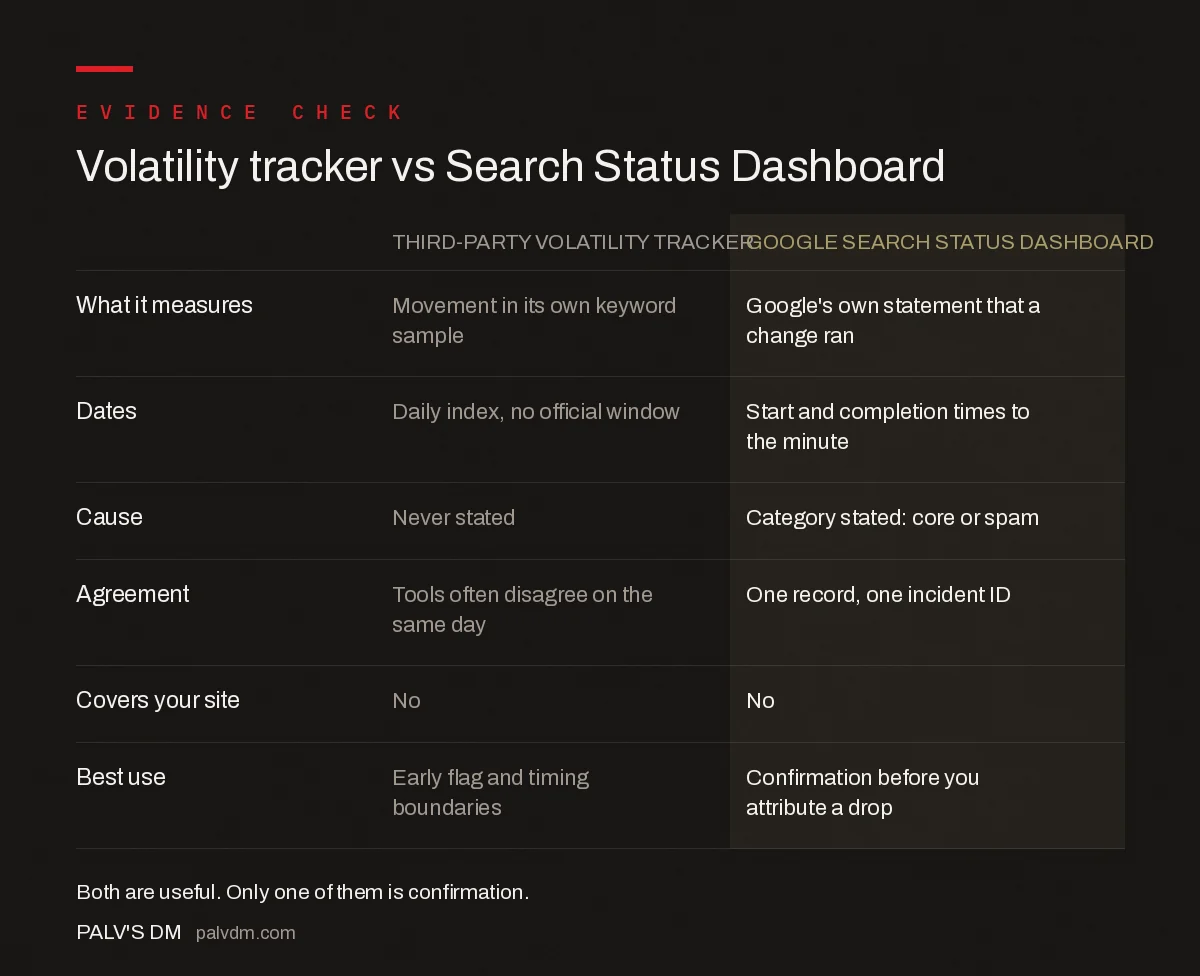
Volatility tracker vs Search Status Dashboard
| Third-party volatility tracker | Google Search Status Dashboard | |
|---|---|---|
| What it measures | Movement in its own keyword sample | Google’s own statement that a change ran |
| Dates | Daily index, no official window | Start and completion times to the minute |
| Cause | Never stated | Category stated: core or spam |
| Agreement | Tools often disagree on the same day | One record, one incident ID |
| Covers your site | No | No |
| Best use | Early flag and timing boundaries | Confirmation before you attribute a drop |
Frequently asked questions
What is the difference between a confirmed and an unconfirmed Google update?
A confirmed update is one Google has published, normally as a dated entry on the Search Status Dashboard with a start time, a completion time and an incident ID. An unconfirmed update is inferred from third-party volatility trackers, forum chatter or traffic changes. Trackers measure that search results moved; only Google can confirm that Google moved them.
Are volatility trackers like Semrush Sensor accurate?
They accurately report what they measure, which is aggregate movement across their own keyword sample. That is a real signal, but it cannot tell you whether a ranking system changed, whether a SERP layout changed, or whether your queries were affected. Different trackers use different samples and scales, which is why they often disagree about the same day.
Should I act on an unconfirmed Google update?
Your response should be almost identical either way. If rankings and clicks genuinely fell, find the URLs and query clusters that lost, compare them against the pages that gained, and close the gap. Confirmation mainly raises your confidence that the timing was not coincidence. It never justifies emergency rewrites while a rollout is still running.
Why do trackers spike when Google says nothing happened?
Several causes produce the same signal: routine unannounced changes, SERP layout and feature changes, indexing or serving bugs, artefacts in the tracker’s own data collection, and unrelated incidents landing in the same week. In early August 2026, a GA4 reporting bug, Ad Manager disruptions and a Discover decline that began in mid-July all coincided with tracker spikes.
Where does Google officially confirm algorithm updates?
The Search Status Dashboard at status.search.google.com is the authoritative source. It publishes a dated entry for each core and spam update with start and completion times and a permanent incident ID. Google occasionally announces updates first on the Search Central blog or an official social account, but the dashboard entry is the record of reference.
How many tracking tools showed movement in August 2026?
Roughly fourteen third-party tools registered elevated movement across 1 to 3 August and again on 5 to 6 August 2026, with earlier spikes on 24, 18 and 11 July. Google’s Search Status Dashboard showed no ranking, indexing, crawling or serving incident in that August window, and Google announced no algorithm update that month.
Sources
- Google Search Status Dashboard
- Google core updates and your website — Search Central
- How Google Search works — Search Central
- Performance report (Search results) — Search Console Help
Want this done on your site?
Every PalV’s DM engagement starts with a free audit of your actual website — a 12-point
crawl covering what is blocking indexation, on-page gaps against your primary keywords, speed
findings, and the three to five fixes worth making first. Delivered in two working days. No
payment details, and the findings are yours whether you hire us or not.


