
301 vs 302 Redirects: When Each One Is Correct
A 301 redirect permanently passes ranking signals to a new URL; a 302 keeps them with the original. The test for choosing correctly, and the mistakes that cost rankings.

Use a 301 redirect when a URL has moved for good and should stop existing; use a 302 when the move is temporary and the original URL needs to stay the one Google indexes. The two status codes look nearly identical in a browser — the visitor lands on the new page either way — but they tell search engines opposite things about which URL deserves to keep ranking, and mixing them up either strands link equity on a dead URL or splits it across two live ones for months.
Most redirect problems on a site aren’t caused by picking the wrong code once. They’re caused by a default set at the CMS or CDN level — plugins, load balancers, and page builders frequently default to 302 — that never gets corrected once the “temporary” change becomes permanent.
What’s the actual difference between a 301 and a 302 redirect?
A 301 redirect tells a browser and a crawler that a resource has moved permanently. Google responds by consolidating the old URL’s ranking signals — backlinks, historical relevance, accumulated trust — onto the destination URL, and over time drops the old URL from the index in favour of the new one.
A 302 redirect tells the same audience the move is temporary. The browser still lands the visitor on the new page, but Google keeps the original URL as the one it indexes and ranks, treating the destination as a stand-in rather than a replacement. No ranking signals transfer permanently.
301 vs 302 at a glance
| Factor | 301 (Permanent) | 302 (Temporary) |
|---|---|---|
| What it tells Google | This move is permanent | This move is temporary |
| Ranking signals | Transfer to the new URL | Stay with the original URL |
| Which URL stays indexed | The destination URL | The original URL |
| Typical use case | Domain change, page merge, permalink change | A/B test, campaign page, maintenance mode |
| Reversible without SEO cost | No — treat as a one-way move | Yes — designed to be reversed |
When should you use a 301 redirect?
A 301 is correct any time the old URL is being retired and won’t come back. That covers domain migrations, merging two pages into one, restructuring a URL slug, removing a discontinued product page in favour of a category page, and consolidating near-duplicate content. In every one of these cases, the goal is for Google to eventually forget the old URL exists and treat the new one as the sole authority for that content.
The practical test: if you’d be unhappy to see the old URL still ranking in six months, it needs a 301, not a 302.
When should you use a 302 redirect?
A 302 is correct when the original URL needs to keep its ranking position because the redirect is a stand-in, not a replacement. Common legitimate cases: routing users to a seasonal or region-specific landing page while the evergreen URL stays the canonical target, sending traffic to a maintenance page during a short outage, or running an A/B test variant that will either be discarded or promoted later.
If there’s any chance the “temporary” state becomes permanent, revisit the decision on a schedule rather than leaving a 302 running indefinitely — that’s the single most common way 302s turn into an SEO problem.
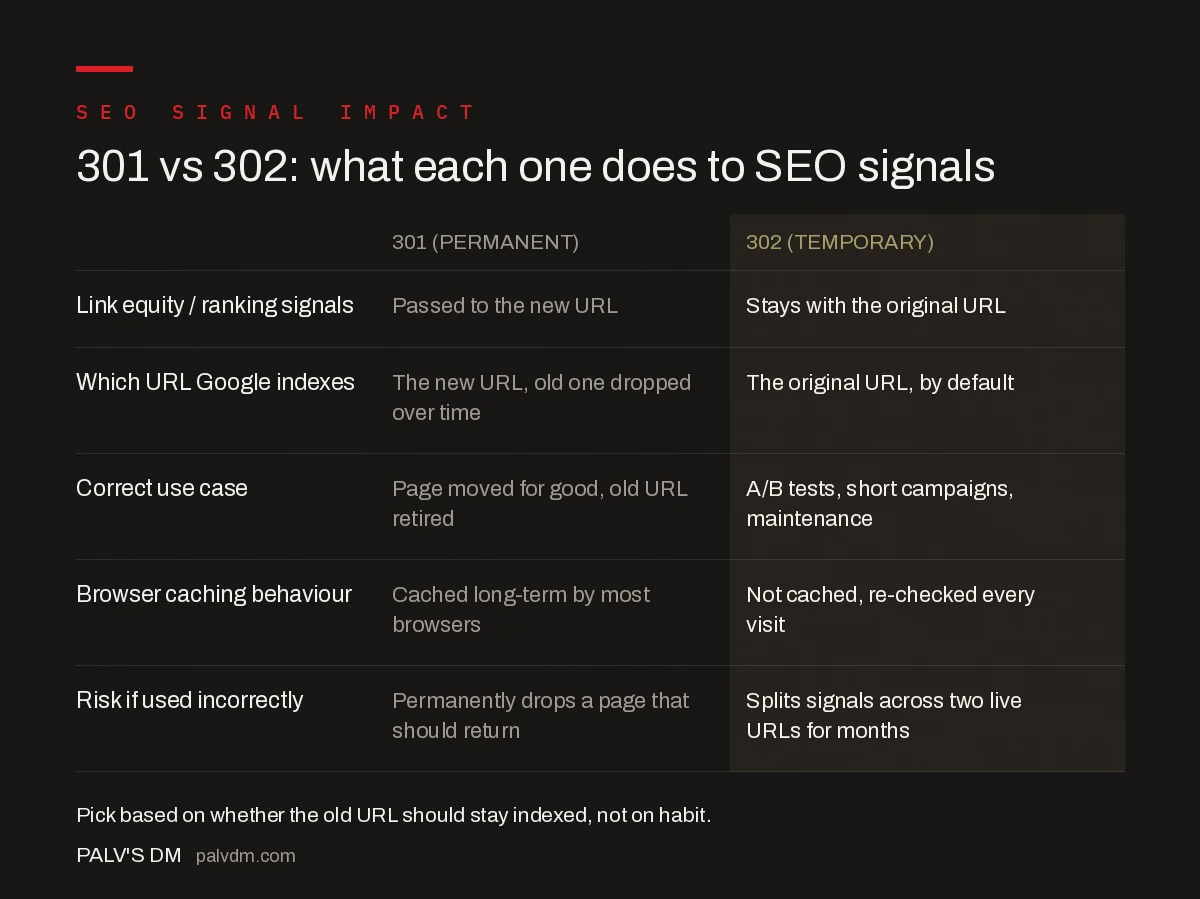
301 vs 302: what each one does to SEO signals
- Link equity / ranking signals — 301: passed to the new URL. 302: stays with the original URL.
- Which URL Google indexes — 301: the new URL, old one dropped over time. 302: the original URL, by default.
- Correct use case — 301: page moved for good, old URL retired. 302: A/B tests, short campaigns, maintenance.
- Browser caching behaviour — 301: cached long-term by most browsers. 302: not cached, re-checked every visit.
- Risk if used incorrectly — 301: permanently drops a page that should return. 302: splits signals across two live URLs for months.
What mistakes turn a redirect into an SEO problem?
- Leaving a permanent move on a 302. Page builders and some CMS redirect managers default to 302. A migration or permalink change left on the default setting never fully consolidates its signals.
- Redirect chains. A 301 that points to another redirect, which points to a third URL, forces Google to follow the chain and dilutes the signal at each hop. Point every redirect straight at its final destination.
- Redirecting everything to the homepage. A blanket redirect from a removed page to the homepage, instead of the closest relevant replacement, wastes the topical relevance signal the old URL had built up.
- Removing a 301 too soon. External sites still linking to the old URL will hit a broken link the moment the redirect is deleted, even if internal links were all updated months earlier.
- Using meta refresh instead of a server-side redirect. A client-side refresh is a weak, slow signal compared to an HTTP 301 or 302 header and should not be used as a substitute.
How do you implement each redirect type correctly?
On Apache, a 301 is set with Redirect 301 /old-url/ /new-url/ or an equivalent RewriteRule with an [R=301,L] flag; dropping the explicit code number defaults to 302 in some configurations, which is the source of many accidental temporary redirects. On Nginx, return 301 https://example.com/new-url/; inside the relevant server block is the standard pattern, with return 302 reserved for genuinely temporary routes. Most WordPress redirect plugins let you set the type explicitly per rule — check that default before bulk-creating redirects for a migration, since a wrong default applied at scale is expensive to unwind later.
How do you audit a site’s existing redirects for the wrong type?
A full crawl with Screaming Frog or a similar tool, configured to report the HTTP status code of every redirect on the site, surfaces the mismatch quickly. Export the list, then check it against a simple rule: any redirect pointing away from a URL that no longer exists anywhere on the business’s roadmap should be a 301. Any redirect standing in for something genuinely short-lived — a campaign page, a seasonal promotion, a maintenance window — should be a 302. Redirects that don’t fit either description cleanly are usually the ones somebody set up in a hurry and never revisited.
On larger sites, cross-reference the crawl against server logs to see whether the redirected URLs are still receiving meaningful crawl budget from Googlebot months later. A 301 that Google is still crawling heavily a year in usually means external links are still pointing at the old URL — worth fixing at the source where possible, since every hop through a redirect is a small tax on crawl efficiency even when the redirect itself is configured correctly.
How do CDN and platform defaults affect which redirect type you get?
Cloudflare Page Rules, Netlify’s _redirects file, and most WordPress redirect plugins all let you set the status code explicitly, but their defaults differ, and it’s worth checking rather than assuming. Some default to 301, treating every redirect as permanent unless told otherwise; others default to 302, treating every redirect as a temporary forward. Neither default is safe to rely on blindly for a bulk operation like a migration — always set the type explicitly in the rule itself rather than trusting the platform’s default behaviour, especially when generating hundreds of redirects programmatically from a spreadsheet.
Frequently asked questions
Does a 302 redirect hurt SEO?
Not inherently, but leaving one in place for months on a URL that has actually moved for good does. The old URL keeps competing for the ranking instead of consolidating signals onto the new one, which is the opposite of what a permanent move needs.
Can Google treat a 302 as a 301?
Yes. If a 302 redirect stays live for an extended period, Google’s algorithms may infer the move is actually permanent and start treating it like a 301. This isn’t reliable behaviour to plan around; use the correct status code from the start.
What status code should I use for a site migration?
301. A site or domain migration is, by definition, a permanent move: the old URLs are being retired and every ranking signal needs to consolidate on the new ones. A 302 during a migration leaves the old domain competing with the new one.
How long should I keep a 301 redirect live?
At least a year, and longer if analytics or Search Console still show traffic hitting the old URL. External links pointing to the old address become broken the moment the redirect is removed, so removing it too early trades a small server cost for lost traffic.
Is a 302 redirect ever better for SEO than a 301?
Yes, when the change genuinely is temporary: an A/B test variant, a seasonal landing page, or a maintenance page. Using a 301 in those cases risks permanently deindexing a URL you intend to bring back.
Sources
- 301 Redirects and Google Search — Google Search Central
- Technical SEO: The Complete Working Guide
- noindex, nofollow, and Robots Directives Compared
- How to Find and Fix Redirect Chains and Loops
Want this done on your site?
Every PalV’s DM engagement starts with a free audit of your actual website — a 12-point
crawl covering what is blocking indexation, on-page gaps against your primary keywords, speed
findings, and the three to five fixes worth making first. Delivered in two working days. No
payment details, and the findings are yours whether you hire us or not.


