
Caching Headers Explained: max-age, s-maxage, stale-while-revalidate
max-age, s-maxage, and stale-while-revalidate each control a different layer of HTTP caching. What they do, how they interact, and the settings that fit each asset type.

Cache-Control headers tell browsers and CDNs how long they can reuse a response before checking back with the server, and the three directives that confuse people most — max-age, s-maxage, and stale-while-revalidate — each control a different layer of that decision. max-age sets freshness for every cache in the chain. s-maxage overrides that setting specifically for shared caches like a CDN. stale-while-revalidate defines a grace window where a cache can serve an expired response instantly while fetching a fresh one in the background. Get these three right and repeat visits load close to instantly; get them wrong and you’re either serving stale content or throwing away caching’s entire benefit.
Most sites either cache too little, because someone was worried about serving stale content and set every header to no-cache, or cache too much, because a default CDN configuration cached HTML for a day and nobody noticed until content stopped updating. The fix in both cases is the same: match the cache duration to how often each type of file actually changes.
What does the Cache-Control header actually control?
Cache-Control is a response header the server sends alongside a file, and it’s read by every cache between the origin server and the browser — a CDN edge node, a corporate proxy, and the browser’s own disk cache. The header is a comma-separated list of directives, and the two most load-bearing ones for performance work are max-age and the visibility flags public and private.
| Directive | What it controls | Applies to |
|---|---|---|
| max-age=N | Seconds a response is considered fresh | All caches, including the browser |
| s-maxage=N | Overrides max-age for shared caches only | CDNs, reverse proxies — browsers ignore it |
| stale-while-revalidate=N | Extra seconds a stale response can be served while refreshing in the background | Modern browsers and CDNs that support it |
| no-cache | Forces revalidation before every use, even if not expired | All caches |
| no-store | Forbids storing the response at all | All caches |
| public / private | Whether shared caches are allowed to store the response | All caches |
A common mix-up: no-cache does not mean “don’t cache.” It means “cache it, but check with the server before reusing it every time.” no-store is the directive that actually prevents caching entirely, and it’s the one to use for genuinely sensitive, never-cache content.
What’s the real difference between max-age and s-maxage?
max-age applies uniformly across the caching chain — the browser, any CDN, any proxy in between all treat the response as fresh for that many seconds. s-maxage exists specifically to let you set a different, usually longer, freshness window for shared infrastructure without changing what the end user’s browser does.
A typical pattern: Cache-Control: max-age=60, s-maxage=3600. The browser treats the page as fresh for one minute, so a user hitting back and forward doesn’t cause a fresh network request every time. The CDN, though, holds onto it for an hour, because the CDN sits in front of thousands of users and a one-hour cache dramatically cuts origin server load, while the browser’s shorter window keeps any individual user reasonably current. This split is exactly why s-maxage exists as a separate directive rather than folding into max-age.
How does stale-while-revalidate change the experience after expiry?
Without stale-while-revalidate, the moment max-age expires, the very next request has to wait for a full round trip to the origin server before rendering, even if the content hasn’t actually changed. stale-while-revalidate removes that wait for a defined grace period: the cache serves the expired copy immediately, then fetches a fresh version in the background for next time.
With max-age=120, stale-while-revalidate=300, a response is fresh for two minutes. For the following five minutes after that, requests still get the cached version instantly, while a background fetch quietly updates the cache. Only after the full 420 seconds does a request have to wait on a live fetch. This is the mechanism behind why some CDNs report near-100% cache hit rates even on frequently updated content — the visible response is almost never blocked on a fresh fetch.
How should different asset types actually be cached?
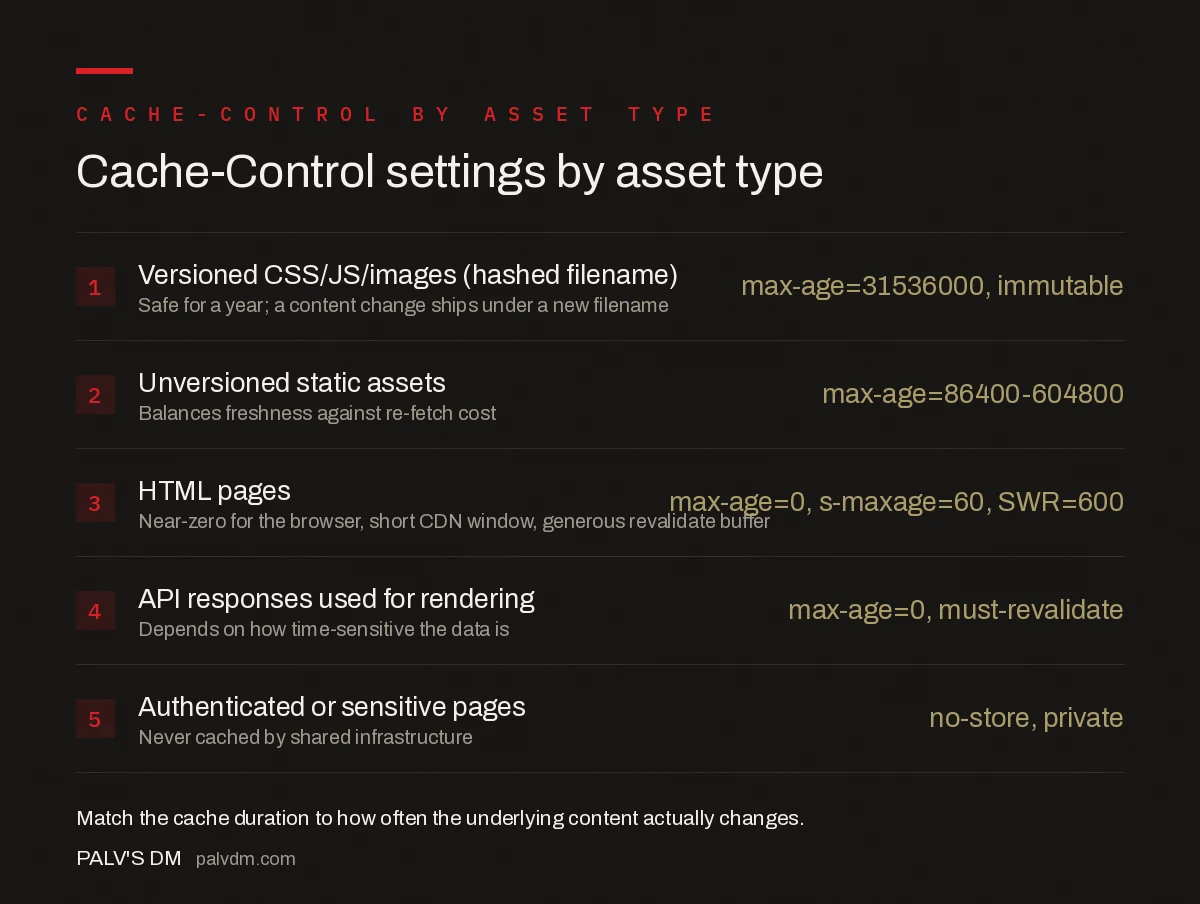
Cache-Control settings by asset type
- Versioned CSS/JS/images (filename includes a hash) —
max-age=31536000, immutable— Safe for a year; a content change ships under a new filename. - Unversioned static assets —
max-age=86400to604800— A day to a week, balancing freshness against re-fetch cost. - HTML pages —
max-age=0, s-maxage=60, stale-while-revalidate=600— Near-zero for the browser, short CDN window, generous revalidate buffer. - API responses used for rendering —
max-age=0, must-revalidateor a short s-maxage — Depends on how time-sensitive the data is. - Authenticated or sensitive pages —
no-store, private— Never cached by shared infrastructure, not stored at all where genuinely sensitive.
The rule underlying all five: cache duration should track how often the underlying content actually changes, not a single sitewide default. Versioned static assets are the easiest win because the filename itself guarantees correctness — cache them for a year and never worry about staleness, since a change produces a new URL rather than overwriting the old one.
How do caching headers affect Core Web Vitals and crawl efficiency?
Aggressive, correct caching directly improves repeat-visit performance, which shows up in Largest Contentful Paint and Time to First Byte on return visits, since the browser skips the network round trip entirely for fresh cached assets. It’s a smaller lever than fixing server response time on the first visit, but it compounds — a returning visitor on a well-cached site experiences a materially faster load than the same visitor on a site issuing no-cache on everything.
On the crawling side, Google’s own documentation on its crawling infrastructure confirms Googlebot supports conditional requests via ETag and Last-Modified headers, and can skip re-downloading a page’s content when the server indicates nothing changed. That’s not a ranking factor directly, but it means well-configured caching headers make each crawl pass more efficient, which matters more on large sites where crawl budget is a real constraint than on a five-page brochure site.
What commonly breaks caching headers in production?
- A CDN default that caches HTML for 24 hours because nobody overrode it, so published edits don’t appear until the cache naturally expires or someone manually purges it.
- Cache-busting query strings on static assets that never change (
style.css?v=1left static forever), which defeats the versioned-filename pattern and forces re-validation on every deploy regardless of whether the file changed. - Third-party scripts setting their own caching headers that your site has no control over — worth checking when auditing what a given third-party script actually costs you, since some default to no caching at all and re-fetch on every page load.
- Mismatched Cache-Control between origin and CDN where the origin sends one policy and the CDN configuration silently overrides it with another, leaving nobody sure which one is actually in effect.
The fastest way to catch these is checking response headers directly in browser dev tools on a handful of representative URLs — one static asset, one HTML page, one API call — rather than assuming the CDN dashboard settings match what’s actually being served.
Worth testing directly rather than trusting documentation alone: some CDNs implement stale-while-revalidate differently, or not at all, and silently drop the directive from the response they pass through, which means the behaviour you configured at the origin isn’t necessarily the behaviour a visitor experiences at the edge. A quick way to confirm is a repeat curl request against a live URL just after its max-age window closes — check the response headers for an updated Age value and confirm the content itself didn’t change on that particular request, which tells you the stale-while-revalidate window is actually being honoured rather than assumed.
Frequently asked questions
What’s the difference between max-age and s-maxage?
max-age applies to every cache in the chain, including the browser. s-maxage applies only to shared caches like a CDN or reverse proxy, and overrides max-age for those caches specifically. If s-maxage is absent, shared caches fall back to max-age; if present, browsers ignore s-maxage and use max-age instead.
Does stale-while-revalidate slow down the first request after expiry?
No, that’s the point of the directive. The cache serves the stale copy immediately while fetching a fresh version in the background, so the user gets an instant response instead of waiting for revalidation. The next request after that gets the updated content.
Does caching affect Google’s crawling and indexing?
Yes. Google’s crawling infrastructure supports conditional requests using ETag and Last-Modified headers, and can skip re-downloading unchanged pages when those headers are set correctly, which is more efficient use of your crawl budget. It doesn’t affect rankings directly, but it does affect how quickly and thoroughly Googlebot can revisit a site.
Should HTML pages be cached the same way as CSS and JS files?
No. Static assets like versioned CSS, JS, and images can use long max-age values because their filenames change when the content changes. HTML that reflects current content should use short max-age values or none at all, since serving stale HTML shows visitors outdated information.
Sources
- Crawling December: HTTP Caching — Google Search Central Blog
- Prevent Unnecessary Network Requests With the HTTP Cache — web.dev
- Core Web Vitals: The Complete Guide
- Technical SEO: The Complete Working Guide
- Server Response Time and TTFB: Diagnosing the Real Cause
- Third-Party Scripts: Measuring What Each One Costs You
- How to Fix INP (Interaction to Next Paint)
Want this done on your site?
Every PalV’s DM engagement starts with a free audit of your actual website — a 12-point
crawl covering what is blocking indexation, on-page gaps against your primary keywords, speed
findings, and the three to five fixes worth making first. Delivered in two working days. No
payment details, and the findings are yours whether you hire us or not.


