
Website Platform Lock-In: How to Spot It Before You Sign
Website platform lock-in shows up in export terms, renewal clauses and account ownership, not just the CMS name. Here is what to check before signing.
Website platform lock-in means switching away from your current developer, agency, or builder costs more, takes longer, or is blocked outright, and the warning signs are almost always visible in the contract before you sign, not after. The two clauses to read twice are data export terms and who legally holds your domain, hosting, and analytics accounts.
Most business owners find out they’re locked in at the worst possible time: mid-dispute with an agency, or the week they need a redesign fast and discover the “developer” who built the site five years ago is unreachable and still owns the hosting login. This covers what lock-in actually looks like, the specific contract language that creates it, and the questions that get you a straight answer before you commit.
What does platform lock-in actually look like day to day?
It rarely announces itself as “you are now locked in.” It shows up as friction at the exact moment you try to leave. A request for your login gets a slow, evasive answer. An export comes back as a PDF instead of usable data. A cancellation triggers a fee nobody mentioned during onboarding. By the time you notice, you’ve usually already paid for a year of hosting or a build you can’t take with you.
Three patterns cover most of the real cases we see: proprietary page builders that don’t export cleanly to any other platform, accounts (domain, hosting, Google Analytics, Search Console) registered under the agency’s business rather than yours, and contracts with termination or early-exit penalties steep enough that leaving costs more than staying.
What are the specific warning signs to check before signing?
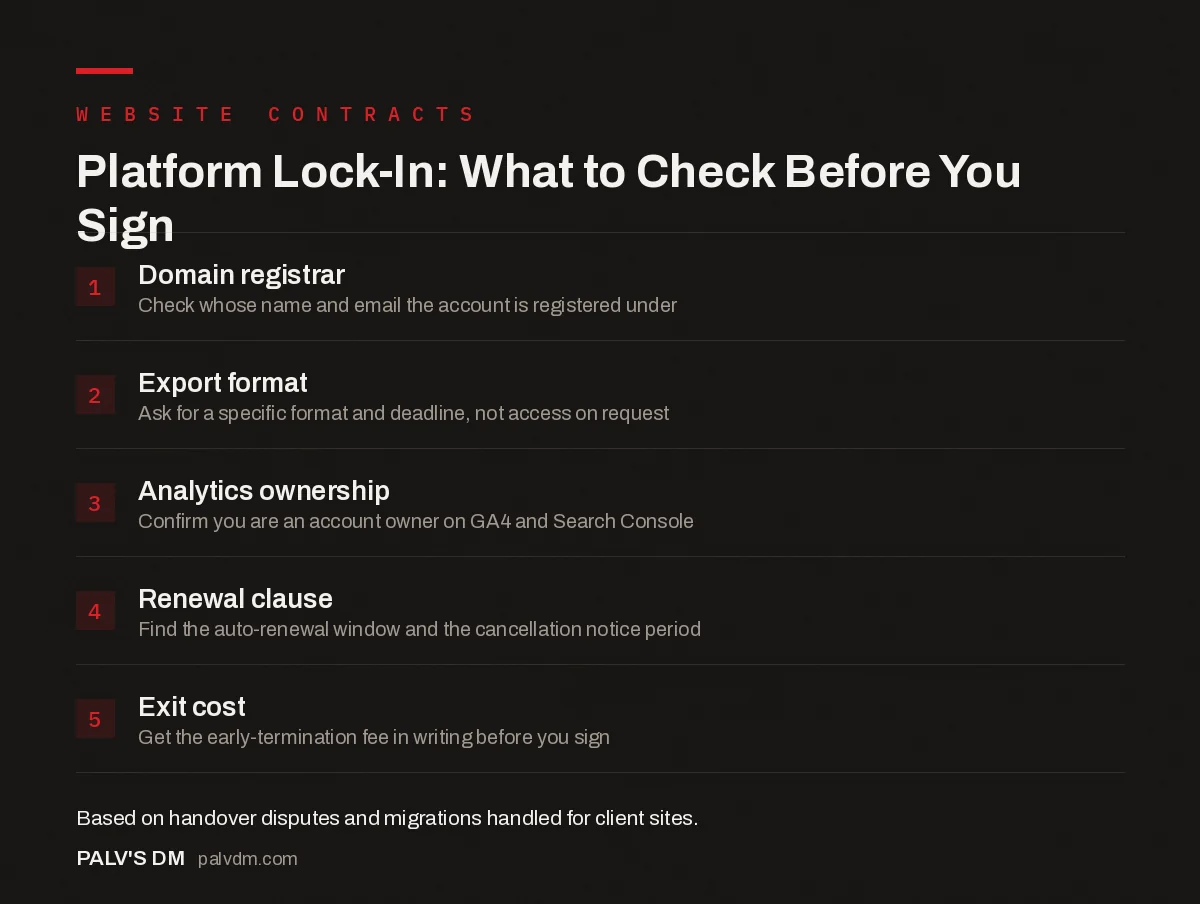
Platform Lock-In: What to Check Before You Sign
- Domain registrar. Check whose name and email the account is registered under.
- Export format. Ask for a specific format and deadline, not access on request.
- Analytics ownership. Confirm you are an account owner on GA4 and Search Console.
- Renewal clause. Find the auto-renewal window and the cancellation notice period.
- Exit cost. Get the early-termination fee in writing before you sign.
Read the export and termination sections first, not the pricing table. Vendors know most people skim to the number at the bottom. If a contract lets you export data “upon request” with no defined format or deadline, that clause gives the vendor months of legal room to stall a handover while you’re still paying for hosting you can’t use productively.
Automatic renewal clauses deserve the same scrutiny. A contract that renews automatically unless you cancel inside a narrow window, sometimes 60 or 90 days before the term ends, quietly locks you into another full cycle if you miss the window. Combine that with an early-termination fee and switching becomes a two-part cost: the penalty for leaving early, plus a fresh year you already owe.
Open platform vs locked-in setup: what actually differs
| Open setup | Locked-in setup | |
|---|---|---|
| Domain registrar account | Registered in the client’s name and email | Registered under the agency’s account |
| Hosting account | Client owns the hosting login | Agency-owned reseller hosting, no direct access |
| Content export | Standard format (WordPress XML, CSV, raw files) | No structural export, or PDF/screenshot only |
| Analytics and Search Console | Client is account owner or has admin access | Agency email is the account owner |
| Contract renewal | Clear term, manual renewal, plain-language notice period | Auto-renewal, short cancellation window, buried in fine print |
Every row in that “locked-in” column is legal and common. None of it requires a bad actor, most agencies default to keeping accounts under their own name because it’s operationally simpler for them, not because they’re planning to trap anyone. That’s exactly why you need to ask rather than assume good intent covers it.
Does the platform itself matter, or is it all about the contract?
Both, and they’re not the same risk. WordPress is open source: your content exports as portable XML, your theme files and media are just files you can access directly if you hold the hosting account. That’s a structural advantage over closed website builders like Wix or Squarespace, which generally don’t offer a full export of your site’s structure and design, only your written content and images in isolation. Rebuilding on a new platform after leaving one of those is closer to starting over than migrating.
But an agency can build lock-in on top of an open platform just as easily. A WordPress site with a heavily customised page-builder theme, no documentation, and every account under the agency’s login is functionally just as locked in as a proprietary builder, even though the underlying software is technically portable. The platform being open is necessary, not sufficient.
What should you actually ask before you sign?
- Who owns the domain registrar account once the project is delivered? Get the specific answer, not “you’ll have access.” Access and ownership are different things.
- What format does a full export come in, and how long does it take? A vague “we can provide your content” answer is not an answer.
- Does the contract auto-renew, and what’s the cancellation notice window? Get the exact number of days, in writing.
- What happens to hosting and email if you cancel mid-term? Some contracts pull the site down immediately on non-renewal, others give a grace period.
- Who is the listed owner on Google Analytics and Search Console? These accounts hold your historical performance data. If you’re not the primary owner, ask to be added as one during onboarding, not after a dispute starts.
What do you do if you’re already locked in?
Start with a written, dated request for account access and a full content export, sent by email so there’s a record. Most agencies comply once asked directly and formally, the ones that stall usually do so out of disorganisation rather than malice, though the effect on you is the same either way. If the request goes nowhere after a reasonable follow-up period, a domain registrar transfer can often proceed with proof of ownership even without the current holder’s cooperation, though the process and timeline vary by registrar.
The uncomfortable middle ground is a site you can’t fully export but can still access. In that case, a rebuild that recreates the design and content on a platform you control usually costs less in the long run than staying locked into a relationship you can’t get data out of. We’ve walked several clients through exactly that trade-off, and the deciding factor is almost always how much of the existing content is worth preserving versus how much has gone stale anyway.
Why do agencies default to keeping accounts under their own name?
Mostly for operational convenience, not conspiracy. Managing thirty client sites is genuinely easier when the hosting reseller panel, the domain registrar, and the analytics accounts all live under one login the agency controls. Password resets go through one place. Renewals get billed once. From the agency’s side, it’s a reasonable default, not usually a trap being deliberately set.
The problem is that “reasonable default for the agency” and “reasonable default for the client” point in opposite directions, and nobody flags the conflict at signing because it doesn’t feel urgent then. It only becomes urgent when the relationship ends, and by then negotiating leverage has shifted entirely to whoever holds the accounts. This is why the ask needs to happen at contract stage, when both sides still want the deal to go smoothly, not during a dispute when the same request reads as adversarial.
What does the actual cost of switching look like when lock-in is real?
It’s rarely one bill. It’s a stack of smaller ones: the early-termination fee if the contract has one, a fresh domain registration if the old registrar won’t cooperate on a transfer, a full rebuild rather than a migration if the platform doesn’t export cleanly, and weeks of downtime risk while DNS and hosting move between providers. None of those costs are exotic on their own. Added together, they routinely exceed what a proper handover clause would have cost to negotiate up front.
There’s also a quieter cost that doesn’t show up on an invoice: historical data. A Google Analytics or Search Console account you never had ownership of doesn’t transfer with the site. If the agency won’t add you as an account owner and the relationship sours, years of performance history and query data can be gone for good, not migrated, just inaccessible. That’s worth raising in the very first onboarding call, not after month eighteen.
Frequently asked questions
What is website platform lock-in?
It is a situation where switching your website away from a developer, agency, or proprietary builder is expensive, slow, or practically blocked, usually because you don’t hold the accounts, can’t export the content in a usable format, or signed a contract with heavy termination penalties. The lock-in is rarely announced. It shows up the day you try to leave.
What is the single biggest warning sign of lock-in in a contract?
Vague or missing language about data export and account ownership. If the contract does not name who owns the domain, hosting and analytics accounts, and does not specify a format and timeframe for exporting your content, assume the vendor intends to keep control by default.
Can I get my website content out if I switch developers or platforms?
It depends on the platform. WordPress content exports as portable XML and the media files are just files on a server you can access directly. Proprietary website builders like Wix or Squarespace typically do not offer a full structural export, so you would be rebuilding the site rather than migrating it.
Is WordPress a lock-in risk too, or just proprietary platforms?
WordPress itself is open source and the content is portable, but an agency can still create lock-in on top of it by keeping the domain, hosting account, or a heavily customised theme registered in their name with no handover documentation. The platform being open doesn’t automatically make the relationship open.
What should I ask before signing a website contract?
Ask who will hold the domain registrar, hosting, and analytics logins once the project is delivered, what format you receive a full export in and how long that takes, whether the contract auto-renews and under what notice period, and what happens to your data if you cancel or the vendor shuts down.
Sources
- ICANN: Transfer Policy for domain registrars
- WordPress.org: Export tool documentation
- WordPress SEO: The Complete Configuration Guide
- How to Vet a Web Development Agency
- What to Get in a Website Handover From Your Developer
- Who Should Own Your Domain, Hosting and Analytics Accounts
Want this done on your site?
Every PalV’s DM engagement starts with a free audit of your actual website — a 12-point
crawl covering what is blocking indexation, on-page gaps against your primary keywords, speed
findings, and the three to five fixes worth making first. Delivered in two working days. No
payment details, and the findings are yours whether you hire us or not.
Get your free SEO audit
See web development plans and prices


