
Who Should Own Your Domain, Hosting and Analytics Accounts
Your business, not your agency, should hold the domain, hosting, GA4 and Search Console accounts. Here is the ownership checklist and how to fix it.
Your business should own the domain, the hosting account, Google Analytics, Search Console and every other account tied to your website, full stop. Your agency or developer gets added as a user with the access they need to do the work, not as the account owner. If that’s backwards on your site right now, you don’t own your website, you’re renting access to it from someone else.
This sounds obvious once it’s said out loud. In practice it’s one of the most common gaps we find during a first audit. Nobody sits down and decides to give away control of their domain. It happens by default, because the developer who built the site three years ago was also the one who registered the domain, and nobody ever moved it.
Why does this happen so often?
Most of the time it isn’t malicious. A freelancer or small agency is building your first website. They’re comfortable in their own registrar account, so they register the domain there. It’s faster than walking a non-technical client through creating a GoDaddy or Cloudflare account, verifying payment, and setting up nameservers. Three clicks versus a twenty-minute onboarding call. They mean to hand it over eventually, and then the project ends, the invoice gets paid, and nobody circles back.
The same pattern plays out with Google Analytics and Search Console. Someone needs to verify the property, and the fastest path is verifying it under whichever Google account is already logged in on the laptop doing the work. Eighteen months later that’s the agency’s personal Gmail, holding two years of your traffic history, and the person who set it up left the company six months ago.
What accounts actually need to be in your name?
Here’s the checklist we run through on every new client engagement before touching anything else.
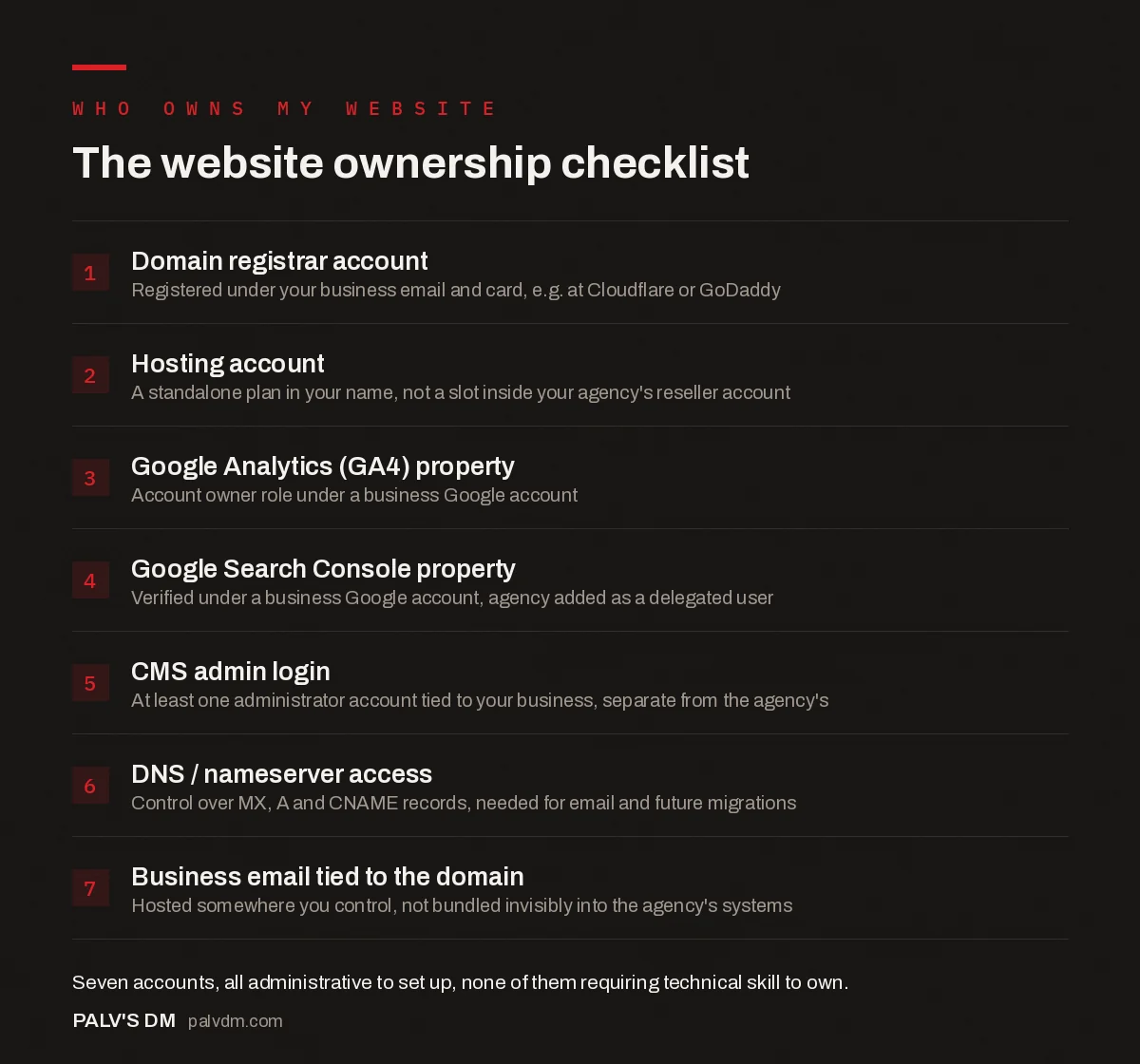
The website ownership checklist
- Domain registrar account. Registered under your business email and card, e.g. at Cloudflare or GoDaddy.
- Hosting account. A standalone plan in your name, not a slot inside your agency’s reseller account.
- Google Analytics (GA4) property. Account owner role under a business Google account.
- Google Search Console property. Verified under a business Google account, agency added as a delegated user.
- CMS admin login. At least one administrator account tied to your business, separate from the agency’s.
- DNS / nameserver access. Control over MX, A and CNAME records, needed for email and future migrations.
- Business email tied to the domain. Hosted somewhere you control, not bundled invisibly into the agency’s systems.
A pattern worth noticing in that list: none of it requires technical skill to own. It requires an email address, a credit card, and ten minutes per account. The technical skill is needed to use these accounts well. Ownership is administrative, not technical, which is exactly why there’s no good excuse for an agency to hold it instead of you.
What’s the real risk if you don’t own these?
The risk isn’t abstract. A few concrete scenarios play out repeatedly:
- Domain renewal lapses. If the domain sits in an old freelancer’s account and their card on file expires, your domain can drop, and someone else can register it the moment it becomes available. This is not rare with small agencies that shut down without warning.
- Leverage in a pricing dispute. An agency that controls your hosting and domain can, in theory, hold your site hostage during a fee disagreement. Most won’t. Some will. You don’t want to find out which kind yours is mid-negotiation.
- Lost historical data. Google Analytics and Search Console data doesn’t transfer cleanly when ownership changes hands informally. If you ever need to prove three years of organic traffic trends to a buyer during a business sale, gaps here hurt.
- Slow, painful transfers. Domain transfers between registrars typically take 5 to 7 days and need an authorisation code from whoever currently controls the account. If that person is unresponsive, you’re stuck waiting, or worse, restarting the domain relationship from scratch.
How do you fix it if you’re already in this position?
Start by finding out where you actually stand before asking anyone for anything. Run a WHOIS lookup on your domain. Check who’s listed as the account owner in your Google Analytics admin settings under Account Access Management. Log into your hosting control panel, if you can, and see whose name and card are on the billing page.
Once you know the gap, ask your current agency directly for ownership transfer, not just “access.” Most reasonable providers will do this without friction; it’s a normal, expected request. If you meet resistance, that resistance is itself useful information about whether to keep working with them. Put a firm date on it in writing. A provider who keeps deferring the conversation for months is telling you something, even if they never say it out loud.
For the domain specifically, the transfer has a mechanical path regardless of how the conversation goes: unlock the domain at the current registrar, get the authorisation (EPP) code, and initiate the transfer from the registrar you want to move to. For Google Analytics and Search Console, the fix is often simpler than a full transfer. You can usually be added as an account owner alongside the existing one, verify the property under your own login, and then have the old account removed once you’ve confirmed data continuity. Neither of these needs a lawyer for a normal, cooperative handover. It only escalates to that when someone is being deliberately obstructive.
Hosting is the odd one out. If your files and database live on hosting owned by the agency’s reseller account rather than a standalone plan in your name, there’s no clean “transfer” option; you’re migrating to new hosting, not reassigning existing hosting. Budget time for a full migration, including DNS propagation, which typically takes a few hours but can stretch to 24 to 48 hours in less common cases.
None of this is complicated once you’re doing it deliberately instead of discovering the problem mid-crisis.
For anything new you’re setting up, insist your provider create logins under your business email from day one. It costs them nothing extra and it removes this entire problem before it starts.
Does the same rule apply to ad accounts and social media?
Yes, and it’s worth naming separately because the mechanics differ slightly. Google Ads and Meta Business Manager both have a concept of account ownership that’s distinct from user access. Your business should be the account owner in both, with the agency added as a partner or admin user through Google Ads’ “Manager Account” linking or Meta’s Business Portfolio structure. Neither platform requires you to hand over your login credentials to grant this. If an agency ever asks for your actual password instead of using the partner access features both platforms provide, that’s worth questioning on its own.
Social media is murkier because Instagram, Facebook Pages and LinkedIn Company Pages don’t always have a clean single “owner” field the way a domain registrar does. The practical fix is the same principle: the page or profile should be created under a business email, with team members and agencies added as page admins or editors, never as the sole account holder logging in with credentials only they know.
What should a good agency actually do?
A provider that’s confident in the value it delivers doesn’t need to hold your accounts hostage to keep you as a client. The setup we use, and recommend to anyone building a new site, looks like this: the client creates the registrar account, the hosting account and the Google accounts themselves, under their business identity, then adds the agency as a collaborator with the specific permission level the work requires. Full admin where needed, restricted where it isn’t.
This isn’t extra paperwork for the sake of it. It’s a five-minute setup step that removes an entire category of risk, and across every handover audit I’ve run for a new client, I’ve never once seen a legitimate agency object to it.
Frequently asked questions
Who should own the domain name for my business website?
Your business, registered under a company email address and payment method you control, not your agency’s account or a personal email belonging to a freelancer. The registrant listed in WHOIS or your registrar dashboard should be your business.
What happens if my web agency owns my domain?
You lose leverage. The agency can hold pricing, response times or the relationship itself hostage because moving away means risking downtime or losing the domain entirely. Transfers are possible but typically take 5 to 7 days and require the current owner’s cooperation.
Should I own my Google Analytics and Search Console accounts?
Yes. Both should be set up under a Google account tied to your business, with your agency added as a user with the access level they need. If the agency’s personal Google account is the property owner, historical data and verification can be lost when you switch providers.
How do I check who currently owns my domain?
Run a WHOIS lookup on your domain through your registrar or a tool like ICANN Lookup. It shows the registrant organisation and registrar of record, though privacy protection services can mask the underlying registrant email.
Can a web designer legally keep my website hostage?
It depends on your contract and local copyright law. Without an explicit ownership transfer clause, some jurisdictions default custom code and design ownership to the person who created it, even after you’ve paid in full.
What’s the difference between admin access and ownership?
Admin access lets someone manage an account day to day. Ownership controls who can remove other users, close the account, or transfer it elsewhere. An agency can have full admin rights and still leave you fully in control, as long as the account itself is registered to you.
Sources
- Why Your Clients Should Own Their Domain, Email and Hosting — GoDaddy Resources
- ICANN Lookup — WHOIS Domain Registration Data
- WordPress SEO: The Complete Configuration Guide
- Website Platform Lock-In: How to Spot It Before You Sign
- The Five Accounts You Must Have in Your Own Name
- What to Get in a Website Handover From Your Developer
Want this done on your site?
Every PalV’s DM engagement starts with a free audit of your actual website — a 12-point
crawl covering what is blocking indexation, on-page gaps against your primary keywords, speed
findings, and the three to five fixes worth making first. Delivered in two working days. No
payment details, and the findings are yours whether you hire us or not.
Get your free SEO audit
See Web Development plans and prices


