Service Support — Web Development
Wix to WordPress: What We Learned Moving Our Own Site
Our own wix to wordpress experience moving palvdm.com: the URL inventory, redirect map, and metadata checklist we used to protect our search rankings.
Our wix to wordpress experience came down to one thing: treating the move as a migration project, not a redesign. We inventoried every URL, mapped redirects one-to-one, rebuilt metadata and schema by hand instead of copy-pasting it, and staged the cutover so we could roll back if anything broke. Nothing about it was exotic. What mattered was doing the boring parts in order, on our own site, before we’d ever recommend the same sequence to a client.
Key takeaway
- Wix’s editor made the site easy to start, but it also locked our structure, our markup, and eventually our SEO headroom inside a platform we didn’t control.
- The riskiest part of any platform move isn’t the design — it’s the URL and redirect mapping, because that’s what determines whether search visibility survives the switch.
- Moving our own site first, before offering the same service to clients, meant we found the annoying edge cases (redirect loops, orphaned media, re-verification steps) on something that was our own risk to carry.
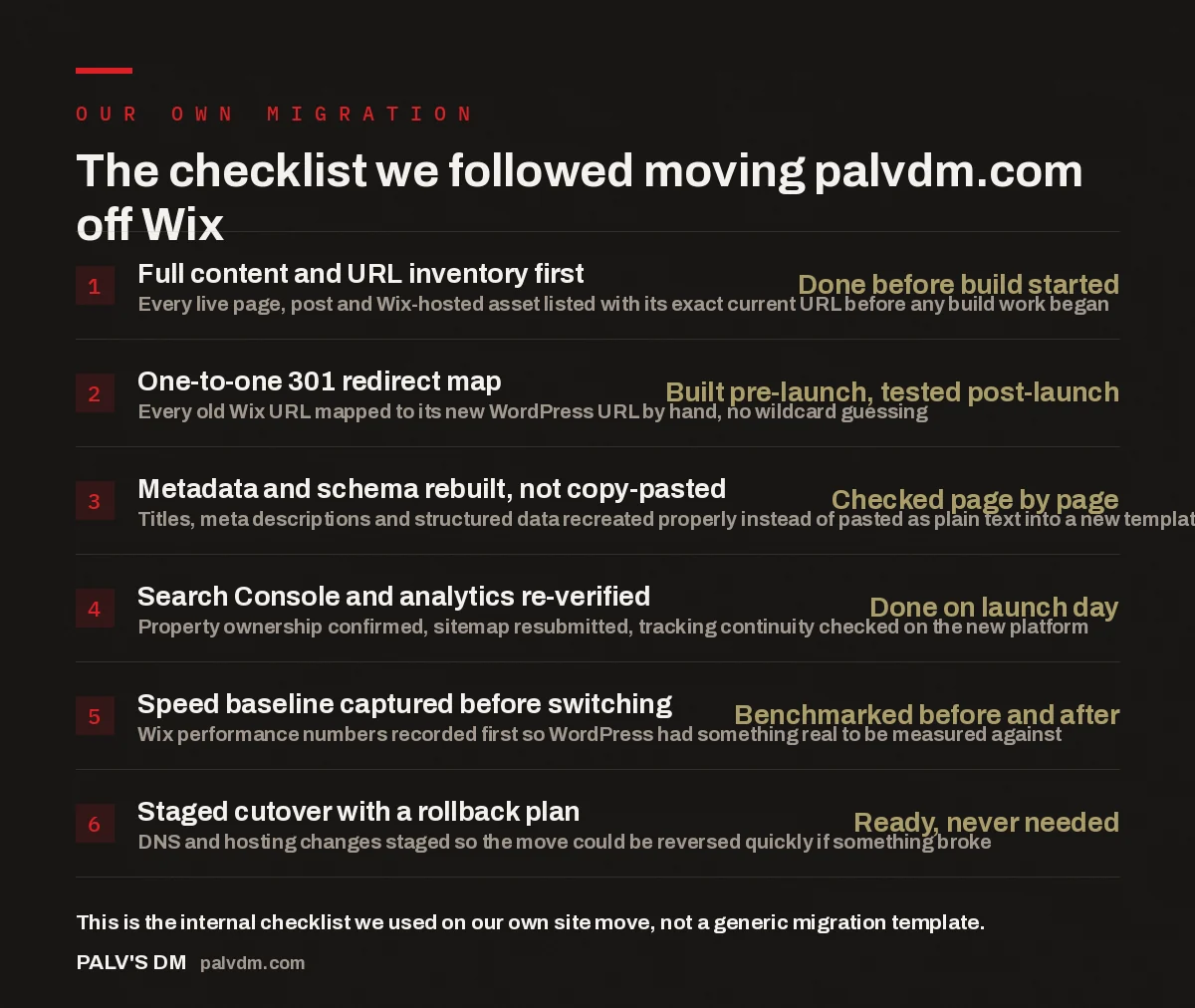
The checklist we followed moving palvdm.com off Wix
- Full content and URL inventory first — Done before build started. Every live page, post and Wix-hosted asset listed with its exact current URL before any build work began.
- One-to-one 301 redirect map — Built pre-launch, tested post-launch. Every old Wix URL mapped to its new WordPress URL by hand, no wildcard guessing.
- Metadata and schema rebuilt, not copy-pasted — Checked page by page. Titles, meta descriptions and structured data recreated properly instead of pasted as plain text into a new template.
- Search Console and analytics re-verified — Done on launch day. Property ownership confirmed, sitemap resubmitted, tracking continuity checked on the new platform.
- Speed baseline captured before switching — Benchmarked before and after. Wix performance numbers recorded first so WordPress had something real to be measured against.
- Staged cutover with a rollback plan — Ready, never needed. DNS and hosting changes staged so the move could be reversed quickly if something broke.
Why did our Wix to WordPress move happen in the first place?
Wix got the agency’s first site live fast, and for a while that was the right trade. The editor is genuinely easy to use, hosting is bundled, and there’s no server to think about. But an agency that sells site builds and SEO work has a different relationship with its own site than a typical small business does — we needed to demonstrate, on our own domain, the same technical foundation we recommend to clients. That’s difficult to do convincingly on a platform where you don’t control the underlying markup, the server environment, or how deeply plugins and scripts can integrate with the page.
The specific friction points were concrete rather than philosophical. Page markup on Wix is generated by the platform, which limits how cleanly you can structure headings, schema, and internal linking at scale. Adding new content types — the kind of structured, interlinked cluster content this exact article is part of — meant working around templates rather than extending a system. And every plugin-equivalent (Wix calls them apps) added weight to pages we didn’t fully control, which made isolating performance issues harder than it should have been. None of this made Wix a bad tool for its intended audience. It made it the wrong long-term foundation for a content-heavy, SEO-first agency site.
How do you move a live site without losing the traffic it already has?
This is the part that actually determines whether a platform migration is a success or a self-inflicted traffic drop, and it starts before a single line of the new site gets built. We pulled a complete inventory of every URL Wix had indexed or was serving — blog posts, service pages, tag archives, even orphaned pages that weren’t linked from navigation anymore but were still ranking for something. Skipping this step is the single most common way migrations go wrong: pages that quietly carried search value get dropped because nobody remembered they existed.
With the inventory in hand, we built a one-to-one redirect map — every old URL pointed to its specific new equivalent, not a blanket redirect to the homepage or a generic catch-all pattern. Blanket redirects are tempting because they’re faster to set up, but they tell search engines the destination page isn’t really a match for the old one, which is exactly the signal you don’t want to send during a move. Where a piece of content genuinely didn’t have a direct equivalent on the new site, we made a deliberate call — merge it into a related page, or let it 404 and accept the loss — rather than redirecting it somewhere unrelated just to avoid a broken link.
The other piece that’s easy to underestimate is metadata and structured data. Copy-pasting a Wix page’s visible text into a new WordPress template looks fine at a glance, but title tags, meta descriptions, canonical tags, and schema markup don’t always come across cleanly in a straight platform swap — they need to be checked and, in some cases, rebuilt page by page. We treated this as a launch-blocking task, not a follow-up item, because a redirect that lands on a page with no title tag or a duplicated canonical is still a broken migration from a search engine’s point of view, even if a human visitor never notices.
What actually broke, or almost broke, during the move?
Nothing catastrophic, but a few things needed real attention. Media was the first: images and files hosted directly on Wix’s CDN don’t just carry over — they need to be downloaded, re-uploaded to the new environment, and re-linked, and it’s easy to miss a handful buried in older blog posts if the inventory step wasn’t thorough. We found this the hard way on a couple of older pages and went back through the full media library a second time to be sure nothing was left pointing at a Wix-hosted file that would eventually stop resolving.
Search Console and analytics needed explicit re-verification rather than just a mental note to “check it later.” Moving hosting and, in our case, changing the underlying platform can affect how ownership is verified and how consistently tracking fires, so we treated re-verifying Search Console and confirming analytics continuity as a launch-day task, done and checked before we called the move complete — not something to circle back to once traffic patterns looked odd a few weeks later.
We also captured a speed and Core Web Vitals baseline on the Wix site before switching anything, specifically so the comparison after launch would be honest rather than assumed. It’s easy to claim a new build is faster without ever having measured the old one properly, and that’s not a standard we’d accept from a client’s site, so we didn’t accept it from our own.
We don’t ask a client to trust a migration process we haven’t run on something we’d be embarrassed to lose. Moving our own site first meant the mistakes were ours to find, on our own timeline, before they were ever someone else’s risk.
Palash, Founder, PalV’s DM
What would we do differently on the next platform move?
The sequence held up — inventory, redirect map, metadata rebuild, re-verification, benchmark, staged cutover — and it’s the same order we now use on client migrations for exactly that reason. The one change we’d make is starting the media audit earlier and treating it as its own line item instead of folding it into the general content inventory. It’s a small enough task to underestimate and a large enough one to cause real cleanup work if it’s rushed.
The other lesson wasn’t technical. It was about timeline honesty. A platform move that touches structure, markup, hosting, and search visibility all at once takes longer to do properly than it does to do quickly, and the gap between those two timelines is exactly where migrations go wrong. Building in the buffer for a proper redirect audit and a staged cutover, rather than compressing the schedule to hit a launch date, is the difference between a move that holds its search rankings and one that spends months recovering from a rushed cutover.
Next step
If you’re weighing a move off Wix, Squarespace, or another builder onto a platform you actually control, we can walk through what that migration would look like for your specific site before you commit to a date.
FAQ
Does moving from Wix to WordPress hurt your SEO rankings?
It can, but not because of the platform switch itself — it’s almost always because of an incomplete redirect map or lost metadata. Rankings are tied to specific URLs and the signals attached to them. If every old URL has a matching new one with equivalent content and a proper 301 redirect, search engines generally treat it as a continuation rather than a new site.
How long does a Wix-to-WordPress migration actually take?
It depends heavily on how much content exists and how thorough the inventory and redirect work needs to be, not just on how long it takes to rebuild the design. A small site with a handful of pages moves faster than one with years of blog content and media to account for. Treat the redirect mapping and QA phase as the long pole, not the build itself.
Can you export Wix content directly into WordPress?
Wix doesn’t offer a clean, direct export into WordPress’s format, so content typically needs to be pulled out page by page or through a combination of manual work and tooling, then rebuilt in WordPress rather than dropped in as-is. This is exactly why treating the move as a real migration project, with its own inventory and QA steps, matters more than treating it as a simple copy-paste.
Is it worth moving off Wix if the site is small and simple?
Not always. If a site is small, isn’t leaning on SEO for growth, and doesn’t need deep customisation or content scale, Wix can remain a reasonable fit. The calculus changes once a business depends on organic search, needs to publish content regularly, or wants control over hosting, plugins, and markup that a builder platform doesn’t expose.
What’s the biggest mistake businesses make moving off a website builder?
Treating it as a design refresh instead of a migration. Businesses often focus on how the new site looks and underinvest in the redirect map, metadata parity, and re-verification steps that actually protect search visibility. The visual rebuild is usually the easy part; the URL and technical continuity work is where migrations succeed or fail.
Short version: our wix to wordpress experience worked because we treated it as a migration project first and a redesign second — full URL inventory, a one-to-one redirect map, metadata and schema rebuilt by hand, re-verified Search Console and analytics, a pre-switch speed baseline, and a staged cutover with a rollback plan. Nothing about the sequence was unique to us; it’s the same order we now recommend to clients moving off Wix, Squarespace, or any other builder. For related reading, see why we build on self-hosted WordPress in the first place, how we migrate a client site without a traffic drop, the broader decisions and trade-offs behind rebuilding our own site, and why we don’t use page builders on client sites.