Service Support — Web Development
Cheap Website vs Built-to-Rank Website: The Real Difference
Weighing a cheap website vs professional build? See what actually separates them: page speed, site structure, technical SEO, and total cost over three years.
The real difference in a cheap website vs professional build isn’t the price tag on the invoice — it’s what happens twelve months after launch. A cheap build gets a business online. A built-to-rank build gets a business found, and keeps finding new customers without every visit being paid for through ads. The gap between the two shows up in three concrete places: how fast the site loads on a phone, whether the structure can absorb new pages without breaking navigation, and whether search engines and AI answer engines can actually parse what’s on the page. Everything else — theme choice, colour palettes, “customisation” — is decoration around those three facts.
Key takeaway
- A cheap website is usually cheap because of what’s missing underneath it — site structure, technical SEO, and a codebase that can be extended — not because the visible design is worse.
- The cost difference is mostly front-loaded. A built-to-rank site costs more to launch and less to run, rebuild, and fix over the following three years.
- A cheap build can be the right call for a genuinely short-lived project. It’s the wrong call for any business that plans to rank in organic search or be surfaced by AI tools over time.
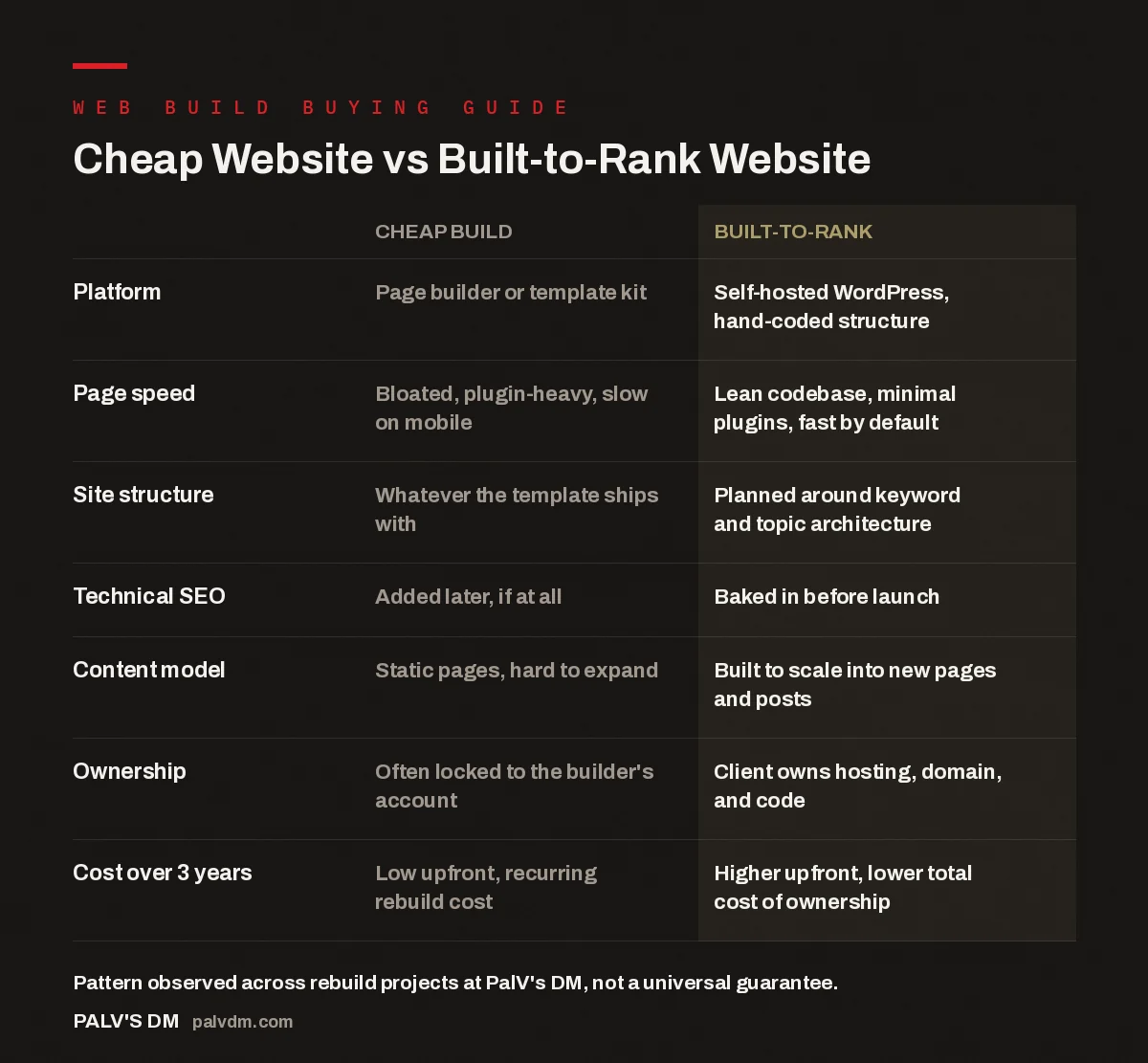
Cheap Website vs Built-to-Rank Website
| Cheap build | Built-to-rank | |
|---|---|---|
| Platform | Page builder or template kit | Self-hosted WordPress, hand-coded structure |
| Page speed | Bloated, plugin-heavy, slow on mobile | Lean codebase, minimal plugins, fast by default |
| Site structure | Whatever the template ships with | Planned around keyword and topic architecture |
| Technical SEO | Added later, if at all | Baked in before launch |
| Content model | Static pages, hard to expand | Built to scale into new pages and posts |
| Ownership | Often locked to the builder’s account | Client owns hosting, domain, and code |
| Cost over 3 years | Low upfront, recurring rebuild cost | Higher upfront, lower total cost of ownership |
What actually makes a website “cheap”?
Price is a symptom, not the cause. A website is cheap when the time that went into it was cheap — fewer hours spent on planning the page structure, fewer hours spent testing how it loads on a mid-range phone on mobile data, fewer hours spent making sure the code doesn’t fight the browser. Most cheap builds run on a page builder or a pre-made template, which is not automatically a problem, but it does mean the site inherits whatever assumptions that template made about layout, scripts, and page weight. Those assumptions are rarely made with search visibility in mind — they’re made to look good in a demo.
The visible layer — fonts, colours, hero images, a contact form — is where a cheap build and a built-to-rank build can look almost identical to a client sitting in a handover call. The difference is underneath: in the HTML that search engines crawl, in how many separate scripts load before the page becomes usable, and in whether the site’s internal structure gives Google (or an AI answer engine) a clear signal of what the business actually does and for whom. Our own breakdown of what’s included in a complete website build covers this in more detail — the visible page is one line item among many.
Why does a cheap site rank worse, not just look worse?
Ranking is a function of trust signals accumulated over time, and a slow, poorly structured site makes every one of those signals harder to earn. Page speed is the clearest example: Google has been explicit for years that Core Web Vitals — how fast a page loads, how quickly it becomes interactive, and how much it shifts around while loading — factor into ranking, and mobile users abandon slow pages before they even see the content. A template loaded with unnecessary plugins and render-blocking scripts is fighting that battle before a single word of content gets read.
Structure matters just as much. In the rebuild projects we take on, the pattern that shows up repeatedly is a site with no real hierarchy — service pages competing with blog posts for the same keyword, no clear internal linking between related topics, thin category pages that neither help a visitor nor tell a search engine what the section is about. A search engine (and increasingly, an AI system summarising search results) relies on that structure to understand what a site covers and how authoritative it is on a topic. Without it, even genuinely useful content on a cheap site struggles to surface, because there’s no scaffolding around it proving relevance.
This is also where AI visibility diverges from classic SEO in a way that makes cheap builds age worse. AI answer engines lean heavily on clean, well-labelled HTML — proper headings, tables, lists — to extract facts they can cite. A page builder that renders content as a soup of nested div tags with no semantic structure is harder for both a search crawler and an AI system to parse cleanly, even if a human reader can’t tell the difference.
What does a built-to-rank website actually include?
A built-to-rank website starts from the keyword and topic architecture, not the visual design. The page list, URL structure, and internal linking plan get decided before a single mockup gets built, because retrofitting structure onto a finished site is far more expensive than planning it up front. From there, the build typically includes:
- A lean, self-hosted codebase with only the plugins the site genuinely needs — see why we don’t use page builders on client sites for the reasoning.
- Technical SEO fundamentals — clean URLs, schema markup, XML sitemaps, proper heading hierarchy — set up before launch rather than bolted on after, as covered in the technical SEO we bake in before launch.
- A content model that can grow — new service pages, location pages, or blog posts slot into the existing structure instead of requiring a rebuild.
- Performance budgets enforced at build time, not fixed after a client complains the site feels slow.
- Full ownership handed to the client — hosting, domain, and code are theirs, not locked inside a builder’s ecosystem.
None of this is exotic. It’s closer to what a competent development team would have called “just building the site properly” a decade ago, before page builders made it possible to ship something that looks finished in a weekend without any of the underlying work.
A cheap website and a built-to-rank website solve two different problems. One gets you a URL to put on a business card. The other gets you a channel that keeps producing traffic on its own. Confusing the two is the single most expensive mistake we see clients make before they come to us.
Palash, Founder, PalV’s DM
How much more does a built-to-rank website actually cost?
The honest answer is: more upfront, and directionally less over time. A cheap build wins on the invoice you see on day one. A built-to-rank build wins on every invoice you don’t see later — the rebuild that a growing business eventually needs when the cheap site can’t support new pages without breaking, the emergency fixes when a plugin update takes the site down, the lost organic traffic that has to be replaced with paid ads because the site was never structured to earn it in the first place. We’ve written separately about what a website actually costs to run each year, because the sticker price at launch is only ever part of the real number.
The businesses that regret a cheap build almost never regret it in month one. They regret it when they try to expand the site — add a new service line, a new location page, a booking system — and discover the template can’t absorb the change cleanly, or when they notice a competitor with a similar offering consistently outranking them despite what looks, on the surface, like a comparable site.
When is a cheap website the right call?
There are legitimate cases for a cheap build, and it’s worth naming them honestly rather than pretending every business needs the same solution. A short-lived event page, a landing page for a single campaign with a fixed end date, or a placeholder site while a business validates whether an idea has demand at all — these don’t need architecture built for years of organic growth, because they aren’t going to be around for years of organic growth. In those cases, spending on structure and technical SEO is money spent solving a problem that doesn’t exist yet.
The calculation changes the moment a business expects the website to be a growth channel — the place new customers find them through search, not just a page people are sent to after they’ve already been convinced elsewhere. At that point, a cheap build isn’t a lower-cost version of the same thing; it’s a different product that happens to look similar on a screen.
Not sure which one your business needs?
If you’re weighing a cheap build against a built-to-rank one, the right starting point is an honest look at your current site’s structure and speed, not another quote.
FAQ: Cheap website vs professional build
Is a cheap website always bad for SEO?
Not automatically, but it’s rarely built with SEO as a priority. A cheap build can be optimised after the fact, but retrofitting site structure, speed fixes, and technical SEO onto an existing template usually costs more in time and money than building it correctly the first time. The cost saved at launch tends to reappear later as a bigger bill.
Can I start cheap and upgrade the website later?
You can, but “upgrading” a cheap site is often closer to rebuilding it, because the underlying structure and codebase are what need to change, not just the visual layer. If a full rebuild is likely within the first year or two, it’s worth weighing whether the upfront saving on a cheap build is actually a saving at all. Our redesign or rebuild decision framework walks through how to make that call.
What’s the biggest visible difference between the two?
Mobile page speed is usually the first thing a visitor notices, even without knowing why. A built-to-rank site tends to feel instantly responsive; a cheap, plugin-heavy build often has a noticeable lag before it becomes usable. Beyond that, the differences — site structure, technical SEO, code ownership — are invisible to a normal visitor but directly affect how the site performs in search over time.
Does using a page builder always mean the site is “cheap”?
Not by definition, but in practice page builders make it easy to accumulate the exact problems that hold sites back — extra plugins, render-blocking scripts, and markup that isn’t semantically clean. It’s possible to build carefully on top of one; it’s just uncommon, because the appeal of a page builder is speed of assembly, which pulls against the slower work of getting structure and performance right.
How do I know if my current website is the “cheap” kind?
Check mobile load speed, look at whether adding a new page is straightforward or requires fighting the template, and see whether your organic traffic has grown or flatlined over the past year despite adding content. If two or three of those look wrong, the site is likely costing you leads rather than generating them — a pattern we cover in signs your current website is costing you leads.
Short version: a cheap website vs professional build isn’t a debate about which looks better on launch day — it’s a debate about which one is still working for you in three years without a rebuild. If the website only needs to exist for a few weeks, cheap is fine. If it’s meant to be a growth channel, the structure, speed, and technical SEO decided on day one are the actual product, and they’re exactly what a template can’t shortcut.