Service Support — Web Development
Redesign or Rebuild? A Decision Framework
Confused about a website redesign or rebuild? This decision framework shows which signals mean rebuild, which mean redesign, and how to protect SEO either way.
A website redesign or rebuild decision comes down to one question: is the problem how the site looks, or how it’s built? If the platform, code and hosting are sound and only the visual layer feels dated, redesign it — new templates, new content, same technical bones, usually 4-8 weeks. If the platform itself is slow, hard to update, built on a page builder or CMS you’ve outgrown, or can’t support the structured data and page speed modern search and AI systems expect, a redesign will only repaint a structural problem. That calls for a rebuild.
Key takeaway
- A redesign changes the surface — layout, copy, visuals — while keeping the platform, URLs and code underneath. A rebuild replaces the foundation itself.
- The right test isn’t “do we like how it looks” — it’s whether the current platform can be updated, secured, made fast and structured for search without constant workarounds.
- Rebuilds carry more ranking risk than redesigns because URLs, architecture and templates usually change — that risk is manageable with a proper migration plan, not a reason to avoid a rebuild you actually need.
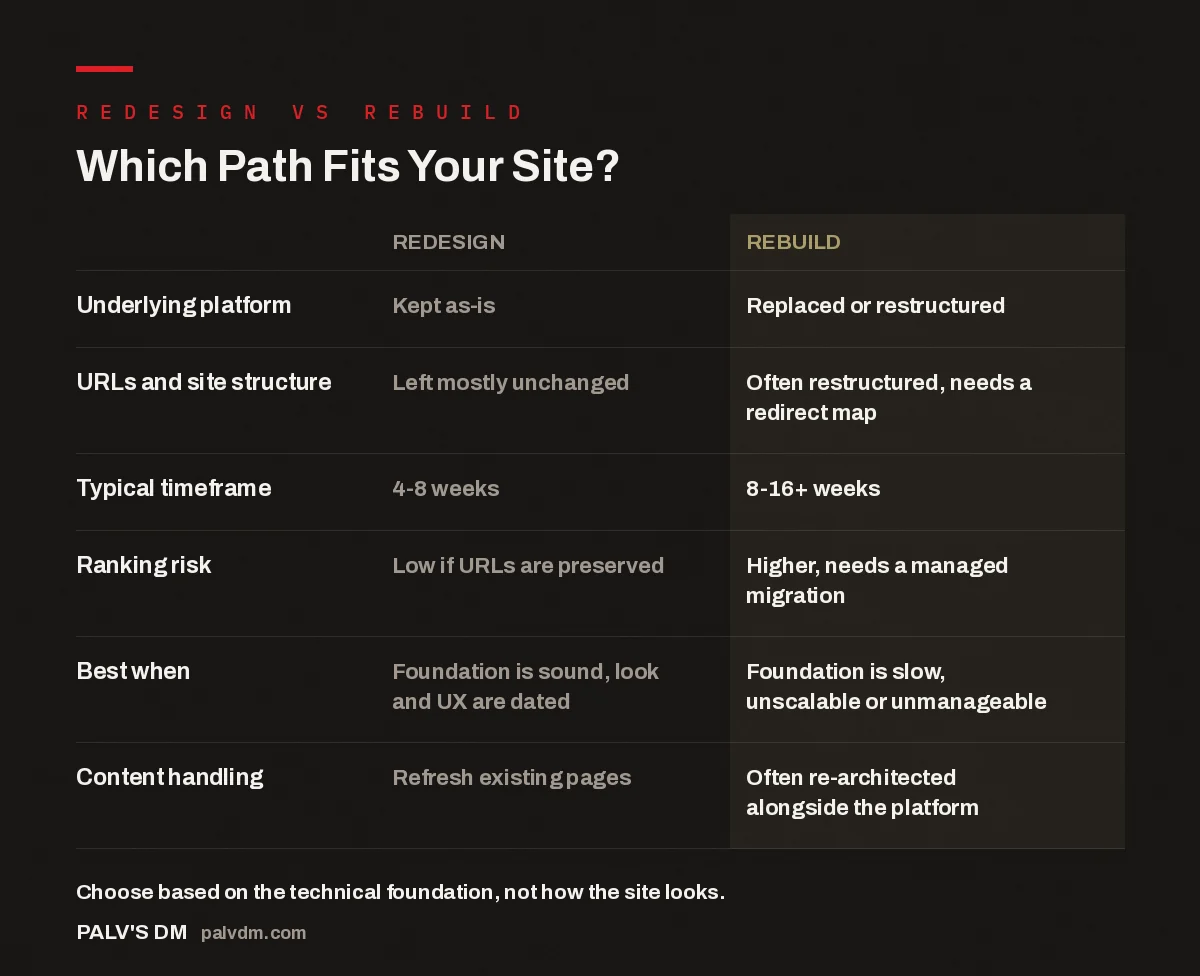
Which Path Fits Your Site?
| Redesign | Rebuild | |
|---|---|---|
| Underlying platform | Kept as-is | Replaced or restructured |
| URLs and site structure | Left mostly unchanged | Often restructured, needs a redirect map |
| Typical timeframe | 4-8 weeks | 8-16+ weeks |
| Ranking risk | Low if URLs are preserved | Higher, needs a managed migration |
| Best when | Foundation is sound, look and UX are dated | Foundation is slow, unscalable or unmanageable |
| Content handling | Refresh existing pages | Often re-architected alongside the platform |
What’s the actual difference between a redesign and a rebuild?
A redesign works on top of what already exists. The CMS, hosting, database and most of the URL structure stay the same. What changes is the template, the visual system, the copy and often the navigation — the equivalent of renovating a house whose plumbing, wiring and foundation are fine.
A rebuild replaces the foundation. That might mean moving off a page builder onto hand-coded templates, migrating from a hosted platform like Wix or Squarespace to self-hosted WordPress, consolidating a bloated plugin stack, or re-architecting the site’s information structure because the old one no longer reflects the business. The visual layer usually changes too, but that’s a side effect — the real work is underneath, in code, hosting and structure that a redesign can’t reach.
The confusion between the two usually starts because both projects produce a “new website,” and the amount of visible change gets mistaken for the size of the project. A site can look almost identical after a rebuild — same brand, same layout logic, same content — and still be a completely different, faster, more maintainable piece of engineering underneath.
How do you know you need a rebuild instead of a redesign?
In the accounts we take over, a handful of signals show up over and over when a redesign alone won’t fix the actual problem:
- Every content change needs a developer. If updating a price, a service page or an FAQ requires touching code because the page builder or theme is that fragile, the platform is the bottleneck, not the design.
- Page speed won’t move no matter what you optimise. Compressing images and adding a caching plugin only gets you so far if the theme and plugin stack are architecturally heavy. At some point the ceiling is the platform, not the settings.
- The plugin count keeps climbing and the site keeps breaking. Each new feature bolted onto an aging build adds another point of failure. When updates routinely break something else, that’s structural debt, not a styling issue.
- The site can’t represent the business anymore. If you’ve added services, entered new markets or changed how you sell, and the navigation and page structure are being stretched to cover territory they weren’t built for, no amount of restyling fixes an information architecture problem.
- You’re on a platform that limits what search and AI systems can read. Some page builders and hosted platforms make it genuinely difficult to control clean markup, structured data and crawlable HTML — all things that matter for both traditional rankings and how AI answer engines represent your business.
If none of that applies — the platform is capable, updates are manageable, speed is acceptable — but the site still looks like it was built five years ago and isn’t converting the way it should, that’s a design and content problem, not a technical one. That’s exactly what a redesign is for.
When does a redesign make more sense than a rebuild?
A redesign is the right call when the platform is doing its job quietly in the background and nobody’s thinking about it — which is exactly how it should be. If your team can add a page without calling a developer, the site loads reasonably fast, and search performance is stable, then the visible layer is the thing worth investing in. Outdated visual design, unclear messaging, weak calls to action and a navigation structure that no longer matches how customers actually browse are all redesign problems. They’re also usually the faster, cheaper fix, because you’re not touching hosting, migrating a database or remapping URLs — you’re building new templates on infrastructure you already trust.
Redesigns also carry meaningfully lower SEO risk. When URLs, internal linking and core page structure stay in place, search engines don’t have to re-crawl and re-evaluate the entire site the way they do after a full migration. That’s one of the reasons “just redesign it” is the more comfortable default answer — it’s genuinely lower-risk when the underlying platform can support it.
What do a redesign and a rebuild actually cost in time and effort?
A redesign is typically the shorter project — new templates, refreshed content and a design pass on an existing platform generally take weeks, not months, because the technical scaffolding is already in place. A rebuild takes longer by nature: new hosting environment, platform migration or reconstruction, content moved and often restructured, a full QA pass, and a redirect map covering every URL that’s changing. Site size and content volume move the exact number, but as a rule, a rebuild is a multi-month commitment where a redesign is a multi-week one.
The cost difference tracks the same logic. You’re not just paying for more design and development hours on a rebuild — you’re paying for the migration work: content audits, redirect mapping, structured data rebuilt from scratch, and a launch process built specifically to avoid a traffic drop. That’s real, necessary work, and skipping it to save money is where rebuilds go wrong.
Most site owners want to know which option is cheaper. The better question is which option actually fixes the problem — because a redesign on a broken platform is money spent solving the wrong layer.
Palash, Founder, PalV’s DM
How does a rebuild affect SEO rankings and AI visibility?
This is the part that makes people nervous about rebuilding, and the caution is fair — a poorly executed migration is one of the most common ways an otherwise healthy site loses rankings overnight. The risk isn’t the rebuild itself; it’s what happens to URLs, internal links, page titles and content during the move. If old URLs 404 instead of redirecting, if internal links point to pages that no longer exist, or if content gets thinner in the process, search engines read that as a site that’s gotten worse, not better.
Handled properly — a documented redirect map from every old URL to its new equivalent, preserved or improved content depth, and structured data rebuilt rather than dropped — a rebuild is an opportunity to fix technical SEO debt that a redesign never touches: slow page speed, missing schema, unclean markup, orphaned pages. We’ve written in more detail about how we migrate a site without a traffic drop, and about the technical SEO we bake in before launch — the two things that make the difference between a rebuild that loses ground and one that gains it.
There’s also a forward-looking reason rebuilds are coming up more often now: AI answer engines read a site’s structured data and clean HTML to decide how to represent a business in a generated answer. A platform that can’t output clean markup limits that just as much as it limits traditional rankings. If you want the fuller picture of how search behaviour is shifting, our state of search in 2026 piece covers where AI visibility fits alongside traditional SEO.
What questions should you ask before deciding?
Before committing to either path, it’s worth answering a short set of questions honestly, ideally with whoever manages the site day-to-day:
- Can content be updated without a developer, and does that actually happen reliably?
- Has page speed been tested with real optimisation, or only guessed at?
- Is the current information architecture still an accurate map of the business today?
- How often does a plugin or theme update break something else on the site?
- If we’re not sure, what would it cost to find out properly, rather than guess?
If you’re still unsure after answering those honestly, that uncertainty is itself useful information — it usually means the site is somewhere in between, and worth a proper audit before either project starts. Our post on the signs your current website is costing you leads is a good next read if speed and conversions, not just aesthetics, are the concern. If timeline is the deciding factor either way, how long a business website takes to build properly lays out realistic expectations for both paths. And if you want to see how this plays out in practice rather than in theory, we’ve documented rebuilding our own site, including the decisions and trade-offs we made ourselves.
Not sure which one you need?
A short technical audit will tell you whether your platform is holding you back or your design is — before you spend on the wrong fix.
Redesign vs rebuild: frequently asked questions
Can I redesign a site that’s on a page builder without rebuilding it?
You can restyle it, but you’ll inherit the page builder’s performance and maintenance limits either way. If speed, plugin conflicts or fragile editing are already problems, a redesign on the same builder usually just recreates those problems in new templates.
Will a website rebuild hurt my search rankings?
It can, if URLs change without redirects, internal links break, or content gets thinner during the move. It doesn’t have to — a rebuild with a documented redirect map and preserved or improved content depth is a normal, low-drama process, not an inherent risk to rankings.
How much longer does a rebuild take compared to a redesign?
A redesign typically runs a matter of weeks because the platform and hosting are unchanged. A rebuild is a longer, multi-month project because it includes platform migration or reconstruction, content restructuring, redirect mapping and a fuller QA pass before launch.
What if I only need to fix a few pages, not the whole site?
That’s usually not a redesign or rebuild decision at all — it’s a targeted content and template update on specific pages. Full redesigns and rebuilds make sense when the problem is site-wide: consistent slowness, an outdated system across every page, or a structure that no longer fits the whole business.
Do I need to migrate to WordPress specifically to fix these problems?
Not necessarily, but the platform matters. What matters is whether the platform gives you control over code, markup, hosting and structured data. Some hosted site builders limit that by design, which is why moving off them is a common — though not universal — reason for a rebuild.
Short version: redesign what looks wrong, rebuild what’s broken. If the platform can be updated safely, loads reasonably fast and doesn’t fight you on every change, a redesign is the faster, lower-risk, lower-cost path. If the platform itself is the ceiling — on speed, on maintainability, on what search and AI systems can read — a rebuild is the only fix that actually holds, and the migration risk that comes with it is manageable with a proper plan, not a reason to keep patching a foundation that’s already given out.