
Article Schema: Fields That Matter and Fields That Don’t
Google recognises only five Article schema properties for rich results. Here's what actually matters, what's decoration, and mistakes to avoid.

Google’s own documentation recognises exactly five Article schema properties: headline, image, author, datePublished and dateModified. Everything else you’ll see in generator tools and plugin defaults, like wordCount, articleBody, or keywords, is valid schema.org markup that Google’s Article feature simply doesn’t use. That doesn’t make those extra fields wrong to include. It makes them decoration rather than a lever that moves anything in Search.
We see a lot of client sites with Article schema stuffed full of properties someone copied from a generator tool, half of which schema.org supports and Google ignores entirely. That’s not a disaster, but it’s wasted effort when the five properties that actually matter get less attention than they deserve.
The author field is where we find the most actual bugs during audits, not the exotic properties. A generic “Admin” author name, or a merged string with two names jammed together, shows up more often than you’d expect on sites that otherwise look well built.
What does Google actually use from Article schema?
Per Google Search Central’s own Article structured data documentation, the recognised properties are narrow:
| Property | What it does | Notes |
|---|---|---|
| headline | The article’s title | Keep it concise; long titles can get truncated on some devices |
| image | Representative image for the article | Google recommends multiple aspect ratios: 16×9, 4×3, 1×1 |
| author | Person or Organization who wrote it | List each author separately; include name and url or sameAs |
| datePublished | First publish date, ISO 8601 format | Include timezone or Google defaults to Googlebot’s timezone |
| dateModified | Most recent update date | Optional but recommended for accuracy; no warning if omitted |
Notice what’s absent: there’s no mention of wordCount, articleBody, keywords, articleSection, or a dozen other properties schema.org’s Article type technically supports. Google states plainly that there are no required properties at all, just recommended ones, and the five above are the full recommended list.
What about the fields everyone adds that Google doesn’t mention?
Rank Math, Yoast, and most JSON-LD generator tools will happily populate wordCount, articleSection, articleBody or a keywords array without telling you Google’s Article documentation doesn’t reference any of them. That’s not malicious, schema.org itself supports these properties, and other systems (some AI crawlers, some third-party tools) may read them. But if your goal is specifically Google Article rich results, populating these fields is optional polish, not a requirement, and definitely not a ranking factor in the way some plugin UI copy implies.
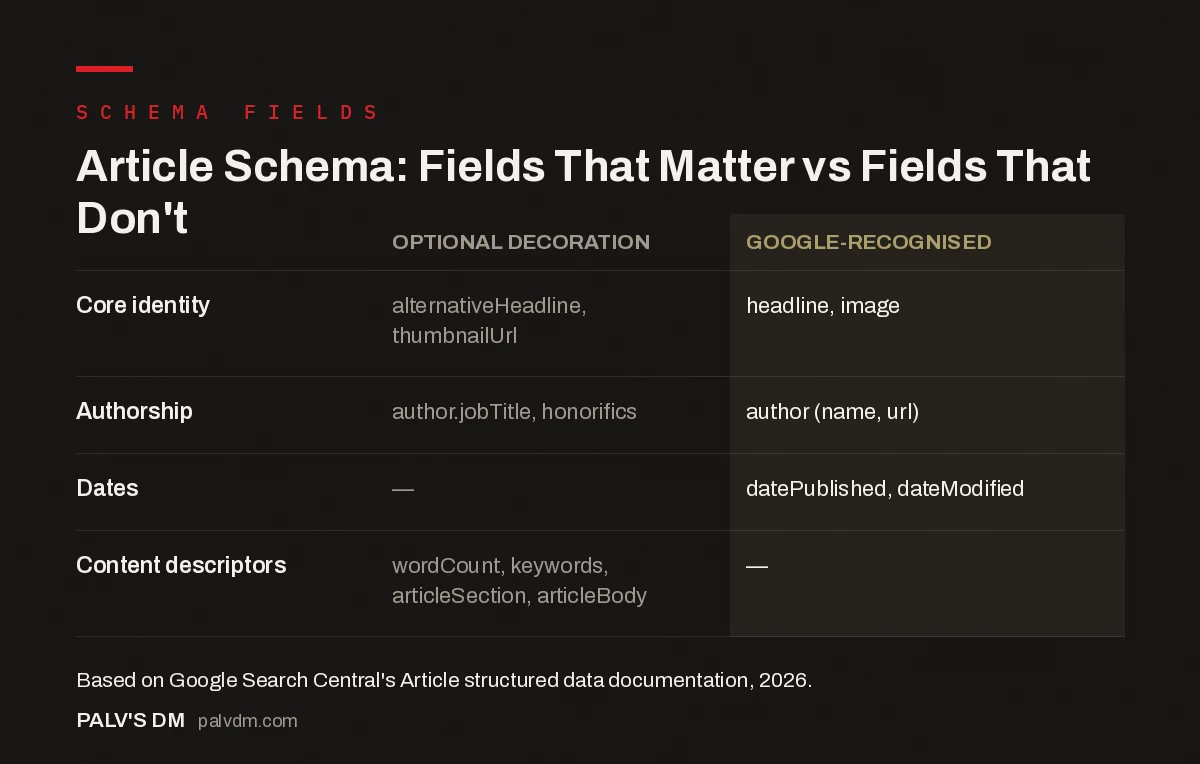
Article Schema: Fields That Matter vs Fields That Don’t
| Optional decoration | Google-recognised | |
|---|---|---|
| Core identity | alternativeHeadline, thumbnailUrl | headline, image |
| Authorship | author.jobTitle, honorifics | author (name, url) |
| Dates | — | datePublished, dateModified |
| Content descriptors | wordCount, keywords, articleSection, articleBody | — |
Article, NewsArticle, or BlogPosting: which type should you use?
Article objects must use one of three schema.org types: Article, NewsArticle, or BlogPosting. For a standard blog post, use BlogPosting; it’s the more specific type and gives Google slightly clearer signal than the generic parent Article type. Reserve NewsArticle for genuine journalism, since it adds fields specific to news publishing, like dateline and printEdition, that don’t apply to a how-to guide or a company blog post. BlogPosting and general Article both inherit the same core fields, so functionally the difference for most business blogs is small, but using the more specific type when it fits is free and slightly more precise.
How should multiple authors be marked up?
Google’s own best-practice guidance is explicit here, and it’s the single most common Article schema mistake we catch in audits: list each author in their own separate author object, never merge two names into one text field like “Jane Doe, John Doe” inside a single author.name. Use the author.url or sameAs property pointing to a bio page, an about page, or the author’s social profile, since that’s what helps Google disambiguate which “Jane Doe” wrote the piece when the name isn’t unique. And keep author.name to just the name, nothing else. Job titles belong in author.jobTitle, honorifics in author.honorificPrefix, not stuffed into the name string.
Do you need a publisher property too?
Publisher isn’t on Google’s recommended list for Article specifically, but nearly every SEO plugin adds it by default, and for good reason that goes beyond the Article feature itself. A consistent Organization entity referenced via publisher across every article on your site reinforces your brand as a recognised entity, which matters for the broader entity and knowledge-graph signals Google builds up over time, separate from whether any single Article rich result appears. Include it. It doesn’t hurt, and it supports work that happens outside the Article schema feature specifically.
What are the most common Article schema mistakes?
- Merged author names in one field. Covered above, and still the most frequent error we find in client audits.
- Missing image aspect ratio variety. Google recommends 16×9, 4×3 and 1×1 versions when possible; a single square thumbnail limits which surfaces can use it.
- datePublished with no timezone. Google defaults to Googlebot’s timezone when none is specified, which can misalign your published time by hours.
- Schema that doesn’t match visible content. If your JSON-LD headline doesn’t match the on-page H1, or the author listed in schema isn’t shown anywhere on the page, that’s a mismatch worth fixing before it becomes a bigger structured-data problem.
- Using Organization as the author type for an individual writer. Google’s guidance is specific: use Person for people, Organization for organizations, and don’t default to Organization just because it’s simpler to set up once.
Does Article schema matter for AI search and citations?
It’s one of several signals that help, though it’s not the whole story. AI systems that summarise or cite web content generally have an easier time when a page’s author, publish date and headline are unambiguous, and clean Article schema is part of what makes that unambiguous instead of inferred from messy HTML. It’s not a guarantee of getting cited, and no schema markup fixes thin or generic content. Think of Article schema as removing friction for machines trying to understand a page correctly, not as a mechanism that manufactures authority the content itself doesn’t have.
The practical implication for AI visibility work: keep datePublished and dateModified accurate and current, since freshness signals matter more to AI retrieval systems evaluating which source to cite than they historically did for classic web search rankings. A page with stale, inaccurate dates in its schema sends a small but real negative signal on top of whatever the content itself says.
How do you check whether your Article schema is actually working?
Run the page through Google’s Rich Results Test first, since that’s the tool that tells you specifically whether Google can use your markup for search features, not just whether the syntax is valid. For broader syntax validation across all schema types, the Schema Markup Validator on schema.org is the right second check. We cover exactly when to use each tool in our Rich Results Test vs Schema Validator comparison, which matters more than it sounds, because passing one doesn’t guarantee passing the other.
Frequently asked questions
What fields does Article schema actually need for Google?
Google’s documentation lists headline, image, author (with name and ideally url), and datePublished as the recommended properties, with dateModified as an extra recommendation for accuracy. There are no properties Google marks as strictly required, but skipping these reduces your odds of qualifying for article-related search features.
Should I use Article, NewsArticle or BlogPosting?
BlogPosting is the right type for most blog content, including this kind of post. NewsArticle is meant for journalism and adds fields relevant to news publishing, like dateline. Article is the generic parent type; using the more specific BlogPosting or NewsArticle when applicable gives Google slightly clearer signal.
Does adding wordCount or keywords to Article schema help rankings?
Google’s Article structured data documentation doesn’t list wordCount, keywords or articleBody among the properties it uses. They’re valid schema.org properties that some other systems may read, but there’s no evidence Google’s Article rich result or ranking systems act on them, so treat them as optional rather than a ranking lever.
Why does my Article schema get an author warning in the Rich Results Test?
The most common cause is merging multiple authors into one text field, or leaving out the author.url or sameAs property that helps Google disambiguate who the author is. List each author as a separate object with a name and a link to a bio or profile page.
Do I need both author and publisher in my Article schema?
Publisher isn’t in Google’s list of recommended Article properties, but most SEO plugins add it automatically because it reinforces your Organization entity and brand consistency across pages. It doesn’t hurt to include it, and it supports broader entity signals even if Google’s Article feature itself doesn’t require it.
Sources
- Article structured data documentation, Google Search Central
- Article type definition, Schema.org
- Schema Markup: A Practical Guide With Copy-Paste JSON-LD
- Organization Schema: The Entity Foundation for Your Brand
- Person Schema and Author Entity Signals
- Rich Results Test vs Schema Validator: Different Jobs
Want this done on your site?
Every PalV’s DM engagement starts with a free audit of your actual website — a 12-point
crawl covering what is blocking indexation, on-page gaps against your primary keywords, speed
findings, and the three to five fixes worth making first. Delivered in two working days. No
payment details, and the findings are yours whether you hire us or not.


