Service Support — Consulting & Audit
Consulting Before a Redesign or Migration
An SEO consultant for migration protects rankings before a redesign: redirect maps, content parity, and post-launch monitoring, explained without fluff.

Bring in an SEO consultant for a migration when the redesign or platform move is still in planning — not after the new site is built. The consultant’s job is to make sure the old site’s rankings, URLs and indexed content survive the transition, which means working alongside the design and development process, not cleaning up after it. Most traffic drops from a redesign are not caused by the new site being worse; they’re caused by decisions made early in the project that nobody checked against search visibility.
Key takeaway
- An SEO consultant for migration needs to be involved during planning and design, not after the new site is already staged — by then, the redirect and content decisions are hard to unwind.
- The two failure points that show up again and again are an incomplete redirect map and content that gets rewritten or dropped without checking what it was actually ranking for.
- A consultant’s real value is a documented pre-launch checklist and a post-launch monitoring window — not a one-off audit that ends the day the site goes live.
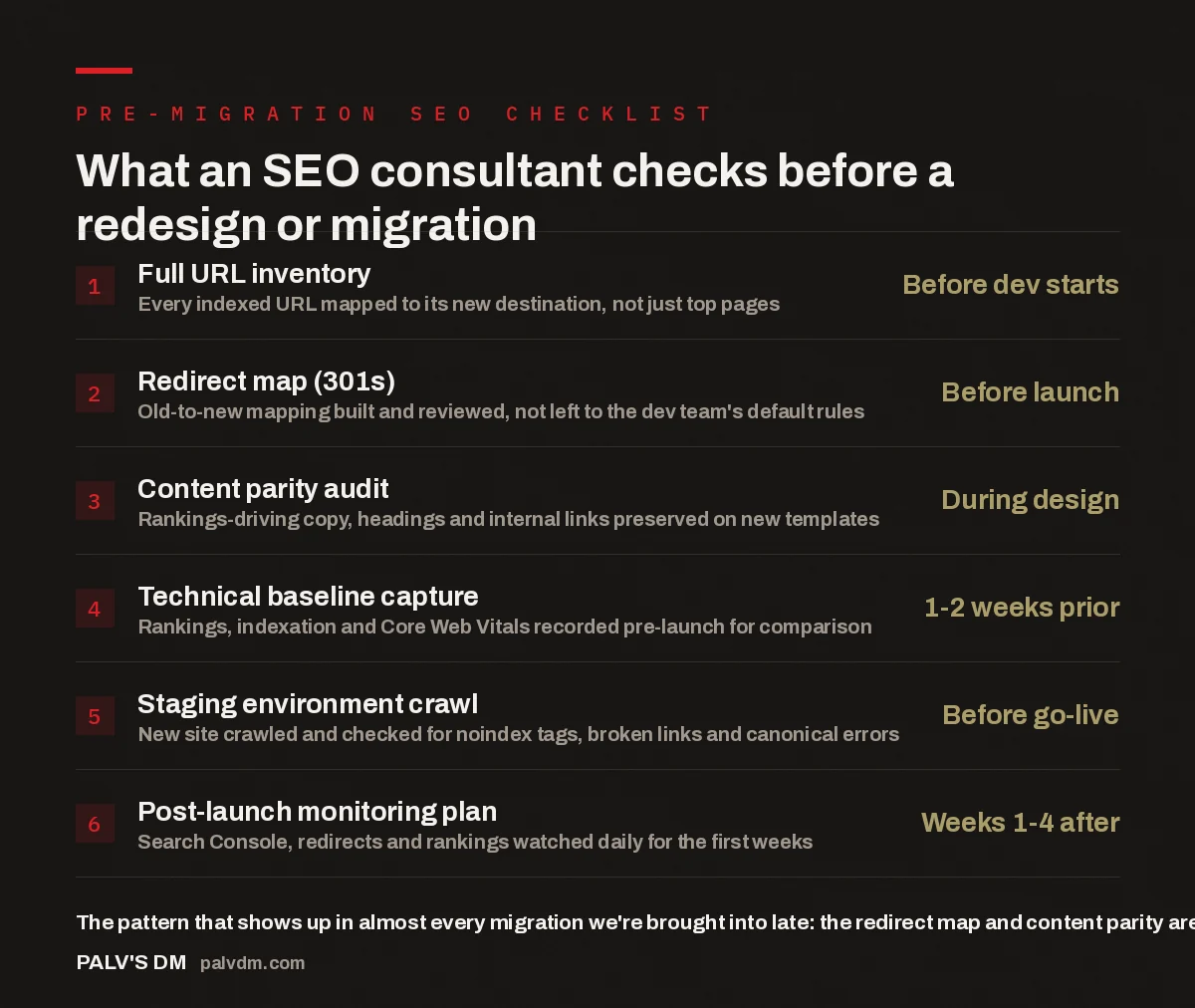
What an SEO consultant checks before a redesign or migration
- Full URL inventory — Before dev starts. Every indexed URL mapped to its new destination, not just top pages.
- Redirect map (301s) — Before launch. Old-to-new mapping built and reviewed, not left to the dev team’s default rules.
- Content parity audit — During design. Rankings-driving copy, headings and internal links preserved on new templates.
- Technical baseline capture — 1-2 weeks prior. Rankings, indexation and Core Web Vitals recorded pre-launch for comparison.
- Staging environment crawl — Before go-live. New site crawled and checked for noindex tags, broken links and canonical errors.
- Post-launch monitoring plan — Weeks 1-4 after. Search Console, redirects and rankings watched daily for the first weeks.
Why do migrations lose rankings in the first place?
A redesign or platform migration changes the things search engines use to understand a page: the URL, the heading structure, the internal linking, sometimes the entire content. None of that is inherently risky — sites get redesigned and migrated successfully all the time. What causes the drop is that these changes usually get made by a team whose brief is “make it look better and work on the new platform,” with no one asking what each page currently ranks for and why. The redesign proceeds on schedule; the SEO consequences surface afterward, in the traffic report.
In the accounts we’re brought into after a migration has gone live, the pattern is consistent: a handful of high-value pages were merged, renamed or restructured without anyone checking what those exact URLs and headings were ranking for. The new page might read better and convert better, but if the phrase driving search traffic got rewritten out of the H1, or the URL changed without a redirect, the ranking history built around that page doesn’t automatically transfer. It’s close to the same triage covered in the first 30 minutes of any audit — checking what’s currently indexed and ranking before touching anything else.
When should you bring in a consultant — before or after the redesign is built?
Before. Specifically, before the site architecture and URL structure are finalised, ideally at the point where the design brief is being written. This runs against the instinct most businesses have, which is to treat SEO as a final review once the new site is nearly done — by which point the URL structure is locked, the content has been rewritten by someone without the old page’s ranking context, and the redirect plan, if one exists at all, has been handed to whoever is doing the technical build as an afterthought.
A consultant engaged early does three things a late-stage review can’t: influences the URL structure before it’s built, works alongside the content team so ranking pages aren’t rewritten blind, and sets a technical baseline — current rankings, indexed pages, Core Web Vitals — as the reference point for what happened after launch. Without that baseline, “did the migration hurt us” becomes a guessing game months later instead of a clear comparison.
The redesign almost never causes the traffic loss. The undocumented decisions made along the way to launch it — which URLs to keep, which pages to merge, which content to “clean up” — are what cause it.
Palash, Founder, PalV’s DM
What does the redirect mapping process actually involve?
Redirect mapping means building a spreadsheet or crawl-based list of every indexed URL on the current site, matched to the single most relevant URL it should point to on the new site. This sounds simple and is the step most commonly done badly. A “redirect everything to the homepage” default, or a bulk pattern-match rule set up without checking each mapping individually, both technically satisfy “we set up redirects” while quietly discarding the ranking signal each old URL had built up.
- Pull a full list of indexed URLs from Search Console and a site crawl, not just the current sitemap, since sitemaps often miss orphaned pages that still rank.
- Match each URL to its closest equivalent on the new site — same topic and intent, even if the slug or template has changed.
- Flag pages with no clear new-site equivalent and decide deliberately whether to redirect to a related page or return a proper 404 — don’t default every unmatched URL to the homepage.
- Implement as 301 (permanent) redirects, and confirm there’s no redirect chain — old to old to new adds unnecessary hops.
- Crawl the new site after launch to confirm every redirect resolves and doesn’t loop back to a 404 or a noindex page.
How does a consultant protect content that’s already ranking?
Every redesign involves a content refresh, and that’s usually good — old copy is often genuinely worse than what a new team would write. The risk isn’t the rewrite itself, it’s rewriting without reference to what the existing page was actually ranking for. A consultant working alongside the content team pulls the current page’s ranking keywords, headings and internal links before the rewrite starts, so the new copy is genuinely better while keeping what was doing the ranking work. This matters most on pages that took years to earn their position — cornerstone service pages, long-standing blog posts, category pages with accumulated internal links. A page that already ranks is closer to inherited equity, and equity is easier to protect than to rebuild — which in practice means reviewing new page drafts against the old page’s ranking signals before they go live on staging, not after.
What should happen in the weeks right after launch?
Launch day isn’t the finish line — it’s the start of the highest-risk window. Search engines need to recrawl and reprocess the new URLs, redirects and content, and that’s where problems that survived staging tend to surface: a redirect that works for a browser but not a crawler, a canonical tag pointing at the wrong URL, a noindex tag left over from staging that nobody removed. This last one is common enough to be worth checking explicitly rather than assuming the build process handled it.
A consultant’s post-launch role is to monitor Search Console for crawl errors and indexing status daily for the first couple of weeks, check that redirects resolve correctly at scale, and compare rankings against the pre-launch baseline weekly for at least a month. A missed redirect found in week one is a five-minute correction; found three months later, after pages have been deindexed, it’s a much slower recovery.
What’s different about consulting for a platform migration versus a visual redesign?
A visual redesign that keeps the same platform and URL structure is lower risk — the main exposure is content and heading changes. A platform migration (moving from one CMS to another, or one hosting environment to another) adds URL structure, rendering and server configuration to the risk list, because the new platform may generate URLs, sitemaps or canonical tags differently than the old one did by default. Some platforms handle trailing slashes or parameter URLs differently out of the box, and small differences like that can quietly create duplicate content across an entire site if nobody checks the new platform’s defaults against what the old site was doing. This is where a consultant’s platform-agnostic view helps — a developer is usually an expert in the new platform, not necessarily in how its defaults compare to what search engines were reading from the old one, and flagging a mismatch before launch is a five-minute conversation instead of a large recovery project after.
If you’re weighing whether this needs a dedicated consultant at all versus folding it into a broader engagement, it helps to first understand when a consultant makes more sense than a full agency retainer — a migration is one of the clearer cases where a focused, time-bound engagement fits better than an open-ended one.
How do you make the most of a consulting call before a migration?
The single most useful thing to bring to a first consulting call is access — Search Console, analytics, and whatever design or platform documentation already exists — rather than a list of questions. A consultant can answer questions from a 20-minute look at the data faster than from a description of the plan. Beyond access, it helps to have a rough timeline and a clear answer to whether the content is being rewritten wholesale or kept largely as-is, since that decision changes most of what the consultant checks first. A longer breakdown of what to prepare is in what to bring to a consulting call to make it worth it, most of which applies directly to a migration kickoff.
What you should walk away with isn’t a verbal “looks fine” — it’s a written pre-launch checklist specific to your site: the URL inventory, the redirect mapping approach, which pages need content review, and who owns post-launch monitoring. See what you walk away with in writing for what a proper deliverable looks like beyond a verbal sign-off.
Before you launch
- Get an SEO consultant involved while the redesign is still being planned, not once it’s already built on staging.
- Insist on a documented redirect map and a written pre-launch checklist, not a verbal sign-off.
- Budget for post-launch monitoring — the first two to four weeks after go-live are when fixable problems are still cheap to fix.
Frequently asked questions
How far in advance of launch should I bring in an SEO consultant?
As early as the design brief or platform decision is being made — ideally before URL structure and page templates are finalised. Once development is underway on a fixed structure, a consultant can still help, but has fewer decisions left to influence.
Will a redesign definitely hurt my rankings?
Not inherently. Sites get redesigned and migrated successfully all the time. The risk comes from specific, avoidable decisions — missing redirects, rewritten content that drops the terms a page was ranking for, or platform defaults that differ from the old site — not from the redesign itself.
Can my developer handle redirects without an SEO consultant?
A developer can implement redirects correctly once given a mapping — that’s a task they’re well placed to do. What usually goes wrong is deciding what each old URL should map to, which requires knowing what that URL currently ranks for. That’s the piece an SEO consultant typically adds.
How long does post-launch monitoring need to continue?
Daily checks for crawl errors and indexing issues in the first one to two weeks, then weekly ranking comparisons against the pre-launch baseline for at least a month. Most migration issues that are going to surface do so within that window, while they’re still cheap to fix.
What’s the difference between this and a general SEO audit?
A general audit reviews a site as it currently exists. Migration consulting is forward-looking and time-bound to the project — reviewing the plan before it’s built, checking staging before launch, and monitoring results after, specifically to protect what the site already has rather than diagnose an existing problem.
The short version
A redesign or migration puts existing rankings at risk not because of the new design but because of undocumented decisions made along the way — which URLs get kept, how content gets rewritten, whether redirects are mapped individually or defaulted in bulk. An SEO consultant brought in during planning can influence those decisions before they’re locked in, set a baseline to measure against, and stay through the post-launch window while fixable problems are still cheap to fix. Brought in after launch, a consultant can still help — but by then it’s recovery instead of prevention.