
Does Hosting Affect SEO? What Actually Changes
Hosting isn't a direct Google ranking factor, but it sets the ceiling on server response time, uptime, and Core Web Vitals headroom. Four hosting myths checked.

Hosting is not a direct Google ranking factor, but it sets the ceiling for two things Google does measure directly: server response time and uptime. A cheap, overcrowded shared plan can cap Core Web Vitals no amount of front-end work fixes, while a well-configured budget host can perform fine for a low-traffic site. The myth isn’t that hosting matters — it’s the specific claims about how and how much.
Four claims about hosting and SEO circulate constantly in agency pitches and forum threads. Some are true with caveats, some are outdated, and one is close to fabricated. Here’s each one, checked.
Myth 1: “Google ranks sites hosted on faster servers higher”
The claim: Server speed is itself a ranking signal, so upgrading hosting directly improves rankings.
The reality: Google measures page speed through Core Web Vitals, which are influenced by server response time (part of Largest Contentful Paint) but also by render-blocking resources, image weight, and JavaScript execution — all front-end factors hosting doesn’t control. A fast server with a bloated, unoptimised front end can still fail Core Web Vitals thresholds.
Why the confusion exists: Server response time genuinely is one input into LCP, so “better hosting equals faster site” is directionally true. It gets oversimplified into “better hosting equals higher rankings,” skipping every layer in between.
Myth 2: “Shared hosting always hurts your SEO”
The claim: Sharing a server or IP address with other sites damages rankings by association.
The reality: Google has been explicit that a shared IP address doesn’t inherently harm a site. What actually causes problems on cheap shared hosting is resource contention — one noisy neighbouring site consuming CPU or bandwidth can slow down every site on that server, including yours, during traffic spikes. That’s a performance problem with an IP-sharing symptom, not a reputation penalty.
Why the confusion exists: Genuinely bad neighbourhoods do exist — a shared IP flooded with spam sites can occasionally create indirect trust issues — but this is rare and distinct from ordinary budget shared hosting.
Myth 3: “Server location needs to match your target country for local rankings”
The claim: Hosting in the same country as your target audience is required for local SEO.
The reality: Google primarily uses ccTLDs, hreflang, and Search Console’s international targeting settings to determine geographic relevance, not server IP geolocation. Server location affects latency — a visitor further from the server experiences a slightly slower first byte — but a CDN with edge nodes near the audience removes most of that gap without moving the origin server at all.
Why the confusion exists: In hosting’s early days, before CDNs were standard, server location and latency were tightly coupled, and some of that guidance never got updated for a CDN-first world.
Myth 4: “Managed WordPress hosting is required for good rankings”
The claim: Only premium managed hosting platforms deliver hosting good enough to rank well.
The reality: Managed hosting typically bundles server-level caching, a CDN, and automatic updates — conveniences that make good performance easier to achieve, not the only path to it. A well-configured budget host with a caching plugin and a CDN in front of it can hit the same Core Web Vitals thresholds. The advantage of managed hosting is less hands-on maintenance, not an SEO capability unavailable elsewhere.
Why the confusion exists: Managed hosts market performance heavily, and their defaults genuinely do outperform an unconfigured budget host out of the box — the comparison just isn’t apples to apples.
What does hosting actually change, concretely?
| Hosting factor | What it affects | Does Google use it directly? |
|---|---|---|
| Server response time (TTFB) | Feeds into Largest Contentful Paint | Indirectly, as one LCP input |
| Uptime | Crawl consistency; repeated downtime can reduce crawl frequency | Indirectly, via crawl stats and availability |
| Shared IP address | No inherent effect; contention under load is the real issue | No, not directly |
| Physical server location | Latency to distant visitors, largely solved by a CDN | No, not for geographic ranking |
| Managed vs unmanaged hosting | Ease of hitting good Core Web Vitals scores, not a capability ceiling | No, not directly |
Shared hosting vs managed/cloud hosting, side by side
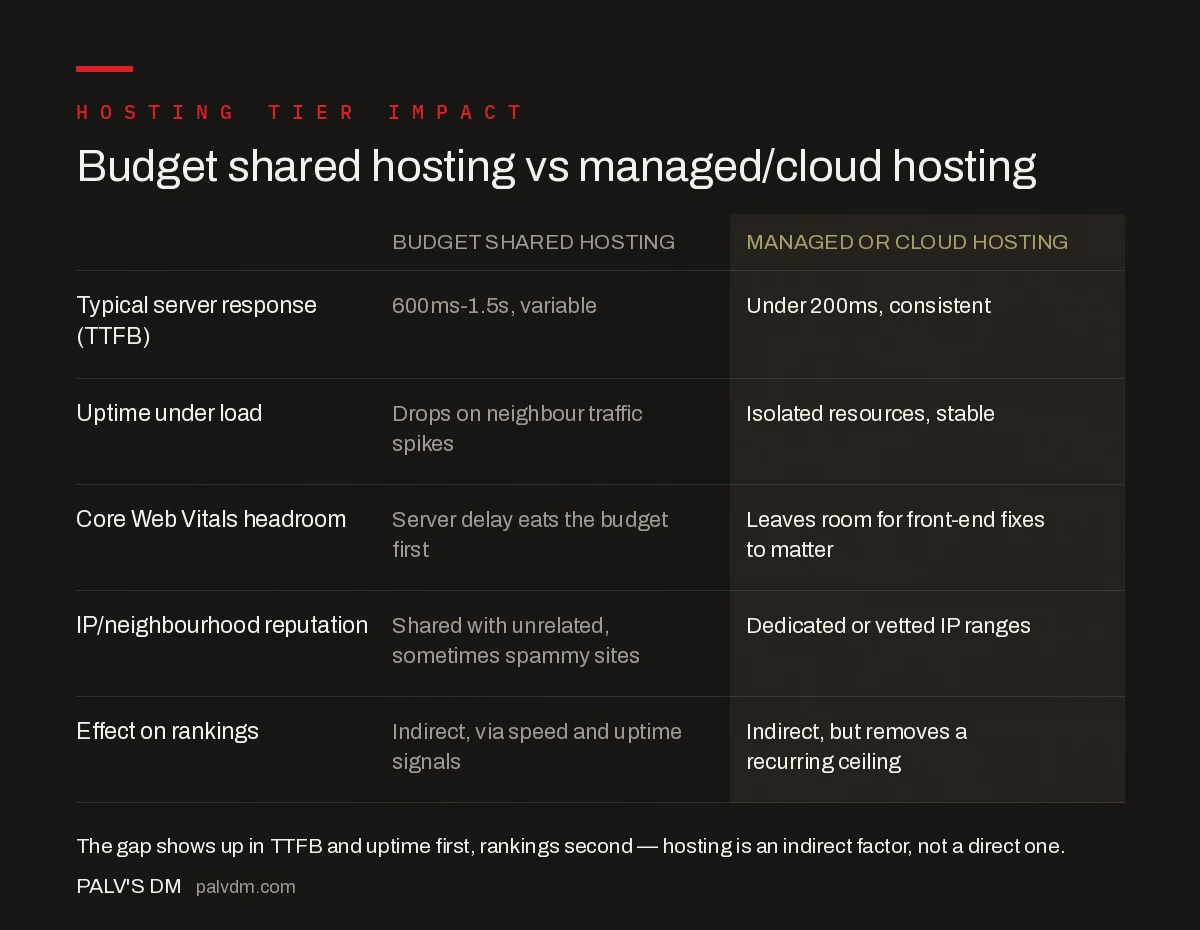
- Server response (TTFB): 600ms-1.5s and variable on budget shared hosting; under 200ms and consistent on managed or cloud hosting.
- Uptime under load: Drops when a neighbouring site spikes on shared plans; isolated resources keep managed/cloud hosting stable.
- Core Web Vitals headroom: Server delay eats the budget first on shared hosting, leaving less room for front-end fixes to matter.
- IP reputation: Shared with unrelated sites on budget hosting; dedicated or vetted ranges on managed/cloud hosting.
- Effect on rankings: Indirect in both cases — hosting removes or creates a recurring performance ceiling, it doesn’t rank a page on its own.
When does upgrading hosting actually move rankings?
Upgrading hosting helps when server response time is the binding constraint — when Search Console’s Core Web Vitals report shows LCP failing and a waterfall trace shows most of the delay happening before the first byte even arrives, not in image loading or JavaScript execution. Upgrading hosting when the real bottleneck is a 4MB hero image or three render-blocking scripts fixes the wrong layer and wastes the budget.
How do you tell if hosting is the bottleneck on your site?
- Check Time to First Byte in Chrome DevTools’ Network tab or a tool like WebPageTest — anything consistently above 600ms on a cached page points at the server.
- Compare TTFB during normal hours against a traffic spike; a sharp jump under load signals shared-resource contention.
- Rule out DNS and redirect delays first — a slow DNS provider or an unnecessary redirect chain can masquerade as a hosting problem.
- If TTFB is already fast and LCP still fails, the bottleneck has moved to the front end, and a hosting upgrade won’t fix it.
What role does a CDN play separately from the hosting decision?
A content delivery network sits between the origin server and the visitor, caching static assets and, increasingly, full HTML responses at edge locations closer to users worldwide. This means a CDN can meaningfully improve perceived speed and TTFB even on a modest hosting plan, because most requests never actually reach the origin server — they’re served from a nearby edge node instead. Sites that assume they need to upgrade hosting to fix speed often find that adding or properly configuring a CDN closes most of the gap for a fraction of the cost, since the CDN addresses the latency and load-distribution problems that hosting upgrades are also trying to solve.
That said, a CDN doesn’t fix a genuinely slow origin server for dynamic, non-cacheable requests — logged-in areas, personalised content, or anything generated fresh per request still depends on the underlying hosting stack. The two decisions work together: hosting sets the baseline for dynamic requests, the CDN handles everything that can be cached.
How do you separate a hosting problem from a application-level performance problem?
A quick diagnostic: load the homepage with browser caching disabled and check the waterfall in DevTools. If the HTML document itself takes more than 600-800ms to arrive before any assets even start downloading, that points at the server — either the hosting infrastructure or an unoptimised application layer (an uncached WordPress installation running expensive database queries on every request behaves identically to bad hosting from a diagnostic standpoint). If the HTML arrives quickly but the page is still slow to become interactive, the bottleneck has moved to render-blocking CSS, unoptimised images, or heavy JavaScript — none of which a hosting upgrade touches. Many sites blamed for “bad hosting” turn out to be running an uncached, unoptimised CMS on perfectly adequate infrastructure.
Frequently asked questions
Is hosting a direct Google ranking factor?
No. Google has never named hosting provider or server location as a direct ranking signal. Hosting affects rankings indirectly, through server response time, uptime, and the Core Web Vitals headroom it leaves for front-end optimisation to matter.
Does the physical location of a server affect rankings?
Only through latency, not through any geographic ranking preference. A server far from most visitors adds round-trip time to every request, which can push Time to First Byte higher. A CDN largely neutralises this without needing to move the origin server.
Will switching to a more expensive host guarantee better rankings?
No. Better hosting removes a server-side speed ceiling, but rankings depend on far more: content quality, relevance, links, and user experience. A faster server on a thin or poorly matched page won’t outrank a slower server with genuinely better content.
Does shared hosting hurt SEO more than the IP address it uses?
The bigger risk on shared hosting is inconsistent performance under load from neighbouring sites, not the shared IP itself. Google has stated shared IPs don’t inherently harm rankings; a genuinely spam-heavy neighbourhood is a much rarer, and separate, concern.
Sources
- Understanding Core Web Vitals and Google Search results — Google Search Central
- Core Web Vitals: The Complete Guide
- Technical SEO: The Complete Working Guide
- Critical CSS: Extracting It Without Breaking Layout
- Third-Party Scripts: Measuring What Each One Costs You
Want this done on your site?
Every PalV’s DM engagement starts with a free audit of your actual website — a 12-point
crawl covering what is blocking indexation, on-page gaps against your primary keywords, speed
findings, and the three to five fixes worth making first. Delivered in two working days. No
payment details, and the findings are yours whether you hire us or not.


