
How Many WordPress Plugins Is Too Many? The Real Answer
There's no hard plugin limit in WordPress. What matters is plugin quality and overlap, not count. Here's the real threshold and when to audit.
There’s no fixed number of WordPress plugins that counts as “too many.” A site can run 40 well-built plugins and load in under two seconds, while a site with six poorly coded ones drags past five. If you want a practical trigger anyway: once you cross roughly 20 active plugins, it’s worth a ten-minute audit, not because 20 is dangerous, but because that’s usually where overlap and forgotten installs start creeping in.
The “plugin count” question gets asked so often that it’s become one of those WordPress myths that sounds like common sense but doesn’t hold up under an actual site audit. We’ve opened client installs with 12 plugins running like molasses and others with 55 plugins that outperform them. The number was never the variable that mattered.
Is there an actual plugin limit in WordPress?
No. WordPress core doesn’t enforce a cap on installed or active plugins. There’s no setting, no warning message, no wall you hit at plugin 30 or plugin 100. Shared hosting can impose practical ceilings, mostly around PHP memory limits and the number of database connections a cheap plan allows, but that’s a hosting constraint, not a WordPress one.
What actually varies from site to site is how much load each plugin adds. A plugin that inserts one shortcode and does nothing else the rest of the time is close to free. A plugin that queries the database on every single page load, enqueues four scripts sitewide, and pings an external API before rendering anything is expensive, and you’d feel that cost even if it were the only plugin installed.
Where does the “too many plugins” myth actually come from?
It comes from a real pattern, just a misdiagnosed one. Slow WordPress sites often do have a lot of plugins, so people assumed the count caused the slowness. What’s usually true is that sites accumulate plugins over years without anyone auditing them, and accumulation correlates with neglect. The neglect is the problem. The count is just a symptom that happened to be easy to see in the plugins screen.
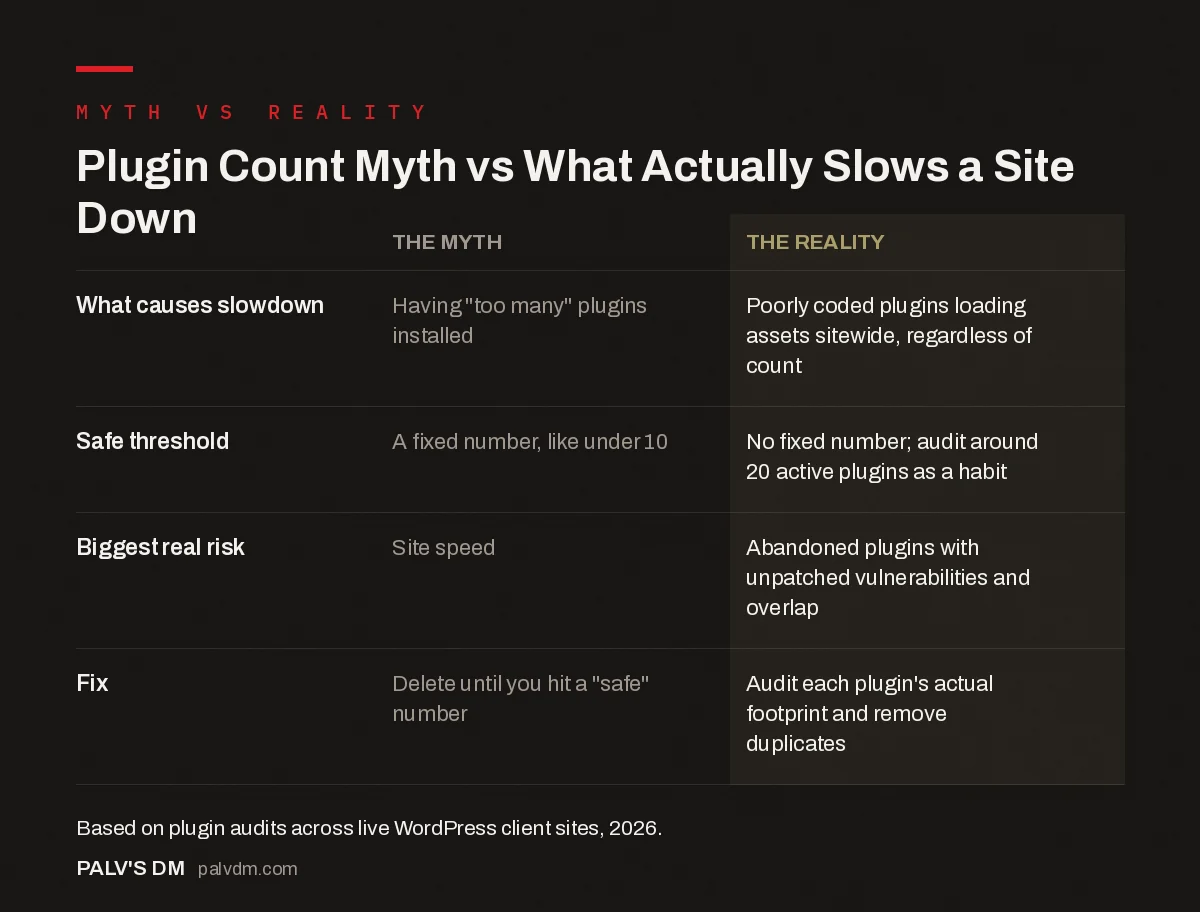
Plugin Count Myth vs What Actually Slows a Site Down
| The Myth | The Reality | |
|---|---|---|
| What causes slowdown | Having “too many” plugins installed | Poorly coded plugins loading assets sitewide, regardless of count |
| Safe threshold | A fixed number, like “under 10” | No fixed number; audit trigger around 20 active plugins is a habit, not a rule |
| Biggest real risk | Site speed | Abandoned plugins with unpatched vulnerabilities and overlapping functionality |
| Fix | Delete plugins until you hit a “safe” number | Audit each plugin’s actual footprint (queries, script loads) and remove genuine duplicates |
What actually slows a WordPress site down, if not plugin count?
Four things, in roughly this order of how often we find them on client audits:
- Unoptimized images. A single 4MB hero photo uploaded straight from a phone does more damage than ten plugins combined. This is the single most common speed issue we find, full stop.
- A heavy or bloated theme. Page builder themes that load a full framework of CSS and JS on every page, whether or not the page uses those features, are a recurring drag.
- Plugins that load assets sitewide instead of only where needed. A contact form plugin that loads its CSS and JS on every page, including ones with no form, is doing unnecessary work thousands of times a month.
- No caching layer at all. Every visitor triggering a fresh PHP execution and database query set, when a static cached version would serve in a fraction of the time.
Plugin count barely cracks the top five. We’ve run PageSpeed Insights and GTmetrix audits on dozens of sites, and the correlation between plugin count and load time is weak at best. The correlation between image weight and load time is close to a straight line.
How many plugins do most business sites actually run?
Once you count everything that’s genuinely doing a job, most small business WordPress sites land somewhere between 15 and 30 active plugins: an SEO plugin, a caching plugin, a security plugin, a form plugin, a backup plugin, an image optimizer, maybe a page builder, a couple of custom-post-type or block utilities, and a handful of small single-purpose tools nobody thinks about because they just work. That range isn’t a target. It’s just what functionality tends to cost once you add it up.
Sites well above 30 aren’t automatically in trouble, but they’re statistically more likely to have overlap: two SEO plugins fighting over the sitemap, three “optimize images” tools doing the same compression pass, a security plugin and a firewall plugin duplicating the same protections. That overlap is worth finding regardless of the total count.
When should you actually audit your plugin list?
Skip the arbitrary number and audit on these triggers instead:
- PageSpeed Insights flags a specific script in its diagnostics, and you can trace it to a plugin you don’t remember installing.
- You cross 25 to 30 active plugins and haven’t reviewed the list in over six months.
- A plugin shows “hasn’t been updated in over two years” in the WordPress admin, a strong signal it’s abandoned and unpatched.
- You inherited the site from another developer or agency and nobody can explain what half the plugins do.
- Two plugins do the same job, which happens constantly with SEO, caching and image optimization tools installed in layers over years.
Which plugins are safe to remove first?
Start with the obvious candidates before touching anything you’re unsure about:
- Duplicate-function plugins. If you’re running both Rank Math and Yoast, or two caching plugins at once, deactivate one. Running two SEO plugins side by side causes duplicate meta tags and conflicting sitemaps, not double the benefit.
- Plugins with zero recent updates. Check the “last updated” date on the Plugins screen. Anything untouched for two-plus years is a liability regardless of how small it seems.
- Demo or trial plugins from a page builder you stopped using. These often keep running scripts sitewide long after anyone stopped using the actual builder.
- Anything installed “to test” and forgotten. Every WordPress developer has a story about a stray plugin from a client request three years ago that’s still active and doing nothing.
Deactivate one at a time, not in a batch. Check the site after each one. Delete only once you’re confident nothing broke, because deactivating and deleting are different risks: deactivating is reversible, deleting can drop settings and custom database tables you might want back.
Do ecommerce and membership sites need way more plugins?
Usually, yes, and that’s fine. A WooCommerce store often runs a payment gateway plugin, a shipping calculator, a tax plugin, an inventory sync tool, an abandoned-cart recovery plugin, and a handful of extensions just for WooCommerce itself, on top of everything a standard business site already needs. That can easily push the count past 35 or 40. None of that is automatically a problem. WooCommerce itself is architected to be extended this way, and the plugins built specifically for it tend to be better maintained than random general-purpose tools, because a broken WooCommerce extension gets reported fast by store owners losing sales.
The audit logic doesn’t change for ecommerce sites, it just applies to a longer list. Check for overlapping cart-abandonment tools, duplicate SEO plugins bundled with a theme, and shipping calculators left active from a carrier you stopped using. We’ve found stores running two separate currency-conversion plugins because nobody realized the theme already had one built in.
Does plugin count affect security more than performance?
It’s closer than the speed question, but the same principle applies: quality and maintenance matter more than raw count. Every active plugin is code that can contain a vulnerability, so in theory, more plugins means a larger attack surface. In practice, one abandoned plugin with a known, published exploit is a far bigger risk than fifteen actively maintained ones from reputable developers. Check plugin update frequency and support responsiveness before you check the count on your Plugins page.
Frequently asked questions
Is there an actual maximum number of plugins WordPress allows?
No. WordPress core has no hard cap on installed or active plugins. Sites run five plugins or 80 plugins without hitting a technical ceiling. The limiting factors are server resources, plugin code quality and how much the plugins overlap, not a number WordPress enforces.
Do more plugins really slow down a website?
Only if those plugins load scripts or run database queries on every page. A well-coded plugin that does nothing until you click a settings button costs almost nothing. A poorly built plugin that loads three JavaScript files sitewide can slow a page more than twenty lightweight plugins combined.
How many plugins is normal for a small business site?
Most functioning business sites run somewhere between 15 and 30 active plugins once you count SEO, forms, security, backups, caching and a handful of small utilities. That range is not a target to hit, it is just what typically shows up once real functionality is added.
How do I know which plugins are safe to remove?
Start with plugins that haven’t been updated in over a year, ones that duplicate a feature another plugin already handles, and ones nobody on the team remembers installing. Deactivate one at a time, check the site, then delete once you’re confident nothing broke.
Can too many plugins cause security problems?
Every active plugin is additional code that can contain a vulnerability, so more plugins does raise the theoretical attack surface. In practice, one abandoned plugin with a known exploit is a bigger risk than ten well-maintained ones. Update frequency matters more than plugin count.
Sources
- Managing Plugins, WordPress.org official documentation
- How Many WordPress Plugins Are Too Many?, Jetpack
- WordPress SEO: The Complete Configuration Guide
- WordPress Plugins That Quietly Slow Your Site Down
- WordPress Security Basics Every Business Site Needs
- Rank Math vs Yoast: An Honest Comparison
Want this done on your site?
Every PalV’s DM engagement starts with a free audit of your actual website — a 12-point
crawl covering what is blocking indexation, on-page gaps against your primary keywords, speed
findings, and the three to five fixes worth making first. Delivered in two working days. No
payment details, and the findings are yours whether you hire us or not.
Get your free SEO audit
See Web Development plans and prices


