
Reducing Main-Thread Work for a Better INP
Main-thread work blocks the browser from responding to interactions. The three levers that cut it down, in the order they typically pay off, to improve INP.

Main-thread work is any JavaScript, style calculation, layout, or paint task the browser runs on its single UI thread — and while it’s running, the browser can’t respond to a click, tap, or keypress. Reducing it means breaking large blocks of script into smaller pieces, moving non-DOM work off the main thread entirely, and cutting the amount of JavaScript the browser has to parse and execute in the first place. Those three levers, in that order of typical impact, are what move Interaction to Next Paint (INP) from “needs improvement” to “good.”
INP measures the delay between a user’s interaction and the next time the browser paints a visual response. A busy main thread is the single biggest cause of a slow INP, because the browser physically cannot process the interaction until whatever script is currently running finishes.
What exactly is main-thread work?
The main thread is where the browser does nearly everything visible: it parses HTML, computes styles, runs your JavaScript, calculates layout, and paints pixels. It’s called “main” because, for most of a page’s execution, there’s only one of it. When a script keeps that thread busy for 50 milliseconds or more without yielding, it’s classified as a long task, and long tasks are the direct cause of poor INP scores.
Third-party scripts — analytics tags, chat widgets, ad libraries — are frequently the largest contributors, because they run on the same thread as your own code and compete for the same limited time. A page can have fast, lean first-party code and still score poorly on INP if it’s loaded down with third-party JavaScript that hogs the thread.
How do you break up long tasks?
The direct fix for an existing long task is to split it into smaller chunks and yield control back to the browser between them, so the browser gets a chance to handle pending interactions before continuing the work.
- Identify the long task. Use Chrome DevTools’ Performance panel or the Long Animation Frames (LoAF) API in production to find scripts running past the 50ms threshold.
- Break the work into smaller units. Instead of processing a large array in one pass, process it in chunks and yield after each one.
- Yield with the right API. Use
scheduler.yield()where supported, or fall back tosetTimeout(fn, 0)orrequestIdleCallbackto give the browser a gap to handle input. - Prioritise with the Scheduler API. Where available, queue less urgent work at lower priority so interaction handling always wins the next available slot.
- Re-measure with the same tool. Confirm the task now shows as multiple smaller blocks rather than one continuous one before moving to the next script.
When should you move work to a web worker?
Web workers run JavaScript on a separate thread entirely, off the main thread, which removes that work from contention with user interactions altogether. The trade-off is that workers can’t touch the DOM directly, so they’re suited to computation-heavy tasks: parsing large JSON payloads, image or data processing, complex calculations, or running a library that doesn’t need to read or write the page.
Moving DOM-manipulation code to a worker isn’t possible without an intermediary layer that posts messages back to the main thread to apply changes, which adds complexity. Reserve workers for genuinely CPU-heavy, DOM-independent work rather than trying to offload everything.
What’s the fastest way to cut total main-thread work?
Before optimising how JavaScript runs, cut how much of it the browser has to process at all. This has the largest effect on sites carrying heavy JavaScript bundles.
| Technique | What it targets | Typical impact |
|---|---|---|
| Remove unused code | Dead code shipped but never executed | Smaller parse and compile time |
| Code-split with dynamic import() | Features not needed on initial load | Less JavaScript evaluated at startup |
| Defer non-critical third-party scripts | Chat widgets, ads, non-essential trackers | Frees the main thread during the interaction-critical window |
| Audit third-party script cost | Vendor tags competing for main-thread time | Identifies which vendors to trim or lazy-load |
Reducing JavaScript volume attacks the root cause; breaking up long tasks and using web workers manage what’s left after that reduction. Sites that only do the second two without addressing bundle size tend to hit a ceiling.
What does a main-thread reduction plan look like in practice?
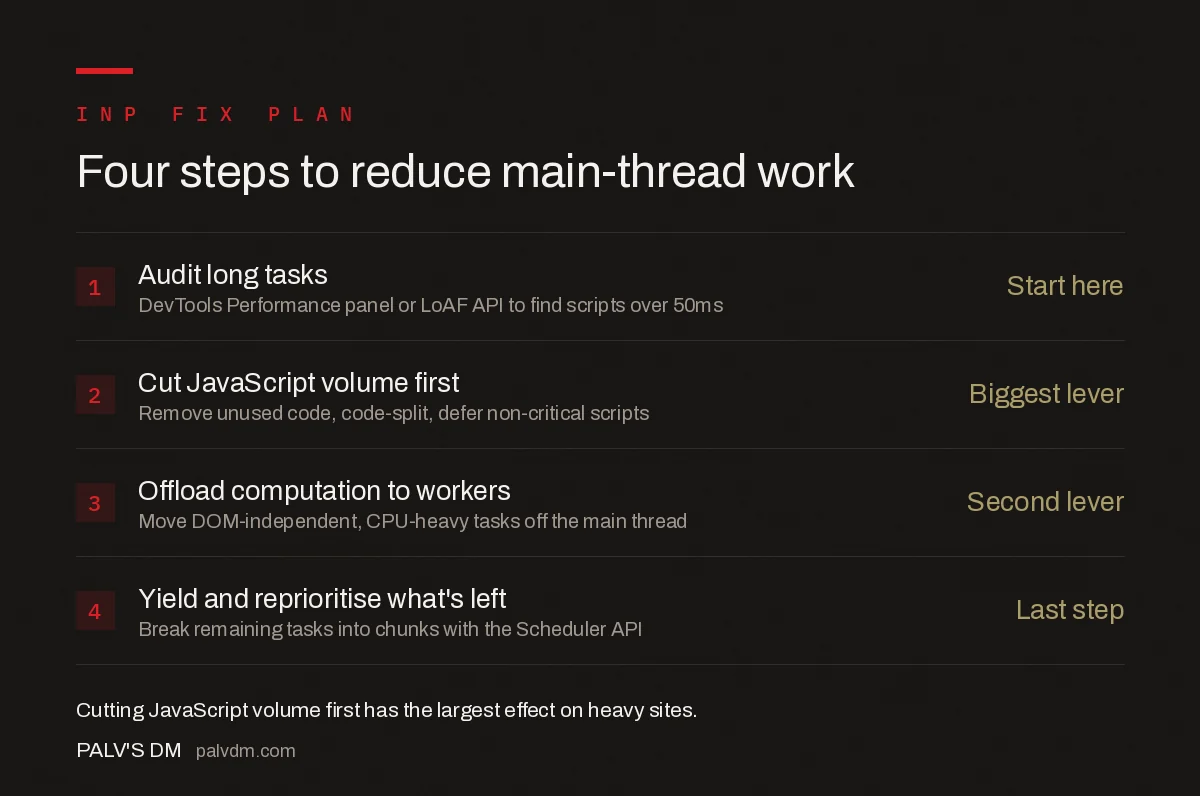
Four-step main-thread reduction plan
- Audit long tasks — Record real interactions in DevTools or via the LoAF API to find the specific scripts over 50ms.
- Cut JavaScript volume first — Remove unused code, code-split by route or feature, and defer anything not needed for the initial interaction.
- Offload computation to workers — Move DOM-independent, CPU-heavy tasks like parsing or data transforms off the main thread.
- Yield and reprioritise what’s left — Break remaining long tasks into chunks and use the Scheduler API so interaction handling always gets the next available slot.
What are the common mistakes when trying to fix this?
- Optimising Largest Contentful Paint techniques and assuming INP follows. They share some root causes but not all — a page can have a fast LCP and still block interactions with a heavy post-load script.
- Deferring everything without checking what breaks. Deferred scripts that a critical interaction depends on will simply move the delay rather than remove it.
- Testing only in DevTools on a fast machine. Lab testing on a high-end development machine under-represents what real users on mid-range phones experience; field data (Chrome UX Report or your own RUM) is what confirms an actual improvement.
- Ignoring third-party scripts because they’re “not our code.” They still run on your main thread and count against your INP just the same as first-party JavaScript.
Frequently asked questions
What counts as a long task on the main thread?
Any block of JavaScript execution that runs uninterrupted for 50 milliseconds or longer. The Long Tasks API flags these automatically. During a long task, the browser can’t respond to clicks, taps, or key presses, which is what shows up as sluggish INP.
Do web workers fix every main-thread problem?
No. Web workers only help with work that doesn’t need DOM access, like data parsing or computation. Anything that reads or writes the DOM must stay on the main thread, so workers reduce contention but don’t eliminate it for UI-heavy code.
How do I find out which scripts are causing long tasks on my site?
Open Chrome DevTools’ Performance panel, record an interaction, and look for red-flagged blocks over 50ms in the main thread track. The Long Animation Frames API and PageSpeed Insights’ diagnostics also surface the specific scripts responsible in a production environment.
Does reducing main-thread work also help Largest Contentful Paint?
Often, yes. Heavy JavaScript parsing and execution during page load can delay when the largest visible element renders, since the browser is busy running scripts instead of painting. Cutting unnecessary JavaScript tends to improve both metrics together.
Sources
- Optimize Long Tasks — web.dev, Google Chrome team
- Core Web Vitals: The Complete Guide
- Technical SEO: The Complete Working Guide
- How to Fix INP (Interaction to Next Paint)
- Third-Party Scripts: Measuring What Each One Costs You
Want this done on your site?
Every PalV’s DM engagement starts with a free audit of your actual website — a 12-point
crawl covering what is blocking indexation, on-page gaps against your primary keywords, speed
findings, and the three to five fixes worth making first. Delivered in two working days. No
payment details, and the findings are yours whether you hire us or not.


