
Transferring a Domain Away From an Agency: The Actual Steps
How to get your domain transferred out of an agency's account: unlocking it, getting the EPP code, and what to do if they stall.
To transfer a domain away from an agency, confirm you’re the actual registrant, get them to unlock the domain and hand over the EPP authorization code, then submit that code at the new registrar and approve the transfer request. The process itself is a fifteen-minute task. What actually takes time, in almost every case I’ve seen, is getting a slow or unresponsive agency to complete their half of it.
This comes up more than people expect. An agency built the site years ago, registered the domain “to make things easier,” and now the relationship has ended, gone quiet, or turned adversarial. The domain is the one asset that can end a business’s online presence overnight if it isn’t handled correctly, so it’s worth doing this carefully rather than quickly.
Why does this situation happen so often?
Most of the time it’s not malicious. An agency sets up a new client site, registers the domain under their own reseller or registrar account because it’s the fastest path to getting the project moving, and nobody circles back to move it into the client’s name once the site is live. Years pass. The relationship ends, and the client discovers the domain was never really theirs to begin with.
The single most common blocker I run into isn’t technical at all. It’s that the WHOIS admin contact email is an inbox at the agency, one nobody at the client’s company can log into, which means every “click this link to confirm” step in the transfer process goes nowhere until that’s fixed first.
What’s the actual step-by-step process?
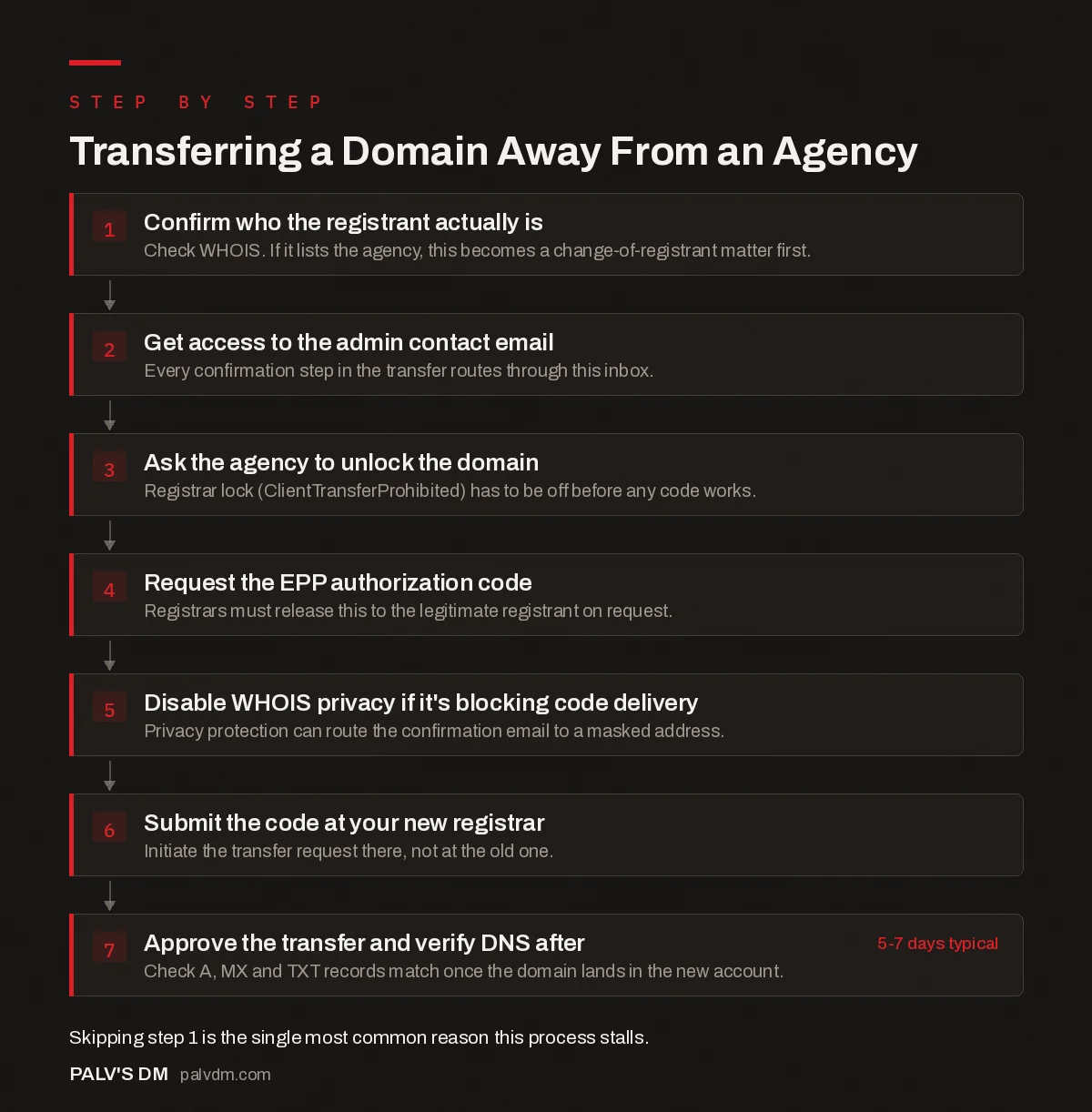
Work through these in order. Skipping ahead, especially trying to get an EPP code before confirming who the actual registrant is, is the most common way this goes sideways.
Transferring a Domain Away From an Agency
- Confirm who the registrant actually is. Check WHOIS. If it lists the agency, this becomes a change-of-registrant matter first.
- Get access to the admin contact email. Every confirmation step in the transfer routes through this inbox.
- Ask the agency to unlock the domain. Registrar lock (ClientTransferProhibited) has to be off before any code works.
- Request the EPP authorization code. Registrars must release this to the legitimate registrant on request.
- Disable WHOIS privacy if it’s blocking code delivery. Privacy protection can route the confirmation email to a masked address.
- Submit the code at your new registrar. Initiate the transfer request there, not at the old one.
- Approve the transfer and verify DNS after. Check A, MX and TXT records match once the domain lands in the new account. 5-7 days typical
What if the agency won’t cooperate?
Start with a direct, dated written request (email, not a phone call) asking specifically for the domain to be unlocked and the EPP code released. Reference the domain and the fact that you’re the registrant or authorized contact. A paper trail matters if this escalates.
If they stall past a reasonable timeframe, check who the actual registrar is (not the agency, the registrar the domain sits with) and contact that registrar’s support directly. ICANN policy requires registrars to release a valid authorization code to the legitimate registrant; an agency withholding it as leverage over an unpaid invoice or a soured relationship isn’t a valid reason under the rules, and registrar support teams generally know this. If the registrant name on WHOIS is the agency’s business, not yours, this becomes a change-of-registrant matter first, which can require more documentation and, in a genuine dispute, legal involvement.
Give a reasonable but firm deadline in that first email, a week is fair for a small agency, and say plainly what happens next if it passes: a support ticket with the registrar and, if the domain sits under the agency’s own account with no clear release path, a formal complaint. Most agencies comply once they realize you know the actual process and aren’t going to just give up after one unanswered email. The ones that don’t are rare, but they exist, and having dates and written requests on record is what makes the registrar’s compliance team take your side quickly instead of asking you to sort it out between yourselves first.
What can go wrong during the transfer?
- WHOIS privacy blocks the code email. If privacy protection is on, the EPP code confirmation often goes to a masked forwarding address the agency controls, not your inbox. Ask them to disable it temporarily, or request the code be delivered directly.
- The domain is locked and nobody unlocks it. A registrar lock (ClientTransferProhibited) has to be turned off before any code will work. This is a checkbox in the registrar’s control panel; ask for it specifically.
- Recent registrant changes trigger a lock window. Updating the WHOIS contact info right before attempting a transfer can trigger a temporary lock that blocks the move you’re trying to make. Get the code and initiate the transfer before touching contact details, not after.
- The admin email bounces. If the listed admin contact is an old employee’s inbox or a shut-down agency domain, transfer confirmation emails go nowhere. This needs fixing at the registrar level, sometimes with proof of business ownership, before anything else can proceed.
What does this actually cost?
The transfer mechanism itself is typically free or close to it. Most registrars extend the domain’s registration by a year as part of accepting an inbound transfer, which you’d be paying for at renewal anyway, so that’s not really an extra cost. Where money enters the picture is when an agency tries to charge a separate “release fee” or ties the code to settling an unrelated invoice. Neither is required by the transfer rules themselves. Whether you pay it is a business decision, sometimes it’s genuinely faster to pay a small fee than to fight, but it isn’t something the transfer process requires.
Watch for one more cost trap: some registrars sell domains at a low first-year price and a much higher renewal price. If you’re moving to a new registrar anyway, it’s worth checking their renewal pricing, not just the price shown at checkout, before you commit.
How do you stop this from happening again?
- Register the domain in your business’s name from day one on any future project, even if a developer or agency is handling setup. Give them access as a delegated user, not as the account owner.
- Use a business email address you control as the WHOIS admin contact, not a personal inbox belonging to whoever happened to run the registration, and not an address at the agency.
- Keep a simple record of which registrar each domain sits with, who has login access, and when it renews. A one-line spreadsheet entry per domain is enough; the point is having it exist at all.
- Ask for a full handover document at the end of any web project, registrar, hosting, analytics, and email accounts included, whether or not you think you’ll ever need it.
What should you check after the transfer completes?
A completed transfer moves the domain to a new registrar account. It does not automatically move your website or email. Before you consider this done, confirm the DNS records at the new registrar match what was live before (A records, MX records for email, any CNAME or TXT records for verification tools), and that the domain now renews on an account and payment method you actually control.
Check who owns the domain the same way going forward. Our guide to checking who currently owns your domain covers how to verify this yourself at any point, without needing to ask an agency’s permission first.
Frequently asked questions
Can an agency legally refuse to give me my EPP code?
No, not if you’re the legal registrant. ICANN rules require registrars to release a valid transfer authorization code to the registrant on request; it can’t be withheld as leverage over an unpaid invoice or a contract dispute. If the registrar itself refuses, escalate directly to them.
How long does a domain transfer actually take?
Once you have a valid EPP code and the domain is unlocked, most transfers complete in five to seven days. Delays almost always come from a locked domain, WHOIS privacy blocking the code delivery email, or an unreachable admin contact, not from the transfer mechanism itself.
What is the 60-day lock and does it affect this?
Registrars have historically applied a lock, commonly around 60 days, after a domain is newly registered, transferred, or has its registrant contact changed. ICANN’s transfer policy is being revised industry-wide, so confirm the current lock period with your specific registrar rather than assuming a fixed number.
What if my domain is registered under the agency’s own name, not mine?
Check the WHOIS registrant field first. If it lists the agency or an employee rather than your business, you’ll likely need a formal change-of-registrant process, and possibly a written release, before a standard transfer is even an option.
Should I move all my domains to one registrar?
Generally yes, once they’re confirmed to be registered in your business’s name. Consolidating under one registrar you control directly makes renewals, DNS changes, and future transfers simpler, and removes any dependency on a vendor relationship you might end one day.
Sources
- FAQs for Registrants: Transferring Your Domain Name, ICANN
- What an EPP Code Is and Why You Need It, NameSilo
- WordPress SEO: The Complete Configuration Guide
- How to Check Who Currently Owns Your Domain
- Who Should Own Your Domain, Hosting and Analytics Accounts
- Website Platform Lock-In: How to Spot It Before You Sign
Want this done on your site?
Every PalV’s DM engagement starts with a free audit of your actual website — a 12-point
crawl covering what is blocking indexation, on-page gaps against your primary keywords, speed
findings, and the three to five fixes worth making first. Delivered in two working days. No
payment details, and the findings are yours whether you hire us or not.
Get your free SEO audit
See Web Development plans and prices


