
Web Font Loading Strategies That Don’t Cause Layout Shift
Custom fonts cause layout shift when a fallback font and the final font take up different amounts of space. The font-display strategies and fallback-matching technique that stop it.
Layout shift from web fonts happens when the fallback font shown before the custom font loads takes up a different amount of space than the custom font — fix it by matching the two fonts’ metrics, not by hiding text longer. The instinct to use font-display: block to avoid an ugly font swap actually makes Interaction to Next Paint and perceived performance worse, while doing nothing for Cumulative Layout Shift once the swap finally happens.
Four separate decisions determine whether a custom font causes a layout shift: the font-display value, whether the font is preloaded, whether it’s self-hosted or third-party, and whether the fallback font’s metrics are adjusted to match. Getting the first one right and ignoring the rest still leaves shift on the table.
What actually causes CLS from web fonts?
Every font has different metrics — average character width, line height, x-height — even fonts that look visually similar. When a page first paints with a system fallback (Arial, for instance) and then swaps to a custom font (say, a geometric sans with wider characters), the same text now occupies more horizontal space, which can push words to a new line, change paragraph height, and shift everything below it. The browser doesn’t do this maliciously; it’s rendering with what it has, then re-rendering with what it downloaded.
How do the font-display values compare?
CSS’s font-display property controls what happens during the loading gap. Four values matter in practice:
| Value | Behaviour during load | CLS risk |
|---|---|---|
auto (browser default) | Usually blocks text for up to 3s, then swaps | High — invisible text, then a shift |
block | Blocks rendering briefly, then swaps once loaded | High — same shift, plus a delay before any text shows |
swap | Shows fallback immediately, swaps whenever the font arrives | Moderate — shift happens, but text is never invisible |
optional | Shows fallback; swaps only if the font arrives almost instantly | Low — the font either loads in time or the browser keeps the fallback |
font-display: swap vs font-display: optional, side by side
font-display: swap vs font-display: optional
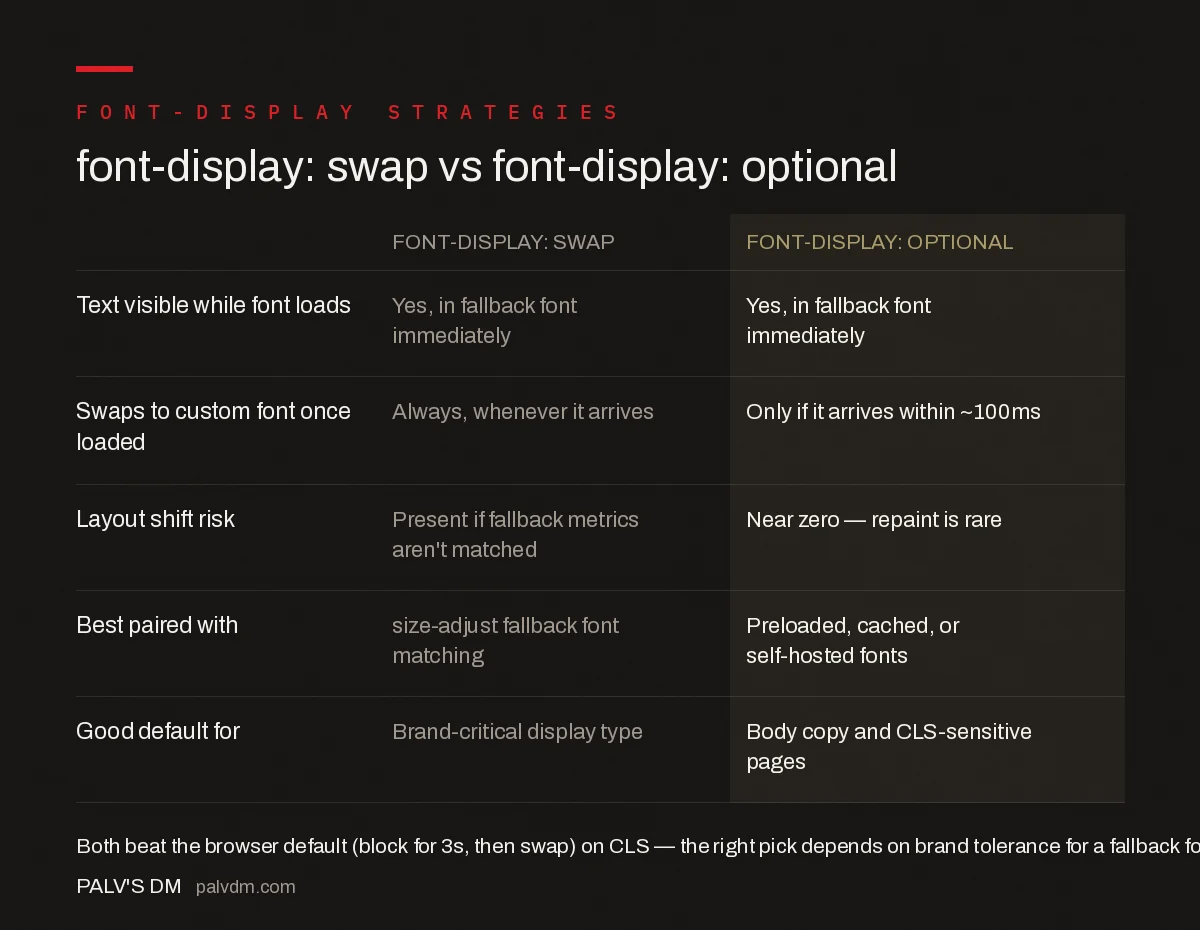
- Text visible while font loads: Both show the fallback font immediately — neither hides text.
- Swaps to the custom font once loaded: Swap always swaps whenever the font arrives; optional only swaps if it arrives within roughly 100ms.
- Layout shift risk: Present with swap unless fallback metrics are matched; near zero with optional since a late swap rarely happens.
- Best paired with: Swap works best with a size-adjusted fallback font; optional works best with preloaded, cached, or self-hosted fonts.
- Good default for: Swap suits brand-critical display type where the custom font must eventually appear; optional suits body copy and CLS-sensitive pages.
How do you match a fallback font’s metrics to the custom font?
Modern CSS supports size-adjust, ascent-override, descent-override, and line-gap-override inside an @font-face declaration for a fallback font. Setting these values so the fallback occupies the same footprint as the custom font means that even when the swap happens under font-display: swap, nothing reflows — only the letterforms change, not the box they sit in. Several free tools generate these override values automatically by comparing metrics between two font files, which is faster and more reliable than hand-tuning them.
Does preloading fonts prevent layout shift?
Preloading with <link rel="preload" as="font" type="font/woff2" href="..." crossorigin> tells the browser to fetch the font earlier in the request waterfall, ahead of where it would normally be discovered through CSS parsing. This shortens the window during which a fallback font is visible, which lowers the odds a shift happens after the user has started reading — but it doesn’t eliminate the shift itself. Preloading and metrics-matching solve two different problems and work best combined: preload cuts the wait, metrics-matching removes the shift regardless of how long the wait is.
Should fonts be self-hosted or loaded from a third party?
Third-party font services add a DNS lookup and a new connection before the font file itself can even start downloading, adding latency on top of whatever font-display strategy is in place. Self-hosting the font files removes that extra hop, letting the browser start the font request as soon as it discovers the reference. Self-hosting also allows preloading with `crossorigin` handled more predictably, since the font shares the page’s own origin.
What’s the step-by-step approach to zero-shift font loading?
- Self-host the font files rather than pulling from a third-party CDN, removing the extra connection.
- Preload the critical weight used above the fold with
rel="preload", not every weight in the family. - Set
font-display: optionalfor body text where a slightly delayed brand font is an acceptable trade for zero shift. - Use
font-display: swapwith metrics-matched fallbacks for headings or brand-critical type that must appear eventually. - Subset the font file to only the character set actually used, cutting file size and download time further.
What common mistakes make font-related CLS worse?
- Loading four or five font weights when the page only uses two, inflating download time for no visual benefit.
- Using
font-display: blockto “avoid ugly flashing,” which delays the first paint and still produces the same shift once the swap finally happens. - Preloading a font that isn’t actually used above the fold, wasting early bandwidth that should go to the LCP image or critical CSS instead.
- Never testing on a throttled connection — font-related shift is often invisible on a fast office connection and obvious on mobile data.
What about variable fonts and font subsetting?
A variable font packs multiple weights and styles into a single file, which can reduce total download size compared to loading four or five separate static font files, particularly on pages that use several weights of the same typeface. The trade-off is that a variable font file is often larger than any single static weight on its own, so the benefit only materialises when a page genuinely needs multiple weights — a page using only one weight is usually better served by a single static file.
Subsetting matters independently of that choice. Most font files ship with full language and glyph coverage — Latin, Cyrillic, Greek, extended symbols — most of which a given page never uses. Subsetting to only the Latin characters (or whatever character set the content actually requires) can cut file size by more than half, shortening download time regardless of which font-display strategy or hosting approach is in use. Tools built into most font foundries’ distribution platforms, and open-source options like glyphhanger, handle subsetting without manual glyph-by-glyph selection.
How do you actually measure whether a font change fixed CLS?
Lab tools like Lighthouse or WebPageTest show CLS for a single simulated load, which is useful for catching an obvious regression but doesn’t reflect the range of real conditions actual visitors load the page under. Chrome’s User Experience Report (CrUX), surfaced through Search Console’s Core Web Vitals report or PageSpeed Insights, aggregates real-user CLS data at the 75th percentile, which is what Google actually uses for the ranking-relevant assessment. Because font-related shift depends heavily on connection speed — it’s often invisible on a cached, fast connection and obvious on a first visit over mobile data — checking the field data after a font-loading change ships, not just the lab score at deploy time, is the only way to confirm mobile users actually stopped experiencing the shift.
What’s a reasonable font-loading checklist before shipping a redesign?
- Confirm the number of font weights actually used in the final design — every unused weight still queued for download is wasted bandwidth and a slower first paint.
- Set
font-displaydeliberately per use case rather than copying one value across the whole stylesheet — headings and body text often warrant different choices. - Preload only the weight rendered above the fold on first paint; preloading every weight defeats the purpose by competing for the same early bandwidth.
- Test on a throttled 3G profile in DevTools, not just a fast office connection, since font-related shift is most visible exactly where it hurts real users most.
None of these steps require exotic tooling — they’re mostly decisions made once at build time and then left alone. The sites that keep running into CLS regressions from fonts are usually the ones where a new font weight gets added later, after launch, without anyone revisiting the original preload and display-strategy decisions to check whether they still make sense with the new addition.
Frequently asked questions
What causes layout shift when a custom web font loads?
Layout shift happens when the fallback font shown before the custom font arrives takes up a different amount of horizontal or vertical space than the custom font. When the browser swaps fonts, text reflows, pushing surrounding content up or down.
What’s the difference between font-display: swap and font-display: optional?
Swap always renders the fallback font first and switches to the custom font whenever it finishes loading, which can cause a shift. Optional only uses the custom font if it loads within a very short window, usually under 100ms, otherwise it keeps the fallback for that visit, avoiding a shift almost entirely.
Should I self-host fonts instead of using Google Fonts?
Self-hosting removes the extra DNS lookup and connection to a third-party domain, which shortens the time before the font can even start downloading. It doesn’t fix layout shift by itself, but combined with preloading, it meaningfully cuts the delay before the font is available.
Does preloading a font guarantee no layout shift?
No. Preloading only makes the font available earlier; it doesn’t change how much space the fallback and custom fonts occupy. Preloading needs to be paired with size-adjust or a metrics-matched fallback font to actually eliminate the shift, not just reduce its odds.
Sources
- Best practices for fonts — web.dev (Google)
- Core Web Vitals: The Complete Guide
- Technical SEO: The Complete Working Guide
- How to Fix INP (Interaction to Next Paint)
- Image Dimensions and CLS: The Two-Attribute Fix
Want this done on your site?
Every PalV’s DM engagement starts with a free audit of your actual website — a 12-point
crawl covering what is blocking indexation, on-page gaps against your primary keywords, speed
findings, and the three to five fixes worth making first. Delivered in two working days. No
payment details, and the findings are yours whether you hire us or not.


