
Webflow vs WordPress for a Content-Heavy Site: Which Actually Wins
Webflow vs WordPress compared for content-heavy sites: real 2026 pricing, CMS item limits, plugin counts and which platform actually holds up.
For a genuinely content-heavy site, WordPress wins, mainly because Webflow’s CMS caps out at 20,000 items on its standard Premium plan. For a smaller marketing site publishing case studies and a handful of landing pages a month, Webflow is a legitimate, often better, choice. The right answer depends entirely on how much content you’re actually planning to publish, not on which platform has the nicer builder.
This question comes up constantly from clients rebuilding a site and comparing quotes. Design agencies tend to push Webflow. Developers who’ve been burned by page builders tend to push WordPress. Both have a bias. Here’s the comparison without one.
What’s actually different between them?
Webflow is a hosted, all-in-one platform: the builder, hosting, CDN and CMS come bundled into one subscription, and you never touch a server. WordPress is open-source software you (or your host) install; hosting, plugins, themes and maintenance are separate decisions you make individually. That single structural difference explains almost every other difference on this page.
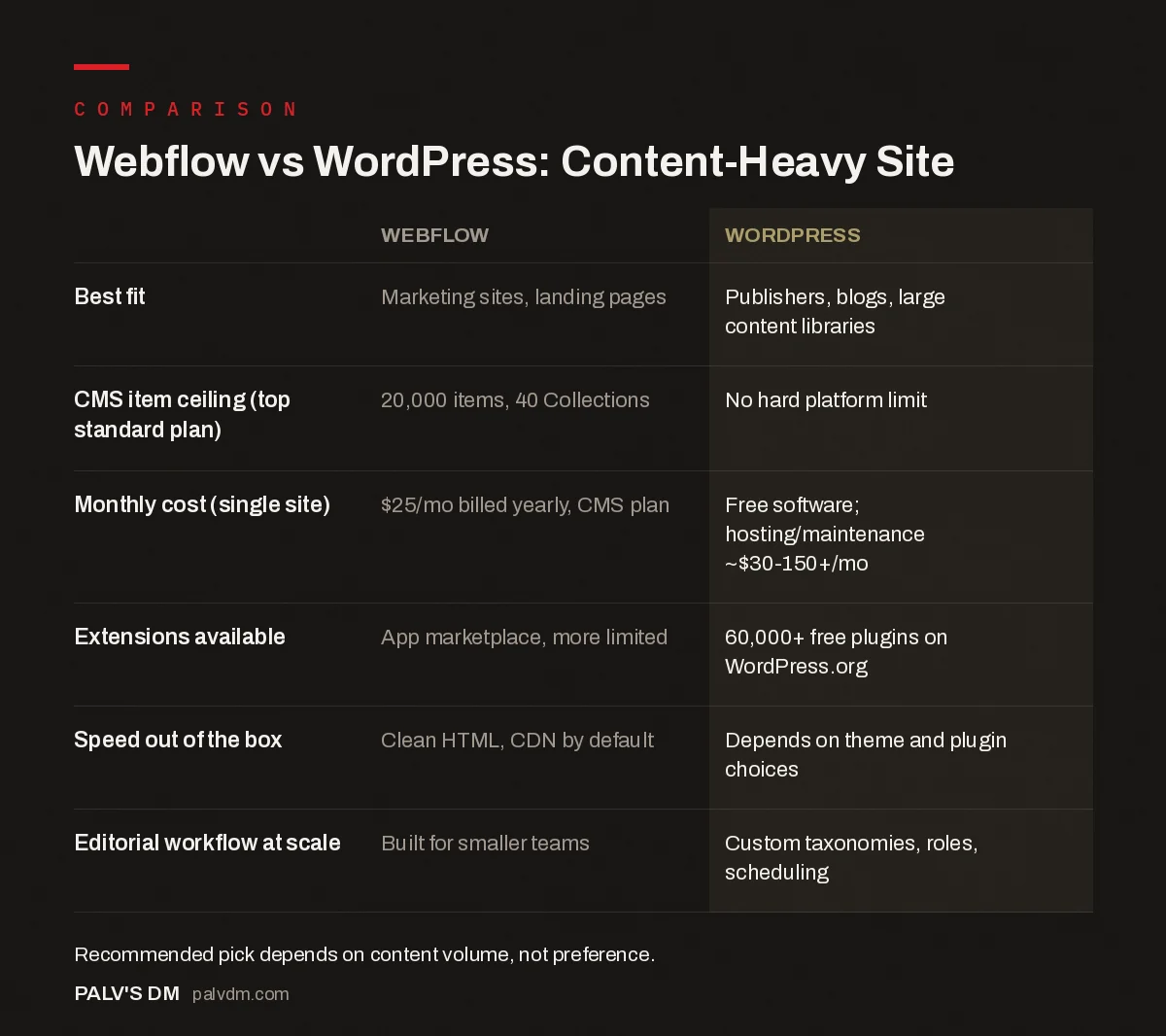
Webflow vs WordPress: Content-Heavy Site
| Webflow | WordPress | |
|---|---|---|
| Best fit | Marketing sites, landing pages | Publishers, blogs, large content libraries |
| CMS item ceiling (top standard plan) | 20,000 items, 40 Collections | No hard platform limit |
| Monthly cost (single site) | $25/mo billed yearly, CMS plan | Free software; hosting/maintenance ~$30-150+/mo |
| Extensions available | App marketplace, more limited | 60,000+ free plugins on WordPress.org |
| Speed out of the box | Clean HTML, CDN by default | Depends on theme and plugin choices |
| Editorial workflow at scale | Built for smaller teams | Custom taxonomies, roles, scheduling |
Where does Webflow’s CMS actually hit a wall?
This is the number that decides the argument for a genuinely content-heavy site. Webflow’s Premium site plan, its main CMS-enabled tier at $25 a month billed yearly, allows 20,000 CMS items across 40 CMS Collections. That sounds like a lot until you count what “items” actually includes: every blog post, every product, every location page, every case study. A publisher running several years of archives, or an ecommerce catalog with a few thousand SKUs each with variants, can burn through that ceiling faster than expected. Once you’re past it, the only path up is Webflow’s enterprise-tier Platform plans, and those start around $2,500 a month on an annual contract, a different order of cost entirely.
WordPress has no equivalent hard limit. Sites with hundreds of thousands of posts run on WordPress without hitting a platform-imposed ceiling; the constraint becomes your hosting and database performance, which you can scale independently as you grow, rather than a subscription tier you’re forced to jump.
Which one is genuinely cheaper?
Neither, flatly, it depends on scope. Webflow’s pricing is predictable: $15 a month for a CMS-less Basic site, $25 a month for the CMS-enabled Premium plan, both billed yearly, hosting included. WordPress software itself costs nothing, but real running costs (hosting, a decent theme, essential plugins, and either your own time or a developer’s for maintenance) range widely. A simple small-business site might run $30 to $150 a month all-in. A larger site with custom development, security monitoring and regular content operations can run into the thousands. The honest framing: Webflow charges more upfront for less ambiguity, WordPress can be cheaper or more expensive depending entirely on what you build and who maintains it.
What about page speed and Core Web Vitals?
Webflow has a structural head start here. It generates clean, minimal HTML and serves every site through a global CDN by default, with no plugin bloat dragging down load times because there’s no plugin ecosystem to bloat it with. A brand-new Webflow site is fast without anyone doing extra work.
WordPress can match or beat that, but it isn’t automatic. The default WordPress install with a heavy page-builder theme and eight unoptimized plugins is often noticeably slower than a comparable Webflow site. The fix isn’t complicated (a lean theme, aggressive caching, image optimization, and genuinely necessary plugins only) but it takes someone deliberately doing it. That’s the trade: Webflow’s speed is a default, WordPress’s speed is a decision.
How do the editorial and publishing workflows compare?
For a team publishing at real volume, WordPress’s editorial tooling is built for it in a way Webflow’s isn’t. Custom post types, taxonomies, author roles with different permission levels, scheduled publishing, and revision history are native and mature. Multiple writers can work in parallel without stepping on each other.
Webflow’s CMS is genuinely good for structured content (a blog, a resources library, a directory of locations) but its editorial roles and workflow tools are lighter, built more for a small team managing a moderate volume of content than a newsroom-style operation. If your content operation involves more than two or three people publishing regularly, that gap becomes noticeable within a few months.
What about extending functionality beyond content?
- WordPress’s plugin ecosystem. More than 60,000 free plugins live in the WordPress.org directory alone, covering everything from booking systems to membership gating to multilingual content. Whatever specific thing you need, there’s usually a plugin, sometimes several competing ones.
- Webflow’s app marketplace and integrations. Smaller and more curated. It covers common needs (forms, ecommerce, analytics, chat) well, but a genuinely niche requirement often means custom code rather than an install-and-configure plugin.
- Custom code, either platform. Webflow allows custom code embeds and, on higher tiers, code components. WordPress allows full custom plugin and theme development. Both are extensible if you’re willing to write code; WordPress just has a bigger pre-built library to reach for first.
Who actually owns the site once it’s built?
This one gets glossed over in almost every agency pitch, and it shouldn’t be. With Webflow, your site lives inside a Webflow Workspace account. If that Workspace was set up under an agency’s own login rather than yours, moving on from that agency can mean losing direct access to the thing you paid for, not just the relationship. Always confirm you own the Workspace itself, with billing under your name, before a project starts.
WordPress separates these concerns more cleanly by default: your hosting account, your domain registrar and your WordPress admin login are typically three distinct things, any of which you can hold directly regardless of who built the site. That separation is exactly why platform lock-in shows up more often in Webflow horror stories than WordPress ones, not because Webflow is worse software, but because its all-in-one structure makes it easier for an agency to keep the keys by accident or by design.
So which should you actually pick?
If your site is genuinely content-heavy, meaning you’re publishing regularly, running an archive that will keep growing for years, or managing a catalog in the thousands, choose WordPress. The lack of a hard content ceiling and the maturity of its editorial and plugin tooling matter more at that scale than Webflow’s cleaner out-of-the-box performance.
If you’re building a marketing site, a SaaS company site, or an agency portfolio with a moderate, fairly stable amount of content, Webflow is a strong, sometimes better, choice. You get predictable pricing, no server to manage, and design control that’s hard to match inside WordPress without a skilled developer or, worse, a bloated page builder. We build in both, and the deciding question we ask a client first is never “which platform do you prefer,” it’s “how much content will this site be carrying in three years.”
Frequently asked questions
Is Webflow better than WordPress for SEO?
Neither has an inherent ranking advantage. Webflow ships cleaner default HTML and a global CDN out of the box, which helps Core Web Vitals without extra work. WordPress can match or beat that with a lean theme and good caching, but it takes deliberate setup rather than coming free with the platform.
Can Webflow handle a large blog or content library?
Up to a point. Webflow’s Premium site plan supports 20,000 CMS items and 40 CMS Collections, which covers most blogs comfortably. A large publisher, directory site, or ecommerce catalog running into the tens of thousands of items will hit that ceiling, where WordPress has no equivalent hard limit.
Is Webflow cheaper than WordPress?
It depends what you’re comparing. Webflow’s CMS-enabled Premium plan is a flat $25 a month billed yearly, all-inclusive of hosting. WordPress software is free, but real costs (hosting, theme, plugins, maintenance) vary from roughly $30 a month for a simple site to several thousand for a complex one, so the honest answer is “it depends on scope,” not a fixed comparison.
Can I migrate from Webflow to WordPress later?
Yes, but it’s manual work, not a one-click export. Webflow doesn’t provide a native WordPress export, so a migration typically means rebuilding templates in WordPress and moving CMS content over via CSV import or a custom script. Budget real time for this if platform lock-in is a concern from day one.
Does Webflow have plugins like WordPress?
Not in the same sense. Webflow has an Apps marketplace and native integrations, but nothing close to the more than 60,000 free plugins in the WordPress.org repository alone. For highly specific functionality (a particular booking system, a niche membership tool), WordPress usually has an existing plugin where Webflow requires custom code.
Sources
- Webflow Pricing, Site and Platform Plans
- WordPress Plugin Directory, WordPress.org
- WordPress SEO: The Complete Configuration Guide
- Static Sites vs WordPress for a Marketing Site
- Headless WordPress: When It’s Worth the Complexity
- Website Platform Lock-In: How to Spot It Before You Sign
Want this done on your site?
Every PalV’s DM engagement starts with a free audit of your actual website — a 12-point
crawl covering what is blocking indexation, on-page gaps against your primary keywords, speed
findings, and the three to five fixes worth making first. Delivered in two working days. No
payment details, and the findings are yours whether you hire us or not.
Get your free SEO audit
See Web Development plans and prices


