Why You Keep Every Account, Login and Asset
Why the client owns SEO accounts at PalV's DM — every login, asset and account stays in your name, not the agency's, from day one, with no exceptions.
At PalV’s DM, every account touched during an SEO engagement — Google Search Console, Google Analytics, Google Business Profile, your CMS, your domain registrar, your keyword-tracking tool — is set up so the client owns SEO accounts, not the agency. We work inside your properties as an added user. If we disappeared tomorrow, you would lose nothing: no traffic history, no ranking data, no reviews, no backlink record. This isn’t advertised as a favour. It’s the only setup that doesn’t leave you hostage to whoever happens to be running your SEO.
Key takeaway
- Every SEO-related account is created and owned under your business identity, with the agency added as a collaborator, never the reverse.
- Losing access to your own Search Console, GA4, Google Business Profile or domain registrar is one of the most common ways businesses end up stuck with an agency they can’t leave.
- Ownership isn’t a courtesy — it’s operational. You need those accounts to switch agencies, run ads, bring on a new hire, or sell the business later.
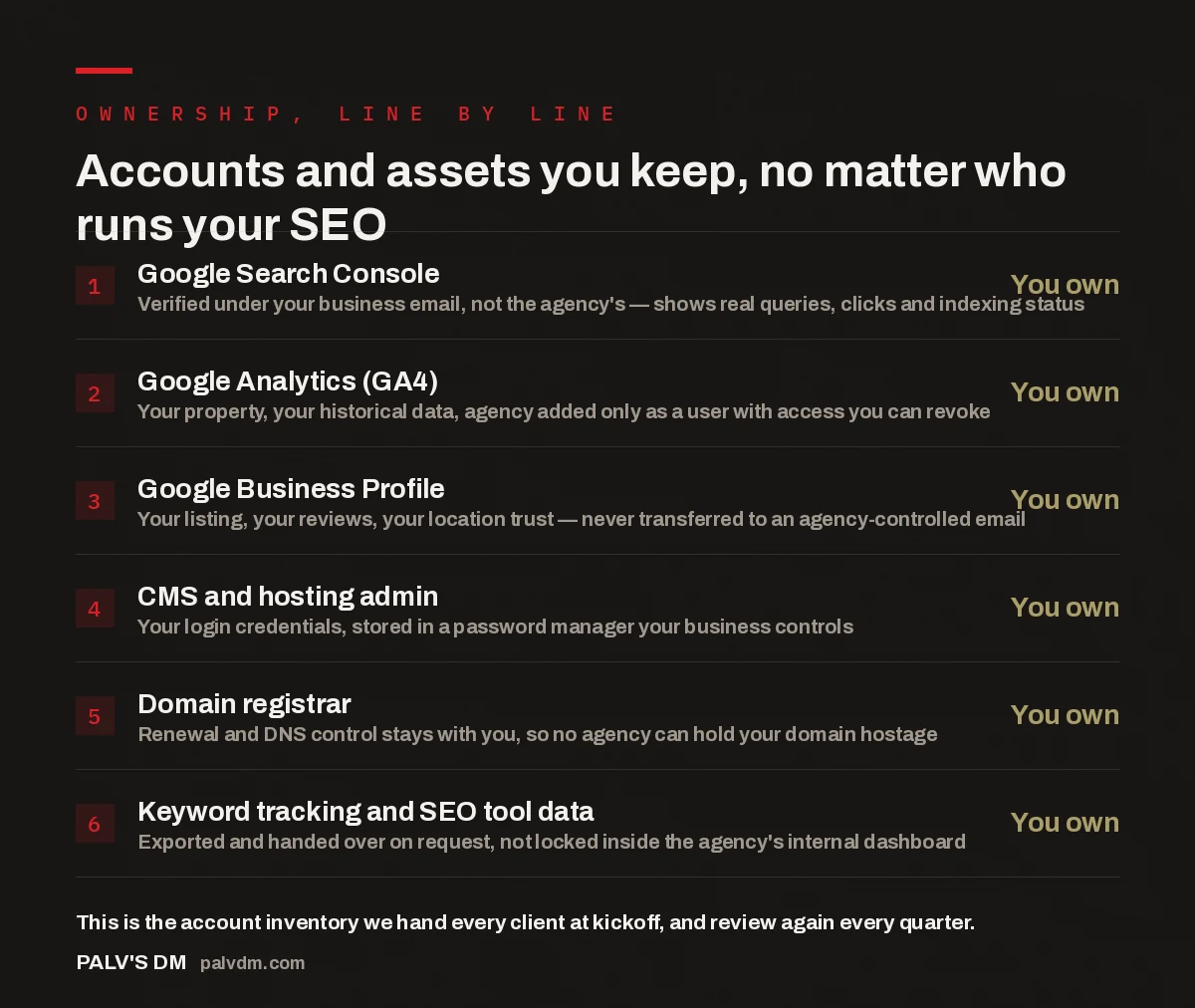
Accounts and assets you keep, no matter who runs your SEO
- Google Search Console — You own. Verified under your business email, not the agency’s — shows real queries, clicks and indexing status.
- Google Analytics (GA4) — You own. Your property, your historical data, agency added only as a user with access you can revoke.
- Google Business Profile — You own. Your listing, your reviews, your location trust — never transferred to an agency-controlled email.
- CMS and hosting admin — You own. Your login credentials, stored in a password manager your business controls.
- Domain registrar — You own. Renewal and DNS control stays with you, so no agency can hold your domain hostage.
- Keyword tracking and SEO tool data — You own. Exported and handed over on request, not locked inside the agency’s internal dashboard.
What does “you own your SEO accounts” actually mean?
It means every account that touches your search visibility is created under an email address and business identity you control, and the agency is added on top of that as a user, editor or manager — never as the primary owner. In practice that covers six things: Google Search Console (property verification and search performance data), Google Analytics 4 (your traffic history), Google Business Profile (your local listing and reviews), CMS and hosting admin logins, your domain registrar account, and any paid SEO tools where rank or backlink data is stored. If a tool has a “manager account” or “team member” structure — Google Ads manager accounts, GA4 admin roles, Search Console user permissions — that structure exists specifically so an agency can work inside your account without ever holding the keys to it.
This is different from how a lot of engagements start. It’s common for a freelancer or small agency to set up Google Analytics or Search Console themselves during onboarding “to save you the hassle,” using their own email. Six months later that convenience becomes the exact reason a client can’t leave — the historical data, the verified domain, the review history all sit inside an account they don’t have the login to.
Why do some agencies keep the accounts under their own name?
There’s a genuinely convenient reason and a less charitable one, and they get blurred together on purpose. The convenient reason: managing forty client accounts is easier from one master login than juggling forty separate sets of client credentials, especially for reporting dashboards that pull from multiple tools at once. That’s a real operational argument, and it’s solvable without taking ownership — most tools now support multi-client dashboards that read from client-owned accounts via permission, not agency-owned accounts via default.
The less charitable reason is leverage. An agency that holds your Google Business Profile, your Analytics history and your domain registrar login has a built-in argument for why you shouldn’t leave, separate from whether the SEO work is actually good. If results stall and a client wants to switch, “we’ll need a few weeks to transfer everything back to you” turns into months, missing data, or a Google Business Profile that has to be re-verified from scratch because it was tied to an email the agency won’t hand over. That friction is the point. It doesn’t need to be malicious to be effective — an agency that’s simply disorganised about handoffs produces the same outcome as one that’s deliberately obstructive.
The pattern is easy to spot before you sign anything: ask directly, in writing, whose name every account will be under. An agency confident in its results has no reason to hesitate on that question.
What actually happens if you don’t own your own accounts?
The problem rarely shows up while the relationship is fine. It shows up at the exact moment you need to act — switching agencies, pausing work for a quarter, or bringing SEO in-house — and that’s when the cost is highest. A Google Business Profile registered under an agency’s email means a new agency, or your own in-house hire, has to request access transfer or file an ownership dispute with Google, which can take the listing offline or reset review visibility while it’s sorted out. A GA4 property under agency ownership means the traffic history you’d use to prove year-over-year growth to an investor or a bank doesn’t travel with you — you start a new property with no history. A domain sitting in an agency’s registrar account means the agency effectively controls whether your website resolves at all, which is not a position any business should be in over a marketing vendor.
None of this requires bad faith to become a real problem. Agencies close, get acquired, lose the one person who remembers which email owns what, or simply take weeks to prioritise a handoff for a client that’s leaving. Ownership sitting with you from day one removes all of those scenarios as a risk, because there’s nothing to hand back — the agency’s access can be revoked in minutes, and everything else stays exactly where it was.
If an agency’s pitch depends on you not being able to leave, that’s not a service model — that’s leverage. Ownership is the only proof that clients stay because of results, not because they’re locked in.
Palash, Founder, PalV’s DM
How do you set account ownership up correctly from day one?
This is a one-time setup cost, usually handled inside the first week of onboarding rather than something you retrofit later. The sequence we follow with every new client:
- Create every SEO-relevant account — Search Console, GA4, Google Business Profile, domain registrar, any paid rank-tracking tool — under a business email your company controls, not a personal freelancer inbox or an agency-branded address.
- Add the agency as a user, editor or manager inside each tool’s own permission system, never as the primary owner. GA4, Search Console and Google Business Profile all support this natively.
- Where a “manager account” structure exists — Google Ads manager accounts being the clearest example — link through it instead of sharing a master login, so access can be revoked with one click and never needs a password reset.
- Store every credential in a password manager your business controls, not a spreadsheet emailed once during onboarding and never updated again.
- Ask for a written account inventory at kickoff — what exists, who’s the verified owner, who has access — and get it refreshed every quarter as part of the standard reporting rhythm.
None of this is technically difficult. It takes an extra thirty minutes at the start of an engagement compared with letting an agency set everything up under its own login. The reason it doesn’t happen everywhere isn’t complexity — it’s that nobody asked for it on day one, and by month six it feels awkward to raise.
What should you check right now to confirm you own your accounts?
If you’re already mid-engagement with an agency, the check takes fifteen minutes. Log into Search Console and look at the verified owner under Settings — Users and Permissions. Do the same in GA4 under Admin — Account Access Management. Check Google Business Profile under Business Profile Settings — People and Access. Log into your domain registrar directly, not through a link the agency sent, and confirm the account email is one you control. If any of those show an agency-owned email as the primary owner, that’s worth raising immediately, not at the point you’re already trying to leave.
If you’re evaluating a new agency, ask for this in writing before signing anything: which accounts will be created, under whose email, and what the handoff process looks like if the engagement ends. A written answer to that question tells you more about how an agency operates than most of the rest of the pitch.
Where this fits
Account ownership is one part of how we run every SEO engagement — alongside a published, no-surprises price and monthly reporting you can act on without a decoder ring.
Who owns Google Analytics and Search Console when PalV’s DM manages our SEO?
You do. Both are created and verified under your business email as the primary owner, and we’re added as a user with the access level needed to do the work. You can view, export or revoke that access at any point without needing anything from us.
What if we’re already with an agency that controls our accounts?
It’s fixable, but it takes deliberate effort rather than happening automatically. Start by requesting ownership transfer in writing for each account, and expect it to take longer than it should. We cover the practical steps in detail in rebuilding SEO after a bad agency experience.
Does keeping ownership of our own accounts cost extra?
No. It changes nothing about pricing — it’s a setup decision, not a service tier. We explain the full reasoning behind how our SEO plans are priced in why we publish our prices instead of sending custom quotes.
What happens to our accounts if we pause or leave PalV’s DM?
Nothing changes on your side. Because every account was already yours, pausing or ending the engagement means we simply lose our user access — your data, rankings history and listings stay exactly where they were. The full process is in how to pause or leave without losing your work.
Do we need technical knowledge to check who owns our own accounts?
No. Each platform shows this under a settings menu — Search Console under Users and Permissions, GA4 under Account Access Management, Google Business Profile under People and Access. It’s a five-minute check per account, and you’re looking for one thing: whose email is listed as the owner.
Short version: every account tied to your SEO — Search Console, GA4, Google Business Profile, CMS, domain registrar, tracking tools — should be created and owned under your business’s own email, with any agency added only as a user. If you can’t answer “whose name is this account under?” for each of those right now, check it this week, not the week you decide to leave. Ownership doesn’t slow anything down; it’s what keeps switching agencies, pausing work, or bringing SEO in-house a decision you get to make freely, rather than one an old vendor’s login makes for you.