
Google’s Search Status Dashboard: How to Use It
The Search Status Dashboard is the only place Google confirms an update. How to read an entry, convert the timestamps, and use it to diagnose a traffic drop.
Google’s Search Status Dashboard at status.search.google.com is the only place Google confirms that a ranking update is running. It reports live status for four systems — Crawling, Indexing, Ranking and Serving — and files every core and spam update as a dated Ranking incident with a start time, a completion time and a permanent incident ID. All times on the dashboard are US/Pacific. If an update is not there, Google has not confirmed it, however many volatility trackers turned red that week.
The dashboard is deliberately narrow, and that is what makes it trustworthy. It never mentions your site, never names affected industries and never explains what changed inside a ranking system. What it gives you is an unambiguous window — this ran, from this timestamp, to this timestamp — and a window is exactly what you need before you attribute a traffic change to anything.
What is the Search Status Dashboard?
The Search Status Dashboard is Google’s public status page for Google Search, in the same family as the status pages that cloud providers publish. It lists incidents under four product categories and shows one of three states: available, service disruption, or service outage.
Ranking updates sit slightly outside that scheme. Google files a core or spam update as an incident with the status “service information” and a low severity, because an update is not a fault — it is a change Google chose to make and chose to tell you about. That is why a core update never turns the dashboard red.
Three access routes exist and most people only know the first. There is the web interface, an RSS feed, and a machine-readable JSON history at status.search.google.com/incidents.json containing every incident with its exact begin and end timestamps in UTC. The JSON is the version worth automating against if you manage more than a handful of sites.
What does the dashboard cover, and what does it not?
| Category | What appears there |
|---|---|
| Crawling | Incidents affecting Googlebot’s ability to fetch pages |
| Indexing | Incidents affecting whether fetched pages enter the index |
| Ranking | Every confirmed core update and spam update, plus ranking faults |
| Serving | Incidents affecting how results are returned to users |
Surface-specific updates are filed here too. The February 2026 Discover core update — the first core update Google aimed exclusively at Discover rather than Search — appears under Ranking as incident mYbNTqV1ytDc2fA8hUz4, running 5 February to 27 February 2026, listed as 21 days and 17 hours.
What the dashboard does not cover is the more useful half of the answer. It reports on Google Search systems only. A Google Analytics 4 reporting bug, a Google Ad Manager disruption, a Search Console data delay or an AI Overviews trigger-rate change will never appear on it. That distinction is exactly what went wrong in early August 2026, when a GA4 reporting bug, Ad Manager disruptions and a Discover decline that had begun in mid-July were widely misread as a Google algorithm update that never existed. The dashboard showed no ranking, indexing, crawling or serving incident at all in that window.
How do you read a dashboard entry?
Each Ranking incident has the same anatomy: a title, a start date, a running duration, and a set of timestamped updates in reverse chronological order. The incident ID sits in the URL and never changes, which makes it the cleanest way to reference an update in a report.
Google’s launch text follows a template. For core updates it reads: “Released the March 2026 core update. The rollout may take up to 2 weeks to complete.” For spam updates the wording differs in a way worth noticing: “Released the June 2026 spam update, which applies globally and to all languages. The rollout may take a few days to complete.” Completion notices are one line: “The rollout was complete as of April 8, 2026.”
Read the estimate as an estimate, not a forecast. The dashboard record shows Google’s own predictions missing in both directions:
| Update | Google’s stated estimate | Actual duration |
|---|---|---|
| December 2025 core update | Up to 3 weeks | 18 days, 2 hours |
| March 2026 spam update | A few days | 19 hours, 30 minutes |
| March 2026 core update | Up to 2 weeks | 12 days, 4 hours |
| May 2026 core update | Up to 2 weeks | 11 days, 21 hours |
| February 2026 Discover core update | Up to 2 weeks | 21 days, 17 hours |
The February 2026 entry is the instructive one: Google estimated two weeks and the rollout ran a week beyond it. An estimate on the dashboard is not a commitment, and planning a client report around one is a mistake.
Timestamps matter more than people expect. Google marked the March 2026 core update complete at 06:12 PDT on 8 April 2026. If you work in India, that is 18:42 IST the same day — so 8 April is a split day in your data, not a clean boundary. Search Console’s performance report also reports in Pacific Time, which makes the two directly comparable; most analytics platforms do not, which is where boundary errors creep in.
How do you use the dashboard to diagnose a traffic drop?
- Find the exact window first, before looking at your own data. Open the Ranking history, note the start and completion timestamps, and write down the incident ID. Doing this first stops you from fitting the dates to a story you have already decided on.
- Check whether the incident is a Ranking entry or something else. A Serving or Indexing incident produces very different symptoms from a core update and calls for a different response.
- Convert the timestamps into the timezone your analytics uses. A rollout that ends at 06:12 PDT ends mid-evening in IST and mid-afternoon in UTC. Comparing a Pacific-time boundary against local-time daily data quietly blends two states.
- Compare equal-length periods that both sit entirely outside the rollout window. A window that straddles the rollout is a blend of before and after and cannot tell you anything. Choosing the comparison window correctly is where most amateur analysis fails.
- Separate positions, impressions and clicks, and separate Search from Discover. Discover and Search move independently. A Discover decline diagnosed as a Search update sends you rewriting pages that were never affected.
- Rule out your own deployments in the same window. Releases, template changes, robots.txt edits and migrations cause more drops than Google does. Establishing whether it was an update or you resolves more cases than the dashboard ever will.
Confirming update impact properly walks through the full comparison method once the window is fixed.
What the dashboard will never tell you
- Whether your site was affected. Google confirms that an update ran globally. It says nothing about any individual domain, and it never will.
- What changed inside the ranking systems. Google issued no new guidance with either the March 2026 or May 2026 core updates. The entry tells you an update happened, not what it rewards.
- Which industries or query types moved. That is what third-party trackers attempt, with the caveats set out in confirmed versus unconfirmed updates.
- Anything about unannounced changes. Google makes thousands of changes to Search a year and files only a fraction on the dashboard. Silence is not evidence that nothing happened — it is only evidence that Google did not announce anything.
How do you turn the dashboard into a record you can actually use?
Checking the dashboard during a crisis is the least valuable way to use it. The value is in the archive you build before the crisis.
Subscribe to the RSS feed or poll the JSON history, and when an update is confirmed, log four things: the incident ID, the start and end timestamps converted to your reporting timezone, Google’s stated estimate, and the actual duration. Annotating those dates in your analytics means that in nine months, when someone asks what happened in May, the answer is on the chart rather than in somebody’s memory.
Keep your own deployments in the same update log. The dashboard records Google’s actions and your log records yours, and almost every genuinely hard diagnosis is resolved by putting the two timelines side by side. The 2026 update timeline gives you the confirmed dates to start from, and what a core update actually is covers what to do once you have established that one hit you.
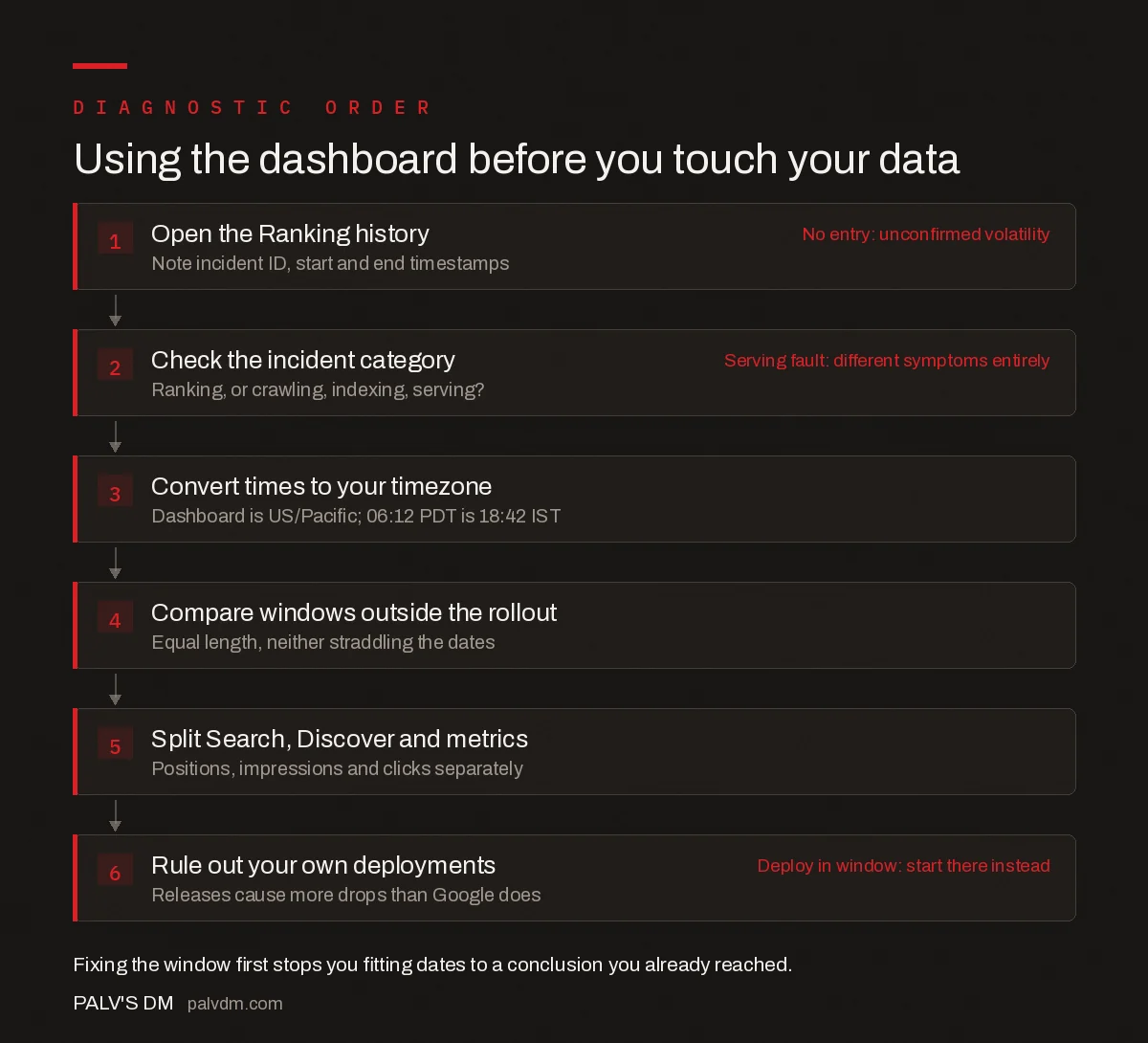
Using the dashboard before you touch your data
- Open the Ranking history. Note incident ID, start and end timestamps. No entry: unconfirmed volatility
- Check the incident category. Ranking, or crawling, indexing, serving?. Serving fault: different symptoms entirely
- Convert times to your timezone. Dashboard is US/Pacific; 06:12 PDT is 18:42 IST.
- Compare windows outside the rollout. Equal length, neither straddling the dates.
- Split Search, Discover and metrics. Positions, impressions and clicks separately.
- Rule out your own deployments. Releases cause more drops than Google does. Deploy in window: start there instead
Frequently asked questions
What is the Google Search Status Dashboard?
The Search Status Dashboard at status.search.google.com is Google’s public status page for Google Search. It reports live status for Crawling, Indexing, Ranking and Serving, and files every confirmed core update and spam update as a dated Ranking incident with a start time, a completion time and a permanent incident ID. All times shown are US/Pacific.
Does the Search Status Dashboard show every Google algorithm update?
No. Google makes thousands of changes to Search each year and files only confirmed core updates, spam updates and system faults on the dashboard. An absence of entries means Google announced nothing, not that nothing changed. The dashboard also covers Google Search systems only, so Analytics, Ad Manager and Search Console reporting issues never appear there.
How do I know when a Google core update finished?
Google posts a completion notice on the Search Status Dashboard, worded as a single line stating that the rollout was complete as of a given date. The summary view also displays a total duration. The March 2026 core update ran 12 days and 4 hours; the May 2026 core update ran 11 days and 21 hours.
Are Google's rollout estimates on the dashboard reliable?
Treat them as estimates only. Google predicted up to three weeks for the December 2025 core update, which finished in 18 days and 2 hours. It predicted a few days for the March 2026 spam update, which finished in 19 hours and 30 minutes. It predicted two weeks for the February 2026 Discover core update, which ran 21 days and 17 hours.
What timezone does the Search Status Dashboard use?
All times on the dashboard are US/Pacific. Google Search Console’s performance report also uses Pacific Time, so the two are directly comparable. Most analytics platforms report in local or account timezone, which is why rollout boundaries often appear to fall on a different day depending on which tool you are looking at.
Can I get Search Status Dashboard data automatically?
Yes. Alongside the web interface, Google publishes an RSS feed and a machine-readable JSON history at status.search.google.com/incidents.json. The JSON contains each incident with its ID, begin and end timestamps in UTC, and the full text of every status update Google posted, which makes it straightforward to log confirmed updates automatically.
Sources
- Google Search Status Dashboard
- Search Status Dashboard documentation — Search Central
- Google core updates and your website — Search Central
- Performance report (Search results) — Search Console Help
Want this done on your site?
Every PalV’s DM engagement starts with a free audit of your actual website — a 12-point
crawl covering what is blocking indexation, on-page gaps against your primary keywords, speed
findings, and the three to five fixes worth making first. Delivered in two working days. No
payment details, and the findings are yours whether you hire us or not.


