
noindex, nofollow, and Robots Directives Compared
Noindex keeps a page out of search results; nofollow stops link signal from passing. Here is exactly when to use each, and the mistakes that break them.

Noindex tells Google not to show a page in search results; nofollow tells Google not to pass crawling or ranking signals through the links on that page, or through one specific link. They control two completely different things, and using one where you meant the other is one of the most common technical SEO mistakes on WordPress and enterprise sites alike. Get the two confused and you either leave low-value pages sitting in the index, or accidentally stop Googlebot from discovering pages you actually want found.
Both directives can be set as a meta tag in the page head, as an HTTP header for non-HTML files, or — for nofollow specifically — as a rel attribute on an individual link. Which method you need depends on what you’re trying to control: the whole page’s presence in the index, or the flow of signal through specific links.
What is the difference between noindex and nofollow?
Noindex is an instruction about the page itself: don’t include this URL in search results, even though you’re allowed to crawl it. Nofollow is an instruction about links: either don’t follow any of the links on this page (page-level, set in the meta robots tag), or don’t treat this one specific link as an endorsement (link-level, set as a rel attribute on an anchor tag).
A page can carry noindex without nofollow — common for a thank-you page you still want linked internally. A page can carry nofollow without noindex — common for a paginated archive you’re happy to have indexed but don’t want passing signal to every article it links to. The two are independent settings, not two names for the same thing.
| Directive | Controls | Set where | Effect on indexing | Effect on link signal |
|---|---|---|---|---|
| noindex | Whether the page appears in search results | Meta robots tag or X-Robots-Tag header | Removes the page from the index | No direct effect |
| nofollow (page-level) | Whether links on the page are followed | Meta robots tag | No direct effect | Googlebot treats all outbound links as a hint not to crawl/credit |
| nofollow (link-level) | Whether one specific link is followed | rel attribute on the <a> tag | No effect on the linking page | Signal to that one link only, treated as a hint since 2019 |
| robots.txt disallow | Whether the page can be crawled at all | robots.txt file | Indirect — Google can’t see a noindex tag it never crawls | Doesn’t stop links being discovered elsewhere |
When should you use noindex?
Noindex belongs on pages that need to exist and stay crawlable, but shouldn’t compete for a spot in search results. Internal search result pages, filtered or faceted URLs that duplicate a parent category, staging or test pages accidentally left live, thin tag archives, and thank-you or confirmation pages are the standard cases.
The tag itself is straightforward: <meta name="robots" content="noindex"> in the page head, or an X-Robots-Tag: noindex HTTP header for PDFs and other non-HTML files where you can’t inject a meta tag. Google’s own guidance is explicit that noindex only works if the page can be crawled — a page blocked in robots.txt never gets far enough for Googlebot to read the tag.
When should you use nofollow at the page level?
Page-level nofollow is rarer than noindex in practice. It made more sense before 2019, when it functioned as a strict instruction rather than a hint. Today, a legitimate use is a page with a large number of untrusted or auto-generated outbound links — a forum thread, a comments section, an aggregator page — where you want to signal caution across the board without editing every single link.
Most sites get more precision, and better results, applying nofollow at the link level instead: tagging individual sponsored links, user-generated links, or low-trust outbound links, while leaving the page’s internal navigation and editorial links untouched.
How does the link-level nofollow attribute work?
Set on an individual anchor tag as rel="nofollow", this tells Google not to treat that one link as an endorsement. Since Google’s 2019 update, two related attributes give more precision: rel="sponsored" for paid or affiliate links, and rel="ugc" for user-generated content like blog comments or forum posts. All three are now treated as hints Google can choose to follow anyway when deciding what to crawl, rather than absolute rules — a meaningful shift from how nofollow worked when it launched in 2005.
Which rel attribute fits which link type
- rel=”nofollow” — General-purpose caution flag for any link you don’t want to vouch for.
- rel=”sponsored” — Paid placements, affiliate links, and any commercially compensated link.
- rel=”ugc” — Links inside comments, forum posts, or any content submitted by users rather than the site owner.
- No attribute (dofollow) — The default. Reserved for links you’re editorially endorsing.
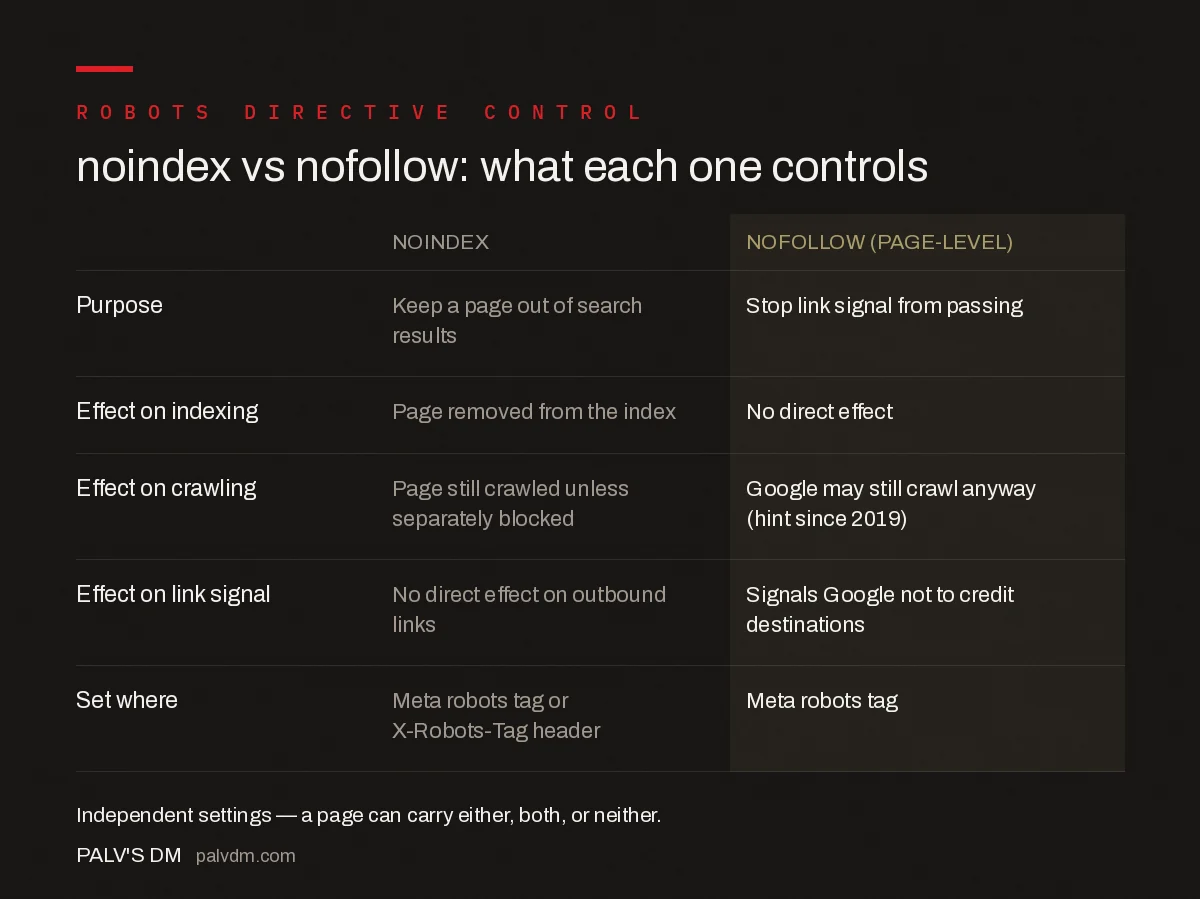
noindex vs nofollow at a glance
- Purpose — noindex: keep a page out of search results. nofollow: stop link signal from passing.
- Effect on indexing — noindex: page removed from the index. nofollow: page indexing unaffected.
- Effect on crawling — noindex: page is still crawled unless separately blocked. nofollow: Google may still crawl the link anyway, since 2019 it’s a hint.
- Effect on link signal — noindex: no direct effect on outbound links. nofollow: signals Google not to credit the destination.
What happens when you combine noindex and nofollow on the same page?
Combining them — content="noindex, nofollow" — is valid and appropriate for pages you want fully excluded: not shown in results, and not treated as a source of link endorsement either. Internal search results pages are the textbook case, since they’re often thin, duplicative, and link out to filtered variants you don’t want Google spending crawl budget discovering through that route.
Where teams get this wrong is applying noindex, nofollow broadly out of caution, on pages that should stay indexed. A blog category page that ranks and drives traffic doesn’t need nofollow just because it also carries noindex for some unrelated reason — check each directive against its own purpose, not as a matched pair by default.
What mistakes commonly break these directives?
- Noindexing a page still blocked by robots.txt. Googlebot can’t read a tag on a page it’s disallowed from requesting, so the noindex never takes effect and the URL can still appear in results, often with no snippet.
- Assuming nofollow removes a page from the index. It doesn’t. A page can carry page-level nofollow and still rank normally; only noindex controls index presence.
- Treating link-level nofollow as a guaranteed block. Since 2019 it’s a hint, not a directive — Google can still crawl and use a nofollowed link if other signals suggest it’s worth following.
- Leaving a noindex tag on a page after it should go live. A common launch-day bug: staging noindex tags shipped to production and left in place, quietly keeping key pages out of the index for weeks before anyone notices the traffic gap.
- Mixing directive syntax across CMS plugins. Some SEO plugins render
noindex,nofollowwithout a space, others render two separate meta tags — both are valid HTML, but check your rendered source, not just the plugin setting screen, to confirm it shipped correctly.
How do you check which directive is actually live on a page?
View rendered source, not just the raw HTML — some directives get injected by JavaScript after the initial page load, and what Googlebot sees after rendering is what matters. Search Console’s URL Inspection tool shows the indexing status Google actually recorded, including whether it found a noindex tag, which is the fastest way to confirm a directive took effect rather than guessing from the page source alone.
Frequently asked questions
Can a page be both noindex and nofollow?
Yes, and it’s a legitimate combination for pages like internal search results or filtered listings you never want indexed or crawled further. Use meta name=”robots” content=”noindex, nofollow” together, or two separate directives if your CMS only allows one per line.
Does nofollow on a page stop Google from indexing it?
No. Page-level nofollow only affects whether Googlebot follows the links found on that page; the page itself can still be crawled and indexed normally. To keep a page out of the index, you need noindex, not nofollow.
Should I use noindex or robots.txt disallow to hide a page?
Use noindex when you want Google to crawl the page but exclude it from results; use disallow when you don’t want Google requesting the page at all. Disallowing a page that’s already indexed won’t remove it, since Google can’t see the noindex tag if it can’t crawl the page.
Does a nofollow link still pass any ranking value?
Since 2019, Google treats rel=”nofollow” as a hint rather than a strict directive, alongside sponsored and ugc. Google may still choose to crawl and use nofollow links as one signal among many, so it no longer guarantees zero value the way it once did.
Why is my noindexed page still showing in Google search results?
The most common cause is Google hasn’t recrawled the page since the tag was added, or the page is blocked by robots.txt so Googlebot never sees the noindex tag at all. Remove any robots.txt block first, then request indexing in Search Console to speed up removal.
Sources
- Block Search Indexing with noindex — Google Search Central
- SEO Link Best Practices for Google — Google Search Central
- Technical SEO: The Complete Working Guide
- How to Find and Fix Redirect Chains and Loops
- Sitemap Index Files for Sites Over 50,000 URLs
Want this done on your site?
Every PalV’s DM engagement starts with a free audit of your actual website — a 12-point
crawl covering what is blocking indexation, on-page gaps against your primary keywords, speed
findings, and the three to five fixes worth making first. Delivered in two working days. No
payment details, and the findings are yours whether you hire us or not.


