
Why We Build WordPress Sites Without Page Builders
No page builder WordPress builds use Gutenberg, ACF and a lightweight theme instead of Elementor or Divi. Here is why, and when a builder still makes sense.
We stopped installing Elementor and Divi on new client builds because the block editor, a lightweight theme and Advanced Custom Fields now cover the same layouts with less code shipped to every visitor. That’s not a purity stance. It’s what happens when you compare page-load waterfalls and support tickets across both approaches for a few years.
Page builders sell speed of building, not speed of the finished site. Those are different things, and the gap between them is where most of the “why is my WordPress site slow” support requests come from. This is the reasoning behind going no-page-builder on WordPress, what you give up, and where a builder still genuinely earns its place.
What does “no page builder” actually mean in practice?
It means building pages with the native block editor (Gutenberg), reusable block patterns, and Advanced Custom Fields for structured, repeatable content, on a lightweight theme that doesn’t ship its own bundled builder framework. No Elementor, no Divi, no Beaver Builder, no WPBakery.
It doesn’t mean hand-coding every page in raw HTML. Full-Site Editing themes give you templates, patterns and global styles, so a marketer can still add a new service page without touching code. The difference is where the layout logic lives: in WordPress core and the theme, not in a third-party plugin’s separate rendering engine.
Why do page builders make sites slower?
Every page builder loads its own CSS and JavaScript framework, on top of the theme’s stylesheet, on top of WordPress core. That framework has to render whether the page uses ten widgets or two, because the builder can’t know in advance which components you’ll need. The browser downloads and parses it all regardless.
This is architectural, not a bug that a future update fixes. A builder’s entire value proposition, dragging and dropping any layout without writing code, requires a general-purpose rendering system sitting between your content and the browser. A native block-built page skips that layer. Fewer files requested, less CSS to parse before first paint, less JavaScript competing for the main thread during page load.
None of this means a builder site can’t hit good Core Web Vitals scores. It means it takes more caching, more plugin pruning and more manual CSS cleanup to get there, work you’d otherwise skip entirely.
What do you actually give up by dropping the builder?
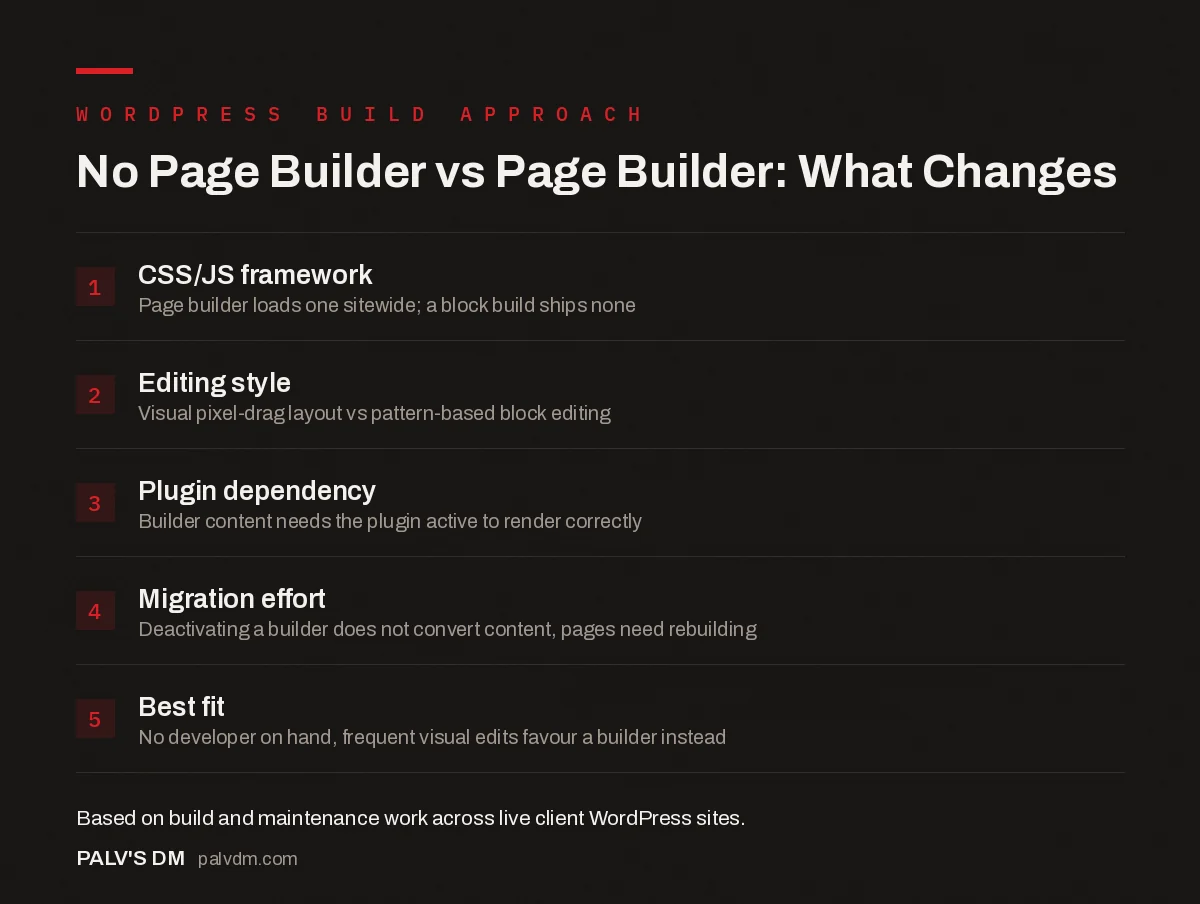
No Page Builder vs Page Builder: What Changes
- CSS/JS framework. Page builder loads one sitewide; a block build ships none.
- Editing style. Visual pixel-drag layout vs pattern-based block editing.
- Plugin dependency. Builder content needs the plugin active to render correctly.
- Migration effort. Deactivating a builder does not convert content, pages need rebuilding.
- Best fit. No developer on hand, frequent visual edits favour a builder instead.
Visual, real-time drag-and-drop editing is the biggest loss. In a builder, you see the exact pixel position as you move an element. In blocks, you’re working within patterns and columns; it’s still visual, but less freeform. For a client who wants to nudge a button three pixels to the left themselves, that’s a real change in workflow, and it’s worth being honest about before the handover conversation, not after.
You also lose the instant gratification of hundreds of pre-built templates. Block pattern libraries are smaller. What you gain instead is a set of patterns built specifically for that site’s brand, which tends to look more consistent across pages precisely because there’s less temptation to try five different layout styles in the same afternoon.
What do you gain that actually shows up in the numbers?
| Typical page builder build | Native block build (Gutenberg + ACF) | |
|---|---|---|
| Extra CSS/JS framework loaded site-wide | Yes, on every page | No separate framework |
| Editing interface | Visual drag-and-drop, pixel-precise | Block-based, pattern-driven |
| Plugin dependency for basic layout | High, site breaks if builder is deactivated | Low, content survives theme changes |
| Typical developer familiarity needed | Builder-specific knowledge | Standard WordPress/PHP/block API |
| Long-term maintenance burden | Tied to one plugin’s update cycle | Tied to WordPress core’s update cycle |
The row that matters most for anyone who plans to keep a site for more than two years is plugin dependency. Deactivate Elementor on a builder-authored site and the page content doesn’t just lose styling, it can turn into a wall of raw shortcodes. That’s a real risk if the plugin gets abandoned, priced out of your budget, or simply stops being maintained the way it is today. Content built in native blocks is stored as standard WordPress content; it degrades gracefully even if every custom block plugin vanished tomorrow.
Does this actually help SEO, or is that overstated?
Indirectly, yes, mostly through page speed and Core Web Vitals, which are confirmed ranking signals, not through some direct “Google prefers Gutenberg” mechanism, because no such mechanism exists. A lighter page that loads faster has a better shot at good Largest Contentful Paint and Interaction to Next Paint scores, and those numbers factor into ranking and, more directly, into whether visitors stick around long enough to convert.
The bigger indirect SEO benefit is markup cleanliness. Page builders sometimes wrap simple content in multiple layers of nested divs to support their drag-and-drop grid systems. That doesn’t stop Google from reading the content, but it does add weight to the DOM that has to be parsed, and it can make heading structure harder to keep clean when every section wraps its own container.
When does a page builder still make sense?
- No developer on call. If the person maintaining the site day to day has zero coding background and needs to rearrange sections themselves every few weeks, a builder’s visual interface is worth the overhead.
- High page-turnover agencies. Building near-identical landing pages at volume, where speed of assembly beats the last 10% of performance, is a legitimate builder use case.
- Existing builder investment. A site with hundreds of pages already built in Elementor isn’t worth migrating just on principle. The migration cost usually outweighs the performance gain unless the site is being rebuilt anyway.
- Highly custom, animated one-off layouts. Some builders and their addon ecosystems still do bespoke animation and interaction work faster than hand-coded blocks, for the rare page that genuinely needs it.
How do you migrate away from a page builder without wrecking the site?
Treat it as a rebuild, not a plugin swap. Builder content is stored as builder-specific markup that Gutenberg can’t interpret, so deactivating Elementor doesn’t magically convert anything, it just strips the styling and leaves shortcodes behind. Rebuild page by page: recreate the layout in blocks or patterns, compare it side by side against the live version, and only then deactivate the builder for that page.
Do the highest-traffic pages first, not the easiest ones. A stalled migration that leaves the homepage on Elementor and everything else on blocks is worse than no migration at all, because now you’re maintaining two systems instead of one. If a full migration isn’t realistic this quarter, it’s fine to leave the existing site alone and just stop building new pages in the builder going forward.
What happens at handover, when the client wants to edit it themselves?
This is the conversation that actually decides whether skipping the builder was the right call for a specific client, not the performance numbers. Some clients genuinely want to log in every week and rearrange sections. Others touch the site twice a year to update a phone number. Ask which one you’re dealing with before you commit to an architecture.
For the second group, the far more common one in our experience, block patterns with locked structure and editable text fields give them exactly the control they need without the risk of a dragged-and-dropped element wrecking mobile layout. We set up patterns for the sections they’ll realistically touch (team bios, pricing, service descriptions) and lock the rest. A client who never wanted pixel-level control doesn’t miss it. A client who does, we tell them upfront a builder might suit them better, because forcing that workflow onto someone who wants freeform control just creates friction later.
One thing that trips people up during handover training: block patterns look locked until someone finds the three-dot menu and converts a pattern to individual blocks, after which it behaves like any other block and can be broken exactly the way a builder section could. Worth a two-minute mention during training so it doesn’t turn into a support ticket in month three.
Frequently asked questions
Do you actually need a page builder for WordPress in 2026?
No, not for most business sites. The block editor plus a handful of custom blocks or Advanced Custom Fields covers layouts that used to require Elementor or Divi. A page builder still saves time for a solo user with no developer on hand who needs to move sections around constantly.
Do Elementor and Divi actually slow down a website?
They add their own CSS and JavaScript framework on top of the theme and WordPress core, extra code the browser downloads and parses on every page regardless of which widgets that page uses. A well-optimised builder site can still pass Core Web Vitals, but it takes more caching and cleanup work to get there.
Can I move an existing Elementor or Divi site to Gutenberg without breaking it?
Yes, but treat it as a rebuild, not a plugin swap. Builder-authored content is stored as builder-specific markup Gutenberg can’t read natively, so pages need recreating in blocks rather than converting automatically. Do it page by page and check each one against the live version first.
Is the WordPress block editor good enough to replace a page builder?
For the layouts most business and marketing sites need, yes. Full-Site Editing themes, block patterns and Advanced Custom Fields cover columns, hero sections, pricing tables and repeatable content. Highly custom, one-off animated layouts are the narrower case where builders still have an edge.
When does a page builder still make sense?
When whoever maintains the site day to day has no developer support and needs to rearrange sections visually and often, a builder’s overhead is worth it. It also suits agencies standardising a large volume of near-identical client sites where build speed matters more than the last 10% of performance.
Sources
- WordPress.org: The Block Editor documentation
- web.dev: Core Web Vitals overview (Google)
- WordPress SEO: The Complete Configuration Guide
- Page Builders vs Native Gutenberg Blocks: The Real Cost
- Choosing a WordPress Theme That Won’t Sabotage Core Web Vitals
- Block Patterns: Reusable Layouts Without Plugin Lock-In
Want this done on your site?
Every PalV’s DM engagement starts with a free audit of your actual website — a 12-point
crawl covering what is blocking indexation, on-page gaps against your primary keywords, speed
findings, and the three to five fixes worth making first. Delivered in two working days. No
payment details, and the findings are yours whether you hire us or not.
Get your free SEO audit
See web development plans and prices


