
Elementor vs Gutenberg: What Page Builders Actually Cost You
Elementor vs Gutenberg compared on real speed data, cost and lock-in. Which one wins for a new WordPress build and when the builder still makes sense.
For a standard business website, native Gutenberg blocks beat Elementor on load speed and long-term maintenance cost. Elementor still wins when a page needs heavy animation or a design your client absolutely will not compromise on. That’s the honest split, and it has nothing to do with which tool is “better” in the abstract.
Most comparisons of these two either come from a page builder’s own marketing team or from a purist who won’t touch a builder under any circumstance. Neither is useful when you’re the one who has to maintain the site eighteen months from now. Here’s what actually changes depending on which one you pick.
What’s the real difference between them?
Gutenberg is the block editor built into WordPress core. No extra plugin, no license, no dashboard bloat. You assemble a page from paragraph blocks, image blocks, column blocks and group blocks, and the output is close to plain HTML with minimal extra markup.
Elementor is a separate visual page builder plugin that replaces the WordPress editor with a drag-and-drop canvas. It renders its own markup, loads its own CSS and JS libraries, and stores layout data in a proprietary format inside post meta. You get pixel-level control and live preview. You also inherit everything Elementor loads to make that possible.
Which one is actually faster?
Gutenberg wins this comparison structurally, not by a small margin. A native block page ships close to the HTML a hand-coded page would produce: no builder framework, no extra widget CSS sitting unused on pages that don’t need it. Elementor loads its own front-end assets on every page where it’s active, plus whatever a given widget pulls in, whether or not that page uses the feature.
In practice, the gap is smaller than a raw framework comparison suggests, because Elementor has invested in performance tooling: an element caching feature that trims repeated markup on complex layouts, and optimized asset loading that only pulls in CSS for widgets actually used on a page. A well-configured Elementor build with caching, an image CDN and unused-widget cleanup can land in a respectable range on PageSpeed Insights. An out-of-the-box Elementor build with a theme’s default settings and a stack of third-party widgets usually will not.
The default WordPress redirect and asset settings trip this up constantly: sites we inherit almost never have Elementor’s own performance settings turned on, because nobody went back and enabled them after launch.
Elementor vs Gutenberg: quick comparison
The infographic below covers the decision points that matter most when you’re choosing between them for a new build.
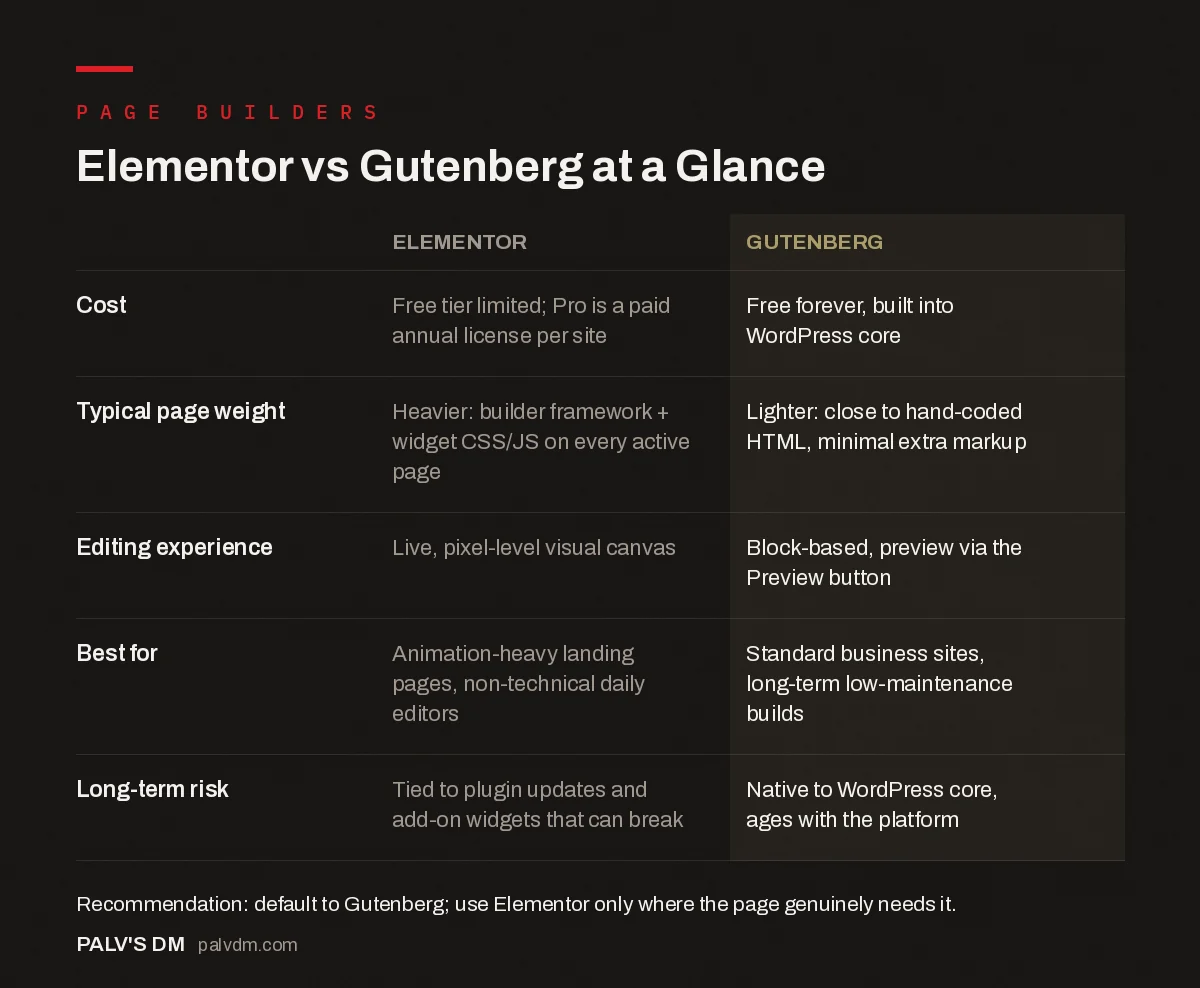
Elementor vs Gutenberg at a Glance
| Elementor | Gutenberg | |
|---|---|---|
| Cost | Free tier limited; Pro is a paid annual license per site | Free forever, built into WordPress core |
| Typical page weight | Heavier: builder framework + widget CSS/JS on every active page | Lighter: close to hand-coded HTML, minimal extra markup |
| Editing experience | Live, pixel-level visual canvas | Block-based, preview via the Preview button |
| Best for | Animation-heavy landing pages, non-technical daily editors | Standard business sites, long-term low-maintenance builds |
| Long-term risk | Tied to plugin updates and add-on widgets that can break | Native to WordPress core, ages with the platform |
What does each one actually cost?
Gutenberg is free and always will be, since it ships with WordPress core. There’s no separate license, no renewal, no per-site fee.
Elementor’s free version covers basic layouts. Pro unlocks theme building, popups, more widgets and the performance tools mentioned above, and it’s licensed per site with an annual renewal. For an agency building and maintaining a dozen client sites, that’s a recurring cost that Gutenberg simply doesn’t have. Factor that into the total cost of ownership, not just the sticker price at launch.
Which one has the steeper learning curve?
- For clients editing their own content: Elementor’s live, what-you-see-is-what-you-get canvas is genuinely easier for a non-technical person to grasp on day one. There’s no mental gap between the editor and the published page.
- For a developer or agency building the site: Gutenberg’s block patterns and reusable blocks, once set up, let a client make safe edits within guardrails you define. Elementor gives more freedom, which also means more ways for a client to break a layout by accident.
- For long-term maintenance: Native blocks age better. A Gutenberg-built site from three years ago still opens and edits normally today. An old Elementor site tied to a since-changed widget or a discontinued add-on plugin can break in ways that are harder to trace.
Does the choice affect SEO directly?
Neither tool blocks indexing or hides content from Google by default; both output crawlable HTML. The SEO impact is indirect and runs almost entirely through page speed and Core Web Vitals, since a bloated, slow page can lose rankings and conversions even with perfect on-page content. If you’re not sure where your current builder choice is hurting you, our Core Web Vitals guide covers how LCP and INP problems get diagnosed and fixed regardless of which editor produced the page.
When does Elementor genuinely win?
Three situations, honestly:
- Complex landing pages with animation and interaction that native blocks can’t replicate without custom development. Recreating that in Gutenberg means custom block development, which costs real developer time.
- Non-technical teams who edit constantly and need the visual, no-guesswork canvas more than they need the last 10% of page speed.
- Agencies with an existing Elementor template library where rebuilding everything in blocks isn’t worth the migration cost for a marginal speed gain on sites that already perform acceptably.
Outside of those, we default to blocks. It’s not a purist stance, it’s what produces fewer support tickets eighteen months after launch.
Can you mix the two on one site?
Yes, and a lot of real sites do exactly that, whether by design or by accretion. Elementor can be active alongside Gutenberg, and you can use blocks on most pages while reserving Elementor for one or two landing pages that need its canvas. The trade-off is that you still pay Elementor’s asset-loading cost on every page where the plugin is active, even pages built entirely in native blocks, unless you configure it to load conditionally. That configuration step gets skipped more often than it should.
What happens when you inherit someone else’s build?
This is the scenario nobody plans for and almost everybody eventually hits. A client comes to us with a site built by a previous freelancer or agency, and it’s running Elementor with nine add-on plugins, half of them abandoned by their developers, none of them documented. Untangling that costs more time than building the same site from scratch would have.
Gutenberg doesn’t fully solve this problem, but it shrinks it. A block-built site depends on WordPress core and, at most, a handful of block library plugins. There’s less to audit, less that can silently stop being maintained, and less risk that a critical layout depends on a widget from a company that no longer exists. If you’re taking over a site someone else built, our guide to vetting a web development agency covers the questions worth asking before you commit to a rebuild versus a repair.
How do you decide for a new project right now?
Ask three questions before touching either tool. First: does any planned page need animation, custom interaction or pixel-precise design that a block theme genuinely can’t produce? If yes, that page justifies Elementor, not the whole site. Second: who edits this site after launch, and how comfortable are they with a slightly less visual workflow in exchange for a faster, lower-maintenance result? Third: is this a one-off site or one of many you’ll be responsible for? Recurring per-site license costs matter a lot more at agency scale than they do for a single business owner.
Most projects, once you actually answer those three questions honestly, land on Gutenberg with maybe one Elementor-built landing page for a specific campaign. That’s the split we build to by default, and clients rarely ask to change it once the site is live and fast.
Frequently asked questions
Is Elementor bad for SEO?
Not inherently. Elementor doesn’t block indexing or hide content from Google. The SEO problem is indirect: extra CSS and JS files, more DOM nodes per section, and third-party widgets that slow down Core Web Vitals if you don’t manage them. A well-built Elementor site can still rank fine.
Can I switch from Elementor to Gutenberg without losing my site?
Not cleanly. Elementor stores layout data in a way Gutenberg can’t read, so switching means rebuilding pages block by block rather than converting them automatically. Budget real time for this, especially on a site with dozens of Elementor-built pages.
Is Gutenberg good enough for a full business website now?
Yes, for most standard business sites. Core blocks plus a solid block theme cover navigation, columns, galleries, forms (with a plugin) and reusable patterns. The gap that remains is complex, animation-heavy landing pages, where a page builder still saves time.
Does Elementor really slow a site down that much?
It depends entirely on how it’s used. A page built with Elementor’s default settings, several third-party widgets and no caching will load noticeably slower than the same layout in native blocks. A disciplined build using Elementor’s own performance features narrows that gap significantly.
Do I need coding skills to use Gutenberg well?
No, not for day-to-day editing. Anyone can drag in paragraph, image, and column blocks with no code. Where light CSS knowledge helps is customizing block styles beyond what the theme provides, which is optional, not required for a functional site.
Sources
- Gutenberg project page, WordPress.org
- Elementor features and performance documentation
- WordPress SEO: The Complete Configuration Guide
- Why We Build Without Page Builders
- Choosing a WordPress Theme That Won’t Sabotage Core Web Vitals
- Block Patterns: Reusable Layouts Without Plugin Lock-In
Want this done on your site?
Every PalV’s DM engagement starts with a free audit of your actual website — a 12-point
crawl covering what is blocking indexation, on-page gaps against your primary keywords, speed
findings, and the three to five fixes worth making first. Delivered in two working days. No
payment details, and the findings are yours whether you hire us or not.
Get your free SEO audit
See Web Development plans and prices


