
Video Schema and Getting Into Video Carousels
How VideoObject schema works, the fields Google actually requires, and what it takes to get a video into search carousels and AI citations.
VideoObject schema is a block of JSON-LD that describes a video’s title, description, thumbnail and upload date so Google can display it as a rich result, a video carousel entry, or a Key Moments-enabled clip, instead of treating the page as plain text with a player embedded in it. Without it, your video content competes on the same terms as a page with no video at all.
Most sites either skip video schema entirely or copy a generator’s output without checking it matches what’s actually on the page. Both mistakes cost you the same thing: eligibility for a search result format that gets noticeably more attention than a standard blue link, because it comes with a thumbnail and a play button sitting right in the results.
What does VideoObject schema actually do?
It tells Google, in a structured format rather than free text, exactly what a video is: its name, what it’s about, how long it runs, when it was published, and where to find the file or the embed. Google reads that data alongside the page content and the video file itself (when accessible) to decide whether the video qualifies for a video rich result, a carousel placement, Key Moments (timestamped jump-to points), or a LIVE badge for streams.
This matters because a text-only page describing a video, with no schema, gives Google far less to work with. It has to infer duration, topic and relevance from surrounding text and whatever metadata the video platform itself exposes, which is a weaker signal than a structured, page-owner-provided description.
What does Google actually require in the markup?
The infographic below covers the required and recommended fields in the order they matter.
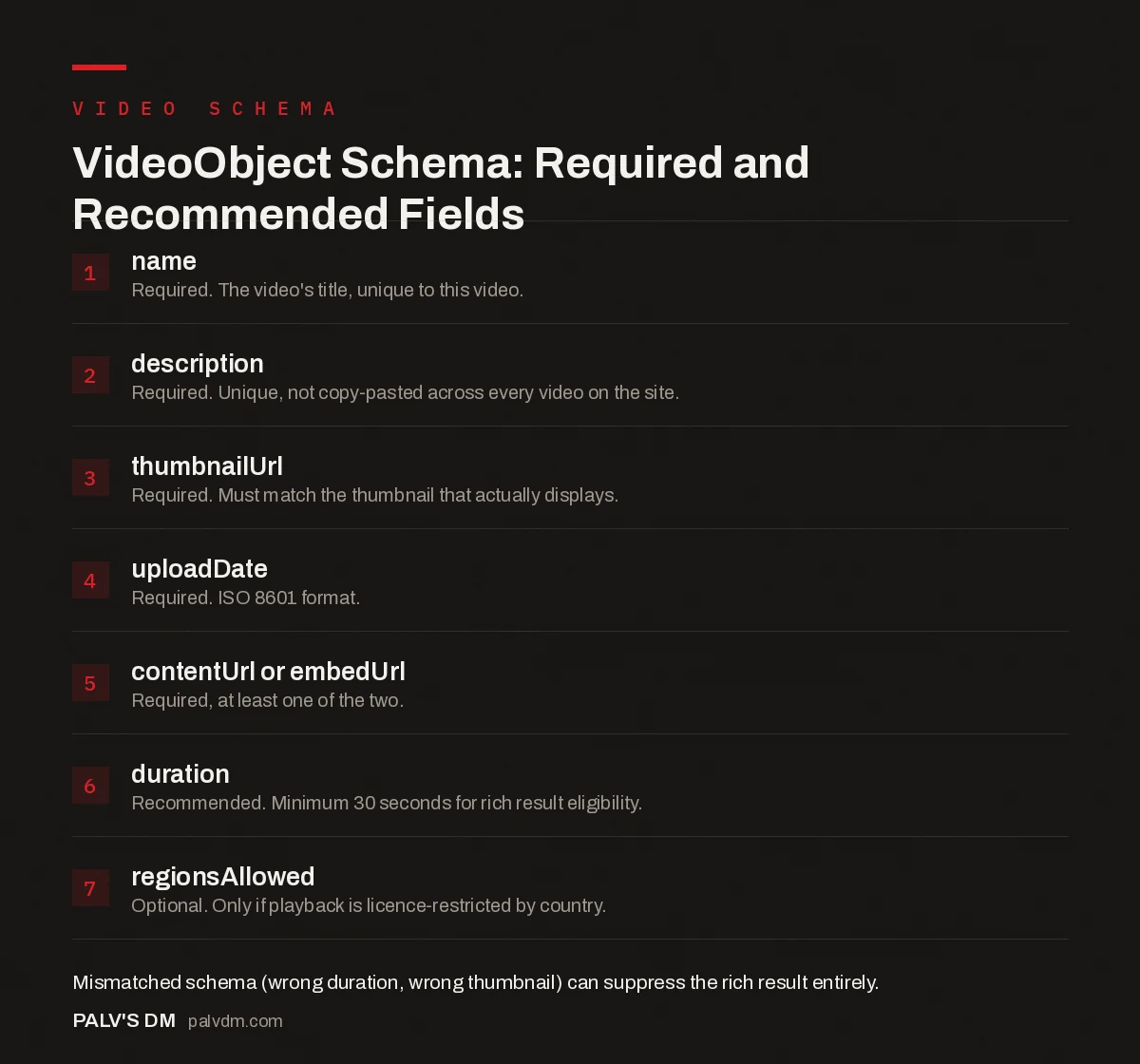
VideoObject Schema: Required and Recommended Fields
- name. Required. The video’s title, unique to this video.
- description. Required. Unique, not copy-pasted across every video on the site.
- thumbnailUrl. Required. Must match the thumbnail that actually displays.
- uploadDate. Required. ISO 8601 format.
- contentUrl or embedUrl. Required, at least one of the two.
- duration. Recommended. Minimum 30 seconds for rich result eligibility.
- regionsAllowed. Optional. Only if playback is licence-restricted by country.
Where does the video need to live?
On the exact page the schema describes, in a playable state. This sounds obvious and gets violated constantly: a common mistake is adding VideoObject schema to a blog post that only links out to a YouTube video rather than embedding the player directly on the page. Google’s guidance is explicit that structured data should sit on a page where the user can actually watch the video, not a page that merely references one elsewhere.
The fix is simple and gets skipped anyway: embed the actual player (YouTube’s iframe embed, a self-hosted HTML5 video, or a Vimeo embed) on the same page as the schema, not a thumbnail image that links away.
What’s the difference between contentUrl and embedUrl?
- contentUrl points to the actual video file, the raw media Google’s crawler can access directly. This gives Google the most information, since it can process the file itself.
- embedUrl points to a page or player that plays the video when embedded, such as a YouTube embed link. This is the more common option for videos hosted on a third-party platform where you don’t control the raw file.
- You need at least one, not necessarily both. Most sites embedding YouTube or Vimeo content will use embedUrl exclusively, and that’s sufficient.
How do you actually get into the video carousel?
Correct schema is the entry ticket, not the whole show. Beyond valid VideoObject markup, Google weighs whether the video file itself is genuinely accessible for it to preview and generate thumbnails or key moments from, whether the page content around the video is substantive and relevant (not a thin page built purely to host an embed), and standard relevance and quality signals against the query. A perfectly marked-up video on a thin, low-value page is unlikely to outrank a well-supported video on a page with real surrounding content and topical authority.
The default WordPress video embed setup trips this up constantly: a lot of themes lazy-load video embeds behind a click-to-play thumbnail using a placeholder image, and if that placeholder isn’t correctly linked to the schema’s thumbnailUrl, Google can end up seeing a mismatch between what the markup claims and what actually renders on first load.
What about Key Moments and SeekToAction?
Key Moments let Google jump viewers to specific timestamps within a video, shown as clickable segments directly in the search result. You can define these two ways: with a manually coded Clip or hasPart array in your VideoObject schema naming each timestamped section, or by using YouTube’s own chapter markers in the video description, which Google can pick up automatically for YouTube-hosted content. For most small business sites publishing occasional how-to or explainer videos, YouTube chapters are the lower-effort path; hand-coded Clip markup makes more sense for a self-hosted video library where precision matters and volume justifies the setup time.
How does this connect to AI search visibility?
Structured video data is becoming a meaningful signal for AI-driven search and assistant results, not just traditional Google Search. AI systems draw on transcripts, page text and structured data together to understand what a video actually covers, so clean VideoObject markup is a prerequisite for a video showing up in an AI Overview citation or an assistant’s video recommendation. It’s not a guarantee, the same way schema was never a ranking guarantee in classic search, but skipping it removes a signal these systems increasingly rely on. For the broader mechanics of how structured data feeds AI citation, our practical schema markup guide covers the fundamentals that apply across every schema type, video included.
What’s the most common mistake to avoid?
Schema that doesn’t match reality. If your VideoObject says the video runs four minutes and the actual embed runs ninety seconds, or the thumbnailUrl points at an image that isn’t what actually displays, that’s a content mismatch Google’s guidelines specifically warn against. It’s not a technicality: mismatched schema can get a rich result feature suppressed even when the underlying page and video are both genuinely good. Run every video page through Google’s Rich Results Test after publishing, not just once during initial setup, since a theme or plugin update can silently change what actually renders.
Should you use regionsAllowed or other optional properties?
Only if they apply to your situation. regionsAllowed restricts where a video result can appear, useful if licensing limits playback to specific countries; most business sites publishing their own marketing or how-to content don’t need it and can leave it out entirely. Other optional fields worth adding when relevant: duration (in ISO 8601 format, like PT4M13S for four minutes thirteen seconds), interactionCount if you’re tracking view counts and want to surface them, and expires if the video is genuinely time-limited content like a webinar replay with a scheduled takedown.
Resist the temptation to fill in every optional field a schema generator offers just because the field exists. Extra properties that don’t map to anything real on the page add maintenance burden without adding eligibility. Stick to what’s true and what’s required, plus the two or three optional fields that genuinely apply.
How do you actually implement this without hand-coding JSON-LD?
If you’re running WordPress, most major SEO plugins can generate baseline VideoObject schema when you add a video block or a supported embed, though the auto-generated version is often minimal and worth reviewing rather than trusting blindly. For a self-hosted video library or a site publishing video content at volume, hand-coding or templating the JSON-LD gives more control over exactly which properties get populated and keeps the markup in sync as videos get updated or replaced. Either path works. What doesn’t work is generating the schema once at launch and never revisiting it as content changes.
Frequently asked questions
What properties does VideoObject schema actually require?
Google requires name, description, thumbnailUrl and uploadDate at minimum, plus at least one of contentUrl or embedUrl so Google can access or embed the video itself. Duration, while not always strictly required, strengthens eligibility for richer video features.
Does the video need to be hosted on my own site?
No. You can mark up an embedded YouTube or Vimeo video with VideoObject schema as long as the page the schema sits on is where a visitor can actually watch it. Pointing schema at a page where the video isn’t playable is against Google’s guidelines.
Is there a minimum video length for schema eligibility?
Yes. Google requires a minimum total video duration of 30 seconds for video rich results. Shorter clips can still exist on the page, but they won’t qualify for video-specific search features.
Will video schema alone get me into the video carousel?
No. Schema makes a video eligible, it doesn’t guarantee placement. Google still evaluates the video and page against relevance, content quality and, for carousel-specific features, whether the file itself is accessible for Google to preview.
Does video schema help with AI search visibility too?
It’s increasingly relevant there. AI-driven search and assistant results lean on structured data alongside transcripts and page text to understand what a video covers, so a clean VideoObject implementation is a prerequisite for a video being cited or recommended by AI systems, not a guarantee of it.
Sources
- Video (VideoObject) structured data guidelines, Google Search Central
- VideoObject, Schema.org
- Schema Markup: A Practical Guide With Copy-Paste JSON-LD
- HowTo Schema: Where It Still Earns Results
- Article Schema: Fields That Matter and Fields That Don’t
- Common Schema Errors in Search Console and Their Fixes
Want this done on your site?
Every PalV’s DM engagement starts with a free audit of your actual website — a 12-point
crawl covering what is blocking indexation, on-page gaps against your primary keywords, speed
findings, and the three to five fixes worth making first. Delivered in two working days. No
payment details, and the findings are yours whether you hire us or not.


