Service Support — AI Visibility
How We Set Up llms.txt and Crawler Access for Clients
Our exact llms txt implementation process: audit crawler access, write and publish the file, then open blocked AI bots so engines can actually read it.
llms.txt implementation is a two-part job: publishing a plain-text file that tells AI engines which pages on your site are worth reading, and making sure the crawlers those engines use can actually reach those pages in the first place. Most sites we onboard get the first part half right and the second part wrong entirely — the file exists, but GPTBot or ClaudeBot is quietly blocked at the robots.txt or CDN level, so the file is invisible to the very systems it was written for. Here is the exact sequence we run for every AI Visibility client, in order, before any citation or content work starts.
Key takeaway
- llms.txt implementation only works if the AI crawlers it’s written for aren’t already blocked — check server logs and robots.txt before writing the file, not after.
- The file is a curated index, not a sitemap dump: list the pages you’d want an AI engine to treat as your canonical answer on a topic, grouped by purpose.
- Publishing llms.txt is a one-hour task; getting real crawler access opened at the server and CDN level is usually the part that takes the rest of the week.
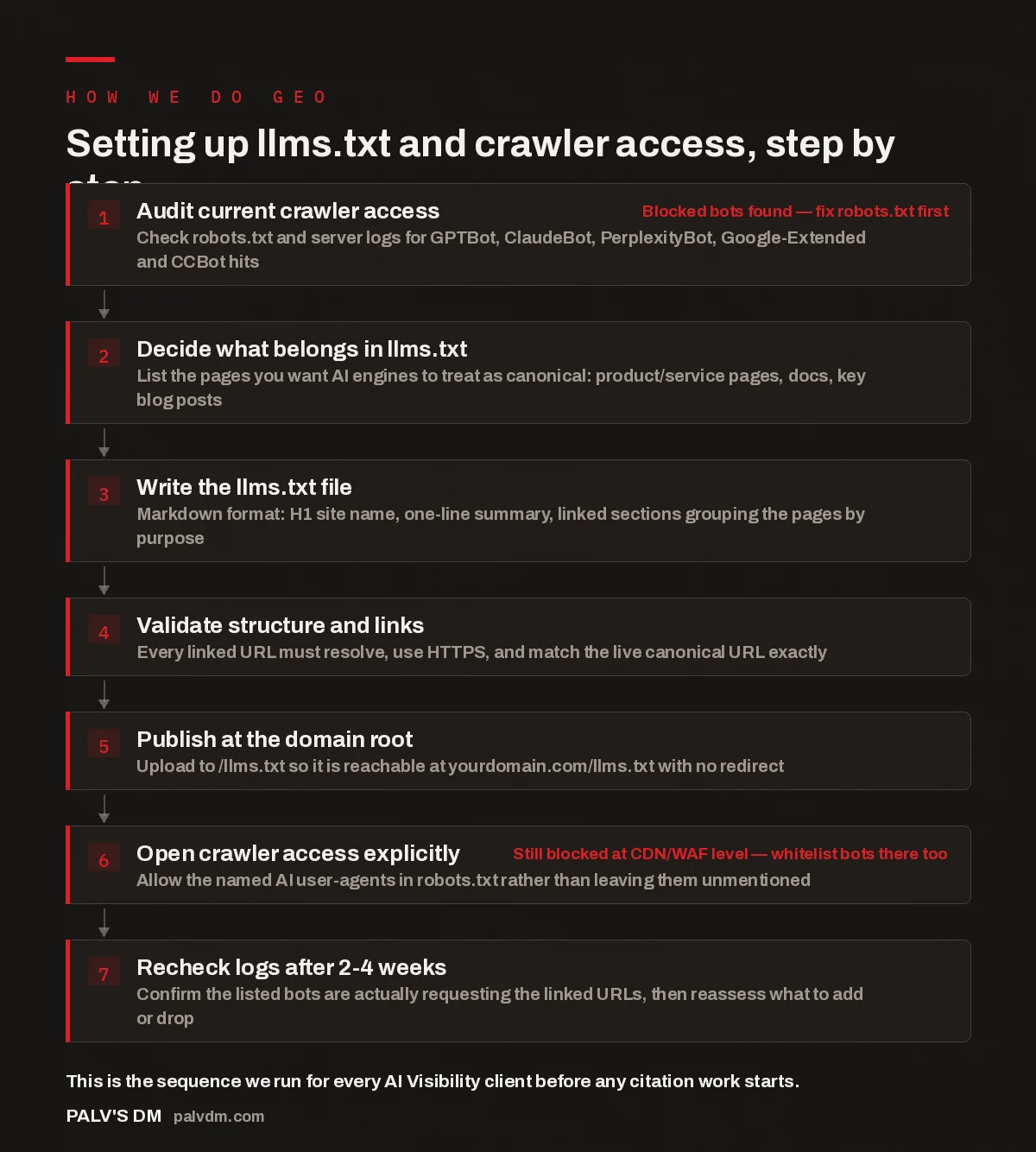
Setting up llms.txt and crawler access, step by step
- Audit current crawler access. Check robots.txt and server logs for GPTBot, ClaudeBot, PerplexityBot, Google-Extended and CCBot hits. Blocked bots found — fix robots.txt first
- Decide what belongs in llms.txt. List the pages you want AI engines to treat as canonical: product/service pages, docs, key blog posts.
- Write the llms.txt file. Markdown format: H1 site name, one-line summary, linked sections grouping the pages by purpose.
- Validate structure and links. Every linked URL must resolve, use HTTPS, and match the live canonical URL exactly.
- Publish at the domain root. Upload to /llms.txt so it is reachable at yourdomain.com/llms.txt with no redirect.
- Open crawler access explicitly. Allow the named AI user-agents in robots.txt rather than leaving them unmentioned. Still blocked at CDN/WAF level — whitelist bots there too
- Recheck logs after 2-4 weeks. Confirm the listed bots are actually requesting the linked URLs, then reassess what to add or drop.
What is llms.txt and why do crawlers care about it?
llms.txt is a plain Markdown file, published at the root of your domain, that acts as a curated index for AI systems — a short summary of what your site does, followed by grouped links to the pages you’d point a new visitor to first. It sits alongside robots.txt and sitemap.xml, but it does a different job: robots.txt tells crawlers what they’re allowed to fetch, sitemap.xml lists everything that exists, and llms.txt tells an AI system what actually matters. Think of it as the equivalent of handing a new hire a one-page “start here” document instead of the entire company wiki.
Adoption of llms.txt by the major AI engines is inconsistent and still evolving — some crawlers reportedly check for it, others don’t yet act on it at all. We treat it as a low-cost, high-leverage addition rather than a guaranteed lever: it costs almost nothing to publish correctly, and where it is read, it shortcuts an AI engine’s job of figuring out your site’s structure. What we won’t do is oversell it — the crawler access work below matters more, because a perfect llms.txt file is worthless if the bots reading it can’t reach the pages it links to.
How do we audit crawler access before touching llms.txt?
Before we write a single line of the llms.txt file, we pull server logs and check for three things: which AI user-agents are hitting the site at all, what status codes they’re getting back, and whether robots.txt is silently disallowing them. This is the step most DIY attempts skip, and it’s the one that determines whether the rest of the work matters. A site can have a beautifully structured llms.txt file sitting at the root and still be completely unreadable to AI engines because a WAF rule or an old robots.txt directive is returning a 403 to every bot whose user-agent string doesn’t look like Googlebot.
In the accounts we’ve onboarded, the most common blocker isn’t a deliberate decision to keep AI crawlers out — it’s leftover configuration. A security plugin set to aggressive mode, a Cloudflare bot-fight rule enabled by default, or a robots.txt file copied from a template years ago that disallows anything not explicitly on Google’s crawler list. None of these were written with AI visibility in mind, but all of them quietly block it. We check log entries for GPTBot, ClaudeBot, PerplexityBot, Google-Extended, and CCBot specifically, because these are the crawlers tied to the AI engines clients most often ask us about.
How do we decide what goes into the llms.txt file?
llms.txt is not a sitemap and it shouldn’t try to be one. We start from the same question we’d ask of a human visitor who’s in a hurry: which pages actually answer the questions people ask about this business? For most client sites that means service or product pages, documentation, pricing or comparison pages, and a handful of the strongest blog posts on the topics the business wants to be known for — not the entire archive.
We group these into sections with short, literal headings — “Services,” “Pricing,” “Guides” — rather than clever marketing language, because the file is being read by a system parsing for structure, not a human skimming for tone. A one-line description under each link helps too: it gives the crawler context it would otherwise have to infer from the page itself. If a page changes meaningfully, the file needs updating at the same time, not on the next quarterly review — a link to a page that no longer exists undermines the trust of the whole file, not just that one line.
How do we write and structure the file itself?
The format is deliberately simple: an H1 with the site or brand name, a one- or two-sentence summary of what the business does, then H2-grouped sections of Markdown links, each with an optional one-line description. There’s no schema to validate against and no required fields beyond the title — which is exactly why discipline matters more than complexity here. A file that’s internally inconsistent, with broken links or duplicated sections, signals sloppiness in the one place a business gets to speak to an AI system in plain language rather than through markup.
Before publishing, we check every linked URL resolves without a redirect, uses HTTPS, and matches the live canonical URL exactly — not a staging path, not a URL with tracking parameters attached, not an old slug that 301s somewhere else. A redirect isn’t fatal, but it’s friction the file doesn’t need to carry, and it’s a five-minute fix to point links at final destinations directly.
Publishing llms.txt takes an hour. Proving to yourself that the crawlers it’s written for can actually read what it points to takes the rest of the week — and that second part is the one most sites skip.
Palash, Founder, PalV’s DM
How do we open crawler access at the server level?
This is where llms.txt implementation stops being a content task and becomes an infrastructure one. We check robots.txt for explicit “Disallow” rules against the AI user-agents named above, and where they exist without a clear business reason, we work with the client’s developer to remove them or scope them narrowly. Just as important — and far more often the actual culprit — is checking the layer above robots.txt: the CDN, the WAF, and any bot-management or security plugin sitting in front of the site. Cloudflare’s bot-fight mode, for instance, can block AI crawlers by default regardless of what robots.txt says, because it’s evaluating request patterns and user-agent strings before the request ever reaches WordPress.
We ask for an explicit allowlist for the AI user-agents a client cares about, applied at whichever layer is doing the blocking. This is a conversation, not a one-click toggle — some businesses have good reasons to keep certain bots out, and the right answer is a deliberate decision, not a default setting nobody remembers enabling.
What happens after llms.txt is live?
Publishing the file and opening access isn’t the end of the job — it’s the start of a verification loop. We recheck server logs two to four weeks after go-live to confirm the named crawlers are actually requesting the URLs listed in llms.txt, not just hitting the homepage and stopping. If a bot is visiting the site but ignoring the file’s links entirely, that tells us something about how much weight that particular engine is currently giving llms.txt, which shapes how much further effort we put into refining it versus focusing on other citation-engineering work.
From there it becomes a maintenance item rather than a project: whenever a client publishes a new cornerstone page or retires an old one, the file gets updated in the same sprint. Left stale, it becomes a small liability — a set of promises about site structure that no longer matches reality.
Where does this fit with the rest of an AI visibility engagement?
llms.txt implementation is one input into a broader AI Visibility program, not a program on its own. It comes after the initial audit identifies whether crawler access is a live problem, and it sits alongside the content and page-level work that actually earns citations once AI engines can reach the site cleanly. If you’re rebuilding an older archive rather than starting fresh, the same crawler-access checks apply before any retrofitting work is worth doing — there’s no point restructuring old posts for citability if the bots reading them are blocked at the door.
We treat this the same way across every client size: check access first with an AI visibility audit, fix what’s blocked, publish and validate llms.txt, then move into the page-level citation engineering process that actually earns mentions. For sites with a large existing blog, this crawler-access work is also the first step before retrofitting an archive for AI — and once it’s live, it feeds directly into tracking citations across five engines every month so you can see whether the access work is actually translating into mentions.
Want this done for you?
Does every site need an llms.txt file?
No site is worse off for having a correctly built one, but it’s not the highest-priority fix for every site. If server logs show AI crawlers are already blocked by robots.txt or a CDN rule, fixing that access problem matters far more than the file itself — a well-written llms.txt pointing to pages a crawler can’t reach accomplishes nothing.
Where exactly should the llms.txt file be published?
At the root of the domain, so it resolves directly at yourdomain.com/llms.txt with no redirect and no subfolder. This mirrors where robots.txt and sitemap.xml live, and it’s the location AI systems checking for the file will look first.
How do I check which AI crawlers are already hitting my site?
Pull raw server access logs (not just Google Analytics, which filters most bot traffic out) and search for user-agent strings like GPTBot, ClaudeBot, PerplexityBot, Google-Extended, and CCBot. Look at the status codes those requests are getting — a run of 403s or 429s means something is actively blocking them even if robots.txt looks permissive.
What’s the difference between llms.txt and robots.txt?
robots.txt is a permissions file — it tells crawlers what they are and aren’t allowed to fetch. llms.txt is a curation file — it tells crawlers, once they’re allowed in, which pages are actually worth reading. You need both working correctly; one doesn’t substitute for the other.
How often should llms.txt be updated?
Whenever the set of pages you’d point a new visitor to changes — a new cornerstone page goes live, a service page is retired, a guide gets substantially rewritten. Treat it as part of the same sprint as that content change, not a separate quarterly task, so it never drifts out of sync with the live site.
Short version: llms.txt implementation is two jobs wearing one name — publish a clean, curated Markdown index at your domain root, and separately confirm the AI crawlers it’s written for aren’t blocked by robots.txt, a CDN rule, or a security plugin. Audit access first, write the file second, verify with logs a few weeks later, and keep it updated whenever your key pages change.