Service Support — Web Development
What You Need to Provide Before a Build Starts
What do I need for a website? Domain access, brand assets, final copy, images, tool logins, a decision-maker, and legal details before the build starts.

What do you need for a website build to start on schedule? Seven things: domain and hosting access, your brand assets, final page copy, images, logins for any tools the site will connect to, one named decision-maker, and your legal or business details. Miss any of these and the project doesn’t fail loudly — it just quietly slips a week at a time, because a designer or developer is sitting idle waiting on an email that never came.
Most timeline overruns on website builds aren’t caused by the agency. They’re caused by the gap between when a contract is signed and when the client actually has these seven items ready to hand over. This is the checklist we send every client before kickoff, and the reasoning behind each item, so you can have everything ready before the first call.
Key takeaway
- The build clock should start when your assets are complete, not when the contract is signed — treat the two as separate dates.
- Final copy is the single most common blocker. Bullet points and “we’ll figure it out later” both stall design.
- One named decision-maker per project prevents the feedback loops that add weeks to an otherwise on-track build.
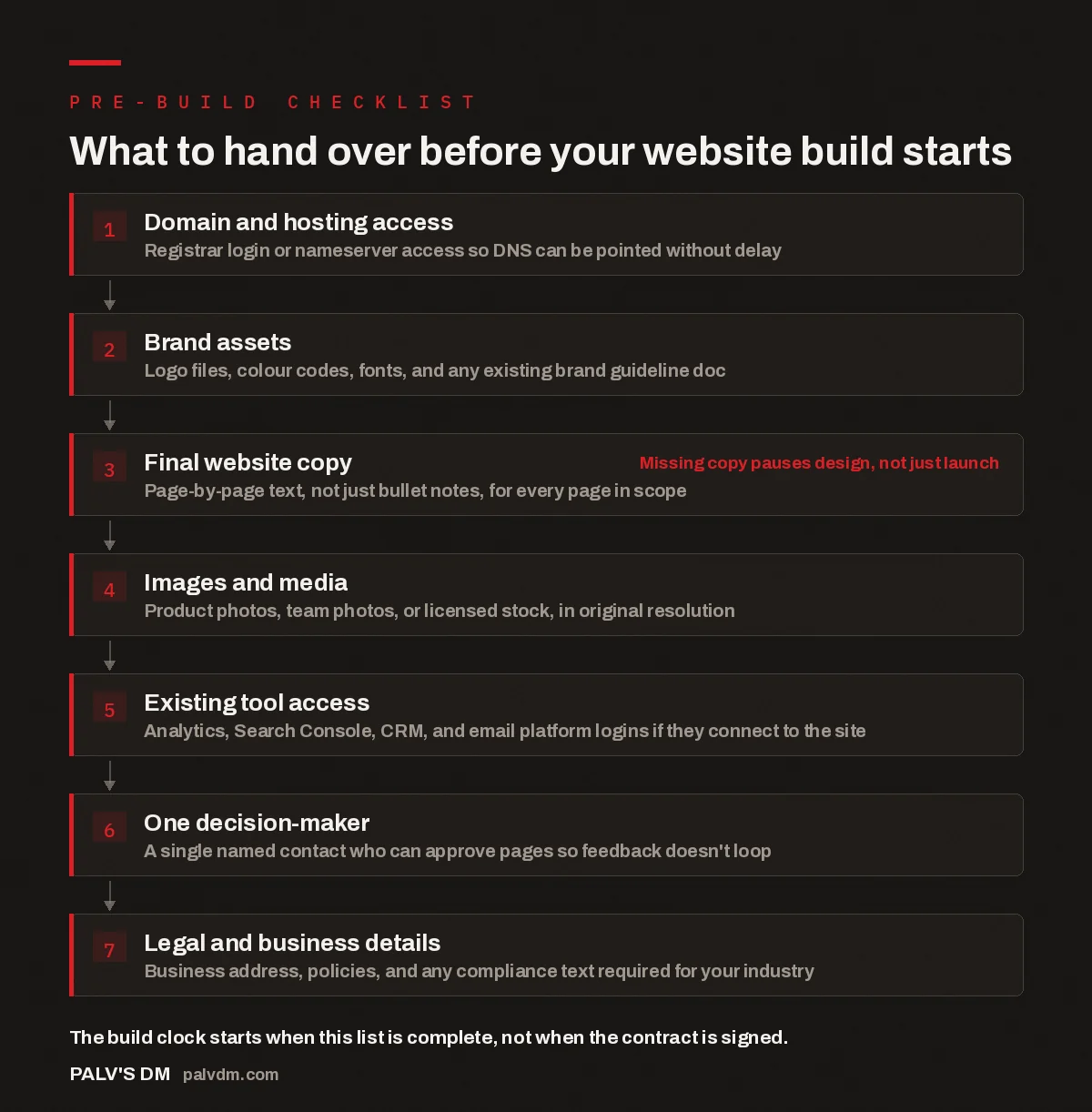
What to hand over before your website build starts
- Domain and hosting access. Registrar login or nameserver access so DNS can be pointed without delay.
- Brand assets. Logo files, colour codes, fonts, and any existing brand guideline doc.
- Final website copy. Page-by-page text, not just bullet notes, for every page in scope. Missing copy pauses design, not just launch
- Images and media. Product photos, team photos, or licensed stock, in original resolution.
- Existing tool access. Analytics, Search Console, CRM, and email platform logins if they connect to the site.
- One decision-maker. A single named contact who can approve pages so feedback doesn’t loop.
- Legal and business details. Business address, policies, and any compliance text required for your industry.
Why does domain and hosting access matter this early?
A website build needs somewhere to live before it’s finished, not just when it goes live. Staging environments, test URLs, and eventually the DNS cutover all depend on someone having access to your registrar account, or at least the ability to update nameservers. If that access sits with a former employee or a slow-to-respond IT contact, it becomes the thing that delays an otherwise finished site from ever going live.
- Confirm who owns the domain registrar login today, not who owned it two years ago.
- If hosting is bundled with the domain provider, decide early whether you’re keeping that hosting or moving it — this changes the technical setup.
- If you don’t have the login, request a password reset from the registrar before kickoff, not during launch week.
In the accounts we work on, domain access issues are rarely dramatic — nobody has lost the domain. The login just lives in an inbox nobody checks anymore, and tracking it down takes three days instead of three minutes.
What brand assets actually need to be handed over?
A logo file is not one file. You need a vector version (SVG or AI) for anything that gets resized, a transparent-background version for use over photos, and ideally a simplified mark for small spaces like a favicon. If all you have is a logo pulled off your own website as a low-resolution PNG, the original files need to be tracked down before design starts, because rebuilding a logo from a screenshot produces a visibly worse result than the client is used to seeing.
Beyond the logo, hand over your brand colours as hex codes, any fonts you’re licensed to use, and a brand guideline document if one exists. If none of this exists yet, say so upfront — a build team can establish a lightweight palette and type system as part of the project, but only if that’s scoped in from the start.
Why does final copy stall more builds than anything else?
Design and development can’t finish a page around placeholder text. Line lengths, heading hierarchy, and layout all depend on knowing what the actual sentence says, not what it might roughly say. A page built around “lorem ipsum” or a bullet-point outline has to be reworked once real copy arrives, so the time spent designing around the placeholder was largely wasted.
The pattern that shows up repeatedly on delayed builds is the same one: every other asset was ready on time, and the project still slipped because copy for two or three interior pages — the “About,” the service pages nobody wanted to write first — arrived weeks late. If you don’t have a copywriter or the time to write it yourself, say that at kickoff. It’s a scoping conversation, not a project-ending problem, raised early.
- Write copy page by page, matching the sitemap agreed at kickoff, not as one long document.
- Include headings and subheadings as you intend them to appear, not just paragraph text.
- Flag any pages where copy genuinely isn’t ready so the build team can sequence around them instead of stalling the whole project.
The single biggest predictor of whether a website launches on the date we quoted isn’t the design complexity or the number of pages — it’s whether the client’s copy was ready on day one.
Palash, Founder, PalV’s DM
What images and media should you gather before the build?
Product photos, team photos, office shots, or case study visuals should be collected in their original resolution, not the compressed versions already sitting on your current website. A photo pulled from your live site has usually already been resized down for web, so re-using it means starting from a smaller, softer image than your photographer originally delivered. If you’re licensing stock photography instead, decide on a source and a rough visual style early so it doesn’t become a page-by-page negotiation during build. If you don’t have usable photography yet, say so before design starts, so the build accounts for licensed stock instead of assuming photos will “show up soon.”
Which existing tool access do you need to provide?
If your new site needs to connect to Google Analytics, Search Console, a CRM, an email marketing platform, or a payment processor, the build team needs access or admin-level invites to those accounts before integration work starts. This is separate from domain access — it’s about the tools the finished site needs to talk to.
- Analytics and Search Console — needed to preserve historical data and set up tracking correctly on the new site.
- CRM or email platform — needed if forms on the new site should feed leads directly into your existing pipeline.
- Payment processor — needed early if the site includes checkout, since account verification can itself take days.
Why does the project need one named decision-maker?
Feedback from three people with three different opinions, delivered on three different days, is what turns a two-round review process into a six-round one. It’s not that multiple stakeholders can’t be involved — it’s that one person needs to be responsible for collecting their input and delivering a single, final answer back to the build team. Without that, a build team ends up implementing a change, then reverting it, then implementing a version of it again, because feedback kept arriving out of order.
This person doesn’t need to be the most senior person in the business. They need to be reachable and empowered to say yes or no.
What legal and business details are usually forgotten?
Your registered business address, GST or tax details if they appear on the site, a privacy policy, and any compliance text specific to your industry (medical, financial, and legal sites in particular) need to be finalised before those pages go live. These are easy to leave until the end because they feel administrative, not creative — but a privacy policy page still marked “coming soon” at launch is a real gap, especially if the site collects personal data through a form.
How do these seven items fit into a realistic build timeline?
A build team can quote a timeline the moment scope is agreed, but that timeline should be understood as starting from asset-complete, not from contract-signed. If you sign a contract on the first of the month but don’t deliver final copy until the twentieth, the finish date moves by roughly that same gap — the team hasn’t gotten slower, the clock simply hadn’t started yet. Being upfront about which of the seven items you have ready today, and which need two or three weeks, lets a build team sequence the project sensibly instead of pretending a placeholder-filled kickoff call means work is actually underway.
| Item | Who usually has it ready | Common gap |
|---|---|---|
| Domain and hosting access | IT contact or original registrant | Login sits with a former employee or old vendor |
| Brand assets | Whoever designed the original logo | Only a low-res PNG survives, no vector file |
| Final copy | Marketing lead or founder | Bullet notes exist; full sentences don’t |
| Images and media | Whoever hired the photographer | Only web-compressed versions are on hand |
| Tool access (CRM, analytics) | Whoever set the tools up originally | Admin rights were never transferred internally |
| Decision-maker | Usually assumed, rarely named | Feedback arrives from multiple people at once |
| Legal and business details | Founder or compliance contact | Privacy policy and address left for “later” |
Ready to start a build?
If you’re weighing up a new build or a rebuild and want a clear-eyed view of scope, timeline, and what we’d need from you before kickoff, the fastest way to find out is to talk it through directly.
A few related reads: if you’re not sure your current site is even worth rebuilding, see Redesign or Rebuild? A Decision Framework. Once your list is ready, see how long a business website takes to build properly so expectations match reality. For what’s covered once the build itself starts, read What’s Included in a Complete Website Build. And near the end of the project, how handover and training works explains what you’ll receive once the site is live.
FAQ: getting your website build requirements ready
What do I actually need to give my web developer before a build starts?
Domain and hosting access, brand assets (logo, colours, fonts), final page-by-page copy, images in original resolution, logins for connected tools, one named decision-maker, and your legal or business details. Most build delays trace back to one of these seven.
Can a website build start before I have final copy ready?
Design can begin around an agreed structure, but final layout depends on real copy, not placeholder text. Starting without it usually means rework once actual sentences arrive, so it’s rarely a genuine time-saver even though it feels like progress.
What if I don’t have my logo files or brand colours anymore?
Say so at kickoff rather than handing over a low-resolution screenshot. A build team can recreate a vector logo or establish a lightweight colour palette as part of the project, but only if it’s scoped in upfront rather than discovered mid-build.
Why does a website build need just one decision-maker?
Multiple stakeholders can be involved in reviewing a site, but feedback needs to be consolidated and delivered by one person. Without that, a build team can end up implementing conflicting changes from different reviewers, which adds review rounds and stretches the timeline well beyond what was quoted.
Does the website build timeline start from the contract date or the asset date?
Treat it as starting from the date all required assets — copy, images, brand files, and access — are actually delivered, not the date the contract was signed. A quoted build timeline assumes assets are ready; any gap between signing and delivering them adds directly to the finish date.
Short version: before your website build starts, have your domain and hosting access sorted, your brand assets in usable formats, your final page copy written (not outlined), your images in original resolution, logins ready for any connected tools, one named person who can approve pages, and your legal and business details finalised. Everything else in the project timeline is downstream of these seven items being genuinely ready, not just assumed to be.